Good morning,
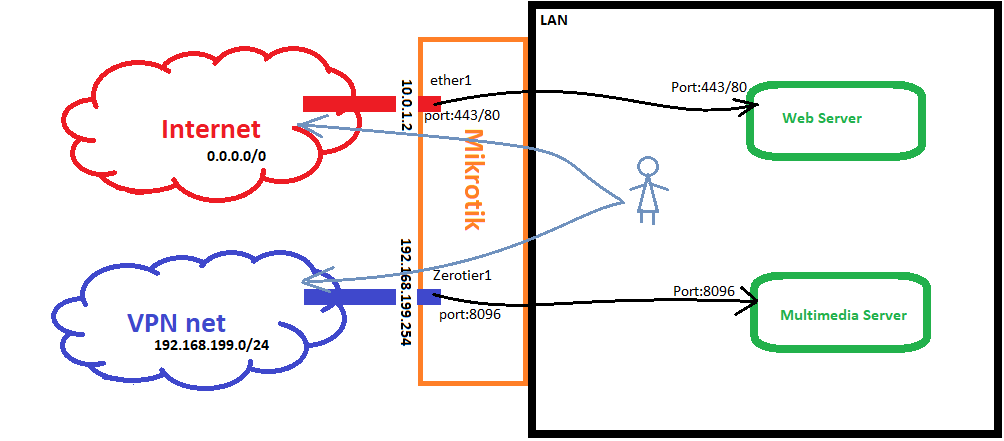
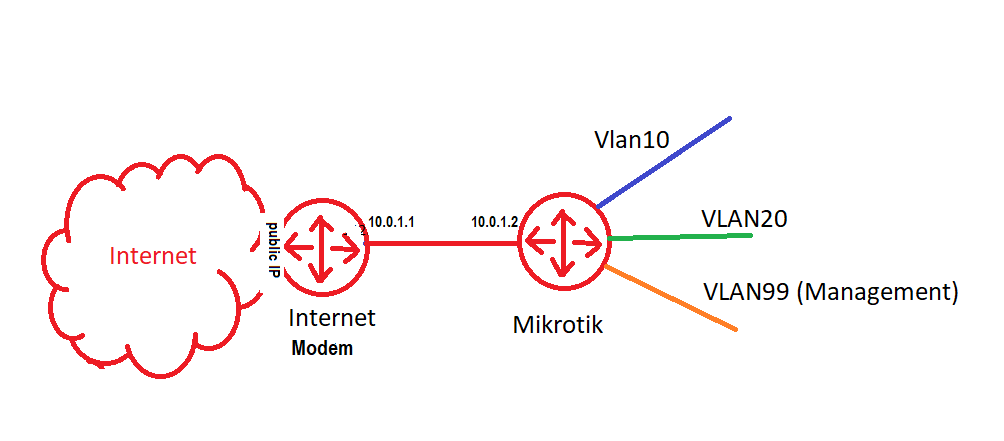
So far my hAP ac² I’m able to reach internet get my Webserver working from internet with my http://publicip:443.
- Now, I would like that the Mikrotik route the traffic of any user from LAN, between Internet (0.0.0.0/00) and the VPN-net (192.168.199.0/24). I guess this should be done with Masquerade, as the others computers do not know what my LAN is. [Note: the IP of the Mikrotik in the VPN-LAN is received from VPN-DHCP (dynamically)]
add action=masquerade chain=srcnat comment="ZT masquerade" out-interface-list=VPN
- On the other hand, I would like to NAT traffic coming from VPN-NET on port 8096 to a specific Server in my LAN. When I monitor the traffic with “Torch” I can see some traffic coming, but not going out.
add action=dst-nat chain=dstnat comment="NAT ZT:8096 > multimediaserver:8096" \
    dst-address=192.168.199.254 dst-port=8096 log=yes log-prefix=8096 \
    protocol=tcp to-addresses=10.0.10.10 to-ports=8096
Can you please help me to correct/improve my config?
Here is the whole config:
# feb/23/2022 22:00:54 by RouterOS 7.1.3
# software id = L7ZV-Q83I
#
# model = RBD52G-5HacD2HnD

/interface bridge
add name=BR1 protocol-mode=none
/interface ethernet
set [ find default-name=ether5 ] name=ether5-access
/interface vlan
add interface=BR1 name=vlan10 vlan-id=10
add interface=BR1 name=vlan20 vlan-id=20
add interface=BR1 name=vlan30 vlan-id=30
add interface=BR1 name=vlan40 vlan-id=40
add interface=BR1 name=vlan99 vlan-id=99
/interface ethernet switch port
set 1 default-vlan-id=99 vlan-header=add-if-missing vlan-mode=secure
set 2 default-vlan-id=10 vlan-header=always-strip vlan-mode=secure
set 3 default-vlan-id=99 vlan-header=add-if-missing vlan-mode=secure
set 5 vlan-mode=secure
/interface list
add name=WAN
add name=VLAN
add name=BASE
add name=VPN

/interface wireless
set [ find default-name=wlan1 ] country=spain disabled=no frequency=auto \
    hide-ssid=no installation=indoor mode=ap-bridge security-profile=\
    profile_Base ssid=BASE vlan-id=99 vlan-mode=use-tag
set [ find default-name=wlan2 ] country=spain disabled=no frequency=auto \
    installation=indoor mode=ap-bridge security-profile=profile_miC ssid=\
    MiC vlan-id=30 vlan-mode=use-tag
/ip pool
add name=VLAN10_POOL ranges=10.0.10.2-10.0.10.254
add name=VLAN20_POOL ranges=10.0.20.2-10.0.20.254
add name=BASE_POOL ranges=10.0.99.231-10.0.99.254
add name=VLAN30_POOL ranges=10.0.30.2-10.0.30.254
add name=VLAN40_POOL ranges=10.0.40.2-10.0.40.254
/ip dhcp-server
add address-pool=VLAN10_POOL interface=vlan10 name=VLAN10_DHCP
add address-pool=VLAN20_POOL interface=vlan20 name=VLAN20_DHCP
add address-pool=BASE_POOL interface=vlan99 name=BASE_DHCP
add address-pool=VLAN30_POOL interface=vlan30 name=VLAN30_DHCP
add address-pool=VLAN40_POOL interface=vlan40 name=VLAN40_DHCP
/zerotier
set zt1 comment="ZeroTier Central controller - https://my.zerotier.com/" \
    identity=**identity** name=zt1 port=**port**
/zerotier interface
add instance=zt1 mac-address=EE:EE:EE:EE:EE:EE name=zerotier1 network=\
    9999999999999999
/caps-man manager
set enabled=yes
/interface bridge port
add bridge=BR1 interface=ether2
add bridge=BR1 interface=ether3
add bridge=BR1 interface=ether4
add bridge=BR1 interface=wlan1
add bridge=BR1 interface=wlan2
/ip neighbor discovery-settings
set discover-interface-list=BASE
/interface detect-internet
set detect-interface-list=all
/interface ethernet switch vlan
add independent-learning=no ports=switch1-cpu,ether2,ether3,ether4 switch=switch1 vlan-id=10
add independent-learning=no ports=switch1-cpu switch=switch1 vlan-id=20
add independent-learning=no ports=switch1-cpu,ether4 switch=switch1 vlan-id=30
add independent-learning=no ports=switch1-cpu,ether2 switch=switch1 vlan-id=40
add independent-learning=no ports=switch1-cpu,ether2,ether4 switch=switch1 vlan-id=99
/interface list member
add interface=ether1 list=WAN
add interface=vlan99 list=VLAN
add interface=vlan10 list=VLAN
add interface=vlan20 list=VLAN
add interface=vlan99 list=BASE
add interface=ether5-access list=BASE
add interface=vlan30 list=VLAN
add interface=vlan40 list=VLAN
add interface=zerotier1 list=VPN
/ip address
add address=10.0.1.2/30 interface=ether1 network=10.0.1.0
add address=10.0.10.1/24 interface=vlan10 network=10.0.10.0
add address=10.0.20.1/24 interface=vlan20 network=10.0.20.0
add address=192.168.5.1/24 interface=ether5-access network=192.168.5.0
add address=10.0.30.1/24 interface=vlan30 network=10.0.30.0
add address=10.0.40.1/24 interface=vlan40 network=10.0.40.0
add address=10.0.99.1/24 interface=vlan99 network=10.0.99.0
/ip dhcp-server network
add address=10.0.10.0/24 dns-server=10.0.10.1 gateway=10.0.10.1
add address=10.0.20.0/24 dns-server=199.85.126.10,1.1.1.2 gateway=10.0.20.1
add address=10.0.30.0/24 dns-server=176.103.130.132,176.103.130.134 gateway=10.0.30.1
add address=10.0.40.0/24 dns-server=10.0.40.1 gateway=10.0.40.1
add address=10.0.99.0/24 dns-server=10.0.99.1 gateway=10.0.99.1
/ip dns
set allow-remote-requests=yes servers=9.9.9.9,1.1.1.1
/ip firewall address-list
add address=192.168.1.1 list="Router Vodafone"
add address=10.0.1.1 list="Router Vodafone"
add address=10.0.10.10 list="multimediaserver Server"
add address=10.0.40.2 list=Webserver
/ip firewall filter
add action=drop chain=forward comment="Drop forward invalid" \
    connection-state=invalid
add action=drop chain=input comment="Drop Input Invalid" connection-state=\
    invalid
add action=accept chain=input comment="--> Ping" protocol=icmp
add action=accept chain=input comment="Allow Estab & Related" \
    connection-state=established,related log-prefix=4
add action=accept chain=input comment="Base -> Winbox" dst-port=\
    8291,443 in-interface-list=BASE protocol=tcp
add action=drop chain=input comment="--> Winbox" dst-port=8291,80,443,23,21 \
    protocol=tcp
add action=accept chain=forward comment="BASE -> Router Vodafone" \
    in-interface=ether1 out-interface-list=BASE src-address-list=\
    "Router Vodafone"
add action=drop chain=forward comment=" --> Router Vodafone" in-interface=\
    ether1 src-address-list="Router Vodafone"
add action=fasttrack-connection chain=forward connection-state=\
    established,related disabled=yes hw-offload=yes log-prefix=fasttrack
add action=accept chain=forward connection-state=\
    established,related,untracked disabled=yes
add action=accept chain=input comment="VLAN -> DNS tcp" dst-port=53 \
    in-interface-list=VLAN protocol=tcp
add action=accept chain=input comment="VLAN -> DNS udp" dst-port=53 \
    in-interface-list=VLAN protocol=udp
add action=accept chain=forward comment="Base -> VLANs" in-interface-list=\
    BASE out-interface-list=VLAN
add action=accept chain=forward comment="VLAN  -> Internet" \
    in-interface-list=VLAN out-interface-list=WAN
add action=accept chain=forward comment="VLAN -> multimediaserver" dst-address-list=\
    "multimediaserver Server" dst-limit=1,5,dst-address/1m40s dst-port=8096 \
    in-interface-list=VLAN protocol=tcp
add action=accept chain=forward disabled=yes dst-address-list="multimediaserver Server" \
    dst-port=8096 in-interface=zerotier1 protocol=tcp
add action=accept chain=forward comment="Internet -> Web server" \
    dst-address-list=Webserver dst-port=443 in-interface=ether1 \
    out-interface=vlan40 protocol=tcp
add action=accept chain=forward comment="Internet -> Web server" \
    dst-address-list=Webserver dst-port=80 in-interface=ether1 log=yes \
    log-prefix=Certbot_Webserver- out-interface=vlan40 protocol=tcp
add action=drop chain=input comment="Drop all rest"

/ip firewall nat
add action=masquerade chain=srcnat comment="Default masquerade" \
    out-interface-list=WAN
add action=masquerade chain=srcnat comment="ZT masquerade" \
    out-interface-list=VPN
add action=dst-nat chain=dstnat comment="NAT ZT:8096 > multimediaserver:8096" \
    dst-address=192.168.199.254 dst-port=8096 log=yes log-prefix=8096 \
    protocol=tcp to-addresses=10.0.10.10 to-ports=8096
add action=dst-nat chain=dstnat comment="NAT Internet:443 > Webserver:443" \
    dst-address=10.0.1.2 dst-port=443 protocol=tcp to-addresses=10.0.40.2 \
    to-ports=443
add action=dst-nat chain=dstnat comment="NAT Internet:80 > Webserver:80" \
    dst-address=10.0.1.2 dst-port=80 protocol=tcp to-addresses=10.0.40.2 \
    to-ports=80

/ip route
add disabled=no distance=1 dst-address=0.0.0.0/0 gateway=10.0.1.1 pref-src=\
    0.0.0.0 routing-table=main scope=30 suppress-hw-offload=no target-scope=\
    10
/ip service
set telnet disabled=yes
set ftp disabled=yes
set www disabled=yes
set ssh disabled=yes
set www-ssl address=10.0.99.0/24 disabled=no
set api disabled=yes
set api-ssl disabled=yes
/system clock
set time-zone-name=Europe/Madrid
/system identity
set name=RouterSwitchAP
/system ntp client
set enabled=yes
/system ntp client servers
add address=130.206.3.166
add address=150.214.94.5
/system routerboard settings
set cpu-frequency=auto
/tool mac-server
set allowed-interface-list=BASE
/tool mac-server mac-winbox
set allowed-interface-list=BASE