Hello I have acquired a new Mikrotik router and I need to route two different networks. 172.16.200.0 network and 10.20.10.0 network. two switches connected to my router. please help me thanks.
I have attached the topology for your referrence.Thank you.
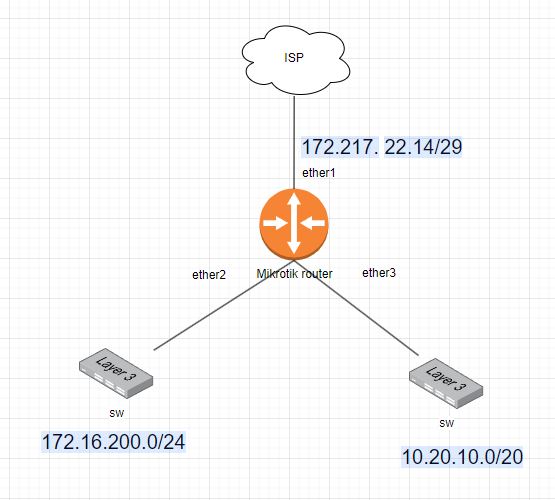
Hello there,
Let’s figure it out and solve that scenario. I think you mean that 2 networks under the router has their own DHCP Server on each network and you wanted that all the client under the network can communicate each other, then you could go to try static routing if you under control on the network and there’s no other network outside your control that you didn’t know what’s the protocol they used to do a routing. (probably you need a dynamic if there’s exist)
You can do start with configuring the IP Address on each ether that directly connected to each switch with their own IP subnets. After that, you can go just typing some command to do a static routing for each network.
Adding some IP Address on each interfaces connected
/ip address
add address=172.16.200.1/24 interface=ether2
add address=10.20.10.1/20 interface=ether3
and then, do some route to acknowledge the network on both side
/ip route
add dst-address=172.16.200.0/24 gateway=10.20.10.1
add dst-address=10.20.10.0/20 gateway=172.16.200.1
I think with that the network should be communicate each other, obviously I don’t have experience with L3 switch, is it need to routed or it can go flawlessly because both network connected through the same router and there’s no need to route. Based on my knowledge, if is 2 or more router and the local not connected directly to the destination that need to reach out then it will need to do some routing. I suggest you read more further into this manual that could help the situation more reliable, Simple Static Routing and IP Route.
Hopefully that could help, if there’s any mistaken please correct me 
Regards.
Make sure ether2 and ether3 aren’t in the bridge: https://help.mikrotik.com/docs/display/ROS/Ethernet
Set appropriate IP addresses, i.e: ether2 -- 172.16.200.1, ether3 -- 10.20.10.1: https://wiki.mikrotik.com/wiki/Manual:IP/Address
Create IP pools i.e 172.16.200.2 -- 172.16.200.254 for ether2: https://wiki.mikrotik.com/wiki/Manual:IP/Pools
Configure 2 DHCP servers: one for ether2 and another one for ether3. Each DHCP server must assign IP from pool (i.e 172.16.200.2 -- 172.16.200.254 for ether2) and gateway (172.16.200.1 for ether2). Set DNS to 8.8.8.8 for now: https://wiki.mikrotik.com/wiki/Manual:IP/DHCP_Server
Enable forwarding between networks in firewall
https://help.mikrotik.com/docs/display/ROS/Filter
enable masquarading to ether1 in NAT to give your networks access to the Internet
https://help.mikrotik.com/docs/display/ROS/NAT
Any reason not to suggest VLANs here ?
sorry I just want to make it clear that the two switches are on DHCP. So when I connect it to the router I receive an IP address. They are existing network. I just want to add the Mikrotik router for me to integrate VPN and access both the network on both switches which have Dynamic IP addresses. Please help me on how to route them. thank you.
If those two switches does DHCP, then I’m confused with your topology showing they have network subnets without clarifying that they got DHCP in the topology diagram, so at first I tough they have statically set IP’s for each interfaces. Maybe you can set static IP’s for each of the ether that directly connect into your switch and you don’t have to think the IP that change dynamically even the switches have DHCP configured. Also, you can try some VLAN’s configuration for each network from the switches through the ether since they were connected into the same router there.
Regards.