Routing issue with site-to-site VPN via a separate VPN server

Hello everyone,

Could you please help me with a routing issue I’ve got with my site-to-site VPN setup?
Problem: Mikrotik hAP ax² fails to forward response packets back via VPN tunnel. Packets are being dropped by firewall as “invalid”.
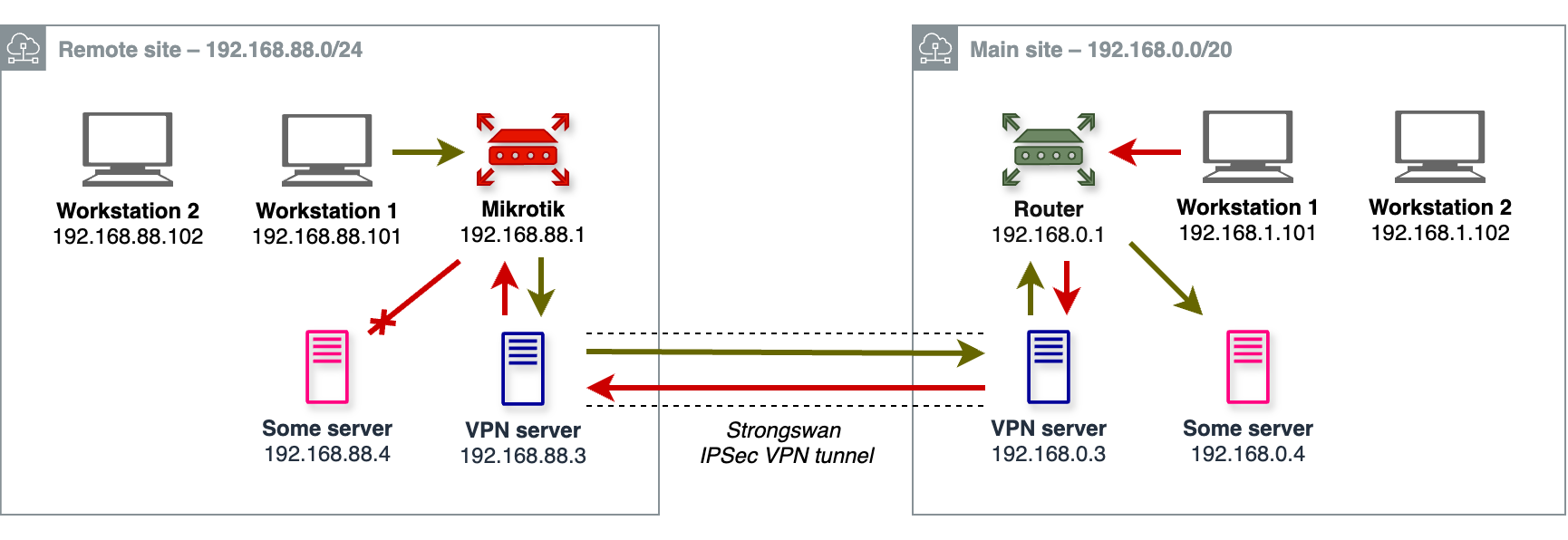
network map.png
Main site (pictured on the right) unites several VLANS: 192.168.0.0/24, 192.168.1.0/24, etc. A 3rd party router is configured to route requests to 192.168.88.0/24 network via a VPN server at 192.168.0.3. The VPN server is running Strongswan and is properly configured to route 192.168.88.0/24 to a remote VPN server and 192.168.0.0/20 to the local router.

Remote site (pictured on the left) includes a single 192.168.88.0/24 LAN, a Strongswan VPN server at 192.168.88.3 configured to route 192.168.0.0/20 through the tunnel, and a Mikrotik router at 192.168.88.1, with a static route:

;;; Main Site access via Strongswan IPSec tunnel
    dst-address=192.168.0.0/20 routing-table=main pref-src="" gateway=192.168.88.3
    immediate-gw=192.168.88.3%bridge distance=1 scope=30 target-scope=10 suppress-hw-offload=no

Remote site hosts can seamlessly access the entire Main site network. For instance, 192.168.88.101 workstation reaches 192.168.0.4 server through the tunnel with no issues (see green arrows).
Main site hosts, however, can only access remote VPN server (see red arrows) and Mikrotik router itself (can ping, ssh, http, etc. 192.168.88.1 and 192.168.88.3), but nothing else on the Remote site. I can’t ping 192.168.88.4 neither from 192.168.1.101 workstation nor from 192.168.0.3 VPN server.

After looking closely at the issue, I’ve found out that when a connection is being initiated from the Main site, packets that should be returned back to the Main site are being dropped on the Mikrotik by this firewall rule:

;;; defconf: drop invalid
    chain=forward action=drop connection-state=invalid log=no log-prefix=""

With logging on, I see the following after running “ping 192.168.88.4” or “curl 192.168.88.4” on 192.168.1.101:

    forward: in:bridge out:bridge, connection-state:invalid src-mac 5c:e9:1e:8d:39:41, proto ICMP (type 0, code 0), 192.168.88.4->192.168.1.101, len 84
    forward: in:bridge out:bridge, connection-state:invalid src-mac 5c:e9:1e:8d:39:41, proto TCP (SYN,ACK), 192.168.88.4:80->192.168.1.101:36656, len 64

With the “forward chain → drop invalid” firewall rule disabled everything works both ways!

What am I missing? Why my static route does not help Mikrotik to route packets back to the Main site? Why are they considered “invalid”?
I would greatly appreciate any ideas. Thanks!

Follow up:

The problem completely goes away after setting:

/interface bridge settings set use-ip-firewall=yes

If I understand it right, the problem was as follows. The first incoming packet from Main site was bridged, but not routed, as originating from bridged LAN port (the one 192.168.88.3 VPN server is attached to). Thus no connection tracking was performed. When 192.168.88.4 tried to send a response, this response was dropped by firewall, since no previous connection was being tracked.
With ‘use-ip-firewall=yes’ all bridged connections are being tracked and routed.

Is that right?
Is ‘use-ip-firewall=yes’ the right approach to address my issue? It would affect the entire LAN, not only VPN server…

You have a asymmetrical routing path so the mikrotik router will not see all the traffic and so the connection tracking will mark that traffic as invalid.
The reason for the asymmetric routing is, that the vpn server will forward packet from the tunnel directly to the host in the subnet.

For example if you add a static router on the host that forward traffic for 192.168.0.0/24 directly to the vpn server (192.168.88.3) the problem will be gone.

The easiest way to fix this, would be to exclude the traffic to 192.168.0.0/24 from in firewall rule.


Is that right?
Is ‘use-ip-firewall=yes’ the right approach to address my issue? It would affect the entire LAN, not only VPN server…

You should totally disable it. It will kill your switch performances for example and there is no need for it do be enabled.

Thank you, almdandi.


No, I can’t add static route on almost every Remote site host: too many places to maintain, and there are WiFi-connected personal mobile devices as well.


Yes, adding this before other ‘forward’ rules fixes my issue:

6   ;;; allow any traffic to remote LANs behind VPN
    chain=forward action=accept dst-address-list=192.168.0.0/20 in-interface-list=LAN log=no log-prefix=""

Switched to this solution and disabled use-ip-firewall.
But I now strongly dislike the fact that LAN–tunnel traffic is being routed asymmetrically. Is there any way to “bridge” traffic with dst-addr in 192.168.0.0/20 to a specific ethernet port? And bypass conntracking, firewall, etc. for such traffic entirely?

Ok, now I’ve tried the following:


[andrey@mikrotik] /interface/bridge/nat> print detail
0   ;;; send all remote LAN traffic directly to the VPN server
    chain=dstnat action=dst-nat to-dst-mac-address=D8:3A:DD:66:5D:09 mac-protocol=ip dst-address=192.168.0.0/20 log=no log-prefix=""

This allowed me to remove previously discussed firewall rule and static route to 192.168.0.0/20 via 192.168.88.3 (D8:3A:DD:66:5D:09 is 192.168.88.3 VPN servers’s MAC).
Is this solution better? Any disadvantages / threats to consider?

In my opinion this is still a little bit hacky and maybe, I’m not sure about it, it will disable hardware acceleration on the bridge.
If so and you also use the the Mikrotik router as switch, this will cost you performance because the CPU also need to forward the layer 2 traffic.
To see if the bridge has hardware acceleration running, you can check bridge window and the Ports tab in winbox. If there is a “H” in the second column of the port, hardware acceleration is enabled and running.

The best solution would be the kick the vpn server out for your network and let the mikrotik router be the endpoint of the ipsec tunnel.

If you can’t change the ipsec endpoint the best solution would still be to change the firewall rule, so the traffic to the other subnet is not marked as invalid. There is no advantage with the bridge nat rule. Properly only disadvantages (hardware acceleration). The traffic path with the bridge nat rule is sill asymmetric.

Don’t have Winbox to try right away, but under SSH there is “yes” in HW column – I presume hardware acceleration is on:

[andrey@mikrotik] /interface/bridge/port> print
#   INTERFACE  BRIDGE  HW   PVID  PRIORITY  PATH-COST  INTERNAL-PATH-COST  HORIZON
0   lan1       bridge  yes     1  0x80             10                  10  none
1   lan2       bridge  yes     1  0x80             10                  10  none
...

I thought traffic path should be perfectly symmetric now – bridged between two lan ports both ways…

Thank you for your help, almdandi!

The HW column just means that you would like to enabled it. If the port is really running with hardware acceleration, you can see in the “flags” column (second column) but same how it’s missing in your print out.

#    INTERFACE     BRIDGE        HW   PVID  PRIORITY  PATH-COST  HORIZON
0  H sfp-sfpplus1  bridge-trunk  yes     1  0x80                 none   
1  H sfp-sfpplus2  bridge-trunk  yes     1  0x80                 none   
2 IH sfp-sfpplus3  bridge-trunk  yes     1  0x80                 none   
3 IH sfp-sfpplus4  bridge-trunk  yes     1  0x80                 none

Hm, I have only I’s for ‘inactive’, and but no H’s:

#   INTERFACE  BRIDGE  HW   PVID  PRIORITY  PATH-COST  INTERNAL-PATH-COST  HORIZON
0   lan1       bridge  yes     1  0x80             10                  10  none
1   lan2       bridge  yes     1  0x80             10                  10  none
2   lan3       bridge  yes     1  0x80             10                  10  none
3 I lan4       bridge  yes     1  0x80             10                  10  none
4   am-2g      bridge          1  0x80             10                  10  none
5 I am-5g      bridge          1  0x80             10                  10  none

And no H’s appear if i disable my Bridge NAT rules.

It seems to me my RouterBoard HW-offloading support is utterly limited and not going to work anyway (see Bridge Hardware Offloading, my switch chip model is [IPQ-PPE]).

Yeah, switch without hardware acceleration on the bridge is bad.

As i sad, in my last post. If you can’t kick the vpn server out of your network and let the mikrotik router be the endpoint, just modify the invalid firewall, so it’s no longer machtes the the asymmetric and you are fine.

The traffic path with the nat rule on the bridge is still asymmetric. The hosts in the network still sending the packets to the mikrotik router because the mikortik router is the default gateway. The nat rule then changed the destination mac address and sends the packet again on his journey.

I see. Will try to migrate VPN server to mikrotik eventually.

Thank you so much for your time, almdandi! I’ve really learned a lot.