Hi,
I think so, the Czech wireguard is working flawlessly. today it is 4 sleepless night and I still cant see where I made a mistake..
thank you for helping… PS: I live in australia, but currently account is in turkey so nordVPN. my friend has unified udm and he runs ok on that there.
config below
# 2025-08-06 15:18:57 by RouterOS 7.19.4
# software id =

# model = E50UG
# serial number = HHE6PF
/interface pptp-client
add connect-to=81.0.xxxx max-mtu=1400 name=VPN_CZ user=ppp1
/interface bridge
add name=bridge1 port-cost-mode=short
/interface wireguard
add listen-port=51820 mtu=1420 name=wireguard1
add listen-port=23132 mtu=1450 name=wireguard_becho
add listen-port=45654 mtu=1420 name=wireguard_ben
add listen-port=13231 mtu=1450 name=wireguard_gewi
add listen-port=13233 mtu=1420 name=wireguard_phone
/interface list
add name=WAN
add name=LAN
/interface lte apn
set [ find default=yes ] ip-type=ipv4 use-network-apn=no
/ip pool
add name=dhcp ranges=192.168.9.2
/ip dhcp-server
add address-pool=dhcp disabled=yes interface=bridge1 name=dhcp1
/routing ospf instance
add disabled=yes name=default-v2
/routing ospf area
add disabled=yes instance=default-v2 name=backbone-v2
/routing table
add fib name=CZ_VPN
add fib name=to-ben-vpn
add comment="wireguard 1" disabled=no fib name=t-wg1
/routing bgp template
set default disabled=yes output.network=bgp-networks routing-table=main
/user group
add name=homeassistant policy="read,test,api,rest-api,!local,!telnet,!ssh,!ftp\
    ,!reboot,!write,!policy,!winbox,!password,!web,!sniff,!sensitive,!romon"
/ip smb
set interfaces=ether1
/interface bridge port
add bridge=bridge1 ingress-filtering=no interface=ether1 internal-path-cost=\
    10 path-cost=10
add bridge=bridge1 ingress-filtering=no interface=ether2 internal-path-cost=\
    10 path-cost=10
add bridge=bridge1 ingress-filtering=no interface=ether4 internal-path-cost=\
    10 path-cost=10
add bridge=bridge1 ingress-filtering=no interface=ether5 internal-path-cost=\
    10 path-cost=10
add bridge=bridge1 ingress-filtering=no interface=ether3 internal-path-cost=\
    10 path-cost=10
add bridge=bridge1 interface=*A
add bridge=bridge1 ingress-filtering=no interface=WAN internal-path-cost=10 \
    path-cost=10
add bridge=bridge1 ingress-filtering=no interface=WAN internal-path-cost=10 \
    path-cost=10
add bridge=bridge1 ingress-filtering=no interface=WAN internal-path-cost=10 \
    path-cost=10
add bridge=bridge1 ingress-filtering=no interface=WAN internal-path-cost=10 \
    path-cost=10
/ip firewall connection tracking
set udp-timeout=10s
/ip neighbor discovery-settings
set discover-interface-list=!dynamic
/ipv6 settings
set disable-ipv6=yes
/interface detect-internet
set detect-interface-list=all
/interface list member
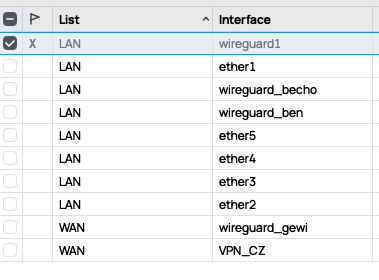
add interface=ether2 list=LAN
add interface=ether3 list=LAN
add interface=ether4 list=LAN
add interface=ether5 list=LAN
add interface=VPN_CZ list=WAN
add interface=wireguard_gewi list=WAN
add interface=wireguard_ben list=LAN
add interface=wireguard_becho list=LAN
add interface=ether1 list=LAN
add interface=wireguard1 list=WAN
/interface ovpn-server server
add mac-address=FE:FD:8D:6C:86:B0 name=ovpn-server1
/interface wireguard peers
add allowed-address=0.0.0.0/0 endpoint-address=81.0.xxxx endpoint-port=\
    13231 interface=wireguard_gewi name=peer1 persistent-keepalive=10s \
    public-key="Hk="
add allowed-address=0.0.0.0/0,192.168.0.0/24 endpoint-address=185.14xxxxx \
    endpoint-port=13231 interface=wireguard_becho name=peer2 \
    persistent-keepalive=40s public-key=\
    "CUAu9XA="
add allowed-address=192.168.222.101/32,192.168.222.100/32,192.168.1.0/24 \
    interface=wireguard_ben name=peer9 persistent-keepalive=10s public-key=\
    "qh="
add allowed-address=192.168.111.100/32,192.168.111.101/32 interface=\
    wireguard_phone name="my devices" persistent-keepalive=25s private-key=\
    "AFQxGJ/g==" public-key=\
    "WNqBUc="
add allowed-address=0.0.0.0/0 endpoint-address=87.249xxxx endpoint-port=\
    51820 interface=wireguard1 name="Turkey Nord VPN" persistent-keepalive=5s \
    public-key="mlY5b4BI="
/ip address
add address=192.168.100.3/24 interface=wireguard_gewi network=192.168.100.0
add address=192.168.110.3/24 interface=wireguard_becho network=192.168.110.0
add address=192.168.111.1/24 interface=wireguard_phone network=192.168.111.0
add address=192.168.222.1/24 interface=wireguard_ben network=192.168.222.0
add address=10.5.0.2 interface=wireguard1 network=10.5.0.0
/ip cloud
set ddns-update-interval=1m
/ip cloud advanced
set use-local-address=yes
/ip dhcp-client
add interface=bridge1 use-peer-dns=no
/ip dhcp-server lease
add address=192.168.2.253 client-id=1:f0:b3:ec:16:76:4e mac-address=\
    F0:B3:EC:16:76:4E server=*2
add address=192.168.2.254 client-id=1:a8:51:ab:91:43:3d mac-address=\
    A8:51:AB:91:43:3D server=*2
/ip dhcp-server network
add address=192.168.4.0/24 dns-server=192.168.4.240 gateway=192.168.4.240 \
    netmask=24
/ip dns
set allow-remote-requests=yes cache-size=4096KiB servers=8.8.4.4,8.8.8.8
/ip dns static
add disabled=yes forward-to=192.168.103.1 regexp=".*\\.o2tv\\.cz\$" type=FWD
add disabled=yes forward-to=192.168.103.1 regexp=".*\\.iol\\.cz\$" type=FWD
add disabled=yes forward-to=192.168.103.1 regexp=".*\\.gemius\\.pl\$" type=\
    FWD
add disabled=yes forward-to=192.168.103.1 regexp=".*\\.ceskatelevize\\.cz\$" \
    type=FWD
add disabled=yes forward-to=192.168.103.1 regexp=".*\\.sysct\\.cz\$" type=FWD
add disabled=yes forward-to=192.168.103.1 regexp=".*\\.czech-tv\\.cz\$" type=\
    FWD
add forward-to=192.168.100.1 regexp=".*\\.czech-tv\\.cz\$" type=FWD
add forward-to=192.168.100.1 regexp=".*\\.o2tv\\.cz\$" type=FWD
add forward-to=192.168.100.1 regexp=".*\\.ceskatelevize\\.cz\$" type=FWD
add forward-to=192.168.100.1 regexp=".*\\.sysct\\.cz\$" type=FWD
add forward-to=192.168.100.1 regexp=".*\\.iol\\.cz\$" type=FWD
add forward-to=192.168.100.1 regexp=".*\\.gemius\\.pl\$" type=FWD
add forward-to=192.168.110.1 regexp=".*\\.tplinkwifi\\.net\$" type=FWD
add forward-to=192.168.100.1 regexp=".*\\.cetin\\.cz\$" type=FWD
add forward-to=192.168.100.1 regexp=".*\\.jyxo\\.cz\$" type=FWD
add forward-to=192.168.100.1 regexp=".*\\.jyxo-tls\\.cz\$" type=FWD
add forward-to=192.168.100.1 regexp=".*\\.conviva\\.com\$" type=FWD
add forward-to=192.168.100.1 regexp=".*\\.nielsen\\.com\$" type=FWD
add forward-to=192.168.100.1 regexp=".*\\.nielsencollections\\.com\$" type=\
    FWD
add disabled=yes forward-to=192.168.222.101 regexp=".*\\.netflix\\.com\$" \
    type=FWD
add disabled=yes forward-to=192.168.222.101 regexp=".*\\.netflix\\.net\$" \
    type=FWD
add disabled=yes forward-to=192.168.222.101 regexp=".*\\.nflxso\\.net\$" \
    type=FWD
add disabled=yes forward-to=192.168.222.101 regexp=".*\\.nflxvideo\\.net\$" \
    type=FWD
add forward-to=10.5.0.2 regexp=".*\\.netflix\\.com\$" type=FWD
add forward-to=10.5.0.2 regexp=".*\\.netflix\\.net\$" type=FWD
add forward-to=10.5.0.2 regexp=".*\\.nflxso\\.net\$" type=FWD
add disabled=yes forward-to=10.5.0.2 regexp=".*\\.nflxsearch\\.net\$" type=\
    FWD
add forward-to=10.5.0.2 regexp=".*\\.nflxvideo\\.net\$" type=FWD
add disabled=yes forward-to=10.5.0.2 regexp=".*\\nflximg\\.net\$" type=FWD
add disabled=yes forward-to=10.5.0.2 regexp=".*\\nflximg\\.com\$" type=FWD
add disabled=yes forward-to=10.5.0.2 regexp=".*\\nflxext\\.com\$" type=FWD
/ip firewall address-list
add address=192.168.4.190 list=access_vpn
add address=192.168.111.100 list=access_vpn
add address=192.168.4.36 list=access_vpn
add address=192.168.4.69 list=access_vpn
add address=23.246.0.0/18 comment=Netflix list=Netflix
add address=37.77.184.0/21 comment=Netflix list=Netflix
add address=45.57.0.0/17 comment=Netflix list=Netflix
add address=64.120.128.0/17 comment=Netflix list=Netflix
add address=66.197.128.0/17 comment=Netflix list=Netflix
add address=69.53.224.0/19 comment=Netflix list=Netflix
add address=108.175.32.0/20 comment=Netflix list=Netflix
add address=185.2.220.0/22 comment=Netflix list=Netflix
add address=185.9.188.0/22 comment=Netflix list=Netflix
add address=192.173.64.0/18 comment=Netflix list=Netflix
add address=198.38.96.0/19 comment=Netflix list=Netflix
add address=198.45.48.0/20 comment=Netflix list=Netflix
add address=208.75.76.0/22 comment=Netflix list=Netflix
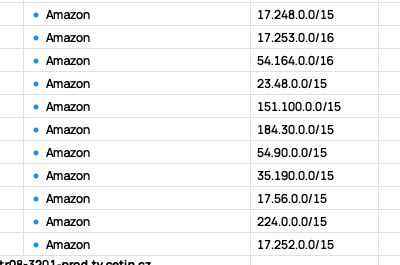
add address=224.0.0.251 list=Amazon
add address=17.57.145.37 list=Amazon
add address=35.190.88.7 list=Amazon
add address=54.91.103.251 list=Amazon
add address=184.31.252.177 list=Amazon
add address=151.101.3.6 list=Amazon
add address=23.48.97.34 list=Amazon
add address=54.164.163.115 list=Amazon
add address=17.253.121.201 list=Amazon
add address=17.253.67.131 list="Amazon  "
add address=17.253.34.131 list=Amazon
add address=17.253.66.37 list=Amazon
add address=17.253.67.140 list=Amazon
add address=17.248.219.18 list=Amazon
add address=17.248.219.66 list=Amazon
add address=85.239.69.39 comment=ns2.sysct.cz list=ct_voyo
add address=85.239.64.136 comment=ns3.sysct.cz list=ct_voyo
add address=50.85.152.114 comment=eboxprod1.tv.cloudapi.cetin.cz list=ct_voyo
add address=104.18.36.244 comment=ws.cms.jyxo.cz list=ct_voyo
add address=172.64.151.12 comment=ws.cms.jyxo.cz list=ct_voyo
add address=199.127.194.109 comment=onprem-ipv4.cws.conviva.com list=ct_voyo
add address=199.127.193.108 comment=onprem-ipv4.cws.conviva.com list=ct_voyo
add address=199.127.194.128 comment=onprem-ipv4.cws.conviva.com list=ct_voyo
add address=172.64.144.48 comment=app-config.cms.jyxo-tls.cz list=ct_voyo
add address=104.18.43.208 comment=app-config.cms.jyxo-tls.cz list=ct_voyo
add address=194.228.98.28 comment=12-str07-3201-prod.tv.cetin.cz list=ct_voyo
add address=194.228.31.79 comment=ingesttls.cms.nova.cz list=ct_voyo
add address=194.228.98.31 comment=12-str08-3201-prod.tv.cetin.cz list=ct_voyo
add address=3.105.196.9 list=TV-Nflx
add address=17.57.145.39 list=TV-Nflx
/ip firewall filter
add action=accept chain=forward in-interface=wireguard_phone
add action=accept chain=input comment="Allow WG from phone" dst-port=13233 \
    protocol=udp
add action=accept chain=forward comment="allow wireguard nord" dst-port=51820 \
    protocol=udp
add action=accept chain=input in-interface=wireguard_ben
add action=accept chain=forward in-interface=wireguard_ben out-interface=\
    bridge1
add action=accept chain=forward in-interface=bridge1 out-interface=\
    wireguard_ben
add action=accept chain=forward out-interface=wireguard1 src-address-list=\
    access_vpn
add action=accept chain=forward out-interface=wireguard1 src-address=\
    192.168.111.0/24
add action=accept chain=forward out-interface=wireguard1 src-address=\
    192.168.4.0/24
add action=accept chain=forward out-interface=wireguard1 src-address=\
    10.5.0.0/24
/ip firewall mangle
add action=change-mss chain=forward comment=\
    "Clamp MSS to PMTU for Outgoing packets" new-mss=clamp-to-pmtu \
    out-interface=wireguard_gewi protocol=tcp tcp-flags=syn
add action=change-mss chain=forward comment=\
    "Clamp MSS to PMTU for Outgoing packets" new-mss=clamp-to-pmtu \
    out-interface=wireguard_ben protocol=tcp tcp-flags=syn
add action=mark-routing chain=prerouting comment="ct a voyo" \
    dst-address-list=ct_voyo log-prefix=ct new-routing-mark=CZ_VPN \
    src-address=192.168.4.36
add action=mark-routing chain=prerouting comment=netflix disabled=yes \
    dst-address-list=netflix new-routing-mark=to-ben-vpn src-address=\
    192.168.4.36
add action=mark-routing chain=prerouting comment="ct a voyo mom ntb" \
    dst-address-list=ct_voyo new-routing-mark=CZ_VPN src-address=\
    192.168.4.178
add action=mark-routing chain=prerouting comment="ct a voyo mom iphone" \
    dst-address-list=ct_voyo new-routing-mark=CZ_VPN src-address=\
    192.168.4.123
add action=change-mss chain=forward comment=\
    "Clamp MSS to PMTU for outgoing packets" new-mss=clamp-to-pmtu \
    out-interface=wireguard1 protocol=tcp tcp-flags=syn
add action=mark-routing chain=prerouting comment=Netflix disabled=yes \
    dst-address-list=Netflix in-interface-list=!WAN new-routing-mark=t-wg1 \
    src-address=192.168.4.36
add action=mark-routing chain=prerouting comment="Amazon (Netflix)" \
    dst-address-list=Amazon in-interface-list=!WAN new-routing-mark=t-wg1 \
    src-address=192.168.4.36
add action=add-dst-to-address-list address-list=TV-Nflx address-list-timeout=\
    none-static chain=prerouting comment="Get Amazon IP" dst-address=\
    !192.168.4.0/24 dst-address-list=!Amazon src-address=192.168.4.36
add action=add-dst-to-address-list address-list=ct_voyo address-list-timeout=\
    none-static chain=prerouting comment="Get voyo IP" disabled=yes \
    dst-address=!192.168.4.0/24 src-address=192.168.4.36
/ip firewall nat
# VPN_CZ not ready
add action=masquerade chain=srcnat out-interface=VPN_CZ
add action=masquerade chain=srcnat out-interface=wireguard_gewi
add action=masquerade chain=srcnat out-interface=wireguard_ben
add action=masquerade chain=srcnat out-interface=wireguard1
add action=src-nat chain=srcnat comment=nordvpn routing-mark=t-wg1 \
    to-addresses=10.5.0.2
/ip ipsec profile
set [ find default=yes ] dpd-interval=2m dpd-maximum-failures=5
/ip route
add comment=pptp disabled=yes dst-address=0.0.0.0/0 gateway=192.168.103.1 \
    routing-table=CZ_VPN suppress-hw-offload=no
add disabled=no distance=1 dst-address=0.0.0.0/0 gateway=wireguard_gewi \
    pref-src="" routing-table=CZ_VPN scope=30 suppress-hw-offload=no \
    target-scope=10
add disabled=no dst-address=192.168.0.0/24 gateway=wireguard_becho \
    routing-table=main suppress-hw-offload=no
add comment=pptp disabled=yes distance=1 dst-address=0.0.0.0/0 gateway=VPN_CZ \
    pref-src="" routing-table=CZ_VPN scope=30 suppress-hw-offload=no \
    target-scope=10
add disabled=no dst-address=192.168.0.0/24 gateway=wireguard_becho \
    routing-table=main suppress-hw-offload=no
add disabled=no distance=1 dst-address=192.168.11.0/24 gateway=\
    wireguard_becho pref-src="" routing-table=main scope=30 \
    suppress-hw-offload=no target-scope=10
add disabled=no distance=1 dst-address=192.168.1.0/24 gateway=wireguard_ben \
    pref-src="" routing-table=main scope=30 suppress-hw-offload=no \
    target-scope=10
add disabled=no distance=1 dst-address=0.0.0.0/0 gateway=192.168.4.1 \
    pref-src="" routing-table=main scope=30 suppress-hw-offload=no \
    target-scope=10
add disabled=no distance=1 dst-address=0.0.0.0/0 gateway=10.5.0.2 pref-src="" \
    routing-table=t-wg1 scope=30 suppress-hw-offload=no target-scope=10
add disabled=no distance=1 dst-address=0.0.0.0/0 gateway=wireguard1 pref-src=\
    "" routing-table=t-wg1 scope=30 suppress-hw-offload=no target-scope=10
add disabled=no distance=1 dst-address=0.0.0.0/0 gateway=192.168.100.1 \
    pref-src="" routing-table=CZ_VPN scope=30 suppress-hw-offload=no \
    target-scope=10
add disabled=no distance=1 dst-address=192.168.1.0/24 gateway=192.168.222.101 \
    pref-src="" routing-table=main scope=30 suppress-hw-offload=no \
    target-scope=10
add disabled=no distance=1 dst-address=192.168.100.0/24 gateway=\
    wireguard_gewi routing-table=CZ_VPN scope=10 suppress-hw-offload=no \
    target-scope=5
add blackhole disabled=no distance=255 dst-address=0.0.0.0/0 gateway="" \
    routing-table=t-wg1 suppress-hw-offload=no
/ip service
set api disabled=yes
/ip smb shares
set [ find default=yes ] directory=/flash/pub
/routing bfd configuration
add disabled=yes interfaces=all min-rx=200ms min-tx=200ms multiplier=5
add disabled=yes interfaces=all min-rx=200ms min-tx=200ms multiplier=5
add disabled=yes interfaces=all min-rx=200ms min-tx=200ms multiplier=5
/system clock
set time-zone-name=Australia/Brisbane
/system identity
set name="HEX Honza"
/system leds
add interface=ether2 leds=user-led type=interface-activity
/system note
set show-at-login=no
/system ntp client
set enabled=yes
/system ntp server
set manycast=yes
/system ntp client servers
add address=195.113.144.201
add address=195.113.144.238
/system routerboard mode-button
set enabled=yes on-event=test-script
/system routerboard settings
set auto-upgrade=yes
/system scheduler
add disabled=yes interval=2s name=voyo on-event="# Only run if 192.168.4.36 is\
    \_reachable\
    \n:if ([/ping 192.168.4.36 count=2] > 0) do={\
    \n\
    \n  :local myServers {\
    \n    \"ivysilani\";\"ceskatelevize\";\"seznam\";\"stream\";\"o2tv\";\"cze\
    ch-tv\";\"iol\";\
    \n    \"sysct\";\"gemius\";\"voyo\";\"cra\";\"nova\";\"sledovanitv\";\"ime\
    dia\";\
    \n    \"sdn\";\"cetin\";\"jyxo\";\"jyxo-tls\";\"conviva\";\"nielsen\"\
    \n  }\
    \n\
    \n  :foreach dnsEntry in=[/ip dns cache all find] do={\
    \n\
    \n    :local name [/ip dns cache all get \$dnsEntry name]\
    \n    :local type [/ip dns cache all get \$dnsEntry type]\
    \n    :local data [/ip dns cache all get \$dnsEntry data]\
    \n\
    \n    :foreach keyword in=\$myServers do={\
    \n\
    \n      :if ([:find \$name \$keyword] != nil) do={\
    \n\
    \n        :local ipToAdd \"\"\
    \n\
    \n        :if (\$type = \"A\") do={\
    \n          :set ipToAdd \$data\
    \n        }\
    \n\
    \n        :if (\$type = \"CNAME\") do={\
    \n          :do {\
    \n            :set ipToAdd [:resolve \$data]\
    \n          } on-error={\
    \n            :log warning \"\E2\9D\8C Failed to resolve CNAME \$data for \
    \$name\"\
    \n          }\
    \n        }\
    \n\
    \n        :if ([:len \$ipToAdd] > 0) do={\
    \n\
    \n          :if ([:len [/ip firewall address-list find list=\"ct_voyo\" ad\
    dress=\$ipToAdd]] = 0) do={\
    \n\
    \n            /ip firewall address-list add list=\"ct_voyo\" address=\$ipT\
    oAdd comment=\$name\
    \n            :log info \"\E2\9C\85 Added \$ipToAdd from \$name to ct_voyo\
    \"\
    \n\
    \n          }\
    \n        }\
    \n      }\
    \n    }\
    \n  }\
    \n\
    \n} else={\
    \n  :log warning \"\E2\9D\8C 192.168.4.36 is not reachable. DNS script abo\
    rted.\"\
    \n}" policy=\
    ftp,reboot,read,write,policy,test,password,sniff,sensitive,romon \
    start-time=startup
add name="Duckdns updater" on-event=\
    "/system script run Duckdns-Dynamic-IP-Updater;" policy=\
    ftp,reboot,read,write,policy,test,password,sniff,sensitive,romon \
    start-date=2025-08-06 start-time=02:29:06
add name=clouddns on-event="/tool fetch url=\"https://ipv4.cloudns.net/api/dyn\
    amicURL/\?q=NTE5MjU5NDozNDI5MTQxODY6MWMzMGFiYTZiMjI3ZWIwOTllNjdkOTRjMTM5Zm\
    VkMjlhYjk4NjAwYzQ5MWRiZTRjNzk0YTA3MjIzZDdiMWQ3Mg\" mode=https" policy=\
    ftp,reboot,read,write,policy,test,password,sniff,sensitive,romon \
    start-date=2025-08-06 start-time=02:30:06
add disabled=yes name=netflix on-event=":local myServers {\"netflix\";\"nflxvi\
    deo\";\"nflxso\";\"nflxext\";\"nflximg\";\"nflxsearch\"}\
    \n\
    \n:foreach dnsEntry in=[/ip dns cache all find] do={\
    \n\
    \n  :local name [/ip dns cache all get \$dnsEntry name]\
    \n  :local type [/ip dns cache all get \$dnsEntry type]\
    \n  :local data [/ip dns cache all get \$dnsEntry data]\
    \n\
    \n  :foreach keyword in=\$myServers do={\
    \n    :if ([:find \$name \$keyword] != nil) do={\
    \n\
    \n      :local ipToAdd \"\"\
    \n\
    \n      :if (\$type = \"A\") do={\
    \n        :set ipToAdd \$data\
    \n      }\
    \n\
    \n      :if (\$type = \"CNAME\") do={\
    \n        :do {\
    \n          :set ipToAdd [:resolve \$data]\
    \n        } on-error={\
    \n          :set ipToAdd \"\"\
    \n          :log warning \"CNAME resolution failed for \$data\"\
    \n        }\
    \n      }\
    \n\
    \n      :if ([:len \$ipToAdd] > 0) do={\
    \n\
    \n        # Remove existing entry to avoid duplicates or comment mismatch\
    \n        :foreach old in=[/ip firewall address-list find address=\$ipToAd\
    d list=\"netflixandamazon\"] do={\
    \n          /ip firewall address-list remove \$old\
    \n        }\
    \n\
    \n        # Add new entry (permanent, with comment)\
    \n        /ip firewall address-list add list=\"netflixandamazon\" address=\
    \$ipToAdd comment=\$name\
    \n        :log info \"\E2\9C\85 Added \$ipToAdd from \$name to netflixanda\
    mazon\"\
    \n\
    \n      }\
    \n    }\
    \n  }\
    \n}" policy=\
    ftp,reboot,read,write,policy,test,password,sniff,sensitive,romon \
    start-date=2025-08-06 start-time=02:28:33
add disabled=yes interval=5s name="netflix and amazon" on-event="# Only run if\
    \_192.168.4.36 is reachable\
    \n:if ([/ping 192.168.4.36 count=2] > 0) do={\
    \n\
    \n :local myServers {\"netflix\";\"nflxvideo\";\"nflxso\";\"nflxext\";\"nf\
    lximg\";\"nflxsearch\"}\
    \n\
    \n  :foreach dnsEntry in=[/ip dns cache all find] do={\
    \n\
    \n    :local name [/ip dns cache all get \$dnsEntry name]\
    \n    :local type [/ip dns cache all get \$dnsEntry type]\
    \n    :local data [/ip dns cache all get \$dnsEntry data]\
    \n\
    \n    :foreach keyword in=\$myServers do={\
    \n\
    \n      :if ([:find \$name \$keyword] != nil) do={\
    \n\
    \n        :local ipToAdd \"\"\
    \n\
    \n        :if (\$type = \"A\") do={\
    \n          :set ipToAdd \$data\
    \n        }\
    \n\
    \n        :if (\$type = \"CNAME\") do={\
    \n          :do {\
    \n            :set ipToAdd [:resolve \$data]\
    \n          } on-error={\
    \n            :log warning \"\E2\9D\8C Failed to resolve CNAME \$data for \
    \$name\"\
    \n          }\
    \n        }\
    \n\
    \n        :if ([:len \$ipToAdd] > 0) do={\
    \n\
    \n          :if ([:len [/ip firewall address-list find list=\"NaA\" addres\
    s=\$ipToAdd]] = 0) do={\
    \n\
    \n            /ip firewall address-list add list=\"NaA\" address=\$ipToAdd\
    \_comment=\$name\
    \n            :log info \"\E2\9C\85 Added \$ipToAdd from \$name to NaA\"\
    \n\
    \n          }\
    \n        }\
    \n      }\
    \n    }\
    \n  }\
    \n\
    \n} else={\
    \n  :log warning \"\E2\9D\8C 192.168.4.36 is not reachable. DNS script abo\
    rted.\"\
    \n}" policy=\
    ftp,reboot,read,write,policy,test,password,sniff,sensitive,romon \
    start-date=2025-08-06 start-time=02:28:33
/system script
add dont-require-permissions=no name=voyo owner=admin policy=\
    ftp,reboot,read,write,policy,test,password,sniff,sensitive,romon source=":\
    global ajouteIP do={\
    \n  :if ([:len [/ip firewall address-list find address=\"\$nouvelleIP\" an\
    d list=\"voyo\"]] = 0) do={\
    \n    /ip firewall address-list add list=\"voyo\" address=\$nouvelleIP tim\
    eout=02:00:00\
    \n  }\
    \n}\
    \n\
    \n:local myServers { \"voyo\";\"cra\";\"nova\";\"cetin\";\"jyxo\";\"jyxo-t\
    ls\"}\
    \n/ip dns cache all {\
    \n  :foreach i in=\$myServers do={\
    \n    :foreach j in=[find where (name~\$i)] do={\
    \n      :local myName [get \$j name]\
    \n      :local myType [get \$j type]\
    \n      :local myData [get \$j data]\
    \n      :if (\$myType = \"A\") do={\
    \n        \$ajouteIP nouvelleIP=\$myData\
    \n       }\
    \n\
    \n      :if (\$myType = \"CNAME\") do={\
    \n        :local ipResolue [:resolve \"\$myData\"];\
    \n         \$ajouteIP nouvelleIP=\$ipResolue\
    \n      }\
    \n    }\
    \n  }\
    \n}"
add dont-require-permissions=no name=cloudns owner=admin policy=\
    ftp,reboot,read,write,policy,test,password,sniff,sensitive,romon source="/\
    tool fetch url=\"https://ipv4.cloudns.net/api/dynamicURL/\?q=NTE5MjU5NDozN\
    DI5MTQxODY6MWMzMGFiYTZiMjI3ZWIwOTllNjdkOTRjMTM5ZmVkMjlhYjk4NjAwYzQ5MWRiZTR\
    jNzk0YTA3MjIzZDdiMWQ3Mg\" mode=https"
add dont-require-permissions=no name=test-script owner=admin policy=\
    ftp,reboot,read,write,policy,test,password,sniff,sensitive,romon source=\
    ":log info message=(\"1234567890\");"
add dont-require-permissions=no name="Cloudflare ddns" owner=admin policy=\
    ftp,reboot,read,write,policy,test,password,sniff,sensitive,romon source=":\
    local apiKey \"apikeyapikeyapikeyapikeyapikeyapikeyapikeyapikey\"\r\
    \n:local cfUser \"jaros@freedom21.cz\"\r\
    \n:local zoneID \"zoneIdzoneIdzoneIdzoneIdzoneIdzoneId\"\r\
    \n:local recordID \"recordIDrecordIDrecordIDrecordIDrecordID\"\r\
    \n:local domainName \"example.com\"\r\
    \n\r\
    \n# Do not edit below\r\
    \n\r\
    \n:local currentIP ([/tool fetch url=\"https://ifconfig.me/ip\" mode=https\
    \_output=user as-value]->\"data\")\r\
    \n:local cloudflareDNSIP [:resolve \$domainName server=1.1.1.1];\r\
    \n\r\
    \n:if (\$currentIP != \$cloudflareDNSIP) do={\r\
    \n  # If the IP has changed, update the Cloudflare record\r\
    \n  :log info (\"Updating Cloudflare record. Old IP: \" . \$cloudflareDNSI\
    P . \" New IP: \" . \$currentIP);\r\
    \n\r\
    \n  :local httpHeaders (\"X-Auth-Email: \" . \$cfUser . \"\\r\\nX-Auth-Key\
    : \" . \$apiKey . \"\\r\\nContent-Type: application/json\")\r\
    \n  :local payload (\"{\\\"type\\\":\\\"A\\\",\\\"name\\\":\\\"\" . \$doma\
    inName . \"\\\",\\\"content\\\":\\\"\" . \$currentIP . \"\\\",\\\"ttl\\\":\
    120,\\\"proxied\\\":false}\")\r\
    \n\r\
    \n  /tool fetch mode=https url=\"https://api.cloudflare.com/client/v4/zone\
    s/\$zoneID/dns_records/\$recordID\" http-method=put http-header=\$httpHead\
    ers http-data=\$payload;\r\
    \n}"
add dont-require-permissions=no name=Duckdns-Dynamic-IP-Updater owner=admin \
    policy=read,write,policy,test source="#----------SCRIPT INFORMATION-------\
    --------------------------------------------\
    \n#\
    \n# Script:  Beeyev DuckDNS.org Dynamic DNS Update Script\
    \n# Version: 1.2.1\
    \n# Created: 29/07/2019\
    \n# Updated: 11/08/2022\
    \n# Author:  Alexander Tebiev\
    \n# Website: https://github.com/beeyev\
    \n#\
    \n#----------MODIFY THIS SECTION AS NEEDED--------------------------------\
    --------\
    \n\
    \n# DuckDNS Sub Domain\
    \n:local duckdnsSubDomain \"40bh\"\
    \n\
    \n# DuckDNS Token\
    \n:local duckdnsToken \"04ef3c9a-271e-4de3-b06c-b012d8d42e79\"\
    \n\
    \n# Set true if you want to use IPv6\
    \n:local ipv6mode false;\
    \n\
    \n#-----------------------------------------------------------------------\
    --------\
    \n\
    \n# Online services which respond with your IPv4, two for redundancy\
    \n:local ipDetectService1 \"https://api.ipify.org/\"\
    \n:local ipDetectService2 \"https://ipv4.icanhazip.com/\"\
    \n\
    \n# Online services which respond with your IPv6, two for redundancy\
    \n:local ipv6DetectService1 \"https://api64.ipify.org/\"\
    \n:local ipv6DetectService2 \"https://ipv6.icanhazip.com/\"\
    \n\
    \n#-----------------------------------------------------------------------\
    --------\
    \n\
    \n:local previousIP; :local currentIP\
    \n# DuckDNS Full Domain (FQDN)\
    \n:local duckdnsFullDomain \"\$duckdnsSubDomain.duckdns.org\"\
    \n\
    \n:log warning message=\"START: DuckDNS.org DDNS Update\"\
    \n\
    \nif (\$ipv6mode = true) do={\
    \n\t:set ipDetectService1 \$ipv6DetectService1;\
    \n\t:set ipDetectService2 \$ipv6DetectService2;\
    \n\t:log error \"DuckDNS: ipv6 mode enabled\"\
    \n}\
    \n\
    \n# Resolve current DuckDNS subdomain ip address\
    \n:do {:set previousIP [:resolve \$duckdnsFullDomain]} on-error={ :log war\
    ning \"DuckDNS: Could not resolve dns name \$duckdnsFullDomain\" };\
    \n\
    \n# Detect our public IP adress useing special services\
    \n:do {:set currentIP ([/tool fetch url=\$ipDetectService1 output=user as-\
    value]->\"data\")} on-error={\
    \n\t\t:log error \"DuckDNS: Service does not work: \$ipDetectService1\"\
    \n\t\t#Second try in case the first one is failed\
    \n\t\t:do {:set currentIP ([/tool fetch url=\$ipDetectService2 output=user\
    \_as-value]->\"data\")} on-error={\
    \n\t\t\t:log error \"DuckDNS: Service does not work: \$ipDetectService2\"\
    \n\t\t};\
    \n\t};\
    \n\t\
    \n\
    \n:log info \"DuckDNS: DNS IP (\$previousIP), current internet IP (\$curre\
    ntIP)\"\
    \n\
    \n:if (\$currentIP != \$previousIP) do={\
    \n\t:log info \"DuckDNS: Current IP \$currentIP is not equal to previous I\
    P, update needed\"\
    \n\t:log info \"DuckDNS: Sending update for \$duckdnsFullDomain\"\
    \n\t:local duckRequestUrl \"https://www.duckdns.org/update\\\?domains=\$du\
    ckdnsSubDomain&token=\$duckdnsToken&ip=\$currentIP&verbose=true\"\
    \n\t:log info \"DuckDNS: using GET request: \$duckRequestUrl\"\
    \n\
    \n\t:local duckResponse\
    \n\t:do {:set duckResponse ([/tool fetch url=\$duckRequestUrl output=user \
    as-value]->\"data\")} on-error={\
    \n\t\t:log error \"DuckDNS: could not send GET request to the DuckDNS serv\
    er. Going to try again in a while.\"\
    \n\t\t:delay 5m;\
    \n\t\t\t:do {:set duckResponse ([/tool fetch url=\$duckRequestUrl output=u\
    ser as-value]->\"data\")} on-error={\
    \n\t\t\t\t:log error \"DuckDNS: could not send GET request to the DuckDNS \
    server for the second time.\"\
    \n\t\t\t\t:error \"DuckDNS: bye!\"\
    \n\t\t\t}\
    \n\t}\
    \n\
    \n\t# Checking server's answer\
    \n\t:if ([:pick \$duckResponse 0 2] = \"OK\") do={\
    \n\t\t:log info \"DuckDNS: New IP address (\$currentIP) for domain \$duckd\
    nsFullDomain has been successfully set!\"\
    \n\t} else={ \
    \n\t\t:log warning \"DuckDNS: There is an error occurred during IP address\
    \_update, server did not answer with \\\"OK\\\" response!\"\
    \n\t}\
    \n\
    \n\t:log info \"DuckDNS: server answer is: \$duckResponse\"\
    \n} else={\
    \n\t:log info \"DuckDNS: Previous IP (\$previousIP) is equal to current IP\
    \_(\$currentIP), no need to update\"\
    \n}\
    \n\
    \n:log warning message=\"END: DuckDNS.org DDNS Update finished\""
add dont-require-permissions=no name=netflix owner=admin policy=\
    ftp,reboot,read,write,policy,test,password,sniff,sensitive,romon source=":\
    global ajouteIP do={\r\
    \n  :if ([:len [/ip firewall address-list find address=\"\$nouvelleIP\" an\
    d list=\"netflix\"]] = 0) do={\r\
    \n    /ip firewall address-list add list=\"netflix\" address=\$nouvelleIP \
    timeout=02:00:00\r\
    \n  }\r\
    \n}\r\
    \n\r\
    \n:local myServers { \"netflix\";\"nflxso\";\"nflxvideo\"}\r\
    \n/ip dns cache all {\r\
    \n  :foreach i in=\$myServers do={\r\
    \n    :foreach j in=[find where (name~\$i)] do={\r\
    \n      :local myName [get \$j name]\r\
    \n      :local myType [get \$j type]\r\
    \n      :local myData [get \$j data]\r\
    \n      :if (\$myType = \"A\") do={\r\
    \n        \$ajouteIP nouvelleIP=\$myData\r\
    \n       }\r\
    \n\r\
    \n      :if (\$myType = \"CNAME\") do={\r\
    \n        :local ipResolue [:resolve \"\$myData\"];\r\
    \n         \$ajouteIP nouvelleIP=\$ipResolue\r\
    \n      }\r\
    \n    }\r\
    \n  }\r\
    \n}"
/tool sniffer
set file-limit=20000KiB file-name=mac filter-interface=ether4 memory-limit=\
    2000KiB