mine is up for 24 hours but i am rejecting all in routes as it causes 100% cpu and keeps it there. Tried everything except install ALL packages instead of only the ones needed like routing-test, system and a few more. I dont see a reason why i should install wireless , arlan etc when i dont have a need for it.
I am still seeing 100% cpu after sync sometimes as well, but not all the time. We have a development lab setup with 2 bgp peers, 2 mt routers, and the 2 routeros boxes using iBGP between them. The routers were configured directly after a /system reset. The latest routing-test works 99% better but still has a lingering cpu problem. I am sure it will be fixed (I hope) and we will go into production when it is. I saw a huge improvement in the last 2-3 updates that came out.
Nikhil, are you doing iBGP peers as well?
Sam
I have 2 routers (MT) , using bgp full with 2 peers in Production. Used to use the standard bgp package. Right now im rejecting all incoming routes and using static routing to keep our network running because as soon as i let the router run it goes into a 100% cpu util. Not using ibgp. I hope they fix this pretty quick because I have another POP to setup in TX . I like to use MT over FreeBSD + Quagga only because of Winbox , torch etc – unlike in any regular unix OS i would need to scroll through tcpdump which would be too much to handle for 2-300 mbps of traffic in/out.
For last 30 hours i get only one error :
Hold timer expired 40 minutes after midnight, then all brp peers was restarted, 30 seconds router has messages in log:
Failed to open TCP connection. Operation now in progress
RemoteAddr=peer1 ip
RemotePort=179
Failed to open TCP connection. Operation now in progress
RemoteAddr=peer2 ip
RemotePort=179
Failed to open TCP connection. Operation now in progress
RemoteAddr=peer3 ip
RemotePort=179
Failed to open TCP connection. Operation now in progress
RemoteAddr=peer4 ip
RemotePort=179
then full bgp tables loaded and everything is ok …
no one knows for this case with hold timer, i see it in this morning when check logs regular with start of work time…
router is in production environment that mean :
connected with 2 ISPs, 4 BGP peers over 4 VLANs
networks are advertised, all is fully operational.
for now …
and let the force be with you…
So did your network must have gone down when those sessions faled.
Waiting for something to go down … 
Im rejecting all routes to see how long it actually holds with my peers.
We have OSPF crashing with 2.9.26. We have to disable all networks and reenable them to get it back up.
Send a support-output file to support@mikrotik.com
Yeah right, I already sent the supout.rif 2.9.26 w/r-t BGP problems
Thank You
Routing Test in 2.9.26 is fine, using it for iBGP on our network with about a dozen nodes running it - havnt had a single issue
I`m using for eBGP, 2 ISP x 185 000 routes, thats my point of view …
glad to see iBGP is OK …wait for other comments cause router is in production …i wont do mistakes..
Why wait for other DIFFERNT networks setups to report in? Load it up on a trial box and peer, thats the only way to make sure .26 will work in YOUR setup
I’m using routing test for eBGP multihop, ospf, rip
My system is :
P4 2.66ghz dual core
2x512mb ddr2
intel 945gnt mobos
3x rtl8139c
1x e1000
1x dom 64mb
Maybe this dual core problem with mikrotik?
Mikrotik require bgp & debug log, I’ll provide this log for 2.9.24 w/ routing test only.
Don’t want to test 2.9.25 and 2.9.26 anymore, didn’t work!
Our OSPF crashed again and I sent off the supout.rif.
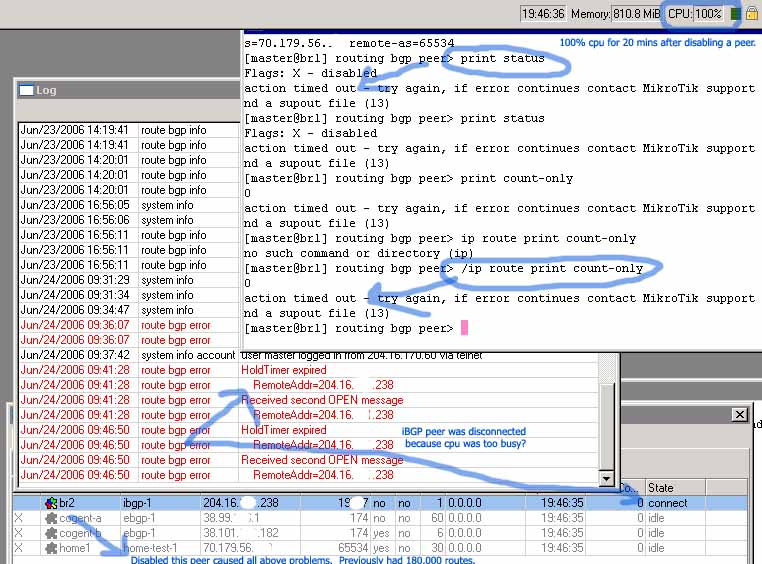
How many people actually have BGP working in production with > 2.9.14 routing-test? Of those how many are using more than 1 peer? We’ve been testing for months and can’t get anything working reliably and I’m close to giving up on it.
Does it have to do with a dual-core cpu being used? I assume not, but who knows. Does it have to do with the quad intel nic that someone else posted about having problems? I assume not, but who knows. I am at my wits end with BGP/MT and am trying to determine if anyone else has a simple BGP setup working in production with > 2.9.14 & routing-test.
We’ve been running somewhat smooth with 2.9.6 routing-test with 2 bgp peers on the same router, but it locks up every few weeks. We are splitting the bgp functions out to 2 separate border routers (1 per peering) but so far I’m left with 2 fancy supermicro boxes that are giving me nothing in return.
Supouts have been sent as always. I think they are getting tired of me emailing them : )
Short list of experienced problems:
iBGP peer sometimes annouces routes that no longer exist in its routing table.
100% cpu forever problems when changing routing filters or disabled/enabling peers.
iBGP peers establish connection but do not exchange routes on a fresh reboot, must disable/enable instance.
(Frustrated thats for sure)
Sam
I have similar problems. I use Mikrotik in production (currently 2.9.26) but I have only one BGP full feed and some peerings. When I have discarded all routes from uplink and used default route, situation is rather stable.
I had sometimes “action timeout”, have sent them supout, but till now no reply…
Gregor
Thats the only way I got 2.9.6 stable, had to discard most routes. I think we have about 15,000 and its working okay on that production router. I know that bgp with no incoming routes is working decently, but with 2 separate border routes and trying to get them to distribute the load to the right peer I somewhat need the incoming routes : )
When you say ‘some peerings’ do you mean to internal routers using ibgp or other outside providers?
Sam
[quote=“changeip”]When you say ‘some peerings’ do you mean to internal routers using ibgp or other outside providers?/quote]
Both - but less than 100 routes each.
Gregor.
@changeip
Same things happened with me, same logs, can’t re-establish bgp if peers refreshes, etc. for 2.9.22-2.9.26 w/routing-test
Always sent supout.rif to mikrotik support, don’t know if they actually find out something going on in that supout.rif?
I will sent bgp+debug log after bgp crashed.
thx
I already try 2.9.27 routing-test
I got problem with ethernet, ping sometimes timeout to one of bgp peer ip, causing bgp hold timer to expire (I think!)
And also routing table random bugged, e.g:
state dst-address gateway distance interface
Db 66.66.66.0/24 10.0.0.1 20 GW1
ADb 66.66.66.0/24 10.0.0.2 20 GW2
but trace always run through GW1=10.0.0.1, damn it!
note: ADb = active dynamic bgp, not all routes but random