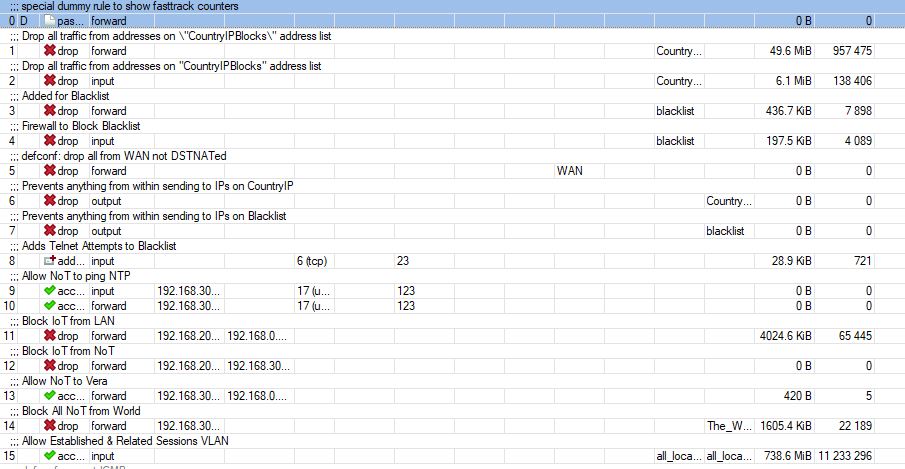
I’ve been searching on how to unblock a specific port to a /24 (which is one of VLANs on my mikrotik), specifically for NTP.
In reading, I see where Mikrotik doesnt support port “groups” which means a couple more step to accomplish.
Thank you so much! Makes total sense. I was just planning for future when I wanted to add additional ports to the “group”. Whats led me down this path was upgrading to all Unifi UBNT Nano-hd’s separating IoT, NoT and main LAN. Lots of good videos if your all UBNT, but I’m in love with RouterOS so all has to work through it.
Again, thank you for your assistance and guidance!
I implemented the above, but dont seem to be capable of passing traffic over 123. I attached a screen capture of the rules in my MT.
Appreciate your review.
There are two ways to get time on the router. According to my experience, sob being an alien may have different experiences
A. comes with default sntp client - to easy like a client set it and it works (enable), no rules needed.
B. Download the NTP package
setup NTP client much like in A, router gets time.
-setup NTP server
Make firewall address list for devices that require NTP service (such as any other MT devices, or managed switches etc…)
add Input chain rule allowing that source address list onto port 123
done~
No requirement for forward chain rules at all.
For example on MT client devices on the lan one puts the ntp source as the IP of the subnet or vlan, ie vlan45 the ntp source is 192.168.45.1 (like dns)
Rules are processed in order from top to bottom. So when #9 and #10 have no hits, either the traffic is blocked by previous rules, or nothing from 192.168.30.0/24 sends such packets for some reason.
My testing was with a couple of android atomic clock apps, and wasn’t able to pass. I’ll dive a little deeper into it. I did move the NTP rules to the 1 & 2 position for testing.
I’ll look for an app that lets me dictate where I want the test to run (by IP/port) The ones I tested had pre-configured servers..
In parallel, I installed the NTP server on the MT. If needed, I can test out the method from Anav (Thanks to you as well!).
This is for an NoT VLAN i’ve created and moving bulbs, plugs etc to that just need to check time.