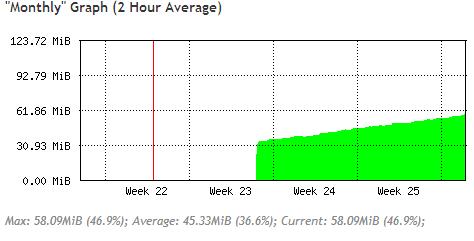
I write a script and I observed memory leak
Would you check where is mistake
This script should double the transfer between 24:00 and 12:00. I have a ppp users that login and SQ is take from radius. I must check SQ every few minutes because my users login on difference time on the day.
The “:put” and using “/system script run” in the scheduler are possible problems.
If you want to check the output, use “:log info no-512” instead of “:put”, then check the log.
I think what you want is more like this. It checks the “max-limit” value only for values that are the incorrect setting for that time of day, then change all occurrences of that rate to the correct rates. I have not run it to see if it does what you want. Before noon the values will be 128K/512K and after noon will be 256K/1M.
:local Time [/system clock get time ]
:local lineno ""

:if ([$Time] < 12:00:00) do={
    :set lineno [/queue simple find max-limit=256K/1M]

    :foreach i in=$lineno do={
        /queue simple set i limit-at=128K/512K max-limit=128K/512K
    }
} else={
    :set lineno [/queue simple find max-limit=128K/256K]

    :foreach i in=$lineno do={
        /queue simple set i limit-at=256K/1M max-limit=256K/1M
    }
}
I have users with wifi card witch connect to pppoe server. From 24:00 to 12:00 user should have double transfer. When one user log in on 10:00 he login with transfer 512k/128k (radius) and I must check every few minutes if someone have 512k/128k and change transfer to 256k/1024k.
Script could theoretically be carried out only between the hours of 24:00 and 12:00.
Maybe the solution to my problem is to set the scheduler to run between 24:00 and 12:00 only.
The code I posted above can be run as often as you like. If it is morning, it will change any afternoon settings to the morning settings. If it is afternoon, it changes any morning settings to afternoon settings. If the settings are correct, it changes nothing.
what the main issues of this case? if TS want to make changes to limit bandwidth? during the daytime users get 128k/512k limits and limits at night will turn into 128k/1024k?
you just need to change the limit, time, date, and also the IP.
My IP LAN will not run if it is used by you. to the LAN IP, change with pppoe server IP, so all you users that use pppoe server will be limited.
I have dynamic simple queue it is create when client log in. I use freeradius (Mikrotik-Rate-Limit = “128k/512k”). I can’t give name=”Day” or ”Night”. I can’t forget the customers who log on during the night hours.
I try a solution that SurferTim post
I try to find the bug because it does not work for me.
The bug is the case of the ‘K’ in limit-at and max-limit. It needs to be lower case, like ‘256k/1M’, not ‘256K/1M’. Insure to change all occurrences, even the find statements.
It worked for me.
I know what you meant, but it has a small bug. This is about what I used. Low speed before noon. Higher speed after noon. Change values of both limit-at and max-limit, but you only need to find one (max-limit in my example). And be consistent about the parameter you find. Don’t find max-limit before noon, then find limit-at after noon.
:local Time [/system clock get time]
:local lineno ""

:if ([$Time] < 12:00:00) do={
    :set lineno [/queue simple find max-limit="128k/1024k"]

    :foreach i in=$lineno do={
        /queue simple set $i limit-at="128k/512k" max-limit="128k/512k"
    }
} else={
    :set lineno [/queue simple find max-limit="128k/512k"]

    :foreach i in=$lineno do={
        /queue simple set $i limit-at="128K/1024k" max-limit="128k/1024k"
    }
}
on the other hand - you could try to use time setting in queues and manage speed increase just by adding duplicate queues with different times and allowed speed.
Background: RB1100AH, ROS v5.16 running as PPPoE server with dynamic simple queues set up by FreeRADIUS Mikrotik-Rate-Limit attribute, currently a little over 200 customers connected. I’m recently testing “unlimited” bandwidth at night, the above command is run every minute between 0:00 and 8:00 (to catch any new connections during that time - would have been better to run a script triggered by new PPPoE interface up, but I don’t know how to do that), then at 8:00 the “disable all queues every minute” scheduled task is disabled and all queues are re-enabled again for the day. Looking at memory usage graphs, it increased by about 400 MiB in a week, and only rises during the night hours when the disable command runs every minute. It can also be reproduced by just running the command several times from the command line, alternated with “/system resource print”. I’ve found a simple workaround - use
so that only enabled queues are disabled, this removes the leak or at least reduces it to manageable level (it won’t exhaust the whole 1.5GB of RAM in a few weeks). I still think there is a bug - disabling an already disabled queue should simply do nothing, not eat memory.