This happens in clients roaming between two 5ghz APs. Unable to connect to network without disconnecting and reconnecting. During this break, the message “disconnected, SA Query timeout, signal strength -54” appears. Roaming is not working.
I use 802.11g because I have IoT devices (Sonoff, Shelly) that are finicky and this provides the greatest reliability. I very well could be wrong, but they are working, and I don’t feel like opening yet another technology war front, so I’ll stay with G until I am extra bored.
Interesting analysis that the SA Query Timeouts happen when roaming between two 5ghz APs. That is definetly not what’s happening for me because there is only one 5ghz AP in the area.
Could it be that it happens when a client’s device changes between 5ghz and 2ghz (same SSID, same physical AP)?
As far as I can see your SSIDs are different for 2.4 and 5 GHz.
I’m in a same boat as you. 2 WLans (2.4 and 5 GHz, different SSIDs), 2 clients on 5 GHz, 2 on 2.4. One of clients on 2.4 disconnects continuously through ~10 minutes with “SA Query timeout”. Before ax3 there was hAP ac (RB962UiGS-5HacT2HnT) on last LTS ROS 6.48.6 with zero issues. Tried everything, dug through all of the related topics in this forum with no success. Won’t even bother to fill support ticket, there is no point to count on company, unable to release LTS version of one of their major products for more than 20 months (v.7.1 is released on 2021-Dec-01). It’s just that this device (hAP ax3) will be the last one I buy where Mikrotik and WiFi co-exist.
I also tried disable steering but no luck… Well I feel it doesn’t matter what I do - it always doesn’t work… On hAP ac lite no problems, on ax2 it still doesn’t work…
I tried on my ax2 and I can’t reproduce the error… One more advice, this is what helped me when I had problems with older versions of ROS, try to put only WPA3.
I created SSID that had only WPA3 enabled and I didn’t had any problems then. Problem was only when WPA2/3 was used.
I’m leaning more and more towards these problems (“SA Query Timeout” and “4-way handshake timeout” and “Group Key exchange timeout” and “Unicast key exchange timeout” and “Sending station leaving”) being more of a signal strength and signal reliability issue on the client device side.
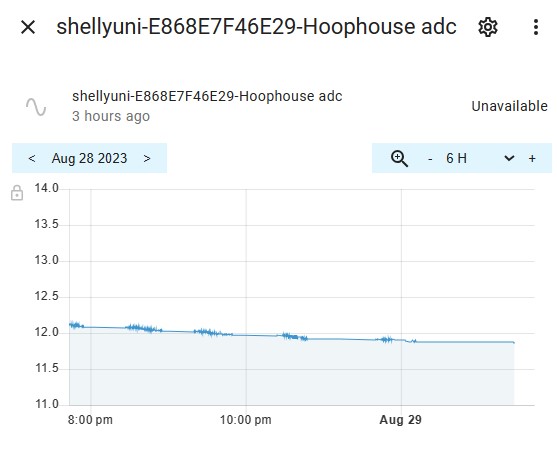
Yesterday my Shelly Uni and Sonoff THR10 and THR316 worked great.
Last evening around 22:40 (10:40pm), with zero changes to the MT config, I started getting the timeout messages.
The only thing that changed (except the weather, which remained clear (no precipitation) but got chilly) is that these devices are powered by solar (panels; controller/charger; batteries) and the voltage dropped to 11.9v.
After some number of failed attempts at staying connected, or at connecting, or some amount of time below 12 volts, the Shelly Uni resets to factory default settings.
This of course requires physically going to the Uni’s location to configure the wifi settings again and stops the Uni from any further connection wifi attempts.
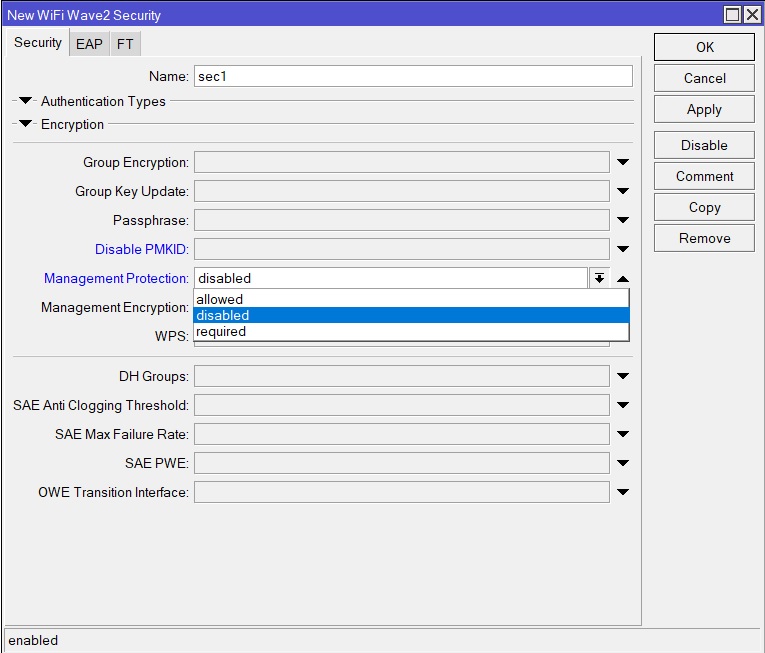
I had some spare time to ‘dig’ here more deeply. It’s obvious that the problem is related to some issue with Management Frame Protection (802.11w). As it mentioned at WifiWave2 wiki current management frame protection implementation is incompatible with the one implemented in the standard wireless package (whatever this means). Since we don’t have a way to tune SA Querry Timeout and Comeback Timer (as it’s done in some Cisco devices) - I disabled it. Yes, I’m aware this is a security flaw. I haven’t had a single SA Query Timeout since disabling it, so… bad approach, but still solves a worse problem.
Well if it works for you, and you are aware of security risk then why not turn it off, I mean in home application it’s better that way… Less dropouts and unhappy family members
You can find it under interface security settings. Go to Winbox - > Wireless → WiFi Wave2, security tab and select profile you created for your network, There you can find this:
With WPA3, Protected Management Frames should be required or allowed, so you can either use WPA2 with PMF disabled, or use WPA3, which requires the use of PMF. As I mentioned in my previous post, this is a security risk, but the decision to take it or not is a personal one. If you insist on using WPA3, you have to put up with possible ‘SA Query Timeout’ disconnects. I got the impression that the problem occurs on older devices (802.11 b/g/n) where WPA3 (it should work with 802.11 ax devices, but it isn’t a must for older ones) is not suitable at all (certainly that was my case), so disabling PMF, when WPA2 is used for authentication was a non-proper, but still working approach.