Hi all,
i m looking for a script to save the logs 1 time per day (to my cf card) and then send it to my email.
Can anybody help me ?
Hi all,
i m looking for a script to save the logs 1 time per day (to my cf card) and then send it to my email.
Can anybody help me ?
/system script add name="LogDump" policy=ftp,reboot,read,write,policy,test,winbox,password,sniff source="
:local body
:foreach int in=[/log find ] do={
  :set body ("$body\r\n" . [/log get $int])
}
/tool e-mail send to="YOU@DOMAIN.COM" subject=([/system identity get name] . " Log " . [/system clock get date]) body=$body
/system logging action set memory memory-lines=1
/system logging action set memory memory-lines=100"
/system script add disabled=no interval=1d name="Run Log Dump" on-event=LogDump start-date=jan/01/1970 start-time=00:00:00
-Louis
thank you for you reply…
I found at the forum, but again thank you very much!!!
Btw, do u suggest any program to analysing this log files ?
wordpad 
I wanted this script under V3.9 to work,
but unfortunately is not ..
Can someone help?
source="
:local body
:foreach int in=[/log find ] do={
  :set body ("$body\r\n" . [/log get $int])
}
/tool e-mail send to="YOU@DOMAIN.COM" subject=([/system identity get name] . " Log " . [/system clock get date]) body=$body
/system logging action set memory memory-lines=1
/system logging action set memory memory-lines=100"
Modify this line
:set body ("$body\r\n" . [/log get $int])
to
:set body ("$body\r\n" . [/log get $int message])
I have a 153 at my house with v3.9. When I ran my original script my CPU went to 100%, then the routerboard would reboot after a couple of seconds. Modifying it with the message option seems to correct that issue.
-Louis
Thanks for the Help @ Louis
I have the script a little added / modified.
It will now also the time in the body.
#read log
:local logcontent
:foreach int in=[/log find ] do={
:set logcontent ("$logcontent\r\n" .[/log get $int time]. " - " .[/log get $int message])
}
#send email
/tool e-mail send to="log@xxxx.xxx" subject=([/system identity get name] . " Log " . [/system clock get date]) body=$logcontent
#delete old log
/system logging action set memory memory-lines=1
/system logging action set memory memory-lines=65000
hej itsh.net
When I copy your script in terminal, I receive this ???
Ros = 2.9.49
[erik@Trekanten] > #read log
[erik@Trekanten] > :local logcontent
[erik@Trekanten] > :foreach int in=[/log find ] do={
{... :set logcontent ("$logcontent\r\n" .[/log get $int time]. " - " .[/log get $int message])
{... }
no such command or directory (find)
invalid expression
Erik
hey Erik
your must add to the Script (i had post the blank script)
and then run the Script
/system script add name="LogDump" policy=ftp,reboot,read,write,policy,test,winbox,password,sniff

#read log
:local logcontent
:foreach int in=[/log find ] do={
:set logcontent ("$logcontent\r\n" .[/log get $int time]. " - " .[/log get $int message])
}
#send email
/tool e-mail send to="log@xxxx.xxx" subject=([/system identity get name] . " Log " . [/system clock get date]) body=$logcontent
#delete old log
/system logging action set memory memory-lines=1
/system logging action set memory memory-lines=65000
i used the V3.9 and the script run fine..
Heloo ,
I tried this script ,work very well in v5.14,but sometimes send e-mail log without date .
I planned a simulation and this is what sends :
jan/02/1970 02:00:12 - router rebooted
jan/02/1970 02:00:15 - ether1 link up (speed 100M, full duplex)
jan/02/1970 02:00:29 - ether1 link down
jan/02/1970 02:00:30 - ether1 link up (speed 100M, full duplex)
jan/02/1970 02:00:31 - ether1 link down
jan/02/1970 02:00:35 - ether1 link up (speed 100M, full duplex)
17:11:11 - ether1 link down
17:11:13 - ether1 link up (speed 100M, full duplex)
17:11:37 - ether1 link down
17:11:39 - ether1 link up (speed 100M, full duplex)
17:11:41 - ether1 link down
17:11:43 - ether1 link up (speed 100M, full duplex)
awesome script, I use it on almost all my routers, but after a upgrade on my grooves, the script go’s mental and kinda crash my router, leaving me a nice supout.rif file and no email! 
Model: Groove A-52HPn
ROS: v6.3
firmware: 3.07
please upgrade to newer RouterOS version as scripting has had a lot of changes since 6.3
I don’t trust the new versions of ros [past experience] …always tends to be full of bugs
So known “non working” is better than “unknown”?
I think the logic goes more like “known to be little broken” is better than “maybe more broken”.
not to keen to kill 20 live AP’s 400km away from me, will rather wait it out till someone else makes the mistake and in mean time, I’ll order the same unit for demo and testing purpose with the new ros version
running this script successfully on by test router using 6.5
anyway, you could update to 6.5 and attempt if this problem still exist (on one router) if you still encounter the problem, just create support output file and send it to us (if there is autsupout.rif file then send that file also).
Hello friends.
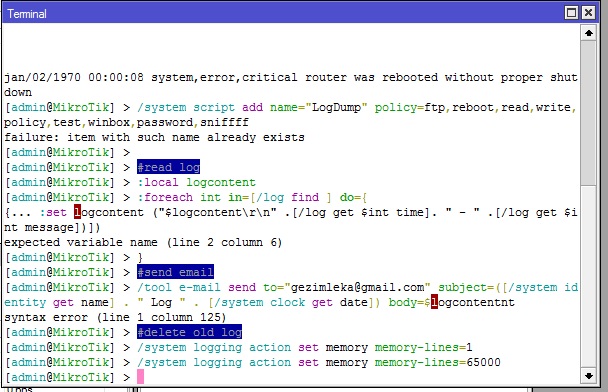
I want to send my log in my email but i can not do that..
i try the script but it shows an error.
My router is SXT v.5.26
The code:
/system script add name=“LogDump” policy=ftp,reboot,read,write,policy,test,winbox,password,sniff
#read log
:local logcontent
:foreach int in=[/log find ] do={
:set logcontent (“$logcontent\r\n” .[/log get $int time]. " - " .[/log get $int message])
}
#send email
/tool e-mail send to=“gezimleka@gmail.com” subject=([/system identity get name] . " Log " . [/system clock get date]) body=$logcontent
#delete old log
/system logging action set memory memory-lines=1
/system logging action set memory memory-lines=65000
Please help me.
Why so complicated? Just log into file and sent the file regularly as email attachment.
can you tell me how to do that…
with script or with winbox.