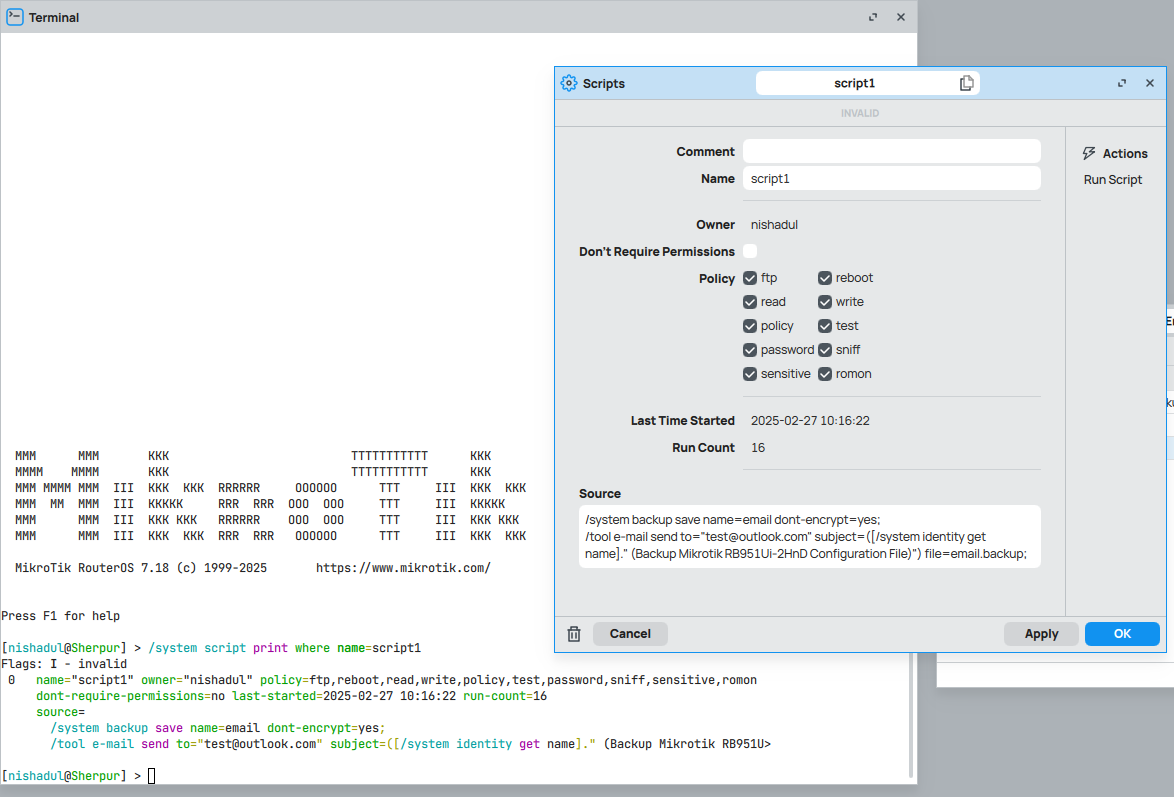
After upgrade ROS my “auto back and sent email” script not working .
my script is:
/system backup save name=email dont-encrypt=yes;
/tool e-mail send to=“test@outlook.com” subject=([/system identity get name]." (Backup Mikrotik RB951Ui-2HnD Configuration File)") file=email.backup;
Log show:
executing script script1 from winbox failed, please check it manually
syntax error (line 2 column 137)
Pl check my script it is working in previous version but not work 7.18 version
Like previously stated you can’t really try to compare string versions of floats. The scripting language has no notion of floats either.
The best solution I’ve found is to convert the floats to real numbers then compare those two numbers.
So if the current version is 7.15.2 and the upgrade version is 7.18 then the two values of $currver and $upver will be 22 and 25 respectively, then you can test for greater or less than or whatever you need.
    :local firmware [:system/routerboard/get current-firmware]
    :local upgrade [:system/routerboard/get upgrade-firmware]
    # convert X.xx.y to sum of X+xx for comparison (no floats)
    :set $curver ([pick $firmware 0 1] + [:pick $firmware 2 4])
    :set $upver ([pick $upgrade 0 1] + [:pick $upgrade 2 4])
	:if ($curver < $upver) do={
		# Do something important here
	}
If you need the the full float for comparison then you’ll need to add the .y portion too with another [:pick] command
If you change ROS & firmware then it is enough to check if upgrade and current version differ as upgrade version is the one that goes in par with ROS despite you could actually upgrade or downgrade.
:if ($Var1**!=**$Var2)
BTW there is no way to easy compare testing versions as numbers as verions contains “betaN” or “rcN”.
It does not matter. If there is a newer version available, what means “with different version string”, then upgrade string != current one no matter if it is “bigger” or “lower” whatever bigger/lower could mean..
Do you really want to teach me the basics?
(for example :set $curver, where is already defined curver? why is present $ in face of curver, you try to add two strings, etc.)
Using your logic:
{
    :local firmware "7.17.1"
    :local upgrade  "7.17.2"
    :local curver ([pick $firmware 0 1] + [:pick $firmware 2 4])
    :local upver  ([pick $upgrade  0 1] + [:pick $upgrade  2 4])
    :put $curver
    :put $upver
    :if ($curver < $upver) do={ :put "the $upgrade is newer than $firmware" }
    :if ($curver > $upver) do={ :put "the $upgrade is older than $firmware" }
    :if ($curver = $upver) do={ :put "the $upgrade is same  than $firmware" }
}
{
    :local firmware "7.17.2"
    :local upgrade  "7.18"
    :local curver ([pick $firmware 0 1] + [:pick $firmware 2 4] + [:pick $firmware 5 7])
    :local upver  ([pick $upgrade  0 1] + [:pick $upgrade  2 4] + [:pick $upgrade  5 7])
    :put $curver
    :put $upver
    :if ($curver < $upver) do={ :put "the $upgrade is newer than $firmware" }
    :if ($curver > $upver) do={ :put "the $upgrade is older than $firmware" }
    :if ($curver = $upver) do={ :put "the $upgrade is same  than $firmware" }
}
26
25
the 7.18 is older than 7.17.2
(aside from the fact that it is more correct to divide at each point, rather than dividing only based on position)
at most it should be compared as
7 * 10000 + 17 * 100 + 2 = 71702
7 * 10000 + 18 * 100 + 0 = 71800
so 71800 > 71702
without taking into account ab_xx_, alpha_x_, beta_x_, rc_x_, etc.
It’s seems you’re a fountain of elitist knowledge. I’ll just refrain from trying to assist anyone in the future since you’re so adept at it.
All I was trying to do is offer a possible solution to the floats issue. I may not be perfect but my requirements only care about the first two values not the sub version.
Instead of being sarcastic, try to understand what I wrote, that these are free lessons.
It doesn’t matter if you admit that you take them into consideration, no one will ever know.
No one is elite or infallible, insistence is wrong, especially when there is a clear and simple solution:
/system routerboard settings set auto-upgrade=yes
already written clearly, without further hijacking this thread.
Now I hope the moderators (kindly) remove all this crap from the topic (and I’m not just referring to these last posts)