Secure banking websites not loading properly behind MikroTik router

Hi everyone, I’m running a small home network on a MikroTik router with RouterOS v7 and overall connectivity is fine for most services like streaming, email, and general browsing. However, I’ve noticed that a few specific HTTPS websites either load very slowly or fail to open completely unless I retry multiple times or switch networks.

One consistent example is my bank’s official site, which I use mainly for checking my FAB account balance. On the same devices, the site opens instantly when I connect through mobile data, so I’m suspecting something in my MikroTik setup rather than the site itself. I’m using basic firewall rules, NAT, and FastTrack with no advanced filtering, but I do have some address lists and connection tracking enabled.

For testing, I noticed the issue isn’t limited to my bank’s main portal only. Even lightweight HTTPS pages related to banking, like this FAB balance check page: https://fbbalancecheck.ae, show the same behavior behind my MikroTik (slow TLS handshake / occasional timeout), while they load instantly over mobile data.

That’s what made me suspect something router-side (possibly MTU/MSS or FastTrack) rather than the bank’s infrastructure itself.

I’m trying to figure out where to look first in RouterOS. Could this be related to MTU, MSS clamping, FastTrack behavior, DNS handling, or TLS inspection issues? I’d appreciate advice from anyone who has seen secure or banking websites behave differently behind MikroTik routers and how you diagnosed it.

Hi,

The answer is: YES.

Without full config there is no way to guess where thr problem is.

/export file=anynameyouwish (minus router serial number, any public WANIP information, keys, dhcp lease lists)


# 2026-02-09 21:27:37 by RouterOS 7.21.2
# software id = **ELIDED**
# 
# model = C53UiG+5HPaxD2HPaxD
# serial number = **ELIDED**

/interface bridge
add admin-mac=**ELIDED** auto-mac=no comment=defconf mtu=1512 name=
bridge
/interface wifi
set \[ find default-name=wifi1 \] channel.skip-dfs-channels=10min-cac
configuration.country="United Arab Emirates" .mode=ap .ssid=TK disabled=
no security.authentication-types=wpa2-psk,wpa3-psk .ft=yes .ft-over-ds=
yes .passphrase="**ELIDED**"
set \[ find default-name=wifi2 \] channel.skip-dfs-channels=10min-cac
configuration.country="United Arab Emirates" .mode=ap .ssid=TK disabled=
no security.authentication-types=wpa2-psk,wpa3-psk .ft=yes .ft-over-ds=
yes .passphrase="**ELIDED**"
add configuration.mode=ap .ssid="TK's Guests" mac-address= **ELIDED**
master-interface=wifi1 name=wifi3 security.passphrase= **ELIDED**
add configuration.mode=ap .ssid="TK's Guests" mac-address= **ELIDED**
master-interface=wifi2 name=wifi4 security.passphrase=123456789
/interface ethernet
set \[ find default-name=ether1 \] mtu=1512
/interface wireguard
add comment=back-to-home-vpn listen-port=46292 mtu=1420 name=back-to-home-vpn
private-key="**ELIDED**"
/interface vlan
add interface=ether1 mtu=1508 name=ether1-etisalat-vlan-1104 vlan-id=1104
/interface pppoe-client
add add-default-route=yes disabled=no interface=ether1-etisalat-vlan-1104
keepalive-timeout=disabled name=pppoe-out1 password=xxxxxxxxx
/interface list
add comment=defconf name=WAN
add comment=defconf name=LAN
/interface wifi configuration
add country="United Arab Emirates" datapath.client-isolation=yes disabled=no
name=guest-cfg security.authentication-types="" .passphrase="" ssid=
"TK's Guest"
/interface wifi
add configuration=guest-cfg configuration.mode=ap disabled=no mac-address=
**ELIDED** master-interface=wifi2 name=wifi2g
/ip hotspot profile
add hotspot-address=172.172.172.1 name=guest-hotspot-prof1
/ip pool
add name=default-dhcp ranges=192.168.88.10-192.168.88.254
add name=lan_dhcp_pool ranges=172.87.26.2-172.87.26.254
add name=guest_dhcp_pool ranges=172.172.172.2-172.172.172.14
/ip dhcp-server
add address-pool=lan_dhcp_pool interface=bridge name=lan-dhcp-server
add address-pool=guest_dhcp_pool interface=wifi2g name=guest-dhcp-server
/ip hotspot
add address-pool=guest_dhcp_pool disabled=no interface=wifi2g name=
guest-hotspot-server1 profile=guest-hotspot-prof1
/disk settings
set auto-media-interface=bridge auto-media-sharing=yes auto-smb-sharing=yes
/interface bridge filter

# wifi3 not ready

# in/out-bridge-port matcher not possible when interface (wifi3) is not slave

add action=drop chain=forward in-interface=wifi3

# wifi3 not ready

# in/out-bridge-port matcher not possible when interface (wifi3) is not slave

add action=drop chain=forward out-interface=wifi3

# wifi4 not ready

# in/out-bridge-port matcher not possible when interface (wifi4) is not slave

add action=drop chain=forward in-interface=wifi4

# wifi4 not ready

# in/out-bridge-port matcher not possible when interface (wifi4) is not slave

add action=drop chain=forward out-interface=wifi4
/interface bridge port
add bridge=bridge comment=defconf interface=ether2
add bridge=bridge comment=defconf interface=ether3
add bridge=bridge comment=defconf interface=ether4
add bridge=bridge comment=defconf interface=ether5
add bridge=bridge comment=defconf interface=wifi1
add bridge=bridge comment=defconf interface=wifi2
add bridge=bridge interface=wifi3
add bridge=bridge interface=wifi4
/ip neighbor discovery-settings
set discover-interface-list=LAN
/interface list member
add comment=defconf interface=bridge list=LAN
add comment=defconf interface=ether1 list=WAN
/ip address
add address=172.87.26.1/24 interface=bridge network=172.87.26.0
add address=172.172.172.1/28 interface=wifi2g network=172.172.172.0
/ip cloud
set back-to-home-vpn=enabled ddns-enabled=yes ddns-update-interval=10m
/ip cloud back-to-home-user
add allow-lan=yes comment="Orchid Residence | hap ax3" name="iPhone 13 mini"
private-key="**ELIDED**" public-key=
"**ELIDED**"
add allow-lan=yes comment="Orchid Residance | hap ax3" name="iPhone 14 Pro"
private-key="**ELIDED**" public-key=
"**ELIDED**"
/ip dhcp-client
add comment=defconf default-route-tables=main interface=ether1
/ip dhcp-server network
add address=172.87.26.0/24 dns-server=172.87.26.1 gateway=172.87.26.1
add address=172.172.172.0/28 dns-server=1.1.1.1 gateway=172.172.172.1
/ip dns
set allow-remote-requests=yes servers=213.42.20.20,195.229.241.222
/ip dns static
add address=172.172.172.1 comment=defconf name=router.lan type=A
/ip firewall address-list
add address=172.172.172.0/28 list="Guest Wifi"
/ip firewall filter
add action=passthrough chain=unused-hs-chain comment=
"place hotspot rules here" disabled=yes
add action=drop chain=input comment=
"blocks directly accessing the router itself from guest network"
dst-address=172.172.172.1
add action=drop chain=input comment=
"blocks directly accessing the router itself from guest network"
dst-address=172.87.26.1 src-address-list="Guest Wifi"
add action=accept chain=input comment=
"defconf: accept established,related,untracked" connection-state=
established,related,untracked
add action=accept chain=input comment=
"defconf: accept to local loopback (for CAPsMAN)" dst-address=127.0.0.1
add action=drop chain=input comment="defconf: drop all not coming from LAN"
in-interface=pppoe-out1
add action=drop chain=input comment="defconf: drop invalid" connection-state=
invalid
add action=accept chain=input comment="defconf: accept ICMP" in-interface=
pppoe-out1 protocol=icmp
add action=accept chain=forward comment="defconf: accept in ipsec policy"
ipsec-policy=in,ipsec
add action=accept chain=forward comment="defconf: accept out ipsec policy"
ipsec-policy=out,ipsec
add action=fasttrack-connection chain=forward comment="defconf: fasttrack"
connection-state=established,related
add action=drop chain=forward comment=
"preventing using the router to access the private side of the LAN by IP"
dst-address=172.87.26.0/24 src-address-list="Guest Wifi"
add action=drop chain=forward comment="sneaking packets past the prior rule so
mehow; the only legitimate forwarding path for guest-side traffic is out t
o the Internet" out-interface=!pppoe-out1 src-address-list="Guest Wifi"
add action=accept chain=forward comment=
"defconf: accept established,related, untracked" connection-state=
established,related,untracked
add action=drop chain=forward comment="defconf: drop invalid"
connection-state=invalid
add action=drop chain=forward comment=
"defconf: drop all from WAN not DSTNATed" connection-nat-state=!dstnat
connection-state=new in-interface-list=WAN
/ip firewall nat
add action=passthrough chain=unused-hs-chain comment=
"place hotspot rules here" disabled=yes
add action=masquerade chain=srcnat comment="defconf: masquerade"
ipsec-policy=out,none out-interface-list=WAN
add action=masquerade chain=srcnat out-interface=pppoe-out1
add action=masquerade chain=srcnat comment="masquerade hotspot network"
src-address=172.172.172.0/28
/ip hotspot ip-binding
add address=172.172.172.14 comment="TK Laptop" mac-address=18:26:49:1C:AA:A7
server=guest-hotspot-server1 to-address=172.172.172.14 type=bypassed
add address=172.172.172.13 comment="TK Mobile" mac-address=76:14:83:0D:A4:DE
server=guest-hotspot-server1 to-address=172.172.172.13 type=bypassed
add address=172.172.172.11 comment="Lily Mobile" server=guest-hotspot-server1
type=bypassed
add address=172.172.172.9 comment="Sony TV" mac-address=F0:A6:54:86:B3:85
server=guest-hotspot-server1 to-address=172.172.172.9 type=bypassed
/ip hotspot user
add disabled=yes name=huser1
/ip service
set ftp disabled=yes
set telnet disabled=yes
set www disabled=yes
set ssh port=2286
set api disabled=yes
set api-ssl disabled=yes
/ip ssh
set strong-crypto=yes
/ipv6 firewall address-list
add address=::/128 comment="defconf: unspecified address" list=bad_ipv6
add address=::1/128 comment="defconf: lo" list=bad_ipv6
add address=fec0::/10 comment="defconf: site-local" list=bad_ipv6
add address=::ffff:0.0.0.0/96 comment="defconf: ipv4-mapped" list=bad_ipv6
add address=::/96 comment="defconf: ipv4 compat" list=bad_ipv6
add address=100::/64 comment="defconf: discard only " list=bad_ipv6
add address=2001:db8::/32 comment="defconf: documentation" list=bad_ipv6
add address=2001:10::/28 comment="defconf: ORCHID" list=bad_ipv6
add address=3ffe::/16 comment="defconf: 6bone" list=bad_ipv6
/ipv6 firewall filter
add action=accept chain=input comment=
"defconf: accept established,related,untracked" connection-state=
established,related,untracked
add action=drop chain=input comment="defconf: drop invalid" connection-state=
invalid
add action=accept chain=input comment="defconf: accept ICMPv6" protocol=
icmpv6
add action=accept chain=input comment="defconf: accept UDP traceroute"
dst-port=33434-33534 protocol=udp
add action=accept chain=input comment=
"defconf: accept DHCPv6-Client prefix delegation." dst-port=546 protocol=
udp src-address=fe80::/10
add action=accept chain=input comment="defconf: accept IKE" dst-port=500,4500
protocol=udp
add action=accept chain=input comment="defconf: accept ipsec AH" protocol=
ipsec-ah
add action=accept chain=input comment="defconf: accept ipsec ESP" protocol=
ipsec-esp
add action=accept chain=input comment=
"defconf: accept all that matches ipsec policy" ipsec-policy=in,ipsec
add action=drop chain=input comment=
"defconf: drop everything else not coming from LAN" in-interface-list=
!LAN
add action=fasttrack-connection chain=forward comment="defconf: fasttrack6"
connection-state=established,related
add action=accept chain=forward comment=
"defconf: accept established,related,untracked" connection-state=
established,related,untracked
add action=drop chain=forward comment="defconf: drop invalid"
connection-state=invalid
add action=drop chain=forward comment=
"defconf: drop packets with bad src ipv6" src-address-list=bad_ipv6
add action=drop chain=forward comment=
"defconf: drop packets with bad dst ipv6" dst-address-list=bad_ipv6
add action=drop chain=forward comment="defconf: rfc4890 drop hop-limit=1"
hop-limit=equal:1 protocol=icmpv6
add action=accept chain=forward comment="defconf: accept ICMPv6" protocol=
icmpv6
add action=accept chain=forward comment="defconf: accept HIP" protocol=139
add action=accept chain=forward comment="defconf: accept IKE" dst-port=
500,4500 protocol=udp
add action=accept chain=forward comment="defconf: accept ipsec AH" protocol=
ipsec-ah
add action=accept chain=forward comment="defconf: accept ipsec ESP" protocol=
ipsec-esp
add action=accept chain=forward comment=
"defconf: accept all that matches ipsec policy" ipsec-policy=in,ipsec
add action=drop chain=forward comment=
"defconf: drop everything else not coming from LAN" in-interface-list=
!LAN
/system clock
set time-zone-name=Asia/Dubai
/system identity
set name="hap ax3"
/system ntp client
set enabled=yes
/system ntp client servers
add address=ntp1.emirates.net.ae
add address=ntp2.emirates.net.ae
/system routerboard mode-button
set enabled=yes on-event=dark-mode
/system routerboard settings
set auto-upgrade=yes
/system routerboard wps-button
set enabled=yes on-event=wps-accept
/system script
add comment=defconf dont-require-permissions=no name=dark-mode owner=\*sys
policy=ftp,reboot,read,write,policy,test,password,sniff,sensitive,romon
source="\\r
\\n   :if (\[system leds settings get all-leds-off\] = "never") do={\\r
\\n     /system leds settings set all-leds-off=immediate \\r
\\n   } else={\\r
\\n     /system leds settings set all-leds-off=never \\r
\\n   }\\r
\\n "
add comment=defconf dont-require-permissions=no name=wps-accept owner=\*sys
policy=ftp,reboot,read,write,policy,test,password,sniff,sensitive,romon
source="\\r
\\n   :foreach iface in=\[/interface/wifi find where (configuration.mode="a
p" && disabled=no)\] do={\\r
\\n     /interface/wifi wps-push-button $iface;}\\r
\\n "
add dont-require-permissions=no name=Backup owner=tsco policy=
ftp,reboot,read,write,policy,test,password,sniff,sensitive,romon source="#
\_BEGIN ROS 7.10
\\n
\\n# get timestamp
\\n:local scl \[/system clock get\];
\\n# remove interpunction
\\n:set ($scl->"d1") (\[:pick ($scl->"date") 0 4\].\[:pick ($scl->"dat
e") 5 7\].\[:pick ($scl->"date") 8 10\] )
\\n:set ($scl->"t1") (\[:pick ($scl->"time") 0 2\].\[:pick ($scl->"tim
e") 3 5\].\[:pick ($scl->"time") 6 8\] )
\\n# timezone
\\n:set ($scl->"tz") ("L");
\\n:if (($scl->"time-zone-name") = "UTC") do={:set ($scl->"tz") ("
Z")};
\\n:set ($scl->"timestamp") (($scl->"d1")."T".($scl->"t1").($sc
l->"tz"))
\\n:log info ("Timestamp: ".$scl->"timestamp")
\\n# filename base
\\n:local fname ("cfg\_".\[/system identity get name\]."\_".$scl->"timest
amp")
\\n:if (\[:len \[/file find where name="flash"\]\] > 0 ) do={ :set fname ("f
lash/".$fname); }
\\n# all above is workaround to get unique filename
\\n
\\n:log info $fname
\\nif (true) do={
\\n/export verbose show-sensitive file=($fname."\_V")
\\n/export compact show-sensitive file=($fname."\_C")
\\n/export verbose show-sensitive terse file=($fname."\_VT")
\\n/export compact show-sensitive terse file=($fname."\_CT")
\\n/system backup save dont-encrypt=yes name=($fname."\_BCK")
\\n}
\\n
\\n# END"
/tool bandwidth-server
set enabled=no
/tool mac-server
set allowed-interface-list=LAN
/tool mac-server mac-winbox
set allowed-interface-list=LAN

I am facing same exact thing from my hap ax3. My ISP provides PPPOE that I am connecting from MK PPPOE client. Default configuration shows actual MTU 1480 (Everything works fine) next to PPPOE interface, if disableing keep alive then MTU is back to 1500 but some sites stop working like my banking website for example. 1M question, is it possible to keep MTU 1500 and get all websites to be working fine when connecting to ISP using PPPOE client in mikrotik? If yes, kindly help.

@Tamer Please remove/edit your configuration parts where you post passwords and other secret data.

By disabling the keepalive you instruct the router not to verify the MTU via LCP. In specific circumstances this is OK, because only LCP is limited, but the 1500 MTU is real.

In your case, the 1500 MTU is not actually true. So the answer is NO: if your ISP network doesn't support it, 1500 is not available for you. (You can complain to your ISP to either provide 1500 connectivity or stop advertising it.)

I'll take my 1MM now... :slight_smile:

Thanks for the notification and care. I did that.

@luker888luker888,

I enabled back the keep alive, I got 1480 MTU as default config on the PPPOE interface, then I started to increase MTU & MRU unti I reached 1488, but when increasing to 1489 then it is back to default 1480.

2M questions :))

1. how to verfity if my ISP supports 1500 MTU over PPPOE or not? I trust your answer but just wondering how to verify.

2.What is the maximum MTU I can reach? Is there a way I can go over 1488? I rememebr I was playing with the settings and I reached 1492 but cannot get that back :sad_but_relieved_face:

Note: the previous 1M and this 2M are thanks only unless you get me 1500 over PPPOE :slight_smile:

One way to probe the real MTU supported by your ISP is to temporarily set keepalive-timeout=disabled again so that the pppoe-out1 interface has the fake 1500 MTU value, then from the command prompt on your computer run:

Windows:

ping -f -l 1472 1.1.1.1

Linux:

ping -c 4 -s 1472 -M do 1.1.1.1

The 1472 payload size corresponds to a 1500-byte IPv4 packet. If the command succeeds, then MTU 1500 is possible with your WAN connection. If not, decrease the number, for example to 1470 and try again. Keep repeating until the ping succeeds. The largest successful payload size + 28 is the usable MTU. For example if ping only works with the payload size 1460 then 1488 is your MTU limit.

Once you have determined the real limit, you can set that value as Max MTU / Max MRU in the PPPoE client setting, and can keep keepalive-timeout=disabled if enabling it cause the MTU to jump back to 1480.


If you have IPv6 the you can also do the probe with IPv6 and can specify fewer command line parameter because routers don't fragment IPv6 packets:

Windows:

ping -l 1452 2001:4860:4860::8888

Linux:

ping -c 4 -s 1452 2001:4860:4860::8888

The IPv6 header has 20 bytes more overhead compared to IPv4, which means 1452 corresponds to MTU 1500.

I’ll go and address the elephant(s) in the room.

Considering that you didn’t sanitize your posted config to exclude sensitive information (remove serial number, auth credentials etc), I’m pretty sure that:

  • those 172.172.172.x and 172.87.26..x that you’re using for your LANs are NOT Private IP ranges, those are Public IPs, any service that’s hosted there will obviously not work since you hijacked that part of the internet for yourself, probably by mistake thinking that anything 172.x is private;
  • You’re using PPPoE over a VLAN over ether1, while I didn’t have enough coffee to check all that, be sure to triple check your MTU for all those interfaces.

Thanks for the right pointers, I agree, it is a mess and needs to be corrected. Thanks for the input.

Thanks for the detailed response, highly appreciated. Below is the finding so far, it is still not clear to me :s

  1. Followed your guide and got it working with 1472 from my pc (behind MK) to 1.1.1.1 (That is my original setting before hitting the main issue of not reaching some endpoints like my banking website and trendyol.com)
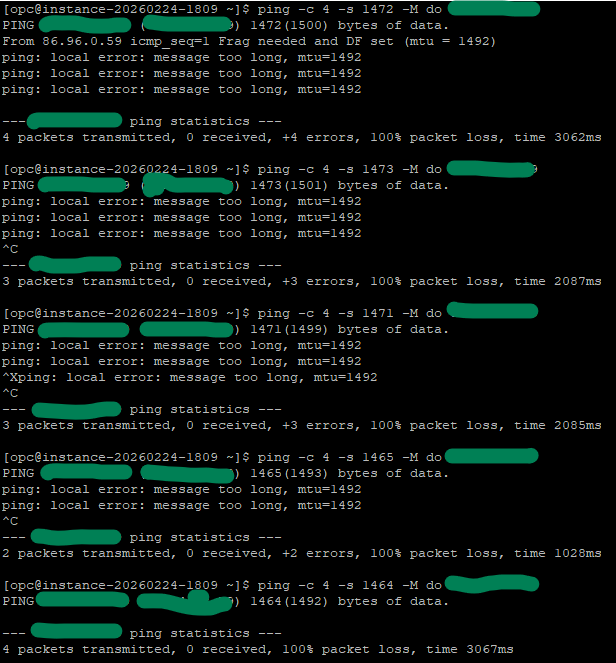
  2. Tried doing discovery from outside to my MK public IP and surprisingly I got the following:
[linuxmachine]$ ping -c 4 -s 1472 -M do mypublicip
PING mypublicip (mypublicip) 1472(1500) bytes of data.
From publicipinthemiddle icmp_seq=1 Frag needed and DF set (mtu = 1492)
ping: sendmsg: Message too long

3. Now I have disabled the keepalive in pppoe and have set max mtu/mru to 1492 and the endpoints in question are working fine

Is there an explanation to this behavior? If attempting from outside into mypublic IP then getting that message but when attempting behind MK 1500 seems to be fine!!

Can you temporarily increase the Max MTU/MRU on pppoe-out1 to 1500 again and try pinging from the router itself to the sites with, for example:

/ping trendyol.com count=4 do-not-fragment size=1500

When pinging from RouterOS, the size parameter is the full IP packet size (not reduced by 28), so 1500 is to test whether MTU 1500 really works, or it was the ping tool on your PC that fragmented the packet (you need the -f parameter for Windows and -M do for Linux to prevent fragmentation. If using macOS, specify -D together with -s size but maybe it doesn't work anymore https://developer.apple.com/forums/thread/775253)? You can also gradually reduce the size if the ping does not succeed, until you reach the largest possible packet size.

If the router can really use MTU 1500, then maybe try with the remote linux host you used in the previous tests as destination. It could be that the 1492 limit is specific to the connection of that remote machine.

Hey, I followed below in squence:

  1. Keep alive kept inactive and got MTU back to 1500
  2. pinged trendyol.com with mtu size 1500 from ROS with no issue, got reply successfully
  3. pinged from a linux box sitting in the internet my public IP (Mikrotik) using different sizes it gave the same message shared before. (Attached more details with different message size sent)

@CGGXANNX , is there further input from your end :slight_smile: ?

Sorry, I missed your previous reply. If you did specify do-not-fragment when pinging from your router and 1500- byte packets could be sent, but doing the same from outside towards your router did not work, then maybe your internet connection has some asymmetry regarding the MTU (the max that can be sent) and MRU (the max that can be received).

When you send ping with the "Don't Fragment" flag set, normally when the other side echo back the payload, their packets do not have the "Don't Fragment" flag set! If your internet connection can send IP packets up to 1500 bytes in size, but cannot receive packets larger than 1460 bytes for example, then a ping test with "Don't Fragment" and packet size 1500 from your side to trendyol.com would still work, because when trendyol.com sends back the response packet that is also 1500-byte large, it normally doesn't set "Don't Fragment" and this packet might be automatically fragmented to be smaller than the example 1460 byte limit above.

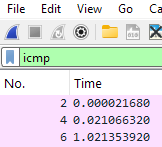
To know if that's really the case, you'll need to do some packet capturing. You can run Wireshark on your PC, do the ping test towards trendyol.com with the 1472 byte payload while filtering the display with icmp

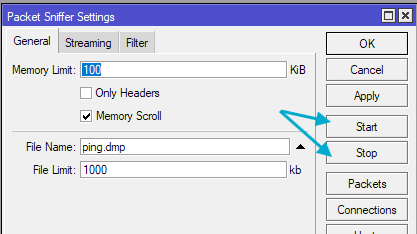
Alternatively, you can also do the capturing using Packet Sniffer on the router itself, by configuring the sniffer like this:

/tool sniffer
set file-name=ping.dmp filter-interface=pppoe-out1 filter-ip-protocol=icmp filter-operator-between-entries=and

with pppoe-out1 being your WAN interface as per your exported config above. Use the Start / Stop button to run the capture:

while you execute the ping commands (ping -f -l 1472 trendyol.com or ping -c 4 -s 1472 -M do trendyol.com or /ping trendyol.com count=4 do-not-fragment size=1500 depending on the operating system). Afterwards, you can download the ping.dmp file to your PC and open with Wireshark.

You should then see in Wireshark the packets sent from your side having the "Don't fragment" flag set and the Total Length of 1500

What important now is how the reply packets look. If fragmentation was needed for the return direction, you'll see something like this in the packet detail:

(in this example I've increase the packet size to 1508 to force the fragmentation, in your case the packet size would still be 1500).

If fragmentation was needed, then the assumption that your internet connection can send large packets but can only receive smaller was correct. Unfortunately, in that case you should reduce the MTU and MRU to the smaller limit. You can derive the real MRU limit from the size of the first fragment payload + 20.

But if the responses could be sent in only one fragment, then the assumption was wrong and your issue has some other cause.

@CGGXANNX, sorry took me some time to come back.

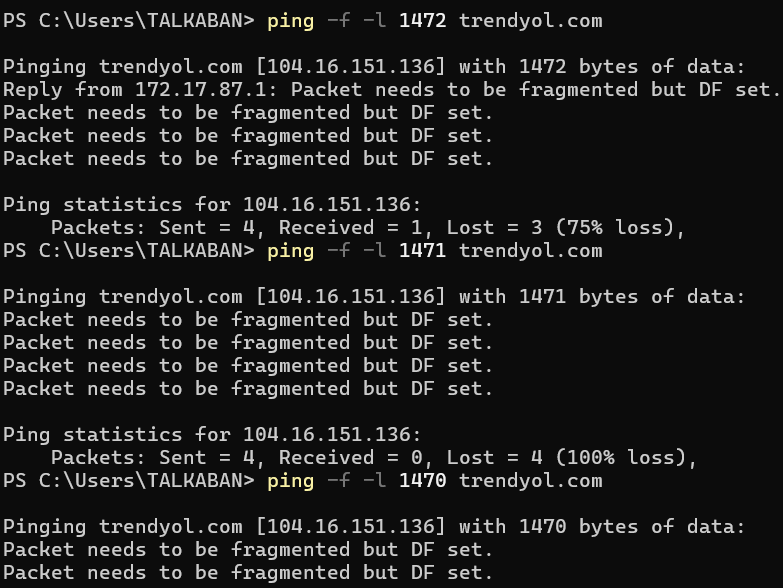
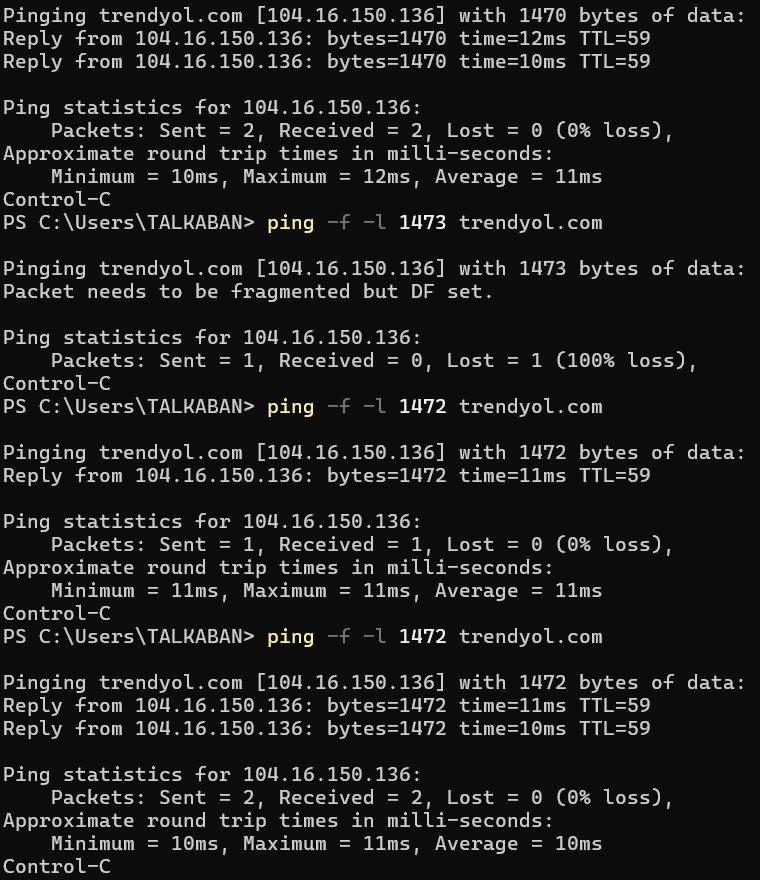
I was was working on the testing you suggested and discovered a strange behavior. I tried pinging trendyol.com from my windows pc (ping -f -l 1472 trendyol.com) and I got a message saying that frag is needed but after some time I got it working. Please see below screenshot.

Trendyol.com (Framentation needed):

Framentation not needed (trendyol.com) working fine:

Is there an explanation to this?

Tamer, did you change the IP address to ''private''? If you did, then in the next step you should correct the order of the firewall rules, because otherwise the traffic may work incorrectly and this will also affect not only throughput, but also security. INPUT - this is the section where the incoming traffic will be....''Forward''- this is the section where we specify everything that goes through the router. If, for example, we need to block access from one subnet to another, then we specify this in the ''Forward chain'' instead of ''Input''. This is important. The rules are executed from top to bottom. The Input section always ends with Drop=ALL and the forward also ends with drop=ALL. This is good practice. We block everything and allow only what we need. Everything else is blocked. That's all. We don't touch the MTU, we leave it by default for testing.

/interface list member
add interface=pppoe-out1 list=WAN
add interface=bridge1 list=LAN
add interface=bridge2 list=LAN2
/ip firewall address-list
add address=172.17.17.0/24 list=Admin (example)
add address=172.18.18.0/24 list=Guest (example LAN2)


/firewall filter
add action=accept chain=input comment=
“defconf: accept established,related,untracked” connection-state=
established,related,untracked*
add action=drop chain=input comment=“defconf: drop invalid” connection-state=invalid
add action=accept chain=input comment=“defconf: accept ICMP” protocol=icmp
add action=accept chain=input comment=
“defconf: accept to local loopback (for CAPsMAN)” dst-address=127.0.0.1
add action=accept chain=input src-address-list=Admin comment="Config Access"
add action=drop chain=input comment="drop all else"

add action=fasttrack-connection chain=forward comment=“defconf: fasttrack”
connection-state=established,related hw-offload=yes
add action=accept chain=forward comment=
“defconf: accept established,related, untracked” connection-state=
established,related,untracked
add action=drop chain=forward comment=“defconf: drop invalid”
connection-state=invalid
add action=accept chain=forward comment=“internet traffic” in-interface-list=LAN out-interface-list=WAN
add action=accept chain=forward comment="internet traffic" in-interface-list=LAN2 out-interface-list=WAN
add action=drop chain=forward comment=Guest-Access dst-address=172.18.18.0/24 \
    src-address=172.17.17.0/24	
add action=accept chain=forward comment=“port forwarding” connection-nat-state=dstnat disabled=yes { enable if required or remove }
add action=drop chain=forward comment=“drop all else”

@johnson73 , sorry to come back late to this, your follow-up is really really highly appreciated. Yes, I changed the IP ranges to be RFC1918 compliant. Regarding the firewall, I am still trying to learn for choosing the most secure way to go (Eventhough my WAN router hap ax3 is live now, I should have been prepared better). In short, my setup is as the following, hap ax3 being in the front (WAN) with two bridges, one bridge is dedicated for internal network and the other I made it guest-network managed by hotspot server only where I allow hosts manually by binding/makring bypassed. I have another Mikrotik (hex) connected to the guest bridge and another AP connected to hex. I will post my configuration for your kind review advise if possible please.