Hello, I am in the process of correcting the way that mikrotiks have been managed. Currently for remote Winbox access we have a firewall rule allowing Input from WAN on 8291. Several RBs are just in default configuration, some however have some complex VLAN things going on. My plan is to enable the QuickSet VPN access option for the simplest of the network topologies ie 192.168.88.0/24 as the default LAN.
I know I need to add the VPN addresses to the LAN address lists to allow access to the Mikrotik. Are there any other things that I need to check before disabling that Remote Winbox firewall rule? Really eager to no longer have this rule in any firewall I am responsible for. Also I need to disable the logging of DHCP assignments, but I believe I am able to do that via System > Logging > info, !dhcp. DHCP logs are congesting the logs to the point of uselessness.
Any other best practices to review before going through with this and hoping I dont get locked out? I have a test desk RB2011 but it is behind CGNAT so limited options for testing. Thanks for any information.
If you have some device/network in your control with a static ip address that you can login to these devices from,
you can (as a short term solution) add this ip address to an address list in ip firewall. (eg. admin2)
Then change the firewall rule that allows 8291 to only allow 8291 with src-address-list=admin2
If the routers are running a (recentish) routerosv7, don’t use quick set to set up a VPN.
Use Wireguard.
ikev2 is also good, but wireguard is usually much easier to setup.
I unfortunately do not have access to a static, public IP address due to Starlink using CGNAT. I have tried wireguard several times in the past, and currently am able to get a tunnel setup but am struggling to get an IP address on the wireguard peer much less an internet connection. I like the supposed simplicity of wireguard but am clearly missing some steps in my setup.
@holvoetn is right, Back to Home is what you’d want to used for Starlink.
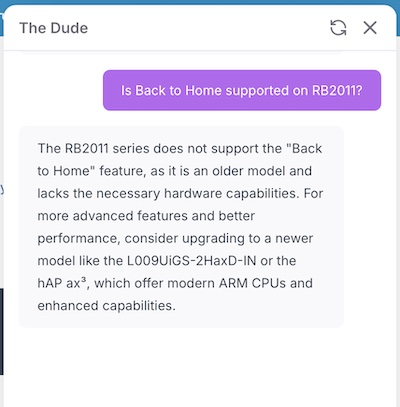
I went to check the docs, but The Dude interrupted me, but he says the RB2011 does not support Back to Home:
You can use plain wireguard, but one side requires a static IP. So another option be to enable a static IPv4 address on your starlink account. Assuming the other end has IPv6, you can use L2TP or Wireguard with a IPv6 address as anotherdption.
Or some cheap VPS in the cloud and install CHR on it, then use that one as pivot point for all Wireguard connections ?
Shouldn’t be too expensive ? Anav always claims it’s about 7$ / month but I don’t know what supplier provides it.
The IP address doesn’t need to be static per se.
You can also use a dynamic address but it needs to be public. Can’t be CGNAT.
I don’t use it but I know some folks use https://www.vultr.com/pricing/
But it tricky to setup CHR on it (long story, CHR image do not just work since Vultr wants UEFI bootable image).
And you do need a license for CHR… which begs the question if an upgrade to hAPaxLite or hAPax2/3 to do BTH be easier…
Correct. And seem to always type “static ip” when I do mean “public ip”.
And depending on Starlink plan, the PUBLIC IP should be a checkbox someone in starlink app. In which case, the QuickSet VPN or plain Wireguard be fine if an upgrade to an ARM device was not possible. Along with enabling /ip/cloud DDNS and using that DNS name in L2TP clients using QuickSet VPN (or similar with Wireguard).
I will look into the Starlink settings for the account. I have also looked into the option of hosting it in the cloud and so its always available. Still learning as I go, so thank yall for the help.
Also, since the RB2011 lives behind the starlink connection and the unifi gateway, I think double nat is going to be an issue. I dont want to have the RB2011 as the main gateway. I think that having it hosted somewhere else might be a better option.
Perhaps, but if the starlink is going to UBNT & you get a public IP from starlink… you can use port forwarding in UBNT for the WG port & then UBNT gateway will forward to RB2011 to solve the double-NAT problem.
You have to setup the ip address on each peer manually.
It is attached to the wg interface associated with that peer.
wg interface
peer - allowed ip addresses
peer - allowed ip addresses
Strictly you don’t have to have ip addresses on the interfaces, but it makes things easier.
Commonly I would have the wg interface (on all peers) being a /24 on the same IP address range.
For hub and spoke, for the hub the basic allowed ip addressed for each peer would be a /32,
while for each spoke, the allowed ip addresses might be a /24 (if all peers can connect to each other via the hub)
or a /32 (if only the hub can connect to the peer)
This allows the peers to connect to each-others wireguard ip addresses without adding routes.
Firewall rules/interface list config also likely required.
Later, additional allowed address can be added to each peer to allow access to devices behind that peer if required.
You will need to add routing entries as well.
Don’t have overlapping allowed ip addresses for different (enabled) peers on the same wg interface.
It doesn’t work.
So I have gotten a public IP via DHCP from Starlink. Setup DDNS on the Unifi GW. Also have options for setting up Wireguard server or client on GW, have successfully connected phone and desktop to that WG server, but have not been able to get Mikrotik to pass traffic via wireguard either as an interface or a peer (still not 100% on how to discern which should be used where). The Mikrotik is behind NAT so I am going to setup WG port forwarding to the RB2011 and try to get it to pass traffic.
I also realize that I need to create a firewall rule to mark the connections for Winbox, and have that routed out via Wireguard. Don’t want all internet traffic, only want Wireguard used for purposes of Winbox. I have tried a mangle rule to mark connection, it flooded the logs, so back to my copy of RouterOS by Example I go. Would I be correct in that mangle is what would be used to first sort that winbox connection and then route it via wireguard?
Since it connects, the would mean the UBNT router is port forwarding (presuming it stays connect that is). I’d recommend you post a sanitized version of config. But you can just have a filter rule that allows only 8291/tcp in filter, and drop all the other wireguard traffic. You shouldn’t need mangle if it’s only winbox you’re after [which is what @holvoetn but our post got crossed]
First, I was not aware that starlink provided public IPs, can you confirm?
Also, its getting messy regarding wireguard, if not using the R2011 as a server what device are you using?
If that is working why would you change it to the mikrotik…
The picture is not all that clear yet.
Starlink has a DHCP provided public IP address option now. I was able to enable it in account settings. Previously it was CGNAT. I have DDNS configured so that it would update.
Currently have Unifi UCGUltra as the Wireguard server, have been able to connect successfully to it with Android phone and Windows desktop. Have not been able to get mikrotik to connect to it. It shows transmitting traffic but not receiving any. Also have L2TP server running on the Unifi GW but have not been able to connect to it with Windows desktop nor Mikrotik. But having tinkered, I think I would be better served by saving this config and starting another one.
Thanks for the help everyone I really appreciate it.
Update: I have joined the Mikrotik to the Wireguard server! I had the public keys backwards. Things work now. So now am able to access winbox via wireguard on my laptop via hotspot. Unable to connect winbox before wireguard activated. Works once activated, but remains active and accessible after wireguard has been disconnected. I think this may have to do with the established / related connection states.
Sorry, I dont really know how to diagram it out what I am trying to do. Will work on trying to diagram things out as I am building them to enhance understanding. Any recommendations on best practices to make diagrams?
So you have another mikrotik router at a different location that you are trying to connect to the unifi?
Like I said nothing is clear, no diagrams provided.
No one mentioned this unless I missed it. For any Mikrotik router, if you have done ANY configuration on that router, NEVER use QuickSet ever again. Doing so may well break whatever config you have already done. QuickSet should only be used on a completely default configuration.
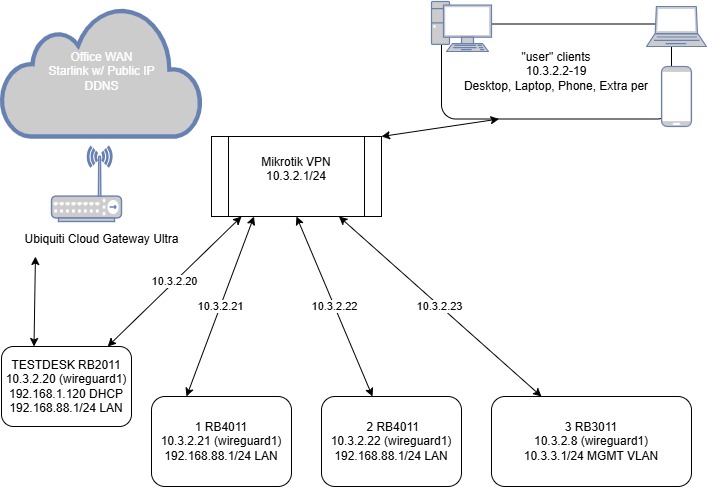
I have created and successfully connected the peers to the wireguard server. Here is the diagram as it currently is working. However, I am stuck with trying to figure out Allowed Addresses in the peer configurations of WireGuard.
TESTDESK - 10.3.2.1/24; 10.3.2.20/24
vs
1 RB4011 - 10.3.2.1/24; 10.3.2.21/24; 0.0.0.0/0
Removing the 0.0.0.0/0 from TESTDESK did not remove its ability to be on the wireguard network. Am I correct in thinking that the 0.0.0.0/0 Allowed Address is not neccessary if no traffic is expected or desired to go in or out Wireguard other than Winbox? I have the Firewall filter rules to allow input for Wireguard port 51820, and to allow Winbox port 8291 input from Interface List LAN which I added wireguard1 setup correctly I believe, most traffic is not passing through the Wireguard interface.
Unsure of what the 0.0.0.0/0 is actually doing, and if it is just a unneeded addition to the config file that Unifi generated? Also what would be a way of testing this other than just watching the traffic on the interface? Thanks for the help.
Also - wireguard Server is being hosted in the Ubiquiti Cloud Gateway Ultra, forgot to put that in my diagram.