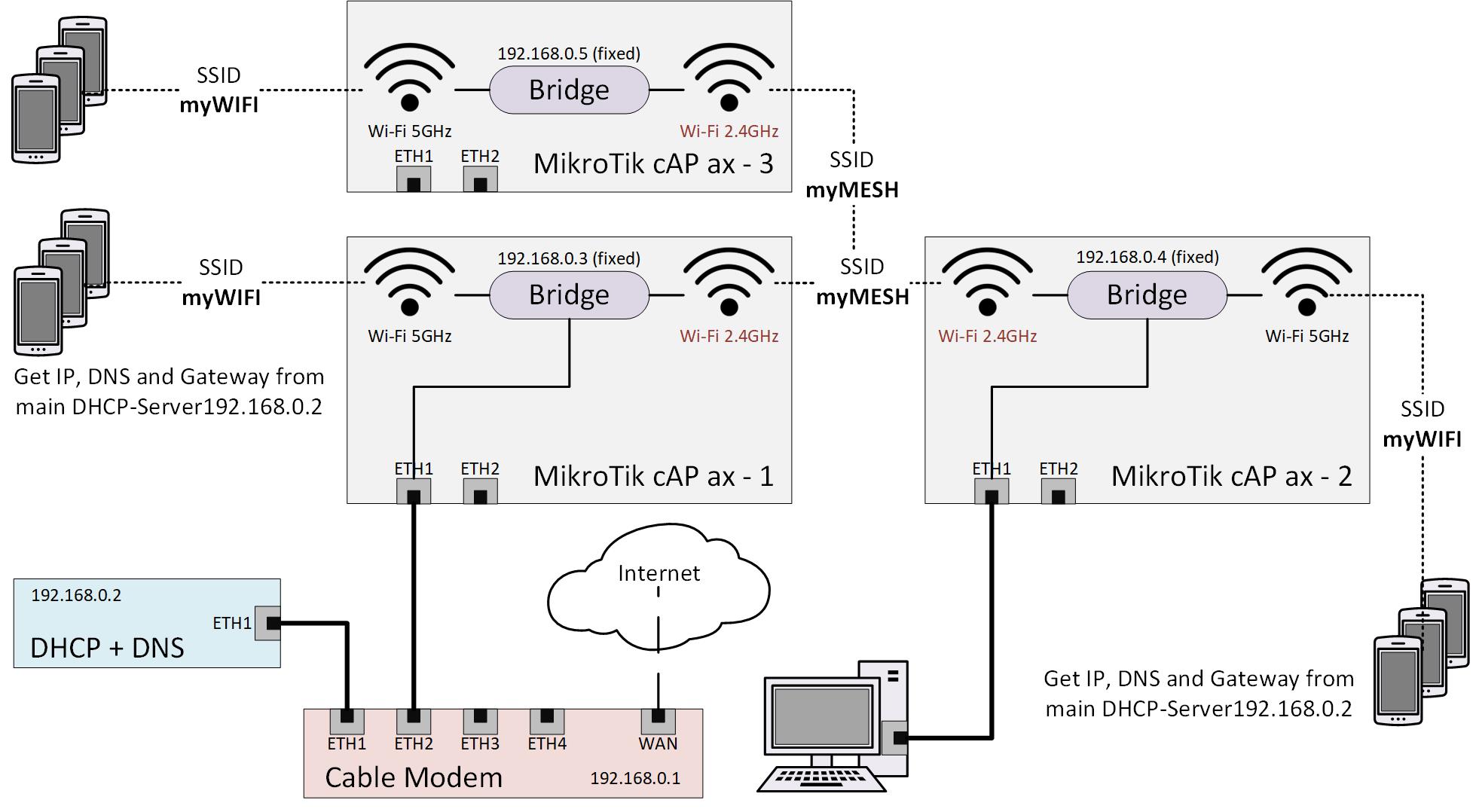
Well, I guess the following is not really what you would usually call a ‘beginners topic’ - but I am afraid, that’s my use-case and the reason why I try to get into Router OS:
Please see the following picture as it will hopefully describe clearly what I’d like to achieve:
I have three MikroTik cAP ax: cAP no. 1 is connected to the local network over Ethernet. cAP no. 2 and no. 3 are in range of cAP no. 1.
Together the three cAP’s cover WLAN in the complete house, so a Smartphone should connect to the cAP with the best signal. Additionally, cAP 2 provides internet access to a workstation computer, which is connected over Ethernet. There will be a port forwarding to this workstation configured in the cable modem, so it should have a fixed IP, which will be ensured by the DHCP server, providing always the same IP for its MAC. All smartphones in the WiFi network should also retrieve their IPs from this DHCP server.
Now to my questions:
I assumed that I just need a single bridge in every cAP, which connects all used interfaces. Maybe I would even need only for the bridge in cAP no. 1 an IP address assigned to be able to route to it from the Ethernet. Is this correct or am I thinking too simple?
How do I configure the DHCP? - Just add a DHCP client with interface bridge and the IP address of my DHCP server in every cAP?
How do I achieve that cAP no. 2 and 3 connect to the 2.4 GHz Wi-Fi of cAP no. 1? Which wireless mode do I have to configure, ‘station bridge’?
Can I realize a MESH setup where Smartphones would always connect to the best AP this way, or do I need a different configuration approach?
Currently I mostly work with WebFig because i can guess there what may be needed. Thiugh, is there any way to find out the console commands behind the configurations I do there? This would be much better for documenting things!
Well, apart from my direct questions: I am always happy for general hints how I can configure the described use-case. If I manage to get it working, I would also write a howto on my own blog and post it here
The term “mesh” can be a bit misleading and a more traditional term is Wi-Fi repeater or wireless bridge even? The Mikrotik devices can certainly do this. Looking at your diagram, are you planning to use 2.4GHz for the wireless mesh/uplinks? If so, then you’ll never get full speed on the 5Ghz interfaces as the backbone will be limited to Wi-Fi 4 speeds, albeit with the Wi-Fi 6 enhanced speed you can get. Would it not be better to use the 5GHz interfaces for the mesh? You can have 5GHz used for both the uplink mesh AND local access point with virtual wireless interfaces.
One would maybe use 2.4GHz mesh if the device is a long way from the base station and the 5GHz signal is low.
I’ve got a hAP ax2 downstairs and a little old hAP ac in the kitchen. It uses a 5GHz uplink to the hAP ax2. It then broadcasts Wi-Fi into the garden.
Devices will roam between access points based on signal strength as they’d do if they were wired or wireless linked.
You are right, when using 2.4GHz for the uplinks it will limit the speed of all devices connected to cAP no. 2 and 3. I drafted it this way since I read, it would required to have separate interfaces for uplink mesh and the local access points. Did not note down the information source, though. Oh, but you are mentioning a ‘virtual interface’ - so I guess you would still separate it within the 5GHz band. How would you configure this?
Wi-Fi 6 would be nice of course - currently only my wife’s iPhone is supporting this but none of the others. So this work as a solution in some years only.
I am a novice, but will give you some tips.
I would let the MODEM use DHCP only. The dhcp pool - 192.168.0.30-192.168.0.254. The 29 addresses could be reserved for network stuff (APs), IP-cameras, printers, PC and etc. You should put them as a “static” IP-addresses.
About the wi-fi bridge between all 3 APs - you can use WDS dynamic. It is transperant and easy to configure. Yes, as other said - better use 5Ghz band between 3 APs with virtual Wi-fi, instead 2.4ghz.
The bigger question is what is the difference between mesh type devices, and using the MT WIFI as repeaters etc…
Do mesh devices work on other frequencies to connect (like non wifi ones)?
Apparently they are often self healing and have other advantages?
I note ISPs now often provided devices that one plugs one into the ISP modem router and the rest just need power and they seem to be work really well throughout a house with no work by the user.
Mikrotik "wifi" does not support 802.11s. So no self healing when mesh node drops out (because APs only know the capsman and nothing of the neighbours) and no other "magic". You can "mimic" a mesh network by using capsman. But very limited IMHO and different.