I am looking for hAP setup help with a long range camera setup I want to use at a rifle range. I am using an IP security camera and two Nanostation 5ac locos. I am unable to connect to the camera when using the hAP's wireless or ethernet connections. The video streams when I connect the Nanostation's AP to my home network.
Hello and welcome to Mikrotik forum.
Let's start with exporting your configuration from hAP ac2 by following this tutorial: https://forum.mikrotik.com/t/forum-rules/173010/5
Did you made any changes to hAP ac2 or are you running default configuration ? If you are running default configuration then your device acts as router not AP so your camera is behind firewall and NAT and that firewall block access to your camera by default.
Nanostations are just forming PTP link so your camera works without a problem
camera1.rsc (6.2 KB)
Config uploaded. While attempting to configure the hAP I set it to Home AP using Quickset, and added the IPs of the Nanostations, so that is why they show up in the config.
Uhhh, there is a lot of mess in your configuration.
As far as I can see, there is a bridge missing, you are using internet detect which should be disabled as it's known to cause issues. There is an IP address on the loopback interface and generally a whole mess with DHCP server, IP addresses etc.
From what I see here you are trying to connect one of the nanostations to hap and use it as local AP and to have some ports available to connect other devices. Is that right ?
In that case you should configure your device as simple AP and we can help you with that.
It would be helpful if you can draw some kind of network diagram so we can see what are you trying to achieve.
What I want to do is connect the AP Nanostation via ethernet to the hAP ac, in order to pass the video stream wirelessly to my Samsung Galaxy tablet. No other devices will need to be connected to the hAP.
Physical description of setup:
IP camera ethernet connect > cam POE inj ethernet>Nanostation POE inj ethernet> Nanostation remote. Create wireless bridge connect > Nanostation AP ethernet > POE inj> ethernet connect hAP > wireless connect to android tablet (or Win 11 laptop). The camera and Nanostations are connected using appropriate POE injectors.
So, let me try to simplify:
- no matter what happens with nanostations, one way or the other the camera is connected via ethernet to the hap ac2.
- the hap ac2 needs to be set as an AP that will normally have only one or two wireless client (your tablet and laptop)
Correct?
If yes, what has to be seen is whether the connection between your tablet and the camera will be at L2 level or L3 level (i.e. you will be using the hap ac2 as "bridge" between wireless and wired or as "router" - conceptually with the camera as WAN and the wireless as LAN).
Do the camera and the nanostations use static IP addresses (or does one of the devices act as DHCP server)?
If there is already a DHCP server, there won't be any need for one if the connection is bridged. If instead the connection is routed you will need one on the wireless interfaces (which I would anyway put into a bridge with at least one ethernet port).
Yes, looking at your explanation you will need hAP ac2 to acts as simple AP.
I would create a bridge with all interfaces in that bridge except ether5 which would be off bridge mgmt port.
Now I believe there is some router which is already a DHCP server as well.
In that case you can attach DHCP client to your bridge, and for ether5 you can manually assign an IP address, for eg. 172.16.0.1/24 and for greater security you could create interface list and add ether5 to it and limit access to your device so you can access it only from interfaces you want, in this example ether5.
The camera is connected to the remote nanostation, and in my situation, set 1000 yards from the other nanostation, which is setup as an AP. The AP nanostation is then connected to the hAP via ethernet, which I should be able to connect either a tablet or a laptop to assuming the hAP is set up as an access point. I can get this to work (wirelessly) when I have it connected to my home's network. I believe I need to set the hAP set up as an wireless access point.
The only devices I have are the hAP and the nanostations. Researching options stated that the hAP could be set up as an wireless AP to the nanostation that is set up as the AP in the bridge. Both nanostations are set up with static IPs. A better description is shown in the graphic. The camera is on the right (remote), and the hAP is on the left (as the access point).
Can the hAP be set up to function in this role?
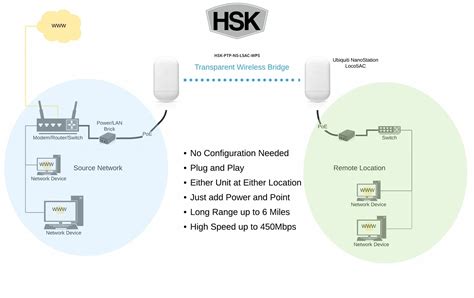
Yep, but that (AP/router) Is the default configuration of a hAP, typically:
-
ether1 Is set as WAN
-
all other interfaces, ether2-5 and the two wifi ones, are assembled into a bridge with default static address 192.168.88.1, categorized as LAN
-
a DHCP client Is set to run on ether1
-
a DHCP server Is set to run on the bridge, assigning addresses in the 192.168.88.10-254 range
-
firewall and Nat are confgured for traffic WAN<->LAN
Points #1, #3 and #5 are irrelevant if you don't connect anything to ether1.
Points #2 and #4 are what needs to be adapted.
If there Is already a DHCP server running in the network section camera/nanostations, you need to remove/disable the DHCP server on the bridge and set a DHCP client on It, then remove/disable the static IP address from It.Otherwise you can keep the default, changing the addresses (static and to be leased) so that they match your current network subnet.
While doing the above changes, you may accidentally lock yourself out, so It Is usually recommended to configure a Port, typically last Port, i.e. ether5 as an offbridge Port, see: Once and for all COMPLETE Offbridge Port setup
Looking at your diagram what you need is, as @mr_smith916 said, is router function. So reset configuration on your hAP ac2 to default one and we will guide you on how to change IP addresses correctly.
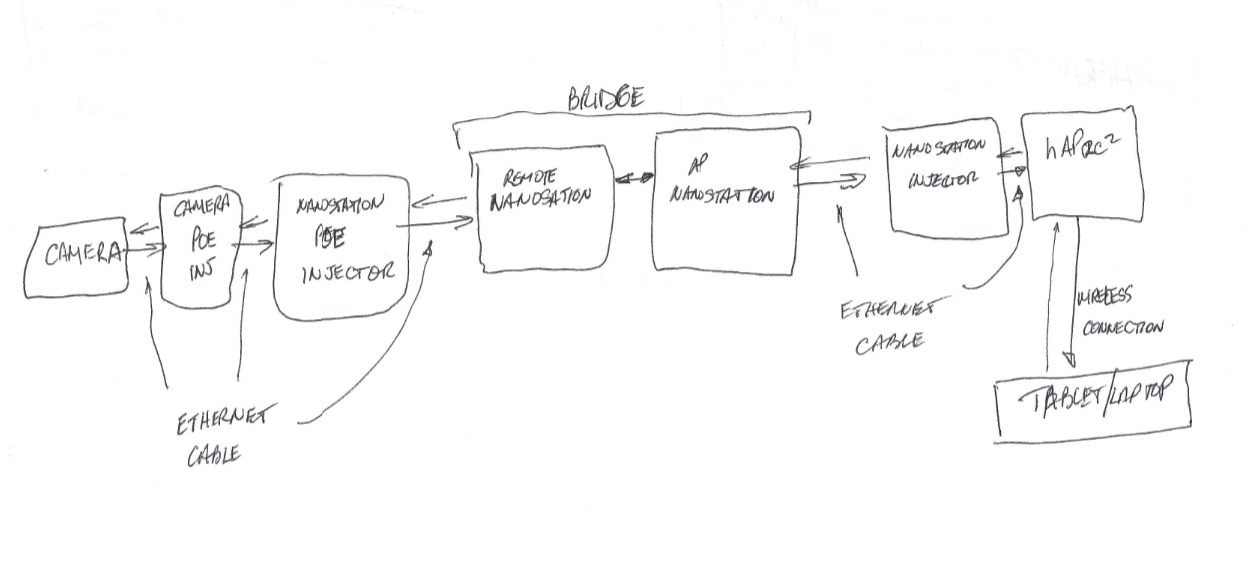
Thank you for the diagram. You didn't speficy here if you need/want internet access ? But honestly default configuration will work just fine here.
Only thing to change is an IP address and range on dhcp server. Or you can use 192.168.88.0/24 network already provided by hAP ac2. In that case i would just change address pool so you have few IP addresses that then can be assigned manually.
Let me know which approach is better for you.
But before making any change I would recommend you to put port 5 off bridge. @jaclaz gave you tutorial on how to do it.