Setup with VLANs (guest wifi, home-office, owner's network, LAN printer, ...) via Bridge plus physical Switches

Hi there - I just finished the first phase of setting up my hAP ac2. Means: VLANs are set-up, wifi networks are working via WAN and the firewall at least seems to do what it should. And the great thing: I can still config my MT, even via the main VLAN.

If there are more advanced users who have fun in commenting improvements of my setup, please feel free. This may help others with similar requirements as well when reading this post. Thanks!:slight_smile:

(all of this is combined from three tutorials and further research)

Why I ended up setting up a MT hAP ac2 (my requirements):

  • improve Wifi networks (approx. 50 wifis are broadcasting around my flat) - the cable router/modem does not offer many options for that
  • connect different Wifi and LAN clients to different LAN devices (e.g. audio/video receiver and NAS = only for the owner’s Wifi/LAN devices)
  • have a separate WAN access for home-office clients (both via LAN port and Wifi), in the future also for the employee’s VPN access
  • allow access to the LAN printer for guests and the home-office clients
  • collect one (and possibly later on further) smart home devices in a separate Wifi (2.4GHz, as the first device does not support 5GHz)
  • integrate the 8port switch in room A and the 5port switch in room B (the clients on one switch may have to communicate with clients on the other switch)
  • both switches have mixed groups of clients (home-office client / owner’s clients), so just a physical split of the LAN segments is not possible
  • both switches are capable of tagged/untagged VLAN ports (Netgear GS105E/GS108E), I think they’re called Level2-managed
  • connect to the existing consumer router/modem, make a switch of the provider / modem easy if needed in the future

Focus should be on:

  • flexibility
  • security (be safe in the owner’s VLAN when e.g. a guest or home-office device was infected with a virus or other threats)
  • speed (rather in terms of latency that bandwidth, to ensure fast browsing and fast access to internal and external file systems e.g. sharepoint, NAS)

What I did so far (RouterOS 6.45.9, based on a manual setup without Quick Set):

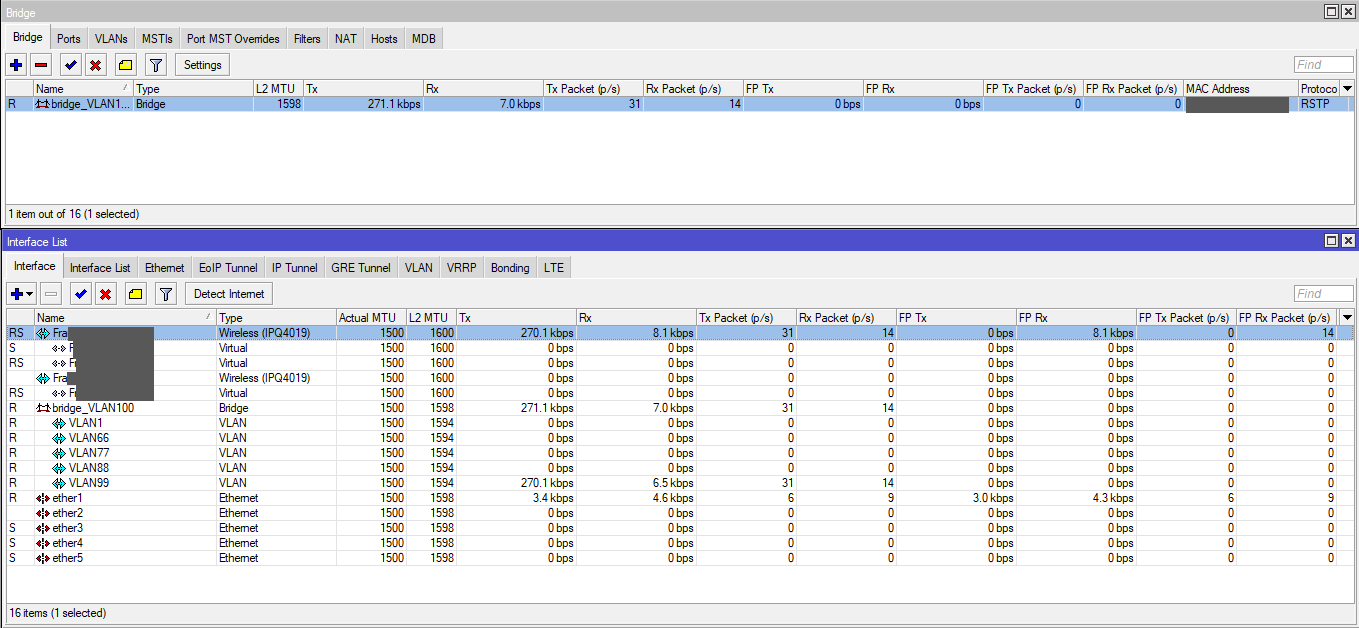
  • Bridge: create one bridge for all VLANs
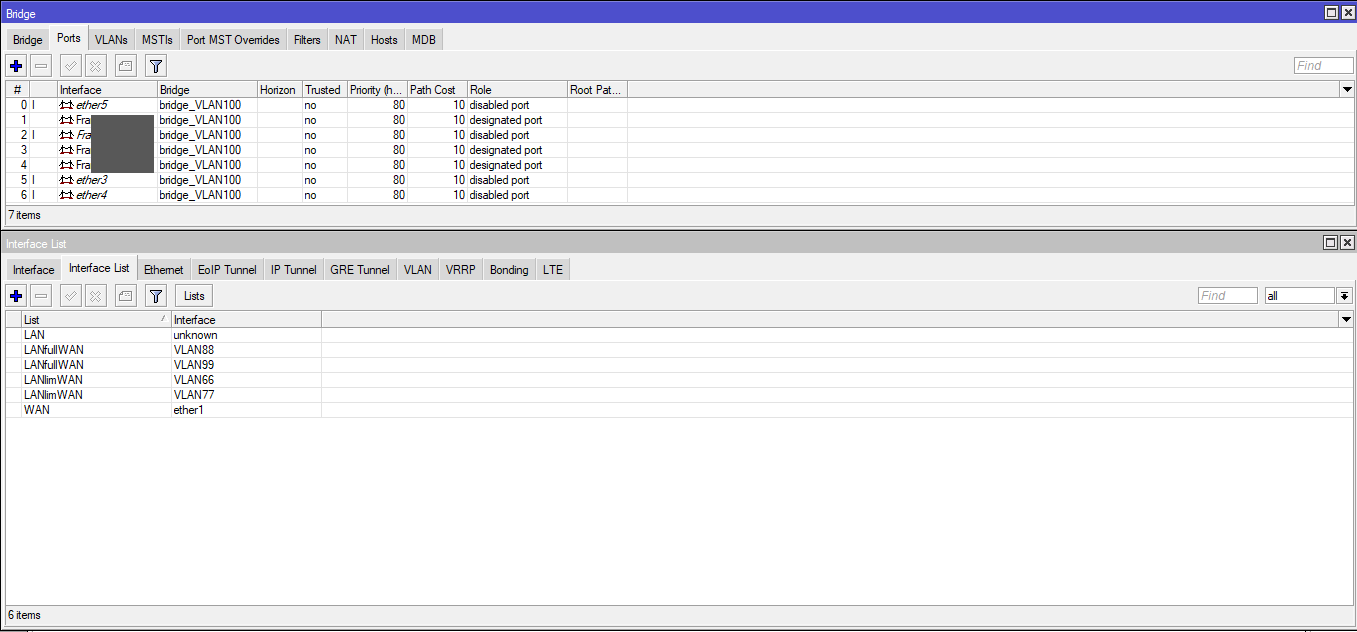
  • Ports: added the relevant Router ports and the Wifis to the bridge
  • Ports: 1=WAN, 2=management port, 3=home-office (untagged), 4=(nn), 5=uplink (tagged) to 8port switch
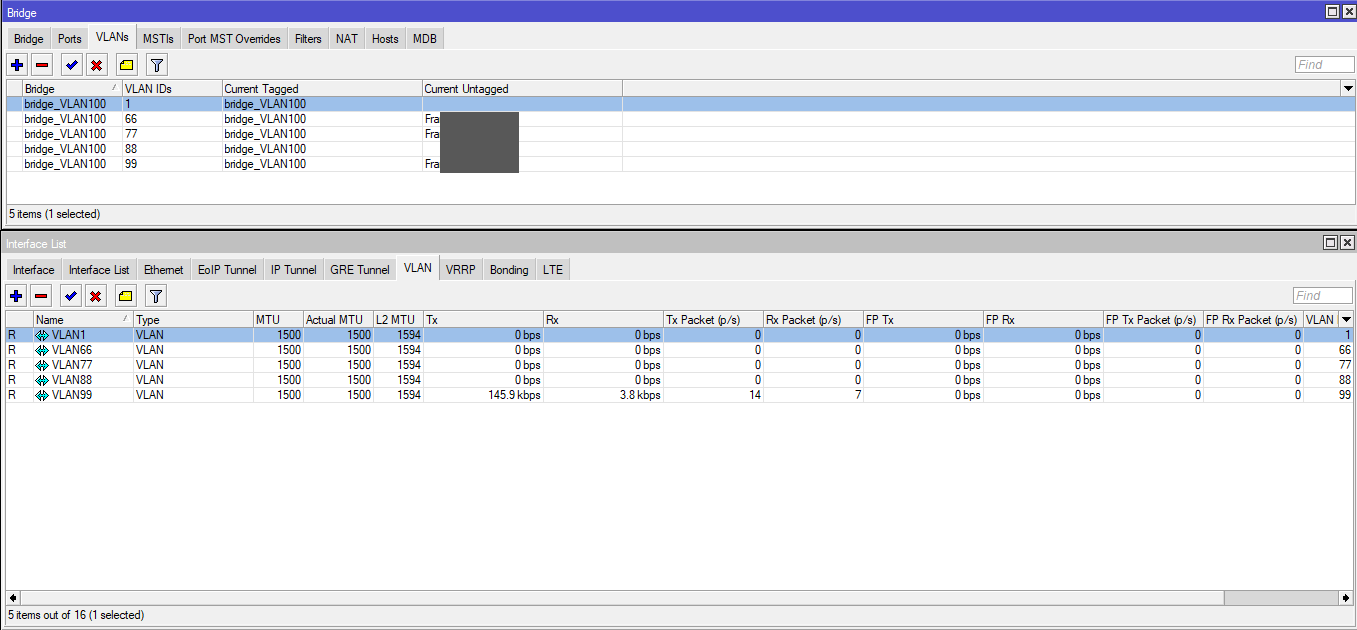
  • VLANs: 1(default)=not used/separated, 66=smart home, 77=guests, 88=home-office, 99=owner
  • every VLAN ist member of the bridge interface
  • DHCP/DNS: all VLANs with separate DHCP servers and address segments (192.168.a.0/24 … 192.168.e.0/24), with defined DNS in each DHCP server
  • created lists of Interfaces to group the communication of the VLANs for firewall rules (VLANs with full WAN access vs. VLANs with limited WAN access)
  • standard NAT rule in the firewall
  • block connections from the IPs that are used at the ports of the cable modem/router (the LAN is currently still connected directly to the cable router), the LAN will be connected to the MT in the next phase
  • also created address lists based on the VLAN addresses (were meant to be used for firewall rules), which I don’t seem to need with all the other settings (e.g. interfaces)

Current status:

  • WAN access from every Wifi is working
  • Winbox config is working via ether2 and VLAN99 only (as desired)
  • no pings between the clients of separate VLANs possible (as desired)
  • no forwarding between Wifi clients of the guest wifi (as desired)

Questions:

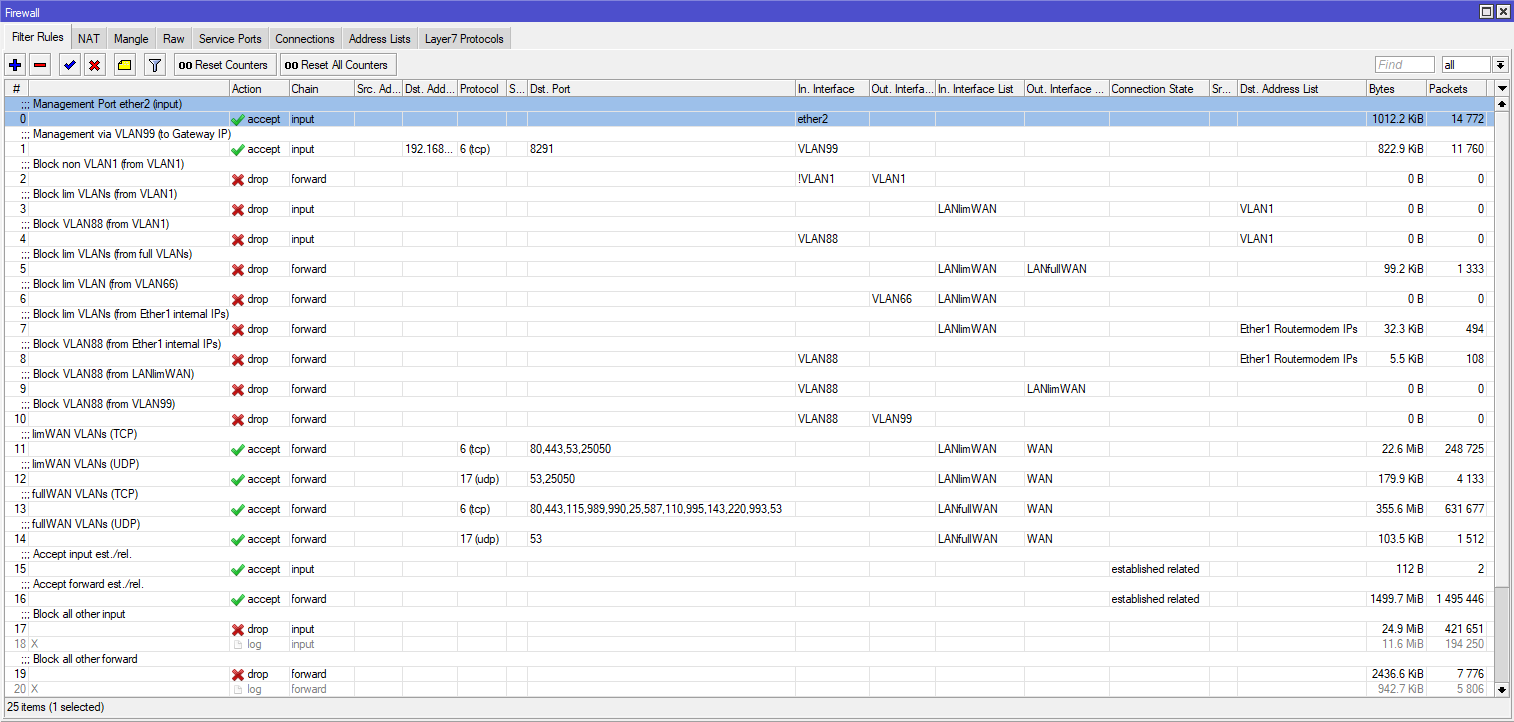
  • Do my firewall rules make sense in this setup? Being a beginner, my gut feeling says I’m a bit too paranoid on one hand and a bit too lax on the oher?! Still have to grasp all details here …

To be tested / configured:

  • connect to the LAN (2 switches) and configure VLAN on the switches
  • check better option: both switches may be connected to the MT (2x uplinks from the MT) or they also may be connected in a row (1st uplink from the MT, 2nd uplink from the first switch)
  • test access within the owner’s network (LAN printer, NAS, TV, …) and from LAN devices to WAN (streaming, browsing, …)
  • create rules to let users outside the owner’s VLAN access the LAN printer (firewall?)
  • check and possibly create MAC address based access to selected wifis
  • optimize wifi speed if possible / if necessary (e.g. by solving conflicts with other wifis)
  • optimize LAN speed if possible / if necessary

You will see some details in the screenshots / config of the bridge and firewall settings.

If you have any question on this for your setup - and of course if you have recommendations for my firewall settings or so - feel free! and thanks a lot!

# jan/22/2021 16:19:51 by RouterOS 6.45.9
# software id = 8ZCU-N24W
#
# model = RBD52G-5HacD2HnD
# serial number = YY
/interface bridge
add dhcp-snooping=yes igmp-snooping=yes name=bridge_VLAN100 vlan-filtering=yes
/interface wireless
set [ find default-name=wlan2 ] band=5ghz-onlyac country=germany disabled=no \
    frequency=auto hide-ssid=yes mode=ap-bridge name=FrannyOwnerW ssid=\
    FrannyOwnerW vlan-id=99 wireless-protocol=802.11 wps-mode=disabled
set [ find default-name=wlan1 ] band=2ghz-onlyn country=germany \
    default-forwarding=no disabled=no frequency=auto hide-ssid=yes mode=\
    ap-bridge name=FrannyW24 ssid=FrannyOwnerW24 vlan-id=66 wireless-protocol=\
    802.11 wps-mode=disabled
/interface vlan
add interface=bridge_VLAN100 name=VLAN1 vlan-id=1
add interface=bridge_VLAN100 name=VLAN66 vlan-id=66
add interface=bridge_VLAN100 name=VLAN77 vlan-id=77
add interface=bridge_VLAN100 name=VLAN88 vlan-id=88
add interface=bridge_VLAN100 name=VLAN99 vlan-id=99
/interface ethernet switch port
set 1 default-vlan-id=0
/interface list
add name=WAN
add name=LAN
add name=LANfullWAN
add name=LANlimWAN
/interface wireless security-profiles
set [ find default=yes ] authentication-types=wpa2-psk eap-methods="" mode=\
    dynamic-keys supplicant-identity=MikroTik
add authentication-types=wpa2-psk eap-methods="" mode=dynamic-keys name=guest \
    supplicant-identity=""
add authentication-types=wpa2-psk eap-methods="" mode=dynamic-keys name=\
    business supplicant-identity=""
add authentication-types=wpa2-psk eap-methods="" mode=dynamic-keys name=home \
    supplicant-identity=""
/interface wireless
add default-forwarding=no disabled=no hide-ssid=yes keepalive-frames=disabled \
    mac-address=0A:55:31:3B:07:7F master-interface=FrannyOwnerW \
    multicast-buffering=disabled name=FrannyOfficeW security-profile=business \
    ssid=FrannyOfficeW vlan-id=88 wds-cost-range=0 wds-default-cost=0 wps-mode=\
    disabled
add default-forwarding=no disabled=no keepalive-frames=disabled mac-address=\
    0A:55:31:3B:07:7E master-interface=FrannyOwnerW multicast-buffering=\
    disabled name=FrannyGastW security-profile=guest ssid=FrannyGastW \
    vlan-id=77 wds-cost-range=0 wds-default-cost=0 wps-mode=disabled
add default-forwarding=no disabled=no keepalive-frames=disabled mac-address=\
    0A:55:31:3B:07:7D master-interface=FrannyW24 multicast-buffering=disabled \
    name=FrannySmartHoW24 security-profile=home ssid=FrannySmartHoW24 vlan-id=66 \
    wds-cost-range=0 wds-default-cost=0 wps-mode=disabled
/ip hotspot profile
set [ find default=yes ] html-directory=flash/hotspot
/ip pool
add comment="Default VLAN (ID 1):" name=dhcp_pool5 ranges=\
    192.168.100.10-192.168.100.50
add comment="Smart Home Network:" name=dhcp_pool6 ranges=\
    192.168.166.10-192.168.166.30
add comment="Guest Wifi:" name=dhcp_pool7 ranges=192.168.177.10-192.168.177.30
add comment="Business Network:" name=dhcp_pool8 ranges=\
    192.168.188.10-192.168.188.30
add comment="Internal Network:" name=dhcp_pool9 ranges=\
    192.168.199.10-192.168.199.50
/ip dhcp-server
add address-pool=dhcp_pool5 disabled=no interface=VLAN1 lease-time=10h name=\
    dhcp1
add address-pool=dhcp_pool6 disabled=no interface=VLAN66 lease-time=1d name=\
    dhcp2
add address-pool=dhcp_pool7 disabled=no interface=VLAN77 lease-time=10h name=\
    dhcp3
add address-pool=dhcp_pool8 disabled=no interface=VLAN88 lease-time=10h name=\
    dhcp4
add address-pool=dhcp_pool9 disabled=no interface=VLAN99 lease-time=10h name=\
    dhcp5
/interface bridge port
add bridge=bridge_VLAN100 frame-types=admit-only-vlan-tagged interface=ether5
add bridge=bridge_VLAN100 interface=FrannyGastW pvid=77
add bridge=bridge_VLAN100 interface=FrannyOfficeW pvid=88
add bridge=bridge_VLAN100 interface=FrannyOwnerW pvid=99
add bridge=bridge_VLAN100 interface=FrannySmartHoW24 pvid=66
add bridge=bridge_VLAN100 interface=ether3 pvid=77
add bridge=bridge_VLAN100 interface=ether4 pvid=99
/interface bridge vlan
add bridge=bridge_VLAN100 tagged=bridge_VLAN100 vlan-ids=1
add bridge=bridge_VLAN100 tagged=bridge_VLAN100 vlan-ids=66
add bridge=bridge_VLAN100 tagged=bridge_VLAN100 vlan-ids=77
add bridge=bridge_VLAN100 tagged=bridge_VLAN100,ether5 vlan-ids=88
add bridge=bridge_VLAN100 tagged=bridge_VLAN100,ether5 vlan-ids=99
/interface list member
add interface=ether1 list=WAN
add list=LAN
add interface=VLAN88 list=LANfullWAN
add interface=VLAN99 list=LANfullWAN
add interface=VLAN66 list=LANlimWAN
add interface=VLAN77 list=LANlimWAN
/ip address
add address=192.168.199.1/24 interface=VLAN99 network=192.168.199.0
add address=192.168.166.1/24 interface=VLAN66 network=192.168.166.0
add address=192.168.188.1/24 interface=VLAN88 network=192.168.188.0
add address=192.168.177.1/24 interface=VLAN77 network=192.168.177.0
add address=192.168.100.1/24 interface=VLAN1 network=192.168.100.0
/ip dhcp-client
add disabled=no interface=ether1 use-peer-dns=no
/ip dhcp-server network
add address=192.168.100.0/24 dns-server=9.9.9.9,1.1.1.1 gateway=192.168.100.1
add address=192.168.166.0/24 dns-server=9.9.9.9,1.1.1.1 gateway=192.168.166.1
add address=192.168.177.0/24 dns-server=9.9.9.9,1.1.1.1 gateway=192.168.177.1
add address=192.168.188.0/24 dns-server=9.9.9.9,1.1.1.1 gateway=192.168.188.1
add address=192.168.199.0/24 dns-server=9.9.9.9,1.1.1.1 gateway=192.168.199.1 \
    netmask=24
/ip firewall address-list
add address=192.168.177.0/24 list="VLAN77 Guest Wifi"
add address=192.168.188.0/24 list="VLAN88 Business"
add address=192.168.199.0/24 list="VLAN99 Intern"
add address=192.168.166.0/24 list="VLAN66 Home"
add address=192.168.100.0/24 list="VLAN1 "
add address=192.168.2.0/24 list="Ether1 Routermodem IPs"
add address=192.168.100.1-192.168.177.255 disabled=yes list=limWAN
add address=192.168.188.1-192.168.199.255 disabled=yes list=fullWAN
/ip firewall filter
add action=accept chain=input comment="Management Port ether2 (input)" \
    in-interface=ether2
add action=accept chain=input comment="Management via VLAN99 (to Gateway IP)" \
    dst-address=192.168.199.1 dst-port=8291 in-interface=VLAN99 protocol=tcp
add action=drop chain=forward comment="Block non VLAN1 (from VLAN1)" \
    in-interface=!VLAN1 out-interface=VLAN1
add action=drop chain=input comment="Block lim VLANs (from VLAN1)" \
    dst-address-list="VLAN1 " in-interface-list=LANlimWAN
add action=drop chain=input comment="Block VLAN88 (from VLAN1)" \
    dst-address-list="VLAN1 " in-interface=VLAN88
add action=drop chain=forward comment="Block lim VLANs (from full VLANs)" \
    in-interface-list=LANlimWAN out-interface-list=LANfullWAN
add action=drop chain=forward comment="Block lim VLAN (from VLAN66)" \
    in-interface-list=LANlimWAN out-interface=VLAN66
add action=drop chain=forward comment=\
    "Block lim VLANs (from Ether1 internal IPs)" dst-address-list=\
    "Ether1 Routermodem IPs" in-interface-list=LANlimWAN
add action=drop chain=forward comment="Block VLAN88 (from Ether1 internal IPs)" \
    dst-address-list="Ether1 Routermodem IPs" in-interface=VLAN88
add action=drop chain=forward comment="Block VLAN88 (from LANlimWAN)" \
    in-interface=VLAN88 out-interface-list=LANlimWAN
add action=drop chain=forward comment="Block VLAN88 (from VLAN99)" \
    in-interface=VLAN88 out-interface=VLAN99
add action=accept chain=forward comment="limWAN VLANs (TCP)" dst-port=\
    80,443,53,25050 in-interface-list=LANlimWAN out-interface-list=WAN \
    protocol=tcp
add action=accept chain=forward comment="limWAN VLANs (UDP)" dst-port=53,25050 \
    in-interface-list=LANlimWAN out-interface-list=WAN protocol=udp
add action=accept chain=forward comment="fullWAN VLANs (TCP)" dst-port=\
    80,443,115,989,990,25,587,110,995,143,220,993,53 in-interface-list=\
    LANfullWAN out-interface-list=WAN protocol=tcp
add action=accept chain=forward comment="fullWAN VLANs (UDP)" dst-port=53 \
    in-interface-list=LANfullWAN out-interface-list=WAN protocol=udp
add action=accept chain=input comment="Accept input est./rel." \
    connection-state=established,related
add action=accept chain=forward comment="Accept forward est./rel." \
    connection-state=established,related
add action=drop chain=input comment="Block all other input"
add action=log chain=input disabled=yes
add action=drop chain=forward comment="Block all other forward"
add action=log chain=forward disabled=yes
add action=accept chain=forward comment="Streaming forward (TCP, external)" \
    disabled=yes dst-port=1755,7070,7071,554 protocol=tcp
add action=accept chain=forward comment="Streaming forward (UDP, external)" \
    disabled=yes dst-port=6970-7170,1024-5000 protocol=udp
add action=accept chain=forward comment=\
    "Streaming forward (TCP, internal DLNA)" disabled=yes dst-port=8200 \
    protocol=tcp
add action=accept chain=forward comment=\
    "Streaming forward (UDP, internal DLNA)" disabled=yes dst-port=1900 \
    protocol=udp
/ip firewall nat
add action=masquerade chain=srcnat out-interface-list=WAN
/system clock
set time-zone-name=Europe/Berlin
/system identity
set name=FrannyHap
firew_01.png
bridge-interf_01.png
bridge-interf_02.png
bridge-interf_03.png

Naw, they suck!
post your config it you want assistance.

Okay, have done so (see the original post) and learnt how to do that. You are very welcome :wink:
Thanks for any support here. Have a good one.

Comments:

  1. I have no idea what the snooping effects (dhcp,igmp) will be as I have never used them.

  2. Remove vlan1, and replace with vlan11. MT uses VLAN1 behind the scenes and does not have to be created by the admin nor should be used by the admin.

  3. If Vlan1 is was not carrying any traffic suggest you probably don’t need a vlan11 either.

  4. What IP address, were you intending the switch to get? If 99 is your management vlan then it should get an IP in the 99 server range.

  5. interface bridge port
    add bridge=bridge_VLAN100 frame-types=admit-only-vlan-tagged interface=ether5
    add bridge=bridge_VLAN100 interface=FrannyGastW pvid=77 frame-types=admit-only-untagged-and-priority-tagged
    add bridge=bridge_VLAN100 interface=FrannyOfficeW pvid=88frame-types=admit-only-untagged-and-priority-tagged
    add bridge=bridge_VLAN100 interface=FrannyOwnerW pvid=99 frame-types=admit-only-untagged-and-priority-tagged
    add bridge=bridge_VLAN100 interface=FrannySmartHoW24 pvid=66 frame-types=admit-only-untagged-and-priority-tagged
    add bridge=bridge_VLAN100 interface=ether3 pvid=77 frame-types=admit-only-untagged-and-priority-tagged
    add bridge=bridge_VLAN100 interface=ether4 pvid=99 frame-types=admit-only-untagged-and-priority-tagged

Note Below I like to program in and see on my config what is untagged even though they are added automatically by the router…I prefer to see it… makes it clearer for me.

/interface bridge vlan
add bridge=bridge_VLAN100 tagged=bridge_VLAN100 untagged=FrannySmartHoW24 vlan-ids=66
add bridge=bridge_VLAN100 tagged=bridge_VLAN100 untagged=FrannyGastW,ether3 vlan-ids=77
add bridge=bridge_VLAN100 tagged=bridge_VLAN100,ether5 untagged=FrannyOfficeW vlan-ids=88
add bridge=bridge_VLAN100 tagged=bridge_VLAN100,ether5 untagged=FrannyOwnerW,ether4 vlan-ids=99

  1. Empy entry for LAN ???
    /interface list member
    add interface=ether1 list=WAN
    add list=LAN
    change to
    add interface=bridge_VLAN100 add list=LAN

  2. Firewall rules simplified by starting from default and then creating the actual few rules required…

Default rules…

/ip firewall filter
add action=accept chain=input comment=\
    "defconf: accept established,related,untracked" connection-state=\
    established,related,untracked
add action=drop chain=input comment="defconf: drop invalid" connection-state=\
    invalid
add action=accept chain=input comment="defconf: accept ICMP" protocol=icmp
add action=accept chain=input comment=\
    "defconf: accept to local loopback (for CAPsMAN)" dst-address=127.0.0.1 
add action=drop chain=input comment="defconf: drop all not coming from LAN" \
    disabled=yes in-interface-list=!LAN
add action=accept chain=forward comment="defconf: accept in ipsec policy" \
    ipsec-policy=in,ipsec
add action=accept chain=forward comment="defconf: accept out ipsec policy" \
    ipsec-policy=out,ipsec
add action=fasttrack-connection chain=forward comment="defconf: fasttrack" \
    connection-state=established,related
add action=accept chain=forward comment=\
    "defconf: accept established,related, untracked" connection-state=\
    established,related,untracked
add action=drop chain=forward comment="defconf: drop invalid" \
    connection-state=invalid
add action=drop chain=forward comment=\
    "defconf: drop all from WAN not DSTNATed" connection-nat-state=!dstnat \
    connection-state=new in-interface-list=WAN

…

I change the rules slightly to drop everything not explicitly allowed.
Also one can drop the capsman rule in the input chain if not intending to use capsman.
The port forwarding rule I make is optional as it can be removed if not using port forwarding.
…

/ip firewall filter
add action=accept chain=input comment=\
    "defconf: accept established,related,untracked" connection-state=\
    established,related,untracked
add action=drop chain=input comment="defconf: drop invalid" connection-state=\
    invalid
add action=accept chain=input comment="defconf: accept ICMP" protocol=icmp
add action=accept chain=input comment=\
    "defconf: accept to local loopback (for CAPsMAN)" dst-address=127.0.0.1 
add action=accept chain=input comment="Allow Admin Access"  in-interface-list=LANfullWAN
(optional to narrow down access--->source-address-list=VLAN99 Intern  or  specific IP address etc.)
add action=accept chain=input protocol=tcp dst-port=53 in-interface=LAN  (optional if use router dns services)
add action=accept chain=input protocol=udp dst-port=53  in-interface=LAN  (optional if use router dns services)
add action=drop chain=input comment="Drop all else"  (be careful to have admin access rules in place first)

…

Forward Chain

/ip firewall filteradd action=accept chain=forward comment="defconf: accept in ipsec policy" \
    ipsec-policy=in,ipsec
add action=accept chain=forward comment="defconf: accept out ipsec policy" \
    ipsec-policy=out,ipsec
add action=fasttrack-connection chain=forward comment="defconf: fasttrack" \
    connection-state=established,related
add action=accept chain=forward comment=\
    "defconf: accept established,related, untracked" connection-state=\
    established,related,untracked
add action=drop chain=forward comment="defconf: drop invalid" \
    connection-state=invalid
add action=allow chain=forward comment="allow LAN to WAN traffic" \
in-interface-list=LANfullWAN out-interface-list=WAN
add action=allow chain=forward comment="allow Admin to all limited vlans"
in-interface=VLAN99 out-interface-list=LANlimWAN  (do you want access to vlan 88 also from vlan 99, if so make another allow rule)
add action=allow chain=forward comment="allow port forwarding" \
 connection-nat-state=dstnat connection-state=new in-interface-list=WAN   (an optional rule) 
 add action=drop chain=forward comment="drop all else"

…

Now that is the start. You have some other requirements that will now be easier to understand and implement based on the above start.
For example only LANfullWANS have access to internet. No vlans will see each other except VLAN99 to the LANlimWAN subnets.
We can go from here when you explain the requirements a bit more clearly and then also we can tackle the destination nat rules as well.

Gosh, thanks for your comments and recommendations, will need a moment to get the details and implement / adopt them but I think I got your points. More to come …

Hi there - so, I guess I have intergrated your recommendations like they were intented. Please find below some comments and if you, anav, or anyone else can answer my questions (see #8 to #11 below), thanks a lot!

(reffering to your numbers above)

  1. dhcp snooping seems a security feature to me, I let it be active (I deactivated igmp for instance, as it improves multicasting only if set in the switches as far as I understand - to be reviewed later on)
  2. VLAN1 deactivated, as not needed
  3. yes, see #2
  4. not sure if I set it correctly now (in the address list as an entry for the bridge)
  5. bridge ports adjusted like recommended
  6. filled the LAN interface list with only the bridge in it
  7. firewall rules almost like recommended, but it seems I need more rules for the heating system (port 25050) as it could not find a connection from the smartphone app (working from the internet, not in the VLAN network) to the client in VLAN66 / LANlimWAN (testing this with the UDP rule above the others at the moment) // also added another rule for the LANlimWAN clients to get a basic WAN access for guests and the heating client // hope this is not crushing the intention of the default rules

And now this / what does not work yet:

  1. I added the VLAN IDs and PVIDs to my switches and for VLAN99, it works fine (e.g. the second switch has untagged ports for VLAN77, VLAN88 and VLAN99: internet access and access to the TV or audio system in VLAN99 on the other switch works fine, also streaming music from WAN to wired LAN clients in VLAN99 works fine)

  2. also, the Wifi interfaces give out IP addresses to the Wifi clients in all VLANs and the connections work very fine (like browsing, streaming, accessing cloud storage)

  3. however, other VLANs than VLAN99 do not get an IP address from their resepective DHCP server in the MT*, therefore they do not get any WAN access (neither (pyhsically) wired clients in LANlimWAN nor wired clients in VLAN88 which is part of LANfullWAN) - I played a bit with additional interfaces and ports connecting the VLANs to the bridge or the Wifis, but that did not change anything (also deactivating the firewall rules or setting up the DHCP server for one of the VLANs had no effect)
    *Update 01: this effect is only on the second swtich (5-port), at the first switch (8-port) VLAN88 clients get an IP address from the DHCP server on the MT. The VLAN config on both switches looks fine for me, but obviously, it isn’t. Both switches have the uplink/downlink port tagged and all uplink/downlink ports are member of VLAN1 and the VLANs that are configured at the untagged ports (which are configured with an PVID for their VLAN ID as well). Curently no idea what to do …
    *Update 02: this seems to be solved now by adding VLAN1 on both switched to all ports (not only to the tagged uplink/downlink ports but also to any untagged port, in addition to the existing specific VLAN IDs).

  4. I started to figure out how to use or set-up a NTP server in my network (to be installed separately), this will be a somewhat important next thing on the list (as at least one client has no configurable time, only via NTP, and at the same time I want to use it with a scheduled on/off scheme) - I also want to check if some kind of a port based forwarding / firewall rule or so may do the same job

In terms of your question for further requirements, at the moment I’d be happy if I can solve the WAN access / DHCP issue for the non-VLAN99 clients (connected by cable). After that, I’ll go from there and will think about forwarding traffic between the VLANs (e.g. to the LAN printer from the business VLAN, to the gateway for light switches from the guest Wifi) and maybe re-group the clients between the owners network and the home network (which should be quiet easy due to the VLAN setup).


# jan/28/2021 20:47:44 by RouterOS 6.45.9
# software id = 8ZCU-N24W
#
# model = RBD52G-5HacD2HnD
# serial number = YY
/interface bridge
add dhcp-snooping=yes name=bridge_VLAN100 vlan-filtering=yes
/interface wireless
set [ find default-name=wlan2 ] band=5ghz-onlyac country=germany disabled=no frequency=auto hide-ssid=yes mode=ap-bridge name=\
    FrannyOwnerW ssid=FrannyOwnerW vlan-id=99 wireless-protocol=802.11 wps-mode=disabled
set [ find default-name=wlan1 ] band=2ghz-onlyn country=germany default-forwarding=no disabled=no frequency=auto hide-ssid=yes mode=\
    ap-bridge name=FrannyW24 ssid=FrannyOwnerW24 vlan-id=66 wireless-protocol=802.11 wps-mode=disabled
/interface vlan
add disabled=yes interface=bridge_VLAN100 name=VLAN1 vlan-id=1
add interface=bridge_VLAN100 name=VLAN66 vlan-id=66
add interface=bridge_VLAN100 name=VLAN77 vlan-id=77
add interface=bridge_VLAN100 name=VLAN88 vlan-id=88
add interface=bridge_VLAN100 name=VLAN99 vlan-id=99
/interface ethernet switch port
set 1 default-vlan-id=0
/interface list
add name=WAN
add name=LAN
add name=LANfullWAN
add name=LANlimWAN
/interface wireless security-profiles
set [ find default=yes ] authentication-types=wpa2-psk eap-methods="" mode=dynamic-keys supplicant-identity=MikroTik
add authentication-types=wpa2-psk eap-methods="" mode=dynamic-keys name=guest supplicant-identity=""
add authentication-types=wpa2-psk eap-methods="" mode=dynamic-keys name=business supplicant-identity=""
add authentication-types=wpa2-psk eap-methods="" mode=dynamic-keys name=home supplicant-identity=""
/interface wireless
add default-forwarding=no disabled=no hide-ssid=yes keepalive-frames=disabled mac-address=0A:yy:31:yy:07:yy master-interface=FrannyOwnerW \
    multicast-buffering=disabled name=FrannyHeadW security-profile=business ssid=FrannyHeadW vlan-id=88 wds-cost-range=0 \
    wds-default-cost=0 wps-mode=disabled
add default-forwarding=no disabled=no keepalive-frames=disabled mac-address=0A:yy:31:yy:07:yy master-interface=FrannyOwnerW \
    multicast-buffering=disabled name=FrannyGastW security-profile=guest ssid=FrannyGastW vlan-id=77 wds-cost-range=0 wds-default-cost=\
    0 wps-mode=disabled
add default-forwarding=no disabled=no keepalive-frames=disabled mac-address=0A:yy:31:yy:07:yy master-interface=FrannyW24 \
    multicast-buffering=disabled name=FrannySmartHoW24 security-profile=home ssid=FrannySmartHoW24 vlan-id=66 wds-cost-range=0 \
    wds-default-cost=0 wps-mode=disabled
/ip hotspot profile
set [ find default=yes ] html-directory=flash/hotspot
/ip pool
add comment="Default VLAN (ID 1):" name=dhcp_pool5 ranges=192.168.100.10-192.168.100.50
add comment="Smart Home Network:" name=dhcp_pool6 ranges=192.168.166.10-192.168.166.30
add comment="Guest Wifi:" name=dhcp_pool7 ranges=192.168.177.10-192.168.177.30
add comment="Internal Network:" name=dhcp_pool9 ranges=192.168.199.10-192.168.199.50
add comment="Business Network:" name=dhcp_pool10 ranges=192.168.188.10-192.168.188.50
/ip dhcp-server
add address-pool=dhcp_pool5 interface=VLAN1 lease-time=10h name=dhcp1
add address-pool=dhcp_pool6 disabled=no interface=VLAN66 lease-time=1d name="dhcp2 (66)"
add address-pool=dhcp_pool7 disabled=no interface=VLAN77 lease-time=10h name="dhcp3 (77)"
add address-pool=dhcp_pool9 disabled=no interface=VLAN99 lease-time=10h name="dhcp5 (99)"
add address-pool=dhcp_pool10 disabled=no interface=VLAN88 name="dhcp2 (88)"
/interface bridge port
add bridge=bridge_VLAN100 frame-types=admit-only-vlan-tagged interface=ether5
add bridge=bridge_VLAN100 frame-types=admit-only-untagged-and-priority-tagged interface=FrannyGastW pvid=77
add bridge=bridge_VLAN100 frame-types=admit-only-untagged-and-priority-tagged interface=FrannyHeadW pvid=88
add bridge=bridge_VLAN100 frame-types=admit-only-untagged-and-priority-tagged interface=FrannyOwnerW pvid=99
add bridge=bridge_VLAN100 frame-types=admit-only-untagged-and-priority-tagged interface=FrannySmartHoW24 pvid=66
add bridge=bridge_VLAN100 frame-types=admit-only-untagged-and-priority-tagged interface=ether3 pvid=77
add bridge=bridge_VLAN100 frame-types=admit-only-untagged-and-priority-tagged interface=ether4 pvid=99
/interface bridge vlan
add bridge=bridge_VLAN100 tagged=bridge_VLAN100 vlan-ids=1
add bridge=bridge_VLAN100 tagged=bridge_VLAN100 vlan-ids=66
add bridge=bridge_VLAN100 tagged=bridge_VLAN100 vlan-ids=77
add bridge=bridge_VLAN100 tagged=bridge_VLAN100,ether5 vlan-ids=88
add bridge=bridge_VLAN100 tagged=bridge_VLAN100,ether5 vlan-ids=99
/interface list member
add interface=ether1 list=WAN
add interface=bridge_VLAN100 list=LAN
add interface=VLAN88 list=LANfullWAN
add interface=VLAN99 list=LANfullWAN
add interface=VLAN66 list=LANlimWAN
add interface=VLAN77 list=LANlimWAN
/ip address
add address=192.168.199.1/24 interface=VLAN99 network=192.168.199.0
add address=192.168.166.1/24 interface=VLAN66 network=192.168.166.0
add address=192.168.188.1/24 interface=VLAN88 network=192.168.188.0
add address=192.168.177.1/24 interface=VLAN77 network=192.168.177.0
add address=192.168.100.1/24 disabled=yes interface=VLAN1 network=192.168.100.0
add address=192.168.199.100 interface=bridge_VLAN100 network=192.168.199.100
/ip dhcp-client
add disabled=no interface=ether1 use-peer-dns=no
/ip dhcp-server network
add address=192.168.100.0/24 dns-none=yes gateway=192.168.100.1
add address=192.168.166.0/24 dns-server=9.9.9.9,8.8.8.8 gateway=192.168.166.1 netmask=24
add address=192.168.177.0/24 dns-server=9.9.9.9,8.8.8.8 gateway=192.168.177.1 netmask=24
add address=192.168.188.0/24 dns-server=9.9.9.9,8.8.8.8 gateway=192.168.188.1 netmask=24
add address=192.168.199.0/24 dns-server=9.9.9.9,8.8.8.8 gateway=192.168.199.1 netmask=24
/ip firewall address-list
add address=192.168.177.0/24 list="VLAN77 Guest Wifi"
add address=192.168.188.0/24 list="VLAN88 Business"
add address=192.168.199.0/24 list="VLAN99 Intern"
add address=192.168.166.0/24 list="VLAN66 Home"
add address=192.168.100.0/24 list="VLAN1 "
add address=192.168.2.0/24 list="Ether1 Routermodem IPs"
add address=192.168.100.1-192.168.177.255 disabled=yes list=limWAN
add address=192.168.188.1-192.168.199.255 disabled=yes list=fullWAN
/ip firewall filter
add action=accept chain=input comment="Management Port ether2 (input)" in-interface=ether2
add action=accept chain=input comment="Management Port via VLAN99 (to Router / Gateway IP)" dst-address=192.168.199.1 dst-port=8291 \
    in-interface=VLAN99 protocol=tcp
add action=accept chain=input comment="defconf: accept established, related, untracked" connection-state=established,related,untracked
add action=accept chain=forward comment=" allow limited LAN to WAN traffic (UDP)" dst-port=53,25050 in-interface-list=LANlimWAN \
    out-interface-list=WAN protocol=udp
add action=drop chain=input comment="defconf: drop invalid" connection-state=invalid
add action=accept chain=input comment="defconf: accept ICMP" disabled=yes protocol=icmp
add action=accept chain=input comment="Allow Admin Access" in-interface=VLAN99
add action=accept chain=input comment="Router DNS Service (TCP)" dst-port=53 in-interface-list=LAN protocol=tcp
add action=accept chain=input comment="Router DNS Service (TCP)" dst-port=53 in-interface-list=LAN protocol=udp
add action=drop chain=input comment="drop all else (input)"
add action=accept chain=forward comment="defconf: accept in ipsec policy" ipsec-policy=in,ipsec
add action=accept chain=forward comment="defconf: accept out ipsec policy" ipsec-policy=out,ipsec
add action=fasttrack-connection chain=forward comment="defconf: fasttrack" connection-state=established,related
add action=accept chain=forward comment="defconf: accept established,related, untracked" connection-state=established,related,untracked
add action=drop chain=forward comment="defconf: drop invalid" connection-state=invalid
add action=accept chain=forward comment="allow LAN to WAN traffic" in-interface-list=LANfullWAN out-interface-list=WAN
add action=accept chain=forward comment="allow limited LAN to WAN traffic (TCP)" dst-port=80,443,53,25050 in-interface-list=LANlimWAN \
    out-interface-list=WAN protocol=tcp
add action=accept chain=forward comment="allow Admin to all limited vlans" disabled=yes in-interface=VLAN99 out-interface-list=LANlimWAN
add action=accept chain=forward comment="allow port forwarding" connection-nat-state=dstnat connection-state=new disabled=yes \
    in-interface-list=WAN
add action=drop chain=forward comment="drop all else (forward)"
/ip firewall nat
add action=masquerade chain=srcnat out-interface-list=WAN
/system clock
set time-zone-name=Europe/Berlin
/system identity
set name=FrannyHap
/system ntp client
set enabled=yes server-dns-names=pool.ntp.org


Thanks again for the initial comments, it looks a bit more well-structured now I’d say.