When I look at the following video from youtube.com, you’re right.
Mikrotik NetInstall
http://www.youtube.com/watch?v=GIijZ6_i55g
For installations where it is possible to use the reset hole and then the reset button, so it’s easy after watching the video. Eg. for RB751x, RB951x …
Somewhat more difficult is it for a variety of SXT, which is still available reset hole with a reset button. See the video below.
Flash Mikrotik SXT mit NetInstall - Deutsch
http://www.youtube.com/watch?v=8hv6VOwQM7Q
But make NetInstall at the device, where is only the reset button(!), it is impossible (nightmare). I am talking about Sextant G-5HPnD, because at the brochure is about only a little. See below:
Sextant G-5HPnD:
RouterOS reset jumper hole (access through the plastic door) – resets RouterOS software to defaults. Must short cir-‐ cuit the metallic sides of the hole (with a screwdriver, for example) and boot the device. Hold screwdriver in place until RouterOS configuration is cleared.
My note: THERE IS NOT RESET HOLE !!! I like find there very much(!).
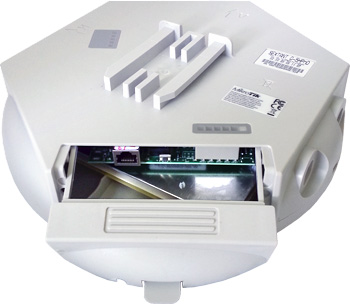
RouterBOOT reset button (access through the plastic door) has two functions:
Hold this button during boot time until LED light starts flashing, release the button to reset
RouterOS configuration (same result as with reset hole)
Hold this button during boot time longer, until LED turns off, and then release it to make the device look For Netinstall servers.
Ehm, when exatly released button ? (2, 5, 15, … minutes?)
Compare with the brochure about SXTs devices:
SXT 5HnD
Button Index
S1400
This button has three functions. Hold the button, then apply power. Depending on when you
release the button, it will do these things:
release immediately (0-5 seconds) after starting the device to load backup bootloader
release when user LED starts to flash to reset RouterOS (5-10 seconds)
release after user LED stops flashing to start Etherboot (Netinstall) mode
(10+ seconds)
RESET
RouterOS reset jumper hole (RESET, marked with a black circle in the diagram above, below
S1400) – resets RouterOS software to defaults. Must short circuit the metallic sides of the
hole (with a screwdriver, for example) and boot the device. Hold screwdriver in place until
RouterOS configuration is cleared.
Now, I am very concerned that the manual from Mikrotik, I can not believe it. The procedure for NetInstall is very vaguely described. (Ehm, reset hole, where?)
I’ve read several times what I have to do to be able to NetInstall, but without success. The key to success lies in the detail describing what must be done to be able do NetInstall.
This device has definitely a different approach to NetInstall.
 follow previous described instruction for the board.