Hi,
Is there a way to upload files from RouterOS via SFTP?
I have tried what I have found on the forum but nothing seems to work.
/tool fetch should be able to do it it seems, but I can not get it to work.
Any idea’s?
Thanks!
Hi,
Is there a way to upload files from RouterOS via SFTP?
I have tried what I have found on the forum but nothing seems to work.
/tool fetch should be able to do it it seems, but I can not get it to work.
Any idea’s?
Thanks!
I use the following in Linux systems:
scp “$NAME_OF_FILE” $SSH_OPTIONS username@router_ip_address:“$NAME_OF_FILE”
After uploading, when using winbox look in Files or in a terminal, /file print.
I don’t use Windows, but PuTTY or WinSCP likely support something similar.
Yes, it works. Show your commands and what happens…
RouterOS SFTP client is picky about authentication. I had to disable everything but password authentication on SSH server side.
mikrotik scp/sftp client to transfer file between MT
That’s the wrong way. He want to upload from RouterOS, not to.
That’s the wrong way. He want to upload from RouterOS, not to.
Oops. Didn’t read – too much frustration with my own fledgling efforts at scripting. 
Speaking about SFTP, I have such strange issue, situation:
Issue:
Anyone else experiencing such issue?
No, even my old RB751 (mpisbe 400MHz) can connect via SFTP. (I do not run my SSH server on Synology NAS, though.)
Please keep on topic, tnx
What you do in this case? Just open case in forum and do nothing ? Even no screenshot.
.
I have not any problems like CPU 100%, etc. I can login as /system ssh to >10 ssh hosts from few different RB platforms.
But SFTP traffic is not working properly.
Checked: v6.45.3 and v6.45.5
Downloading/Uploading by Command:
/tool fetch upload=yes url="sftp://xx.xx.xx.xx/home/users/sibex/file.txt.rsc" src-path="/file.txt.rsc" user="sibex" password="**alphanumeric**"
status: failed
failure: closing connection: <> xx.xx.xx.xx:22 (9) (6)
3th biggest hosting company in PL on server side, logs below, commend his admins: “Both sides not finish crypto and not start checking auth (like login and pass)”:
Aug 31 23:09:52 23207 sshd[18688]: Received disconnect from yy.yy.yy.yy:11: [preauth]
I grab traffic sniffer communication to my hosting provider xx.xx.xx.xx:22 and open it at wireshark. SSH communication is stops, remote server send FIN and communication is break before checking login and password.
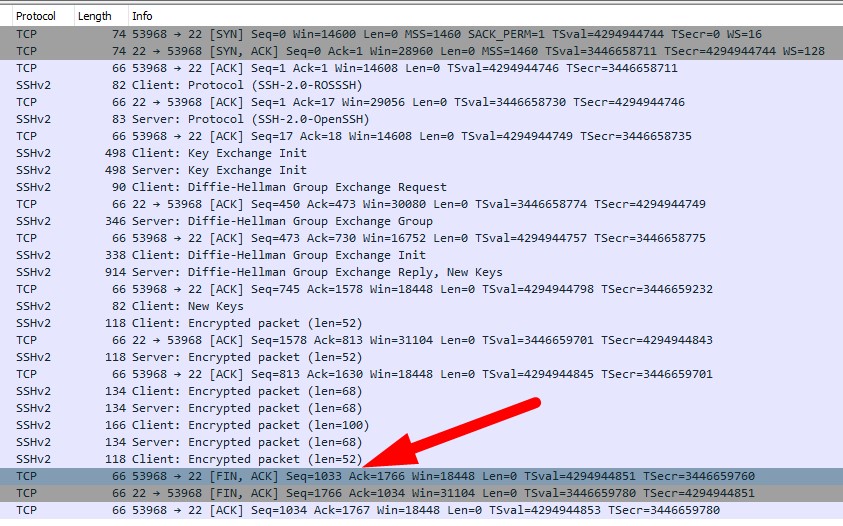
I try download the file from hosting and fail in the same scenario.
I cannot determine what of logging topic can increase debug logs for the fetch tool.
[Ticket#2019090122001146] RE: SFTP Upload at ROSv6.45.3 and 6.45.5 from stable c […]
Try this for verbose logging:
/system logging add topic=ssh,!packet
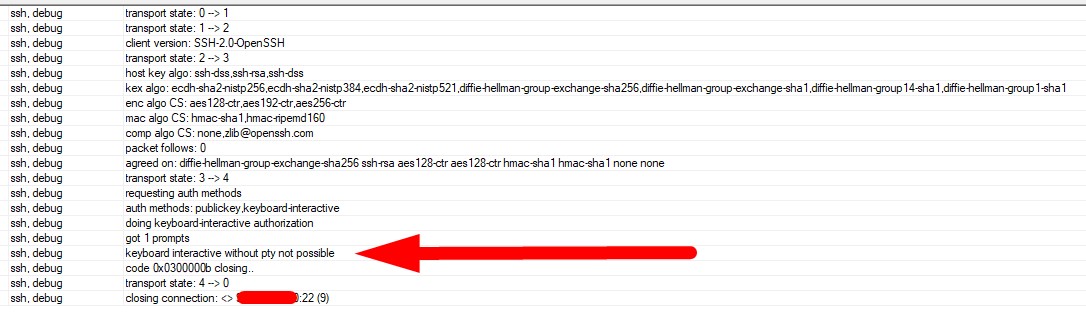
14:54:19 ssh,debug transport state: 0 → 1
14:54:19 ssh,debug transport state: 1 → 2
14:54:19 ssh,debug client version: SSH-2.0-OpenSSH
14:54:19 ssh,debug transport state: 2 → 3
14:54:19 ssh,debug host key algo: ssh-dss,ssh-rsa,ssh-dss
14:54:19 ssh,debug kex algo: ecdh-sha2-nistp256,ecdh-sha2-nistp384,ecdh-sha2-nistp521,diffie-hellman-group-exchange-sha256,diffie-hellman-group-exchange-sha1,diffie-hellman-group14-sha1,diffie-hellman-group1-sha1
14:54:19 ssh,debug enc algo CS: aes128-ctr,aes192-ctr,aes256-ctr
14:54:19 ssh,debug mac algo CS: hmac-sha1,hmac-ripemd160
14:54:19 ssh,debug comp algo CS: none,> zlib@openssh.com >
14:54:19 ssh,debug packet follows: 0
14:54:19 ssh,debug agreed on: diffie-hellman-group-exchange-sha256 ssh-rsa aes128-ctr aes128-ctr hmac-sha1 hmac-sha1 none none
14:54:21 ssh,debug transport state: 3 → 4
14:54:21 ssh,debug requesting auth methods
14:54:21 ssh,debug auth methods: publickey,keyboard-interactive
14:54:21 ssh,debug doing keyboard-interactive authorization
14:54:22 ssh,debug got 1 prompts
14:54:22 ssh,debug > keyboard interactive without pty not possible
14:54:22 ssh,debug code 0x0300000b closing..
14:54:22 ssh,debug transport state: 4 → 0
14:54:22 ssh,debug closing connection: <> xx.xx.xx.xx:22 (9)
As posted in third post in this thread… RouterOS is picky about authentication methods.
Can you configure SSH server to disable all but password authentication? Follow the link above for details.
maybe is picky, but same ROS on arm platform (RB1100) working flawlessly, CRS328 failed with log below
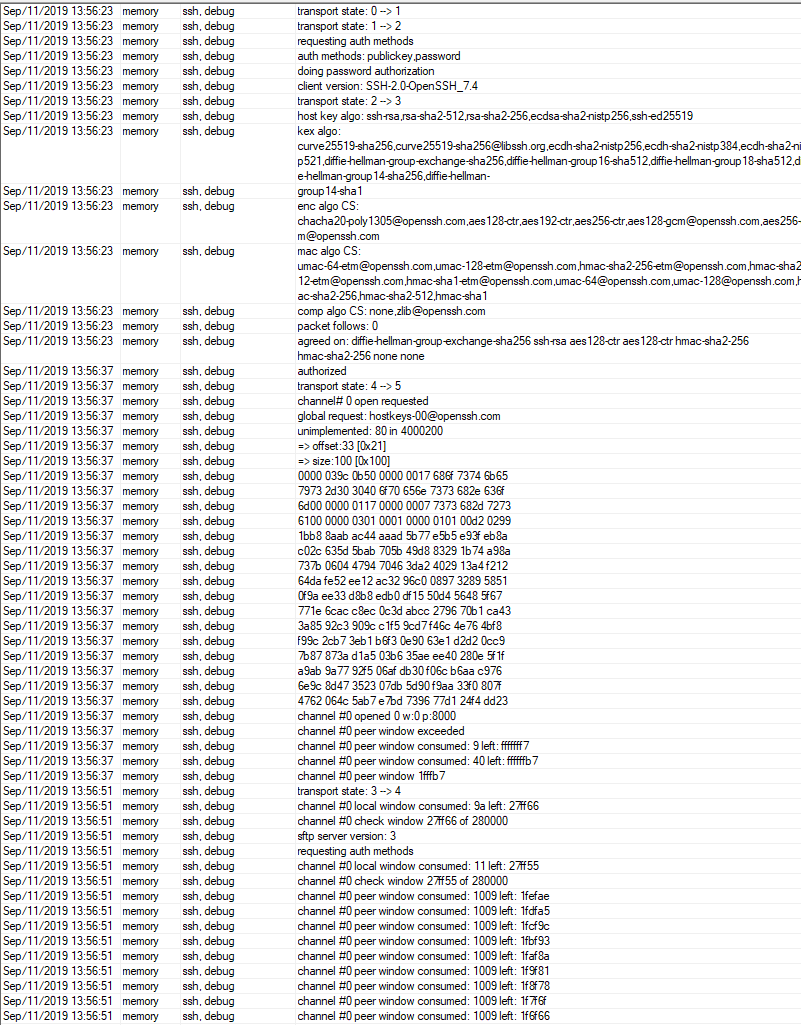
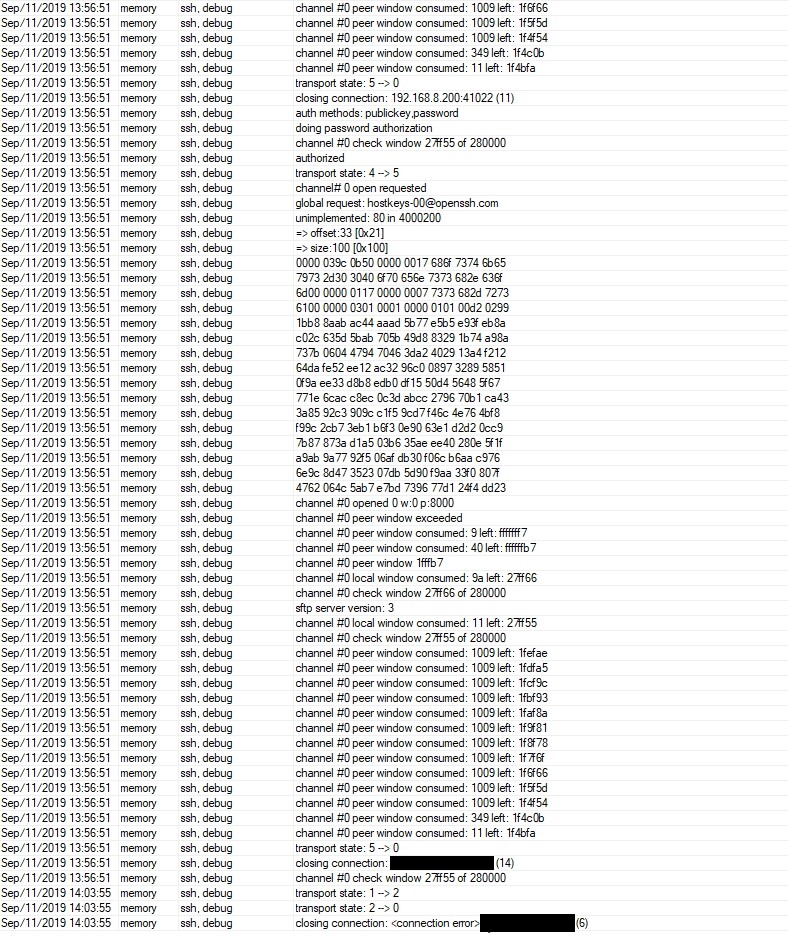
The device from last log successfully authorized, so looks like different issue.
Support give me this info
.
Hello,
you can use publickey and keyboard-interactive thus it’s not “only” password authentication.
Best regards,
.
In your example it’s true.