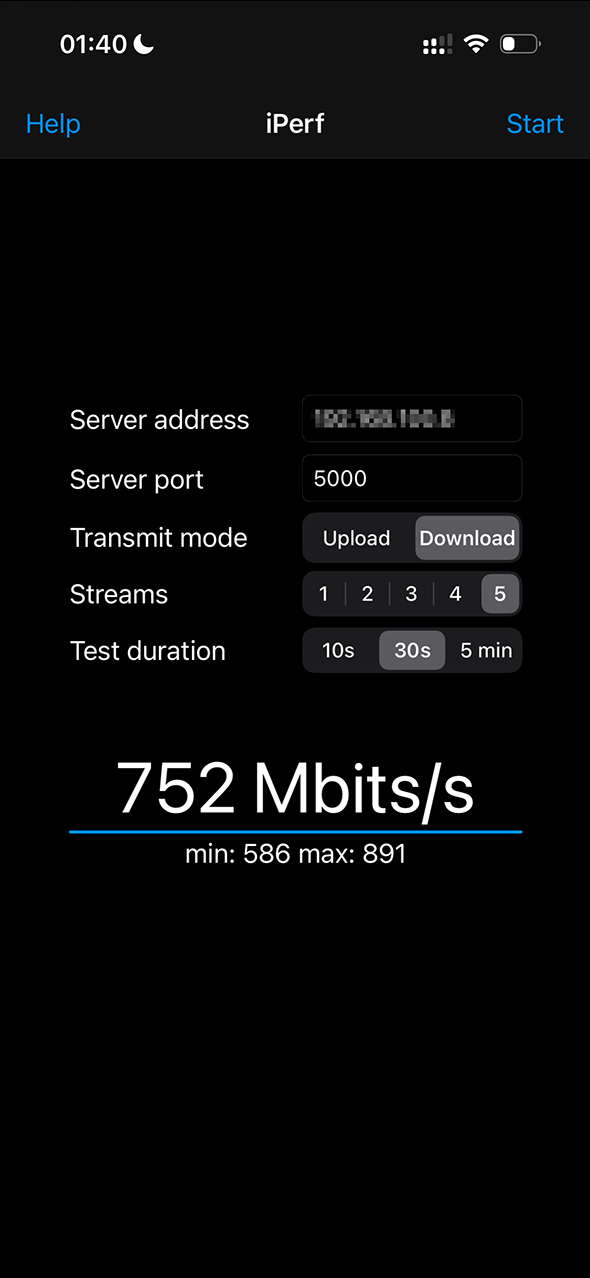
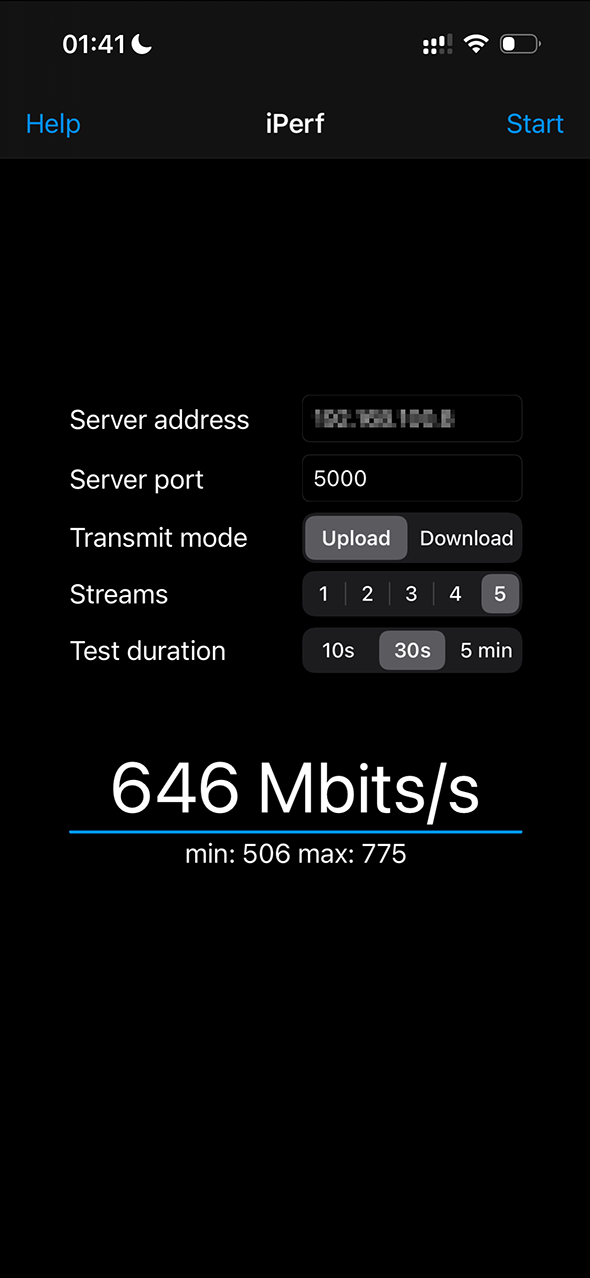
I have recently purchased the Mikrotik hap ax2, after being crazy about the Mikrotik hap ac2. It was the most feature powerful router that I could thing of.
However the anticipated greater excitement was replaced by disappointment!!!
To the technical stuff now.
My problem is the WIFI performance of ax2 in both bands, 2.4Ghz as well as 5Ghz.
This is the config of the ax2.
This is with the latest release candidate. But I had the same results with the latest stable version. I was hoping that the release candidate could have some fixes.
# 2025-12-10 20:32:45 by RouterOS 7.21rc1
# software id = LUDP-XQAV
#
# model = C52iG-5HaxD2HaxD
# serial number = HK80AX9WYWA
/disk
add slot=ramdisk tmpfs-max-size=200000000 type=tmpfs
/interface bridge
add admin-mac=04:F4:1C:9C:FF:85 auto-mac=no comment=defconf name=bridge
add name=docker
/interface wifi
set [ find default-name=wifi1 ] channel.band=5ghz-ax .skip-dfs-channels=\
    10min-cac .width=20/40/80mhz configuration.chains=0,1 .country=Greece \
    .mode=ap .ssid=wifi5 .tx-chains=0,1 disabled=no \
    security.authentication-types=wpa2-psk .ft=no .ft-over-ds=no
set [ find default-name=wifi2 ] channel.band=2ghz-ax .skip-dfs-channels=\
    10min-cac .width=20/40mhz-Ce configuration.chains=0,1 .country=Greece \
    .installation=indoor .mode=ap .ssid=wifi2 .tx-chains=0,1 disabled=no \
    security.authentication-types=wpa2-psk .encryption=ccmp .ft=no \
    .ft-over-ds=no steering.neighbor-group=dynamic-wifi2-8b780c54 .rrm=\
    yes .wnm=yes
/interface veth
add address=10.0.0.2/24 container-mac-address=22:7E:53:82:FC:92 dhcp=no \
    gateway=10.0.0.1 gateway6="" mac-address=22:7E:53:82:FC:91 name=veth1
/interface vlan
add interface=ether1 name=vlan1 vlan-id=835
/interface pppoe-client
add add-default-route=yes disabled=no interface=vlan1 name=pppoe-out1 user=\
    onn1my@otenet.gr
/interface ethernet switch
set 0 cpu-flow-control=yes
/interface list
add comment=defconf name=WAN
add comment=defconf name=LAN
/interface wifi security
add authentication-types=wpa2-psk,wpa3-psk disabled=no encryption=\
    ccmp,gcmp,ccmp-256,gcmp-256 name=Samsung
add authentication-types=wpa2-psk,wpa3-psk disabled=no encryption=\
    ccmp,gcmp,ccmp-256,gcmp-256 name=cosmote
add authentication-types=wpa2-psk disabled=no encryption=ccmp name=\
    wormhole-wifi
/interface wifi configuration
add channel.width=20/40/80/160mhz country="United States" disabled=no mode=\
    station name=5G security=Samsung ssid=Samsung
add disabled=no mode=station name="cosmote bridge" security=cosmote ssid=\
    COSMOTE-pexsuv
add channel.band=2ghz-ax .width=20/40/80mhz country=Greece disabled=no \
    installation=indoor mode=ap name=wifi2 security=wormhole-wifi \
    security.ft=yes ssid=wifi2
add channel.band=5ghz-ax .width=20/40/80/160mhz country=Greece disabled=no \
    installation=indoor mode=ap name=wifi5 security=wormhole-wifi ssid=\
    wifi5
/ip pool
add name=lan ranges=192.168.1.100-192.168.1.200
/ip dhcp-server
add address-pool=lan interface=bridge name=defconf
/queue type
add fq-codel-limit=600 fq-codel-quantum=300 kind=fq-codel name=FQUP
add fq-codel-limit=1200 fq-codel-quantum=300 kind=fq-codel name=FQDOWN
/queue tree
add bucket-size=0.01 max-limit=48M name=DOWN parent=bridge priority=5 queue=\
    FQDOWN
add bucket-size=0.01 max-limit=5M name=UP parent=ether1 priority=1 queue=FQUP
add limit-at=102k max-limit=261k name=UP:acks packet-mark=up_tcp_ack parent=\
    UP priority=1 queue=FQUP
add bucket-size=0.01 limit-at=500k max-limit=1M name=DOWN:dns packet-mark=\
    down_dns parent=DOWN priority=1 queue=FQDOWN
add bucket-size=0.01 limit-at=10M max-limit=47M name=DOWN:other packet-mark=\
    down_other parent=DOWN queue=FQDOWN
add bucket-size=0.01 limit-at=153k max-limit=523k name=UP:dns packet-mark=\
    up_dns parent=UP priority=1 queue=FQUP
add bucket-size=0.01 limit-at=1M max-limit=4500k name=UP:other packet-mark=\
    up_other parent=UP queue=FQUP
add bucket-size=0.01 limit-at=153k max-limit=523k name=UP:ping packet-mark=\
    up_ping parent=UP priority=1 queue=FQUP
add bucket-size=0.01 limit-at=500k max-limit=1M name=DOWN:ping packet-mark=\
    down_ping parent=DOWN priority=1 queue=FQDOWN
add bucket-size=0.01 limit-at=1M max-limit=4500k name=UP:web packet-mark=\
    up_web parent=UP priority=3 queue=FQUP
add bucket-size=0.01 limit-at=10M max-limit=47M name=DOWN:web packet-mark=\
    down_web parent=DOWN priority=3 queue=FQDOWN
/container
add cmd=-s interface=veth1 layer-dir="" name=iperf3:latest remote-image=\
    networkstatic/iperf3:latest root-dir=/ramdisk
/container config
set registry-url=https://registry-1.docker.io
/disk settings
set auto-media-interface=bridge auto-media-sharing=yes auto-smb-sharing=yes
/interface bridge port
add bridge=bridge comment=defconf interface=ether2
add bridge=bridge comment=defconf interface=ether3
add bridge=bridge comment=defconf interface=ether4
add bridge=bridge comment=defconf interface=ether5
add bridge=bridge comment=defconf interface=wifi2
add bridge=bridge interface=wifi1
add bridge=docker interface=veth1
/ip neighbor discovery-settings
set discover-interface-list=LAN
/interface list member
add comment=defconf interface=bridge list=LAN
add comment=defconf interface=pppoe-out1 list=WAN
add interface=vlan1 list=WAN
add interface=ether1 list=WAN
/ip address
add address=192.168.1.1/24 comment=defconf interface=bridge network=\
    192.168.1.0
add address=10.0.0.1/24 interface=docker network=10.0.0.0
/ip dhcp-server network
add address=192.168.1.0/24 comment=defconf dns-server=192.168.1.4 gateway=\
    192.168.1.1 netmask=24
/ip dns
set allow-remote-requests=yes servers=192.168.1.4,8.8.8.8
/ip dns static
add address=192.168.88.1 comment=defconf name=router.lan type=A
/ip firewall filter
add action=accept chain=input comment=\
    "defconf: accept established,related,untracked" connection-state=\
    established,related,untracked
add action=drop chain=input comment="defconf: drop invalid" connection-state=\
    invalid
add action=accept chain=input comment="defconf: accept ICMP" protocol=icmp
add action=accept chain=input comment=\
    "defconf: accept to local loopback (for CAPsMAN)" dst-address=127.0.0.1
add action=drop chain=input comment="defconf: drop all not coming from LAN" \
    in-interface-list=!LAN
add action=accept chain=forward comment="defconf: accept in ipsec policy" \
    ipsec-policy=in,ipsec
add action=accept chain=forward comment="defconf: accept out ipsec policy" \
    ipsec-policy=out,ipsec
add action=accept chain=forward comment=\
    "defconf: accept established,related, untracked" connection-state=\
    established,related,untracked
add action=drop chain=forward comment="defconf: drop invalid" \
    connection-state=invalid
add action=drop chain=forward comment=\
    "defconf: drop all from WAN not DSTNATed" connection-nat-state=!dstnat \
    connection-state=new in-interface-list=WAN
/ip firewall mangle
add action=accept chain=input comment="wireguard mirotik" src-address=\
    192.168.2.0
add action=mark-packet chain=forward comment="UP - ACK" new-packet-mark=\
    up_tcp_ack out-interface-list=WAN packet-size=0-200 protocol=tcp
add action=mark-packet chain=forward comment="UP - Ping" new-packet-mark=\
    up_ping out-interface-list=WAN passthrough=no protocol=icmp
add action=mark-connection chain=forward comment="UP - DNS - udp & tcp" \
    dst-port=53 new-connection-mark=up_dns_conn out-interface-list=WAN \
    protocol=udp
add action=mark-connection chain=forward dst-port=53 new-connection-mark=\
    up_dns_conn out-interface-list=WAN protocol=tcp
add action=mark-packet chain=forward connection-mark=up_dns_conn \
    new-packet-mark=up_dns out-interface-list=WAN passthrough=no
add action=mark-connection chain=forward comment="UP - Web" dst-port=80,443 \
    new-connection-mark=up_web_conn out-interface-list=WAN protocol=tcp
add action=mark-connection chain=forward dst-port=80,443 new-connection-mark=\
    up_web_conn out-interface-list=WAN protocol=udp
add action=mark-packet chain=forward connection-mark=up_web_conn \
    new-packet-mark=up_web out-interface-list=WAN passthrough=no
add action=mark-connection chain=forward comment="UP - Other " \
    new-connection-mark=up_other_conn out-interface-list=WAN
add action=mark-packet chain=forward connection-mark=up_other_conn \
    new-packet-mark=up_other out-interface-list=WAN passthrough=no
add action=mark-packet chain=forward comment="Down - Ping" new-packet-mark=\
    down_ping protocol=icmp
add action=mark-connection chain=forward comment="DOWN - DNS - udp & tcp" \
    new-connection-mark=down_dns_conn protocol=udp src-port=53
add action=mark-connection chain=forward new-connection-mark=down_dns_conn \
    protocol=tcp src-port=53
add action=mark-packet chain=forward connection-mark=down_dns_conn \
    new-packet-mark=down_dns passthrough=no
add action=mark-connection chain=forward comment="DOWN - Web " \
    new-connection-mark=down_web_conn protocol=tcp src-port=80,443
add action=mark-connection chain=forward new-connection-mark=down_web_conn \
    protocol=udp src-port=80,443
add action=mark-packet chain=forward connection-mark=down_web_conn \
    new-packet-mark=down_web passthrough=no
add action=mark-connection chain=forward comment="DOWN - other" \
    new-connection-mark=down_other_conn
add action=mark-packet chain=forward connection-mark=down_other_conn \
    new-packet-mark=down_other
/ip firewall nat
add action=masquerade chain=srcnat comment="defconf: masquerade" \
    ipsec-policy=out,none out-interface-list=WAN
/ipv6 address
add from-pool=internet-ipv6 interface=bridge
/ipv6 dhcp-client
add interface=pppoe-out1 pool-name=internet-ipv6 pool-prefix-length=56 \
    request=prefix
/ipv6 firewall address-list
add address=::/128 comment="defconf: unspecified address" list=bad_ipv6
add address=::1/128 comment="defconf: lo" list=bad_ipv6
add address=fec0::/10 comment="defconf: site-local" list=bad_ipv6
add address=::ffff:0.0.0.0/96 comment="defconf: ipv4-mapped" list=bad_ipv6
add address=::/96 comment="defconf: ipv4 compat" list=bad_ipv6
add address=100::/64 comment="defconf: discard only " list=bad_ipv6
add address=2001:db8::/32 comment="defconf: documentation" list=bad_ipv6
add address=2001:10::/28 comment="defconf: ORCHID" list=bad_ipv6
add address=3ffe::/16 comment="defconf: 6bone" list=bad_ipv6
/ipv6 firewall filter
add action=accept chain=input comment=\
    "defconf: accept established,related,untracked" connection-state=\
    established,related,untracked
add action=drop chain=input comment="defconf: drop invalid" connection-state=\
    invalid
add action=accept chain=input comment="defconf: accept ICMPv6" protocol=\
    icmpv6
add action=accept chain=input comment="defconf: accept UDP traceroute" \
    dst-port=33434-33534 protocol=udp
add action=accept chain=input comment=\
    "defconf: accept DHCPv6-Client prefix delegation." dst-port=546 protocol=\
    udp src-address=fe80::/10
add action=accept chain=input comment="defconf: accept IKE" dst-port=500,4500 \
    protocol=udp
add action=accept chain=input comment="defconf: accept ipsec AH" protocol=\
    ipsec-ah
add action=accept chain=input comment="defconf: accept ipsec ESP" protocol=\
    ipsec-esp
add action=accept chain=input comment=\
    "defconf: accept all that matches ipsec policy" ipsec-policy=in,ipsec
add action=drop chain=input comment=\
    "defconf: drop everything else not coming from LAN" in-interface-list=\
    !LAN
add action=accept chain=forward comment=\
    "defconf: accept established,related,untracked" connection-state=\
    established,related,untracked
add action=accept chain=forward comment="defconf: accept ICMPv6" protocol=\
    icmpv6
add action=accept chain=forward comment="defconf: accept HIP" protocol=139
add action=accept chain=forward comment="defconf: accept IKE" dst-port=\
    500,4500 protocol=udp
add action=accept chain=forward comment="defconf: accept ipsec AH" protocol=\
    ipsec-ah
add action=accept chain=forward comment="defconf: accept ipsec ESP" protocol=\
    ipsec-esp
add action=accept chain=forward comment=\
    "defconf: accept all that matches ipsec policy" ipsec-policy=in,ipsec
add action=accept chain=forward comment=SSH-rasp dst-port=48178 log-prefix=\
    vpn protocol=tcp
add action=accept chain=forward comment=letsencrypt disabled=yes dst-port=80 \
    protocol=tcp
add action=accept chain=forward comment="https" dst-port=443 \
    protocol=tcp
add action=accept chain=forward comment=jellyfin dst-port=8096 protocol=tcp
add action=accept chain=forward comment=bitcoin dst-port=8333 protocol=tcp
add action=accept chain=forward comment="radiosync " dst-port=6789 protocol=\
    tcp
add action=accept chain=forward comment=elementum disabled=yes dst-port=45678 \
    protocol=tcp
add action=accept chain=forward comment=qbitorrent-tcp dst-port=48123 \
    protocol=tcp
add action=accept chain=forward comment=qbittorrent-udp dst-port=48123 \
    protocol=udp
add action=accept chain=forward comment=wireguard disabled=yes dst-port=15831 \
    protocol=udp
add action=drop chain=forward comment="defconf: drop invalid" \
    connection-state=invalid
add action=drop chain=forward comment=\
    "defconf: drop packets with bad src ipv6" src-address-list=bad_ipv6
add action=drop chain=forward comment=\
    "defconf: drop packets with bad dst ipv6" dst-address-list=bad_ipv6
add action=drop chain=forward comment="defconf: rfc4890 drop hop-limit=1" \
    hop-limit=equal:1 protocol=icmpv6
add action=drop chain=forward comment=\
    "defconf: drop everything else not coming from LAN" in-interface-list=\
    !LAN
/ipv6 firewall mangle
add action=change-mss chain=forward comment="Change MSS" new-mss=\
    clamp-to-pmtu protocol=tcp tcp-flags=syn
add action=mark-packet chain=forward comment="UP - Ping" new-packet-mark=\
    up_ping out-interface-list=WAN protocol=icmpv6
add action=mark-connection chain=forward comment="UP - DNS - udp & tcp" \
    dst-port=53 new-connection-mark=up_dns_conn out-interface-list=WAN \
    protocol=udp
add action=mark-connection chain=forward dst-port=53 new-connection-mark=\
    up_dns_conn out-interface-list=WAN protocol=tcp
add action=mark-packet chain=forward connection-mark=up_dns_conn \
    new-packet-mark=up_dns out-interface-list=WAN
add action=mark-connection chain=forward comment="UP - Web" dst-port=80,443 \
    new-connection-mark=up_web_conn out-interface-list=WAN protocol=udp
add action=mark-connection chain=forward dst-port=80,443 new-connection-mark=\
    up_web_conn out-interface-list=WAN protocol=tcp
add action=mark-packet chain=forward connection-mark=up_web_conn \
    new-packet-mark=up_web out-interface-list=WAN
add action=mark-connection chain=forward comment="UP - other internet" \
    new-connection-mark=up_other_internet_conn out-interface-list=WAN
add action=mark-packet chain=forward connection-mark=up_other_internet_conn \
    new-packet-mark=up_other out-interface-list=WAN passthrough=no
add action=mark-packet chain=forward comment="DOWN - ping" new-packet-mark=\
    down_ping protocol=icmpv6
add action=mark-connection chain=forward comment="DOWN - DNS - udp & tcp" \
    new-connection-mark=down_dns_conn protocol=udp src-port=53
add action=mark-connection chain=forward new-connection-mark=down_dns_conn \
    protocol=tcp src-port=53
add action=mark-packet chain=forward connection-mark=down_dns_conn \
    new-packet-mark=down_dns
add action=mark-connection chain=forward comment="DOWN - Web" \
    new-connection-mark=down_web_conn protocol=tcp src-port=80,443
add action=mark-connection chain=forward new-connection-mark=down_web_conn \
    protocol=udp src-port=80,443
add action=mark-packet chain=forward connection-mark=down_web_conn \
    new-packet-mark=down_web
add action=mark-connection chain=forward comment="DOWN - Other" \
    new-connection-mark=down_other_conn
add action=mark-packet chain=forward connection-mark=down_other_conn \
    new-packet-mark=down_other passthrough=no
/ipv6 nd
set [ find default=yes ] advertise-dns=yes
/system clock
set time-zone-name=Europe/Athens
/system logging
add topics=wireless,debug
add topics=wireless,info
add topics=container,debug
/system package update
set channel=testing
/tool mac-server
set allowed-interface-list=LAN
/tool mac-server mac-winbox
set allowed-interface-list=LAN
The following metrics are between my laptop and the ax2.
I have installed iperf3 in a container and is running as a server (iperf3 -s)
Case 1. Laptop is connected through ethernet with the router.
dimitris@USB-arch: \~
$ iperf3 -c 10.0.0.2 -i2 -t 20                                                                                                         \[20:09:47\]
Connecting to host 10.0.0.2, port 5201
\[  5\] local 192.168.1.200 port 41748 connected to 10.0.0.2 port 5201
\[ ID\] Interval           Transfer     Bitrate         Retr  Cwnd
\[  5\]   0.00-2.00   sec   227 MBytes   950 Mbits/sec    0    735 KBytes
\[  5\]   2.00-4.00   sec   225 MBytes   943 Mbits/sec    0    735 KBytes
\[  5\]   4.00-6.00   sec   225 MBytes   943 Mbits/sec    0    758 KBytes
\[  5\]   6.00-8.00   sec   225 MBytes   943 Mbits/sec    0    771 KBytes
\[  5\]   8.00-10.00  sec   224 MBytes   939 Mbits/sec    0    853 KBytes
\[  5\]  10.00-12.00  sec   225 MBytes   942 Mbits/sec    0    853 KBytes
\[  5\]  12.00-14.00  sec   225 MBytes   943 Mbits/sec    0    853 KBytes
\[  5\]  14.00-16.00  sec   224 MBytes   938 Mbits/sec    0   1.22 MBytes
\[  5\]  16.00-18.00  sec   224 MBytes   942 Mbits/sec    0   1.22 MBytes
\[  5\]  18.00-20.00  sec   224 MBytes   942 Mbits/sec    0   1.22 MBytes

---

\[ ID\] Interval           Transfer     Bitrate         Retr
\[  5\]   0.00-20.00  sec  2.19 GBytes   943 Mbits/sec    0            sender
\[  5\]   0.00-20.01  sec  2.19 GBytes   941 Mbits/sec                  receiver

iperf Done.
No complaint here. Just to set a baseline for the speed of the max speed through ethernet and container app.
Case 2.
This is using the 2.4ghz (wifi2 interface of mikrotik). The laptop is less than 1 meter away from the mikrotik.
dimitris@USB-arch: \~
$ iperf3 -c 10.0.0.2 -i2 -t 20                                                                                                         \[20:10:11\]
Connecting to host 10.0.0.2, port 5201
\[  5\] local 192.168.1.2 port 57578 connected to 10.0.0.2 port 5201
\[ ID\] Interval           Transfer     Bitrate         Retr  Cwnd
\[  5\]   0.00-2.00   sec  37.9 MBytes   159 Mbits/sec    0    913 KBytes
\[  5\]   2.00-4.00   sec  36.6 MBytes   154 Mbits/sec    0   1.04 MBytes
\[  5\]   4.00-6.00   sec  34.1 MBytes   143 Mbits/sec    0   1.04 MBytes
\[  5\]   6.00-8.00   sec  37.1 MBytes   156 Mbits/sec    0   1.10 MBytes
\[  5\]   8.00-10.00  sec  29.5 MBytes   124 Mbits/sec    0   1.10 MBytes
\[  5\]  10.00-12.00  sec  34.1 MBytes   143 Mbits/sec    0   1.10 MBytes
\[  5\]  12.00-14.00  sec  32.6 MBytes   137 Mbits/sec    0   1.10 MBytes
\[  5\]  14.00-16.00  sec  29.8 MBytes   125 Mbits/sec    0   1.10 MBytes
\[  5\]  16.00-18.00  sec  32.4 MBytes   136 Mbits/sec    0   1.10 MBytes
\[  5\]  18.00-20.00  sec  32.8 MBytes   137 Mbits/sec    0   1.10 MBytes

---

\[ ID\] Interval           Transfer     Bitrate         Retr
\[  5\]   0.00-20.00  sec   337 MBytes   141 Mbits/sec    0            sender
\[  5\]   0.00-20.04  sec   334 MBytes   140 Mbits/sec                  receiver

iperf Done.

dimitris@USB-arch: \~
$ iwconfig wlan0                                                                                                                       \[20:11:49\]
wlan0     IEEE 802.11  ESSID:"Wormhole2"
Mode:Managed  Frequency:2.412 GHz  Access Point: 04:F4:1C:9C:FF:8A
Bit Rate=300 Mb/s   Tx-Power=20 dBm
Retry short limit:7   RTS thr:off   Fragment thr:off
Power Management:on
Link Quality=70/70  Signal level=-40 dBm
Rx invalid nwid:0  Rx invalid crypt:0  Rx invalid frag:0
Tx excessive retries:0  Invalid misc:588   Missed beacon:0
Case 3
The laptop is connected through the wifi1 interface (5Ghz)
dimitris@USB-arch: \~
$ iperf3 -c 10.0.0.2 -i2 -t 20                                                                                                         \[20:11:58\]
Connecting to host 10.0.0.2, port 5201
\[  5\] local 192.168.1.194 port 48840 connected to 10.0.0.2 port 5201
\[ ID\] Interval           Transfer     Bitrate         Retr  Cwnd
\[  5\]   0.00-2.00   sec  64.4 MBytes   270 Mbits/sec  234   1.43 MBytes
\[  5\]   2.00-4.00   sec  64.2 MBytes   269 Mbits/sec   45   1.15 MBytes
\[  5\]   4.00-6.00   sec  64.5 MBytes   271 Mbits/sec    0   1.23 MBytes
\[  5\]   6.00-8.00   sec  64.8 MBytes   272 Mbits/sec    0   1.26 MBytes
\[  5\]   8.00-10.00  sec  65.0 MBytes   273 Mbits/sec    0   1.26 MBytes
\[  5\]  10.00-12.00  sec  64.4 MBytes   270 Mbits/sec    0   1.26 MBytes
\[  5\]  12.00-14.00  sec  64.2 MBytes   269 Mbits/sec    0   1.30 MBytes
\[  5\]  14.00-16.00  sec  61.4 MBytes   257 Mbits/sec    0   1.39 MBytes
\[  5\]  16.00-18.00  sec  65.0 MBytes   273 Mbits/sec    6   1.12 MBytes
\[  5\]  18.00-20.00  sec  64.5 MBytes   271 Mbits/sec    0   1.32 MBytes

---

\[ ID\] Interval           Transfer     Bitrate         Retr
\[  5\]   0.00-20.00  sec   642 MBytes   269 Mbits/sec  285            sender
\[  5\]   0.00-20.01  sec   639 MBytes   268 Mbits/sec                  receiver

iperf Done.

dimitris@USB-arch: \~
$ iwconfig wlan0                                                                                                                       \[20:13:01\]
wlan0     IEEE 802.11  ESSID:"Wormhole5"
Mode:Managed  Frequency:5.68 GHz  Access Point: 04:F4:1C:9C:FF:89
Bit Rate=866.7 Mb/s   Tx-Power=22 dBm
Retry short limit:7   RTS thr:off   Fragment thr:off
Power Management:on
Link Quality=70/70  Signal level=-30 dBm
Rx invalid nwid:0  Rx invalid crypt:0  Rx invalid frag:0
Tx excessive retries:0  Invalid misc:533   Missed beacon:0
I'm not expecting the link speed to be equal to the real throughput. But I had better speeds using the hap ac2
From my phone the results are so much worse.
In 2.4 Ghz (wifi2) I have trouble connecting from my phone.
The logs on the mikrotik show this each time I tap on the wireless network on my phone. After repeatedly attempts to connect to the wifi and without any change on my phone, I get connected:
2025-12-10 20:21:34 wireless,debug 5A:.....6E@wifi2(wifi2) associated, signal strength -18
2025-12-10 20:21:34 wireless,debug 5A:.....6E@wifi2(wifi2) disassociated, could not associate, signal strength -17
2025-12-10 20:21:56 radvd,warning invalid mtu 9048 on vlan1 from fe80::aede:48ff:fe01:5011
2025-12-10 20:22:24 wireless,debug 5A:.....6E@wifi2(wifi2) associated, signal strength -25
2025-12-10 20:22:24 wireless,debug 5A:.....6E@wifi2(wifi2) disassociated, could not associate, signal strength -25
2025-12-10 20:22:25 wireless,debug 5A:.....6E@wifi2(wifi2) associated, signal strength -25
2025-12-10 20:22:25 wireless,debug 5A:.....6E@wifi2(wifi2) disassociated, could not associate, signal strength -25
2025-12-10 20:22:26 wireless,debug 5A:.....6E@wifi2(wifi2) associated, signal strength -28
2025-12-10 20:22:26 wireless,debug 5A:.....6E@wifi2(wifi2) disassociated, could not associate, signal strength -28
2025-12-10 20:22:27 wireless,debug 5A:.....6E@wifi2(wifi2) associated, signal strength -24
2025-12-10 20:22:27 wireless,debug 5A:.....6E@wifi2(wifi2) disassociated, could not associate, signal strength -24
2025-12-10 20:23:05 ssh,info publickey accepted for user: dimitris
2025-12-10 20:23:05 system,info,account user dimitris logged in from 192.168.1.194 via ssh
2025-12-10 20:23:24 wireless,debug 5A:.....6E@wifi2(wifi2) associated, signal strength -22
2025-12-10 20:23:24 wireless,debug 5A:.....6E@wifi2(wifi2) disassociated, could not associate, signal strength -22
2025-12-10 20:23:26 wireless,debug 5A:.....6E@wifi2(wifi2) associated, signal strength -21
2025-12-10 20:23:26 wireless,debug 5A:.....6E@wifi2(wifi2) disassociated, could not associate, signal strength -21
2025-12-10 20:23:27 wireless,debug 5A:.....6E@wifi2(wifi2) associated, signal strength -21
2025-12-10 20:23:27 wireless,debug 5A:.....6E@wifi2(wifi2) disassociated, could not associate, signal strength -21
2025-12-10 20:23:28 wireless,debug 5A:.....6E@wifi2(wifi2) associated, signal strength -21
2025-12-10 20:23:28 wireless,info 5A:.....6E@wifi2(wifi2) connected, signal strength -21
2025-12-10 20:23:29 dhcp,info defconf assigned 192.168.1.193 for 5A:....E Samsung-s-A52s
When I can finally connect, I cannot get the maximum speed of my internet FTTH line (50mbps/5mbps). But let aside the internet speed. Let's compare to the lan speed.
I have installed an iperf3 app on the phone and I'm connecting as client to the 10.0.0.2 server (container)
This is the link information from my phone when I connect to 2.4Ghz. Again, my phone is less than a meter away from the router.
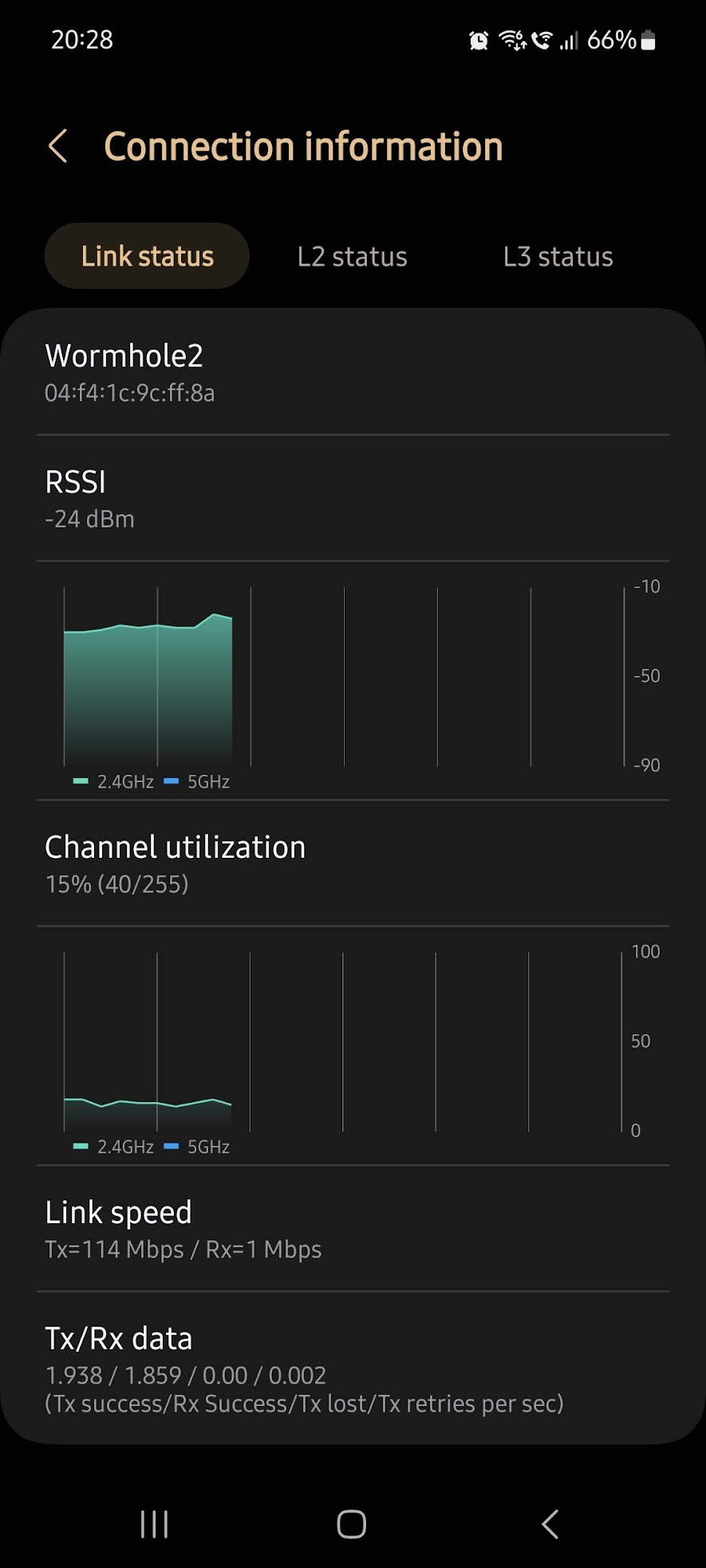
UPLOAD speed test (phone->mikrotik)
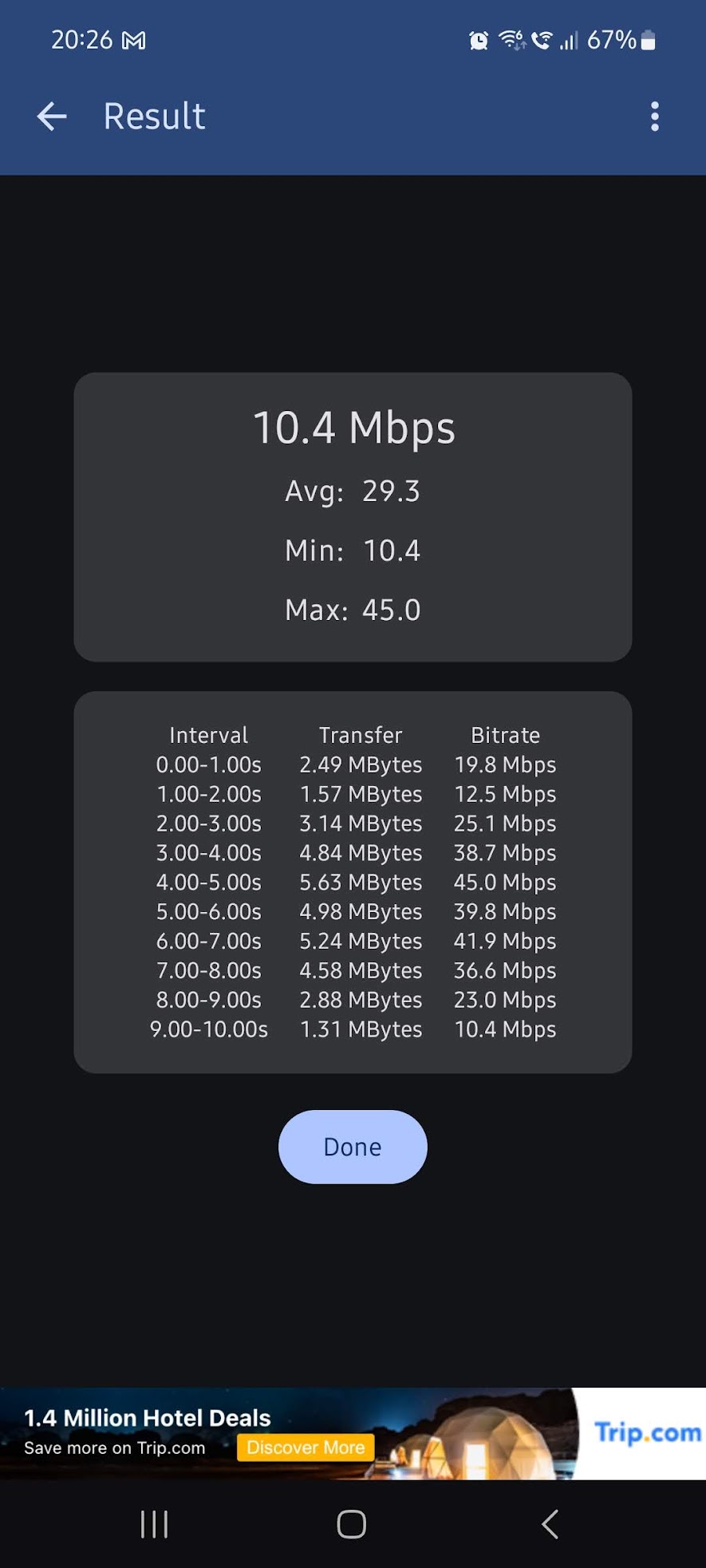
DOWNLOAD speed test (mikrotik->phone)
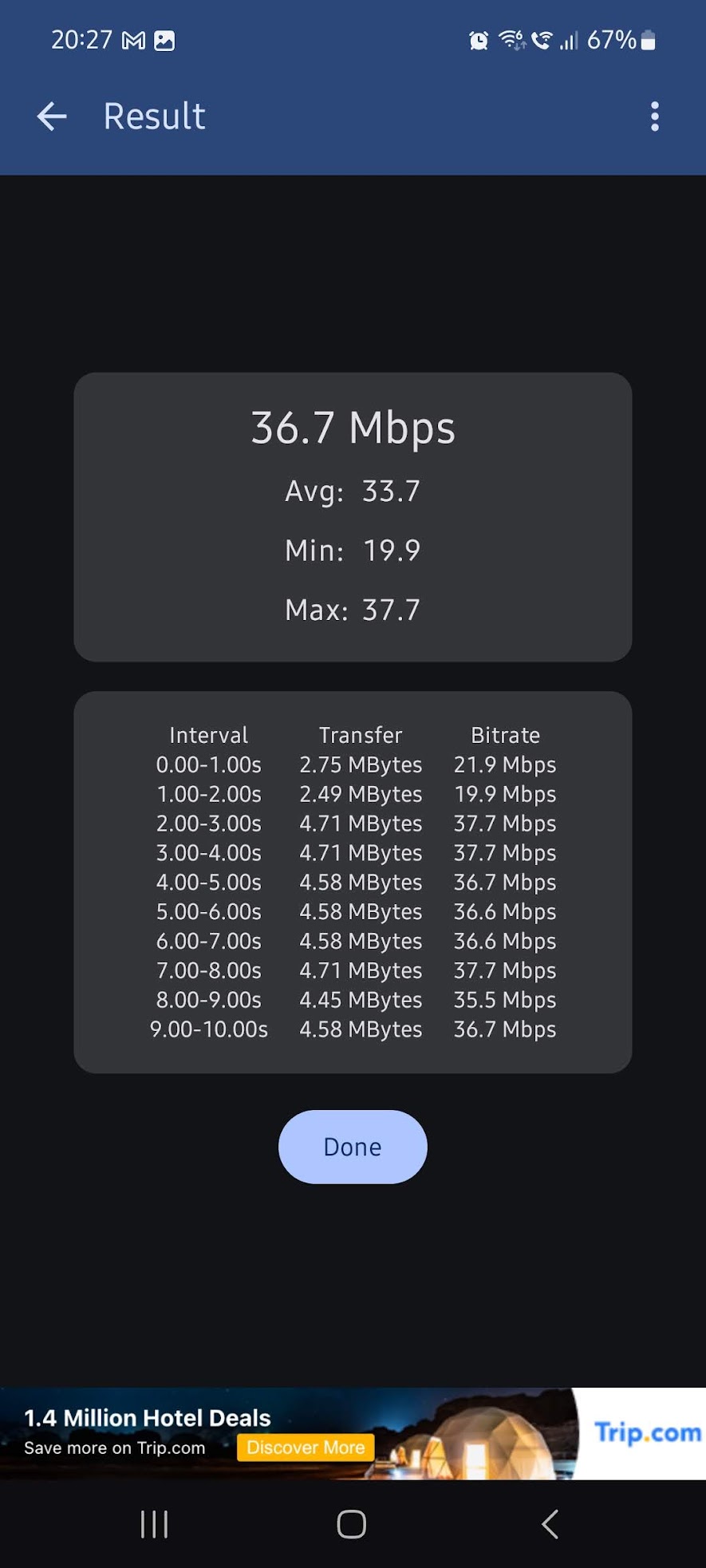
and the following screenshots for the 5Ghz band:
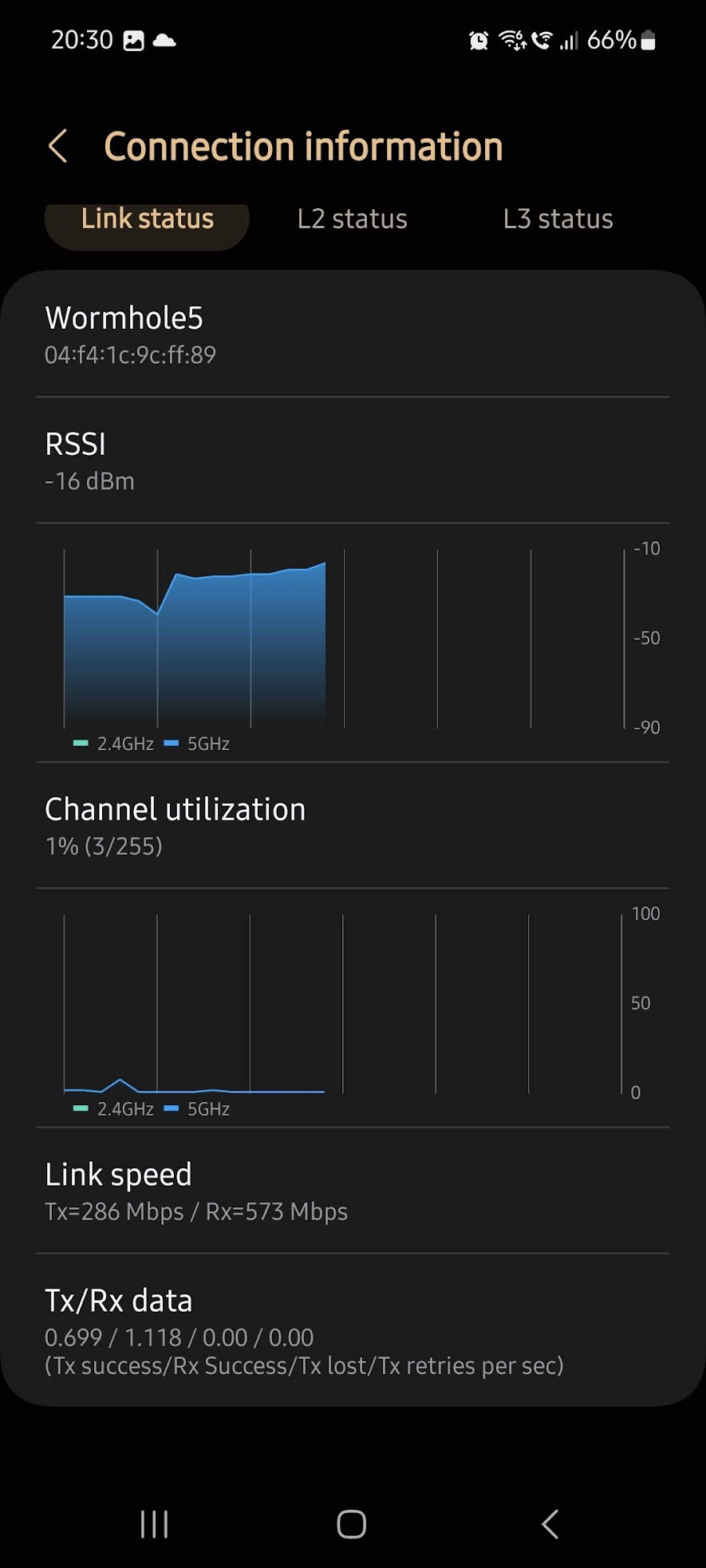
UPLOAD speed test (phone->mikrotik)
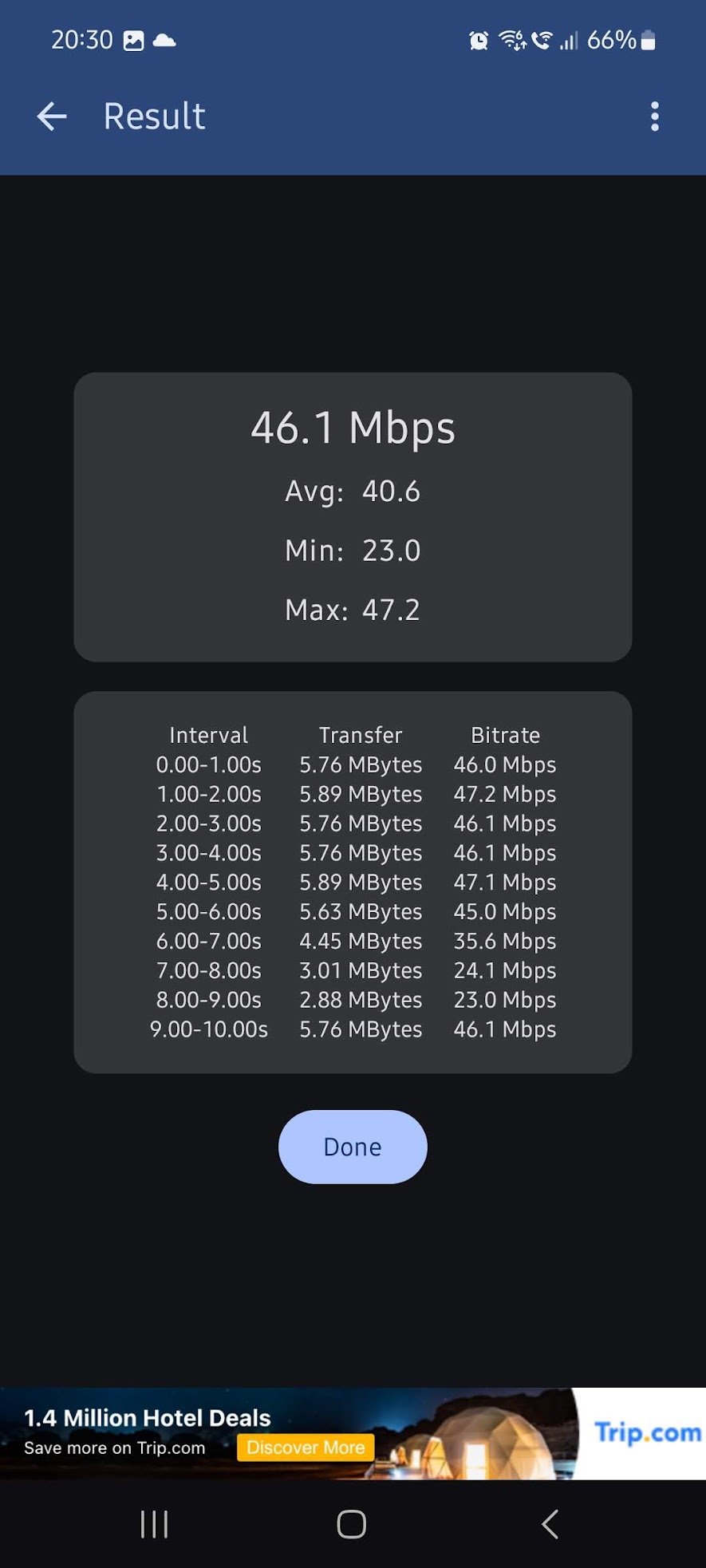
DOWNLOAD speed test (mikrotik->phone)
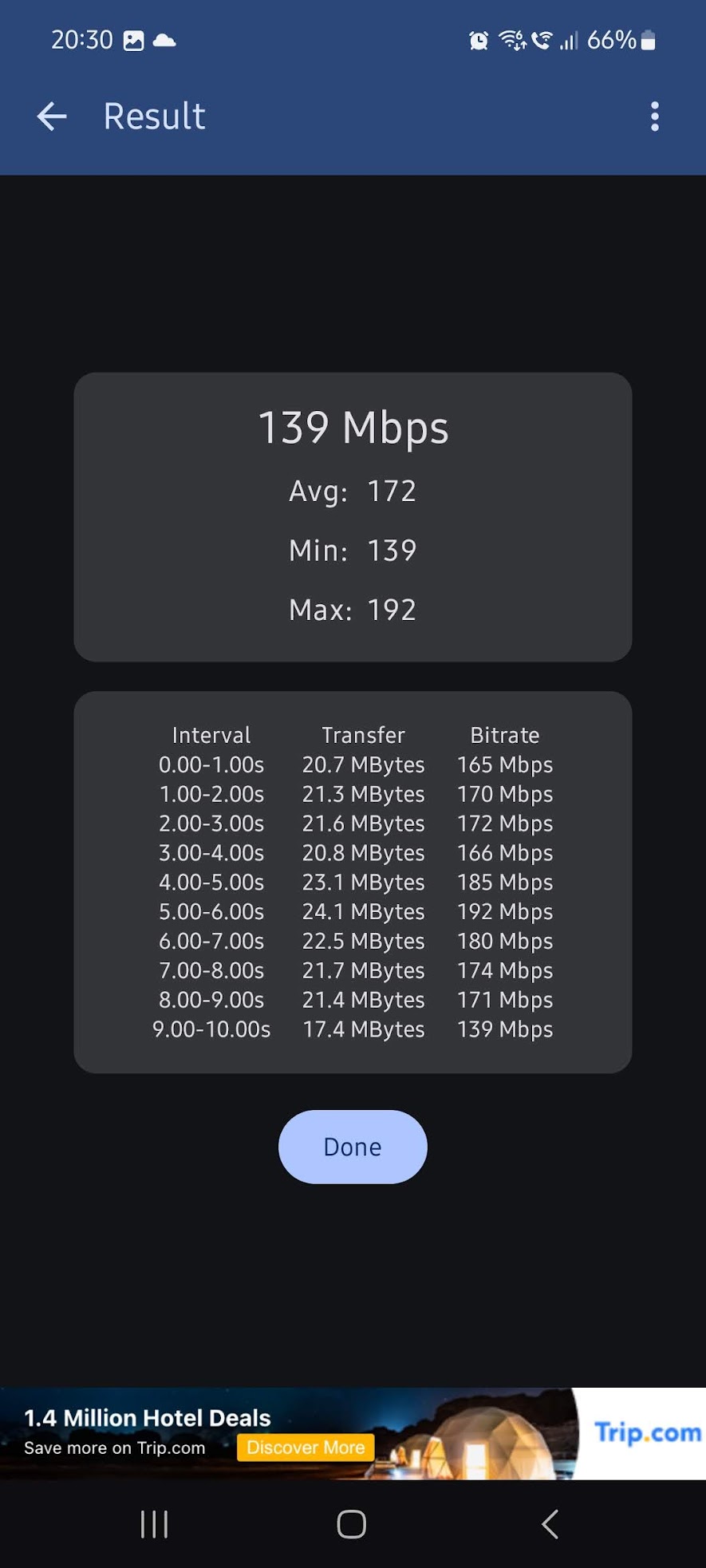
My final questions are these:
Should I return the device? (I don't want to)
Is it my setup? Is it the drivers-wifi chip combination of ax2?
What else could be wrong?
I'm open to suggestions.