Sharing a PPTP connection

Hello Everyone & Happy Hollydays!!!

I have a VPN connection to a server located in different country. its working well when im connecting directly from my workstation, i can access my data & browsing internet bypassing my ISP.

Im trying to configure my Routerboard to connect to the VPN server & share it, so more then 1 workstation can share the single VPN connection.
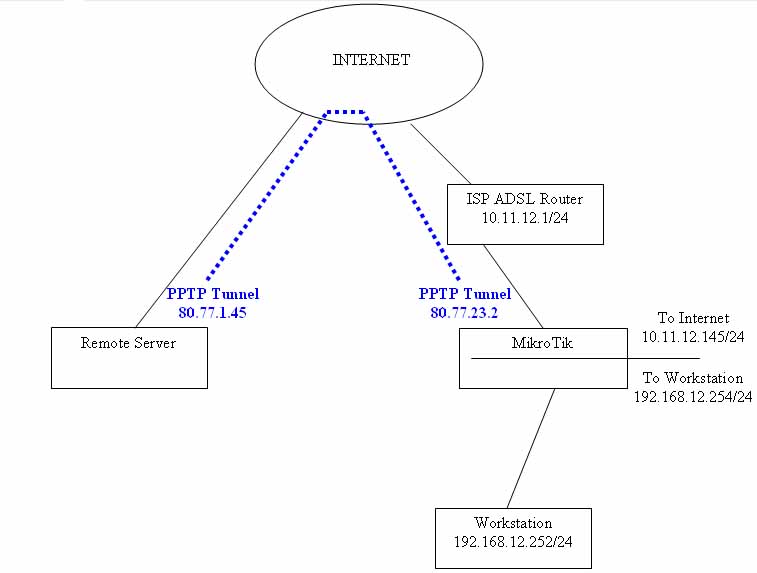

i could successfully configure the routerboard as PPTP client. Then i tried to route my local Interanet over the PPTP tunnel:
ip route add dst-address 192.168.12.0/24 gateway 80.77.23.2

But still not working. when i do tracert, it show that im browsing the internet from my ISP & not from my VPN.

Here's my details:
[admin@Georges] /ip address> print
Flags: X - disabled, I - invalid, D - dynamic

ADDRESS NETWORK BROADCAST INTERFACE

0 192.168.12.254/24 192.168.12.0 192.168.12.255 wlan2
1 10.11.12.145/24 10.11.12.0 10.11.12.255 ether1
2 D 80.77.23.2/32 80.77.1.45 0.0.0.0 pptp-out1


[admin@Georges] /ip firewall nat> print
Flags: X - disabled, I - invalid, D - dynamic
0 chain=srcnat action=masquerade src-address=192.168.12.0/24

[admin@Georges] /ip route> print detail
Flags: X - disabled, A - active, D - dynamic,
C - connect, S - static, r - rip, b - bgp, o - ospf, m - mme,
B - blackhole, U - unreachable, P - prohibit
0 A S dst-address=0.0.0.0/0 gateway=10.11.12.1 interface=ether1
gateway-state=reachable distance=1 scope=30 target-scope=10

1 ADC dst-address=10.11.12.0/24 pref-src=10.11.12.145 interface=ether1
distance=0 scope=10

2 ADC dst-address=80.77.1.45/32 pref-src=80.77.23.2 interface=pptp-out1
distance=0 scope=10

3 ADC dst-address=192.168.12.0/24 pref-src=192.168.12.254 interface=wlan2
distance=0 scope=10

4 S dst-address=192.168.12.0/24 gateway=80.77.23.2 interface=""
gateway-state=unreachable distance=0 scope=255 target-scope=10


On my workstation im using gateway: 192.168.12.254 & DNS= 10.11.12.1

I know its something easy for many of you. could someone tell me where my mistake & whats missing?

Thank You & Best Regards

First change the distance of your current default route to a number higher than 1, i.e. 2.

/ip route
set [find gateway="10.11.12.1"] distance=2

Now create a new default route and set the gateway=80.77.1.45 distance=1 check-gateway=ping

/ip route 
add check-gateway=ping comment="" disabled=yes distance=1 \
    dst-address=0.0.0.0/0 gateway=80.77.1.45 scope=255 target-scope=10

Whenever the PPTP tunnel is up, traffic will be routed over it; otherwise, traffic is routed over 10.11.12.1

Thank You Skillful,

i did & now my routing table is as follow:
[admin@Georges] /ip route> print detail
Flags: X - disabled, A - active, D - dynamic,
C - connect, S - static, r - rip, b - bgp, o - ospf, m - mme,
B - blackhole, U - unreachable, P - prohibit
0 S dst-address=0.0.0.0/0 gateway=10.11.12.1 interface=ether1
gateway-state=reachable distance=2 scope=30 target-scope=10

1 A S dst-address=0.0.0.0/0 gateway=80.77.1.45 interface=pptp-out1
check-gateway=ping gateway-state=reachable distance=1 scope=255
target-scope=10

2 ADC dst-address=10.11.12.0/24 pref-src=10.11.12.145 interface=ether1
distance=0 scope=10

3 ADC dst-address=80.77.1.45/32 pref-src=80.77.23.2 interface=pptp-out1
distance=0 scope=10

4 ADC dst-address=192.168.12.0/24 pref-src=192.168.12.254 interface=wlan2
distance=0 scope=200

5 S dst-address=192.168.12.0/24 gateway=80.77.23.2 interface=“”
gateway-state=unreachable distance=0 scope=255 target-scope=10


i tried the browsing & pinging yahoo.com, it didnt work with the pptp is up. i disabled & the browsing is working well with my ISP DNS are set on my workstation.
i enabled the pptp again & when its up i tried pinging & trying to open any webpages and i noticed in winbox that the tx on pptp showing some traffic but the pptp rx is always 0, while the rx on ether1 showing some traffic.

Any idea?

Delete the #5 route. It is counter productive.

If things still don’t function as expected, post your pptp-client and mangle configuration here.

/int pptp-client pr


/ip firewall mangle pr