Siera Wireless EM7565 Modem - not compatible with RouterOS?

Hi,

I am trying to get the LTE Module EM7565 from Siera Wireless working with RouterOS. However it does not play nicely at all with it.

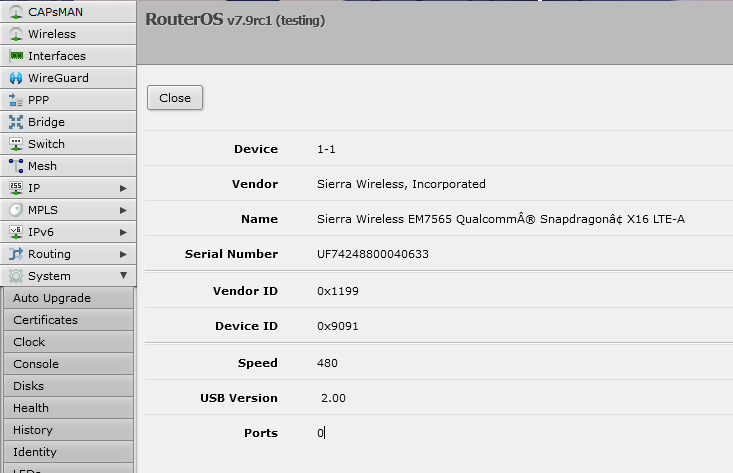
It is listed under “USB” but no “Ports” are offered.
Note here however, that when I flash OpenWRT on the same board it does in fact work very nicely: I get all the Serial Ports offered under /dev/ttyUSBx, including the one to configure the Modem with AT commands.

EM7565.PNG
Is there anything I can do to get this working with RouterOS? I tried 7.8 and 7.9rc1.
The release-notes of 7.8 suggest this should be a better experience:

*) lte - improved AT port matching for SIMCom, Huawei, WeLink, Cinterion, BandLuxe and Sierra modems;

Is there anything I can do, to debug this or get this working?

It likely the AT!USBCOMP needs to be something specific. Generally that’s MBIM for 4G sierras… but I don’t have EM7565 to say specifically.

You can put the LTE into serial mode.

/interface/lte/settings/set mode=serial

And then reboot, maybe some ports shows up… With at least one AT channel, you can use AT commands on the modem.

So assuming you get a port(s) after reboot and mode=serial, you can use

/system/serial-terminal usbX channel=Y

Adjusting as port/channel as needed.

I’d focus on the output of:

AT!CUSTOM?
AT!USBCOMP?    
AT!USBCOMP=?

But I suspect the USBCOMP needs to be something specific for it to show up. AT!USBCOMP=? should describe the format, AT!USBCOMP? will show what’s currently set, and AT!USBCOMP=xxxxxx is how you’d set it.

I don’t have the AT manual for the 7565, but it is some bitfields in USBCOMP settings…so can’t tell you off-hand what’s right on you modem. But you’ll want to set it to MBIM, just don’t know specific magic string for your particular modem.

You may have to open a ticket with mikrotik about this, since sometimes it’s hard to guess the needed modem settings (or there is a bug/etc that prevents it from working). But pretty sure the USBCOMP is what’s needs to be right. And the various output above give Mikrotik some details to work with if you need a ticket for this.

You’ll need to put the LTE modem back to “auto” after your done with the serial port to see if any changes work:

/interface/lte/settings/set mode=auto
*Also if you using a device without USB 3.0 support, this may not work at all.

Likely very similar to the MC7455, see: http://forum.mikrotik.com/t/mikrotik-lte-sierra-wireless-mc7455/158170/6

The full command for the MC7455 was the one recommended in the help text, AT!USBCOMP=1,1,1009
Definitely, DEFINITELY verify this with either the manual or the help text, seen with AT!USBCOMP=?

Thank you for your answer.
I do not have access to the device at the moment, but i will come back to this thread in one week.


But you’ll want to set it to MBIM, just don’t know specific magic string for your particular modem.

The modem was already in mbim mode when i went back from OpenWRT to RouterOS.
These are the commands for the EM7565 to set it to mbim, in case anyone needs it:

AT!ENTERCND="A710"
AT!USBCOMP=1,3,100D


Also if you using a device without USB 3.0 support, this may not work at all.

Why would that be the case? I indeed am using it on a USB2 device with an mPCIe to M.2 Adapter. But the device is showing up on the usb bus. Maybe RouterOS can’t handle this modem specificly.


However thank you, I will play around with the serial mode you mentioned and see if I can get there.

If it shows up in OpenWRT, it should work with Mikrotik. But the exact “USB composition” (AT!USBCOMP) exposed often control what the Mikrotik finds as an lte interface.

Although the miniPCI-e to M.2 adapter can sometimes effect this too… But if mode=serial cause some ports to show up, even more likely it’s the AT!USBCOMP needs adjustment.

You might want to try it using a USBCOMP with a bit mask that does NOT include a NMEA port. That likely “1009” instead of “100D” in your command. As noted, you need to switch the lte mode back to “auto” and reboot if you change this to see if it works.

As I said, it also possible it’s a bug. If you see ports, but no LTE interface, add logging for “lte” in /system/logging, and collect supout.rif after a reboot if you do open a ticket.

One more thing, since I’m not sure of your hardware.

But adding an init-delay, might help on non-ARM platforms:

/system/routerboard/settings/set init-delay=4s

This delay startup for the USB modem to “warmup”.