Looking around a while for an easy, reliabel update script for freedns.afraid.org and here is the howto.
- Login to your freedns.afraid.org Account and got to “Dynamic DNS” (1.)
- Copy the Link Text from “Direct URL” (2.)
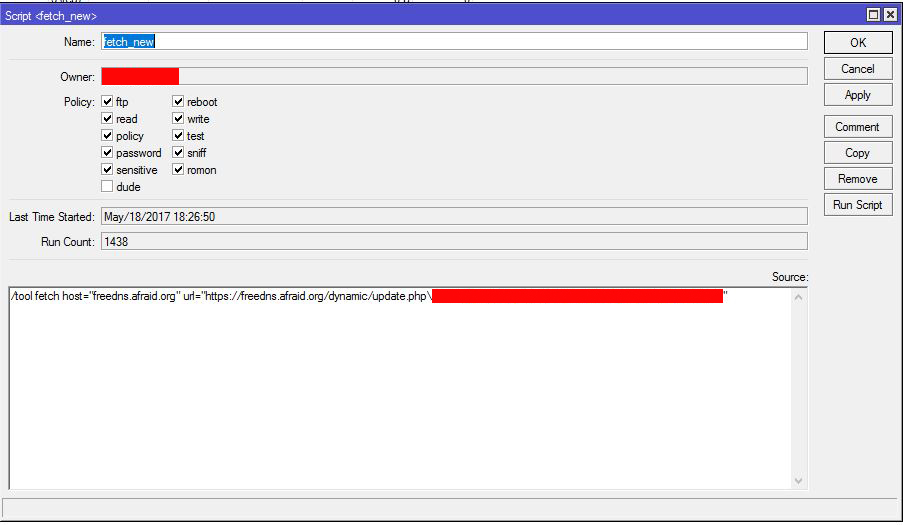
- Login to your Mikrotik and go to “System/Scripts” and add a new script
- Check all policys and as script add: /tool fetch host=“freedns.afraid.org” url=“[https://freedns.afraid.org/dynamic/update.php\[b]your_copied_url](https://freedns.afraid.org/dynamic/update.php\[b]your_copied_url)[/b]”
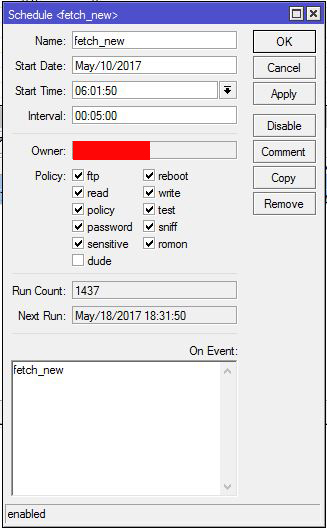
- Go to “System/Scheduler” and add a new schedule for your previous created script.
- Enjoy.