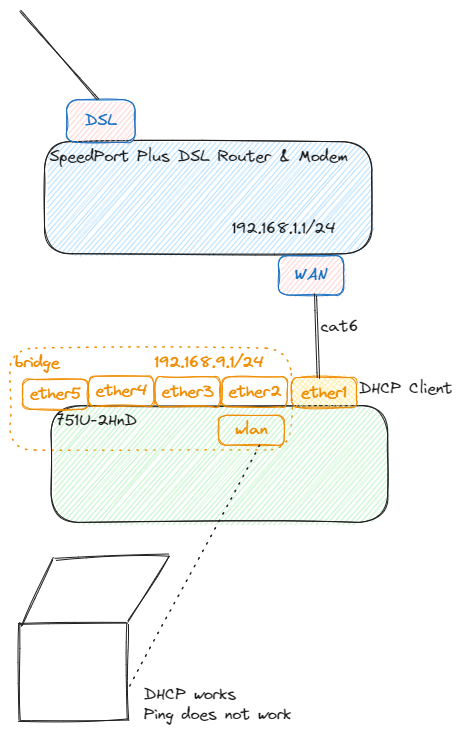
Below is my config export. Do I need to configure anything on my Internet router? To my understanding it should be working as is as long I have NAT setup and ether1 gets IP from the router.
[admin@MikroTik] > /export
# oct/11/2023 23:30:31 by RouterOS 6.49.10
# software id = YK1C-QSJ9
#
# model = 751U-2HnD

/interface bridge
add name=bridge1
/interface wireless
set [ find default-name=wlan1 ] disabled=no mode=ap-bridge ssid=coon wireless-protocol=802.11
/interface list
add name=WAN
add name=LAN
/interface wireless security-profiles
set [ find default=yes ] authentication-types=wpa-psk,wpa2-psk mode=dynamic-keys supplicant-identity=MikroTik wpa-pre-shared-key=<redacted> wpa2-pre-shared-key=<redacted>
/ip pool
add name=pool1 ranges=192.168.9.160-192.168.9.190
/ip dhcp-server
add address-pool=pool1 disabled=no interface=bridge1 name=server1
/interface bridge port
add bridge=bridge1 interface=wlan1
add bridge=bridge1 interface=ether2
add bridge=bridge1 interface=ether3
add bridge=bridge1 interface=ether4
add bridge=bridge1 interface=ether5
/ip neighbor discovery-settings
set discover-interface-list=LAN
/interface list member
add interface=ether1 list=WAN
add list=LAN
add interface=bridge1 list=LAN
/ip address
add address=192.168.9.1/24 interface=bridge1 network=192.168.9.0
/ip dhcp-client
add disabled=no interface=ether1
/ip dns
set servers=1.1.1.1
/ip firewall filter
add action=accept chain=input protocol=icmp
add action=accept chain=input connection-state=established
add action=accept chain=input connection-state=related
add action=drop chain=input in-interface-list=!LAN
/ip firewall nat
add action=masquerade chain=srcnat out-interface-list=WAN
/system clock
set time-zone-name=Europe/Zagreb
/tool mac-server
set allowed-interface-list=LAN
/tool mac-server mac-winbox
set allowed-interface-list=LAN
I ran your setup in a virtual environment and there was something wrong with your dhcp server/pool setup.
The VM I connected to the bridge got an invalid address like 192.168.9.190/0
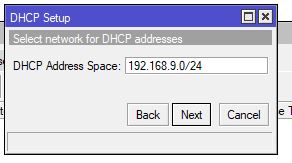
I deleted it, and ran a new DHCP setup and got a right ip address like 192.168.9.189/24 gateway 192.168.9.1, and everything works now.
Make sure that the dhcp setup has an address space like the one you see in the image below
Edit: I missed the above post. It sounds like he found the problem
I would do a factory reset of the router and see if your laptop gets internet using the default settings. If it works then you can make the basic changes to convert the default settings to the IP range, security settings etc. that you want. If it doesn’t work at the default settings then you should start looking at the DSL router/modem.
If you have a computer with an ethernet port then plug the modem into it and see if you get internet.