Hi,
Please help,
In my company i have configured 3 Site-to-Site EoIP tunnels on 3 diffrent Branches.
I am therfore using 6 different routers. 3 im my HQ and 3 on there other Branches (1 at each Branch)
HQ Site
RouterA--------eoip1 ipsec-------RouterA1
RouterB--------eoip2 ipsec------RouterB1
RouterC--------eoip3 ipsec------RouterC1
My goal is to only have one MikroTik 24port router at the HQ. And setup all 3 tunnels on HQ router i.e Site to Multi-Site. How can I acheive this please…??
The answer seems so obvious that I’m sure I must be missing something about the intended use.
Just configure the three tunnels at the single HQ router, with the same settings you’ve used on the separate ones, except that the tunnel-id values must differ even though the remote-address values are different.
EoIP transports ethernet frames so where does IP routing appear from? Are you attempting to use multiple WANs at the HQ site in which case either policy-based routing or mangling rules are required. A better diagram of what you are trying to achieve would help.
And here we go - it’s not a problem with EoIP tunnels, it’s a problem with the network architecture.
What do you need the routes for,
to route the transport packets of the tunnels, i.e. the packets sent by the router itself, towards the remote peer (the other router terminating the tunnel), or
to route the payload packets inside the tunnels to the remote sites?
In both cases, why must those routes be default ones, why cannot they be with more specific dst-address than the whole internet?
The route 0.0.0.0/0 is to the Gateway to my WAN interface of my ISP device. I have an MPLS connection from my ISP… So i have to place the default route so i can ping the other remote router…
Once this is done the my EoIP tunnel is established.
Thats how i setup on all the routers…
But now i cannot place 3 default routes on one HQ router.
As @tdw has already asked - do you need a different gateway (or even a different physical WAN interface) to connect to each remote router? I.e. do you have three MPLS tunnels from the ISP? What are the addresses of the remote routers, i.e. remote-address values of the three tunnels?
On both MK Routers on both sites i do a default routes.
i.e. AS 0.0.0.0/0 via Gateway 192.168.1.2 reachable
AS 0.0.0.0/0 via Gateway 192.168.1.4 reachable
EoIp tunnel established
/ip route add
dst-address=ip.of.remote.router.1 gateway=192.168.1.2
dst-address=ip.of.remote.router.2 gateway=192.168.2.2
dst-address=ip.of.remote.router.3 gateway=192.168.3.2
Also, I assume the actual addresses are not exactly 192.168.1.1 and …1.2 at HQ and 192.168.1.3 and ..1.4 at Site 1, because if they were, you wouldn’t need a manually added route at all as 192.168.1.1 and 192.168.1.3 are in the same subnet so a route to 192.168.1.x, which is added automatically as you attach an IP address to an interface, would beat the default route for the 192.168.1.3 destination.
That’s why I’ve asked about the actual addresses (unless they are public ones of course).
These are the actual IP adress not public… Beacuse the mpls link is site to site…
Yes the 0.0.0.0/0 comes automatically as AS Route. When i do for the first tunnel.
It does not come Automatically when i do for the 2 tunnel, i have to manually add the 0.0.0.0/0 , but it comes blue as S Route but does bot establish the tunnel. It is only the 1st tunnel I configure that works.
So i will do a route like you mentioned and will see.
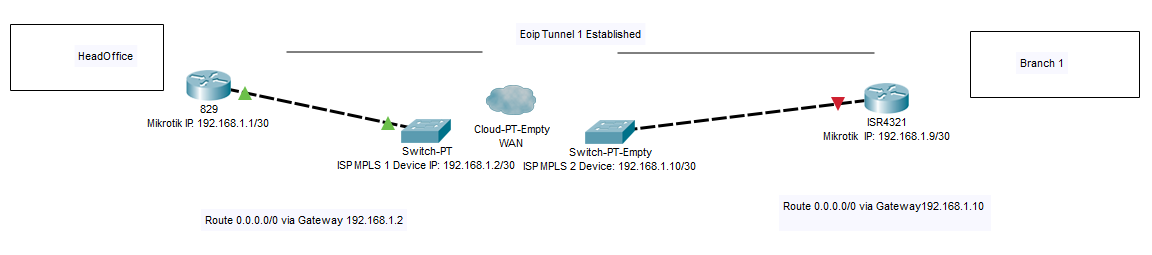
Please find attached the setup.
Here is a small sketch I have made of how my Tunnel is running.
I did for one, the other 2 are of same method. The other routers also connect physically to the same MPLS devices one seperate interfaces by the same method.
OK, so as expected, the remote addresses are actually not 192.168.1.3 and …1.4 but 192.168.1.9 and …1.10, which makes more sense as they are not in the same subnet like 192.168.1.1 and …1.2.
It still doesn’t explain from where the default routes pop up, but it doesn’t matter, as /ip route add dst-address=192.168.1.8/30 gateway=192.168.1.2
beats any less specific route (one with lower mask value), i.e. including any default one.
I assume the remote-address of the EoIP tunnel is 192.168.1.9 here, correct?
So unless the same IP addresses of the remote Mikrotiks are used on the remaining two MPLS tunnels, these individual routes will make the trick happen.
A lot of questions could have been answered in a batch if you posted the configuration exports of the current three routers at the HQ as the first step.
There are no public IPs involved, so I cannot understand why you cannot simply export the complete configs from the three existing routers as a text and just obfuscate the names (and serial numbers and timezones if the paranoia is strong).
So again:
what are the remote-address values at the HQ routers for the individual /interface eoip rows?
are DHCP client attached to the interfaces connected to the MPLS ports?
are the IP addresses attached to these interfaces also statically, or only by DHCP?
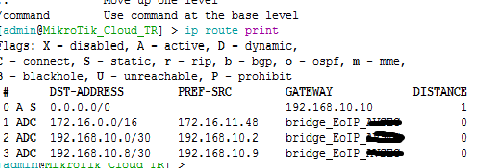
OK, so the default route is added manually. But you don’t need the default route at all, it is enough to have routes to each remote router via the approproiate gateway IP on each WAN. You’ve got:
So you need the following routes instead of the default one: /ip route
add dst-address=192.168.10.12/30 gateway=192.168.10.10
add dst-address=192.168.10.4/30 gateway=192.168.10.1
Another important point, there is no reason to have the WAN interfaces bridged together with the LAN ones and with the EoIP tunnels. The broadcast traffic (ARP etc.) leaks between unrelated networks in such case.
And since you have one LAN port per each EoIP tunnel, it suggests you actually don’t need the L2 connections to the remote sites to be bridged all together? If you want them separate, use a dedicated bridge for each:
/interface bridge port
add bridge=bridge_EoIP_AVSEC interface=ether2_LAN_AVSEC
add bridge=bridge_EoIP_AVSEC interface=eoip-tunnel-to-AVSEC
add bridge=bridge_EoIP_SSR interface=ether4_LAN_SSR
add bridge=bridge_EoIP_SSR interface=eoip-tunnel-to-SSR
add bridge=bridge_EoIP_PRASLIN interface=ether6_LAN_PRASLIN
add bridge=bridge_EoIP_PRASLIN interface=eoip-tunnel-to-PRASLIN
Last, if an interface is made a member port of a bridge, IP configuration should be attached to the bridge, not to the member interface itself. So the address 172.16.11.48/16 should be attached to bridge_EoIP_AVSEC rather than to ether2_LAN_AVSEC.