As you can see: SiteA is using 192.168.11.0/24 and SiteB is using 192.168.17.0
Just one problem: SiteB does not have a static IPv4-Address and I’d like to avoid using DynamicDNS – I think it should be possible to configure the SiteB-Router to establish the tunnel to the SiteA’s static IPv4-Address – SiteA should go fine without knowing the SiteB’s dynamic IPv4-Address.
While searching for a solution, I found hints to setup SiteA-identity with “Generate Policy=port-override” (see https://www.reddit.com/r/mikrotik/comments/baioi1/ipsec_tunel_when_one_site_have_dynamic_ip/ )
I also played around with “passive=yes” and “aggressive-mode” in SiteA-Peer-configuration but did not succeed.
BTW: What IPv4-Adress should be used in SiteA-Peer-Configuration when remote IPv4-Address is dynamic? 0.0.0.0/0?
Hope someone can give me the right hint to implement this configuration.
You have to use generate= at the side with a static WAN address and not specify any policy manually there. You can do more fancy things (create non-default policy templates and link them to identities) but for your simple case this is enough. And passive=yes of course. aggressive is not necessary.
i.e.
[]no policy entry on Static-WAN-side anymore
[]passive=yes for “peer” on Static-WAN-side
[*]generate-policy=port-override for “identity” on Static-WAN-side
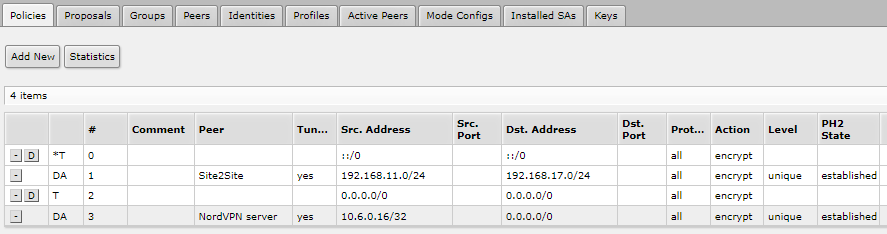
Unfortunately the tunnel does not come up: Having a look at “policies” on Dynamic-WAN-side, it shows PH2-State changing from “ready to send” to “no phase2” and keeps stuck in this state. Under “active peers” I see an entry with no “uptime” and no “PH2 total”. The “active peers”-tab on Static-WAN-side remains empty.
I’m using the following script to update DynDNS entries for IPIP-tunnels. Run at reboot or every hour or so. You could tweak this to whatever you need.
Hard to say. Export the configurations from both machines (using hide-sensitive in ROS 6, not using show-sensitive in ROS 7), obfuscate them in a useful way (so that e.g. the fact that two addresses belong to the same subnet remains visible even after the obfuscation), don’t forget about usernames to ppp services and maybe serial numbers, and post them here.
It may be also helpful to activate IPsec logging and let the routers themselves explain you what you are doing wrong.
/system logging add topics=ipsec,!packet
/log print follow-only file=ipsec-start where topics~“ipsec”
then give it some 30 seconds to have a complete connection attempt recorded, stop the /log print …, download the ipsec-start.txt and start reading.
Yet another point, it is quite useful to set up a simpler VPN (like SSTP) between the devices so that you wouldn’t have to visit them physically in order to debug the IPsec configurations. Other VPN types are often slower that IPsec (except Wireguard which has its own drawbacks though) but for this “temporary remote management” purpose they are more than sufficient.
If the address on one of the ends is static, the OP doesn’t need this for IPsec.
Other than that, instead of using a script, since a few years ago already you can let RouterOS update the address list by setting the ddns fqdn as the address item of the list; RouterOS will create a dynamic item in the same list with the current IP address and automatically update it once the TTL of the previous DNS response expires. For IPIP, you do have to update the remote address using a script. But if you use NAT, modifying the local address in the IPIP tunnel configuration may not be enough to make it continue working.
Thank you for this input - Acutally I am trying to avoid using DynDNS: The Dynamic-WAN-IPv4-side has no services to be exposed to WAN … Therefore I have no need for setting up DynDNS.
As Sindy already mentioned: It should work without DynDNS by using a static IPv4 on just one side.
Meanwhile, I re-visited my parents-in-law to complete your logging-request (still no SSTP ) …
On the Static-WAN-side, the logging-file “ipsec-start.txt” does not collect any information. It seems like the request for establishing the tunnel does not arrive at the Static-WAN-side-Router!?
Having a look at “ipsec-startDynamicWAN.txt” it seems like the Dynamic-WAN-side-Router tries the phase1 “again and again” without any success.
BTW: “217.255.156.244” is the last real dynamic IP - “1.2.3.190” is the obfuscated static WAN-IP (last byte 190 is real, too)
Any ideas why the tunnel request does not appear an the Static-WAN-side?
(Do you think, that the DSL-Modem on Dynamic-side can be some kind of obstacle? It is a “Fritz!Box 7590” - But it is not routing in any way: The Mikrotik-Routers sends a PPPoE-Connection-Request to this device (in VLAN-ID=7 specific for German ISP “T-Online”). So the Mikrotik-Routers holds the Outside-WAN-IP itself an its own interface.) ExportDynamicWAN.rsc (9.49 KB) ExportStaticWAN.rsc (10.1 KB) ipsec-startDynamicWAN.txt (2.78 KB)
On the router with a static public IP, your firewall rules in chain input of filter drop all packets that attempt to initiate new connections except those coming from LAN side.
When the IPsec peer is set as passive (i.e. only acts as a responder), it does not attempt to initiate connections, so it does not create a pinhole for the responses.
So you have to add the following rules: chain=input protocol=udp dst-port=500,4500 action=accept
chain=input protocol=ipsec-esp action=accept
just before the currently last rule in chain input of filter.
For SSTP, you would have to add an appropriate rule too.
I thought that IPSec was not forbidden by FireWall-Rules, since the first setup (policy on both sides) already worked fine - Now I understand that the mutual connection-start resulted in FireWall-States, that allowed the incoming traffic … Without outgoing traffic on the static WAN-side, there will not be this necessary pin-hole in my FireWall.
So, just after adding …
/ip firewall filter add chain=input protocol=udp dst-port=500,4500 action=accept place-before=[find where comment="defconf: drop all not coming from LAN"]
/ip firewall filter add chain=input protocol=ipsec-esp action=accept place-before=[find where comment="defconf: drop all not coming from LAN"]
… an established connection immediately appeared:
But: I cannot reach the remote peer …
Trying to ping 192.168.17.1 (LAN-IP of MikroTik-Router on Dynamic-WAN-side) from 192.168.11.x (local Subnet on Static-WAN-side) will result in time-out. Any ideas on this (hopefully) last problem?
Edit: Each time a ping-packet leaves my LAN, the “TX packets”-count under “IPSec” > “Active Peers” increases by one. “TX Bytes” increases appropriate (60 Bytes). But “RX Bytes” and “RX packets” are always zero.
The reason is very similar, firewall rules. Again we talk about chain input of filter as you want to talk to the Tik itself.
You’ve earned bonus points for realizing that you need to use the proper source address for the ping
The IPsec payload packets decrypted from the IPsec transport ones inherit the in-interface attribute from the transport ones, so they hit the “drop whatever did not come in via LAN” rule again - from the point of view of the firewall, they are unrelated to the transport ones (which is a correct approach if you think about it). So you have to add an accept rule like chain=input in-interface-list=WAN ipsec-policy=in,ipsecsrc-address=192.168.11.0/24 action=accept before that “drop the rest” one.
Just thought, that when my packets arrive on the other tunnels end, then the tunnel would already have bypassed its payload beyond the firewall into the destination subnet.
I will visit the other site again tomorrow and I will apply this additional allow-rule. Quite sure that it will do the job
(Just wondering: In my first posting I used mutual policies - As far as I remember, ping-ing the subnets already worked … But even when using policies on both sides, now I think it should not work w/o this incoming allow-rule … Perhaps I did some magic !?)
Hooray - Germany won the Olympic volleyball openig-match vs. Japan in France - Go for the cup!
There is a difference in how the firewall handles a packet for the router itself and how it handles a packet for for another device. The former is handled by filter chain input, the latter is handled by filter chain forward. And in forward, you do have rules that accept any incoming IPsec payload: chain=forward ipsec-policy=in,ipsec action=accept comment=“defconf: accept in ipsec policy”. In fact this rule is slightly dangerous as it accepts also eventual incoming connections that arrive via your NordVPN connection.
But I forgot to tell you about one more thing - since both your routers have a public IP on their WAN (and it doesn’t matter that one of them keeps changing), IPsec uses bare ESP to carry the payload. And for multiple reasons, the firewall does not handle the ESP traffic as related to the IKE one, so if there is a long silence in the traffic between the LANs, the pinholes for the ESP time out at both ends. And since ESP packets are currently only allowed to create a new pinhole at your home, IPsec payload connections initiated from your inlaws’ home will succeed, but IPsec payload connections initiated from your home to the inlaws’s site will not as the ESP packet carrying the initial request will not get through. So to resolve this, you have to add a corresponding permissive rule to chain input of filter also at the inlaws’s side. Depending on the severity of your paranoia, you might want to restrict the source address of that rule to the static IP of your home; at home, you would have to use a more complicated setup where the current source address of the inlaws’ device as seen in the IKE packets would be stored to an address list with a lifetime of some tens of minutes and the rule accepting ESP would match on that address list.
Not much more to say, but: Works like a charm!!!
Please let me take all the information together, so that other users can re-use it:
When looking for a simple way to implement a Site-to-Site connection using an IPsec-tunnel, you come along with these simple solutions using default-proposal and -profile. (Assuming SiteA uses 192.168.11.0/24 as LAN and SiteB uses 192.168.17.0/24 as LAN)
Approach #1 (knowing the WAN-IPv4-Address of both sites):
SiteA:
Quite simple, but: In most cases you will face changing WAN-IPs. This will result in the need of using Dynamic-DNS-Records - You may want to avoid this, when only one site is using a fixed IP … What leads to Approach #2
Approach #2 (having a static WAN-IPv4-Address on at least one site):
Approach #1 was based upon the idea of establishing a mutual IPsec-connection. In fact, it will be sufficient to just establish the connection by means of a “one way direction”. This should be quite simple, if at least one site will not change its WAN-IPv4-Address. In this case you don’t have to play around with DynDNS and periodically updating address lists.
Assuming SiteA uses such a static IPv4-Address, then SiteB should not need any changes to its configuration. In the end there will just be a few changes to SiteA-configuration:
omit “/ip ipsec policy add” (only needed when acting as IPsec-Initiator)
add “passive=yes” to the “/ip ipsec peer add”-command and use “0.0.0.0/0” as remote-address
add “generate-policy=port-override” to “/ip ipsec identity add” (every generate-policy except “no” will work - “port-strict” will do the job, too)
Basically, this should do the job, but there are some caveats, which are firewall-filter-related …
Remember: Approach #1 used a mutual IPsec-tunnel … These outgoing connections result in firewall states, that automatically allow returning packets. Let’s call them wanted “pinholes” to your firewall - This is just what we do expect when considering a firewall to be “SPI-based”. But thinking of Approach #2 there are no outgoing connections from SiteA anymore. For this reason, the incoming connection from SiteB will be blocked out by SiteA’s firewall.
To make a long story short … Changing the IPsec-configuration from “mutual” to “one-way” is the right approach and it is a rather simple setup, but to get things running, you will have to add additional firewall-filter accept-rules. This all sums up to:
SiteA:
/ip ipsec peer add name=Site2Site address=0.0.0.0/0 passive=yes
/ip ipsec identity add peer="Site2Site" remote-id=ignore auth-method=pre-shared-key generate-policy=port-override secret="secret"
/ip firewall filter add chain=input in-interface-list=WAN protocol=udp dst-port=500,4500 action=accept comment="Allow Site2Site" place-before=[find where comment="defconf: drop all not coming from LAN"]
/ip firewall filter add chain=input in-interface-list=WAN protocol=ipsec-esp action=accept comment="Allow Site2Site" place-before=[find where comment="defconf: drop all not coming from LAN"]
SiteB:
/ip ipsec peer add name=Site2Site address=<PublicIPv4_SiteA>/32
/ip ipsec identity add peer="Site2Site" remote-id=ignore auth-method=pre-shared-key secret="secret"
/ip ipsec policy add peer="Site2Site" src-address=192.168.17.0/24 src-port=any dst-address=192.168.11.0/24 dst-port=any tunnel=yes action=encrypt proposal=default
/ip firewall filter add chain=input in-interface-list=WAN ipsec-policy=in,ipsec src-address=192.168.11.0/24 action=accept comment="Allow Site2Site" place-before=[find where comment="defconf: drop all not coming from LAN"]
/ip firewall filter add chain=input in-interface-list=WAN protocol=ipsec-esp src-address=<PublicIPv4_SiteA>/32 action=accept comment="Allow Site2Site" place-before=[find where comment="defconf: drop all not coming from LAN"]
(Important: Please check the comment of your “drop all”-Firewall-Filter-rule. It should usually be “defconf: drop all not coming from LAN”. If your “drop all”-rule is identified in a different way, adjust the following “place-before”-parameters accordingly.)
One final word concerning the very last firewall-filter accept-rule for SiteB’s router (“protocol=ipsec-esp”):
i.e.: The setup will work without this accept-rule, but there is quite a chance, that SiteB will close a necessary firewall-state, when there is a long silence.
@sindy: Please let us know if I got everything together correctly
This solution has been made obsolete years ago - since then, you can set the fqdn as an address of an IPsec peer. The IPsec stack resolves it to the current IP address whenever it needs to establish the IKE connection; once it gets established, it doesn’t care for the translation any more until the connection eventually breaks.
To be more precise, generate-policy can be set to any other value but no. Actually, port-override has been provided to work around some interoperability issues.
And a practical experience: it is impossible to write a cookbook that would substitute understanding how things work and cover all scenarios that can be encountered in the wild.
Thank you so much! You were extremely helpful in solving my problem.
In most cases one gets help like “why don’t using another approach” - DynDNS would have been one idea, but you just helped out by solving the described problem … and you even investigated my particular configs. Thanks!!!
Frankly spoken, I’d like to ease my debt by sharing a small amazon-gift-card … But as far as I can see, the admins have deactivated all private communication … Please feel free to contact me, if you see any chance to do using this board.
BTW: Ever thought of adding a “Donate-Me”-PayPal-Footer … As much help as you already have provided, this would be very appropriate!!!
Any way: I have updated my last post accordingly to your suggestions (no scheduled tasks for updating address-lists and a note on the “generate-policy”)
Certainly, you are right - But for this particular problem I found a lot of “half solutions” in the internet where no one has figured out, what really has to be done to get this setup working. I would have been happy, if I had stumbled across this topic here … So, let’s see if it will be helpful to someone.
Just after solving this issue one question from me to get some deeper insights: Why the heck do we need the NAT-Rule:
I found it in other solutions and re-used it here - Successfully … But as far as I understand from the usage of a VPN-tunnel, all I need is routing without NAT-ing: If SiteA would have a Next-Hop for the Remote-LAN set to the neighboring router’s IPsec-IP and vice versa, I would think this is enough (without NAT-ing).
Indeed. Matching of packet headers to IPsec policies is the very last step of packet processing before actually sending the packet out the interface chosen by the regular routing, it follows even after the eventual src-nat operation. So to prevent packets that should be “noticed” by IPsec policies from getting src-nated, you can use multiple ways - a rule in the srcnat chain that accepts them before they can reach any src-nat or masquerade one in that chain is one of them, routing them through an interface to which no src-nat or masquerade is bound is another one. But adding some configuration element is necessary in either case, so it is up to your personal preference which one it will be.
However, if using IPsec to cipher some more critical data, many people want to make sure that if the IPsec connection fails for some reason, the packets that would normally get encrypted using IPsec will not leak to the internet in plaintext. Such a functionality is often called a “killswitch”, don’t ask me why. One way to ensure this is to create a dedicated route (or multiple ones where necessary) for these data and set the local bridge as the gateway of these routes. By doing so, you also make sure that the packets will not get src-nated, so you solve two problems for the price of a single configuration row.
Ah, got it It’s all about preventing the packets (destined for the remote LAN) to get SrcNAT-ed towards my Default-WAN-GW.
As you mention the “Killswitch” - This was something most relevant to me, when I set up my NordVPN-Tunnel.
Perhaps you have noticed: My ROS (config on static-IPv4-WAN-side, see above) tags traffic from 192.168.11.176/28 as “via_NordVPN” by applying a “mangle new-connection-mark”.
My Killswitch-approach: Added “connection-mark=!via_NordVPN” to my Masquerade-Rule
This is not a quite good Killswitch , since I expect packets leaking out to the internet using private IPs - But (as all my traffic is TCP-based) no sensitive data will leak, because replying to private IPs is not possible from internet-view and so there will never be a valid TCP-3-way-Handshake.
Now I am facing a little problem: I want to establish a 2nd NordVPN-Tunnel for separate traffic … But: ROS will not allow to exclude >two< different connections marks within a single Masquerade-Rule
Now, that I you say …
… it’s very tempting to ask you again for suggestions: What will be the right configuration to staticly bound marked traffic to NordVPN using hard-coded routing-entries? This marked traffic should never go through my Default-WAN-GW.
I formerly found a ROS6-Killswitch-Routing-Approach, but since Routing-configuration has changed in ROS7 I was not able to adjust this configuration accordingly and moved to the (rather bad) masquerading-exclude-connection-mark-trick
That way, you have only prevented the leaking traffic from getting src-nated, not from getting sent out, as you have realized yourself.
That depends on the network distance of the eavesdropper from your router. Your ISP can add their own NAT and route the responses to your private addresses. Plus already the SYN packet carries the address of the server you were intending to connect to. So it’s again the severity of your paranoia that decides what next.
There are at least two ways to overcome this.
First, you can place two action=accept rules, each matching on another connection-mark value, before the masquerade one. While the IPsec tunnel is up, the dynamically added action=src-nat ones shadow them as the IPsec subsystem always places them to the very beginning of the srcnat chain.
Second, there is a reserved connection mark value, no-mark, so you can make the action=masquerade rule match on that value.
What does /ip firewall nat print show when the NordVPN is established? Feel free to obfuscate the IPs, I am only interested in the match conditions of the dynamically added rules.
I do not expect any eavesdropper within my ISP’s backbone next to my router … Not that paranoid
Quite easy - I did not know about “no-mark” … This will do the job!
Nevertheless, I am very curios how to solve this by applying some fixed routing, which will never fallback to Default-GW when IPsec is down.
I was also not able to apply appropriate Firewall-Rules: Whenever I suppressed the traffic successfully, the corresponding rule also prevented the traffic from traveling through the tunnel … Probably because of this insight, I recently got from you:
My guess: Whenever I created a rule to block this traffic, it engaged before IPsec - Therefore, even IPsec did not get these packets anymore.

 ) …
) …

 … Please feel free to contact me, if you see any chance to do using this board.
 , since I expect packets leaking out to the internet using private IPs - But (as all my traffic is TCP-based) no sensitive data will leak, because replying to private IPs is not possible from internet-view and so there will never be a valid TCP-3-way-Handshake.
