Here is the config export from the server side:
/export hide-sensitive
# apr/24/2018 17:05:20 by RouterOS 6.32.2
# software id = 95JH-UIE2
#
/interface bridge
add admin-mac=E4:8D:8C:1E:2E:A5 auto-mac=no name=bridge-local
/interface ethernet
set [ find default-name=ether1 ] name=ether1-gateway
set [ find default-name=ether4 ] disabled=yes
set [ find default-name=ether5 ] disabled=yes
set [ find default-name=ether6 ] name=ether6-master-local
set [ find default-name=ether7 ] master-port=ether6-master-local name=ether7-slave-local
set [ find default-name=ether8 ] disabled=yes master-port=ether6-master-local name=ether8-slave-local
set [ find default-name=ether9 ] disabled=yes master-port=ether6-master-local name=ether9-slave-local
set [ find default-name=ether10 ] disabled=yes master-port=ether6-master-local name=ether10-slave-local
set [ find default-name=sfp1 ] disabled=yes
/interface pptp-server
add disabled=yes name=pptp-in1 user=""
/ip neighbor discovery
set ether1-gateway discover=no
/interface vlan
add interface=ether3 l2mtu=1594 name=Cameras vlan-id=30
add interface=ether3 l2mtu=1594 name=DMZ vlan-id=99
add interface=ether3 l2mtu=1594 name=GIS vlan-id=3
add interface=ether3 l2mtu=1594 name=Guest vlan-id=98
add interface=ether2 l2mtu=1594 name=Home vlan-id=1
add interface=ether3 l2mtu=1594 name="Raspi's" vlan-id=20
add interface=ether3 l2mtu=1594 name=Servers vlan-id=10
add interface=ether3 l2mtu=1594 name=techentv vlan-id=2
/interface ethernet switch port
set 2 default-vlan-id=1
set 3 default-vlan-id=1 vlan-mode=secure
set 11 default-vlan-id=1 vlan-mode=secure
/interface wireless security-profiles
set [ find default=yes ] supplicant-identity=MikroTik
/ip pool
add name=default-dhcp ranges=10.232.1.110-10.232.1.129
add name=GuestPool ranges=10.232.98.100-10.232.98.150
add name=GISPool ranges=10.232.3.100-10.232.3.150
add name=techzentvpool ranges=10.232.2.100-10.232.2.150
/ip dhcp-server
add address-pool=default-dhcp disabled=no interface=bridge-local lease-time=1h name=default
add address-pool=GuestPool disabled=no interface=Guest name=GuestDHCP
add address-pool=techzentvpool disabled=no interface=techentv name=TechzenDHCP
add address-pool=GISPool disabled=no interface=GIS name=GISDHCP
/routing ospf instance
set [ find default=yes ] disabled=yes redistribute-connected=as-type-2 redistribute-static=as-type-2 router-id=10.232.1.1
/snmp community
add addresses=10.232.1.0/24 name=public2
/system logging action
set 3 remote=10.232.1.213
add bsd-syslog=yes name=action1 remote=10.232.1.128 target=remote
/interface bridge port
add bridge=bridge-local interface=ether2
add bridge=bridge-local interface=ether6-master-local
/interface ethernet switch vlan
add independent-learning=yes ports=switch1-cpu,ether3 switch=switch1 vlan-id=98
add disabled=yes ports=switch1-cpu,ether3 switch=switch1 vlan-id=2
add independent-learning=no ports=switch1-cpu,ether3 switch=switch1 vlan-id=99
add disabled=yes ports=switch1-cpu,ether3 switch=switch1 vlan-id=3
add independent-learning=no ports=switch1-cpu switch=switch1 vlan-id=1
add independent-learning=no ports=switch1-cpu,ether3 switch=switch1 vlan-id=10
add independent-learning=no ports=switch1-cpu,ether3 switch=switch1 vlan-id=20
add independent-learning=no ports=switch1-cpu,ether3 switch=switch1 vlan-id=30
/interface pptp-server server
set authentication=chap,mschap1,mschap2
/interface sstp-server server
set enabled=yes
/ip address
add address=10.232.0.1/23 comment="default configuration" interface=bridge-local network=10.232.0.0
add address=10.232.99.1/24 interface=DMZ network=10.232.99.0
add address=10.232.98.1/24 interface=Guest network=10.232.98.0
add address=10.232.3.1/24 interface=GIS network=10.232.3.0
add address=10.232.2.1/24 interface=techentv network=10.232.2.0
add address=10.232.10.1/24 interface=Servers network=10.232.10.0
add address=10.232.20.1/24 interface="Raspi's" network=10.232.20.0
add address=10.232.30.1/24 interface=Cameras network=10.232.30.0
add address=10.250.0.1/30 interface=pptp-in1 network=10.250.0.0
/ip dhcp-client
add comment="default configuration" dhcp-options=hostname,clientid disabled=no interface=ether1-gateway
/ip dhcp-server network
add address=10.232.0.0/23 comment="default configuration" dns-server=10.232.1.248,10.232.1.249,208.67.222.222 domain=h.geniusideastudio.com gateway=10.232.0.1 \
    netmask=23 ntp-server=10.232.1.248,10.232.1.249
add address=10.232.3.0/24 dns-server=10.232.1.248,10.232.1.249 domain=ideastudio.com gateway=10.232.3.1 netmask=24 ntp-server=10.232.1.248,10.232.1.249
add address=10.232.98.0/24 dns-server=8.8.8.8 gateway=10.232.98.1 netmask=24
/ip dns
set allow-remote-requests=yes servers=10.232.1.248,10.232.1.249
/ip dns static
add address=192.168.88.1 name=router
/ip firewall filter
add chain=forward dst-address=10.232.70.0/24 src-address=10.232.0.0/23
add chain=input protocol=icmp
add chain=input dst-port=1723 in-interface=ether1-gateway log=yes protocol=tcp
add chain=input in-interface=ether1-gateway protocol=gre
add chain=input protocol=udp src-address=206.83.248.2
add chain=input src-address=206.83.248.2
add chain=input protocol=ipsec-esp
add chain=input disabled=yes dst-port=443 in-interface=ether1-gateway log=yes protocol=tcp
add chain=forward disabled=yes out-interface=ether1-gateway
add chain=input comment="default configuration" connection-state=established,related
add chain=forward dst-port=5060 in-interface=ether1-gateway protocol=udp
add chain=forward dst-port=25204 in-interface=ether1-gateway log=yes protocol=udp
add chain=input disabled=yes dst-port=5060 in-interface=ether1-gateway protocol=udp
add chain=forward dst-port=5198 in-interface=ether1-gateway protocol=udp
add chain=forward dst-port=5199 in-interface=ether1-gateway protocol=udp
add chain=forward dst-port=46100 in-interface=ether1-gateway protocol=udp
add chain=forward dst-port=46110 in-interface=ether1-gateway protocol=udp
add chain=forward dst-port=46112 in-interface=ether1-gateway protocol=udp
add chain=forward dst-port=46114 in-interface=ether1-gateway protocol=udp
add chain=forward dst-port=46120 in-interface=ether1-gateway protocol=udp
add chain=forward dst-port=46122 in-interface=ether1-gateway protocol=udp
add chain=forward dst-port=4569 in-interface=ether1-gateway protocol=udp
add action=drop chain=forward comment="default configuration" connection-nat-state=!dstnat connection-state=new in-interface=ether1-gateway log=yes
add action=drop chain=input comment="default configuration" in-interface=ether1-gateway log=yes log-prefix=drop_
add chain=forward comment="default configuration" connection-state=established,related
add action=drop chain=forward comment="default configuration" connection-state=invalid log=yes
/ip firewall nat
add chain=srcnat dst-address=10.232.70.0/24 src-address=10.232.0.0/23
add action=masquerade chain=srcnat comment="default configuration" out-interface=ether1-gateway
add action=dst-nat chain=dstnat dst-port=1194 in-interface=ether1-gateway protocol=udp to-addresses=10.232.1.168
add action=dst-nat chain=dstnat dst-port=7443 in-interface=ether1-gateway protocol=tcp to-addresses=10.232.1.168
add action=dst-nat chain=dstnat dst-port=7446 in-interface=ether1-gateway protocol=tcp to-addresses=10.232.1.168
add action=dst-nat chain=dstnat dst-port=5060 in-interface=ether1-gateway log=yes protocol=udp to-addresses=10.232.1.75
add action=dst-nat chain=dstnat dst-port=25204 in-interface=ether1-gateway log=yes protocol=udp to-addresses=10.232.1.75
add action=dst-nat chain=dstnat disabled=yes dst-port=5198 in-interface=ether1-gateway log=yes protocol=udp to-addresses=10.232.1.136
add action=dst-nat chain=dstnat disabled=yes dst-port=5199 in-interface=ether1-gateway log=yes protocol=udp to-addresses=10.232.1.136
add action=dst-nat chain=dstnat dst-port=46100 in-interface=ether1-gateway protocol=udp to-addresses=10.232.1.82
add action=dst-nat chain=dstnat dst-port=46110 in-interface=ether1-gateway protocol=udp to-addresses=10.232.1.82
add action=dst-nat chain=dstnat dst-port=46112 in-interface=ether1-gateway protocol=udp to-addresses=10.232.1.82
add action=dst-nat chain=dstnat dst-port=46114 in-interface=ether1-gateway protocol=udp to-addresses=10.232.1.82
add action=dst-nat chain=dstnat dst-port=46120 in-interface=ether1-gateway protocol=udp to-addresses=10.232.1.82
add action=dst-nat chain=dstnat dst-port=46122 in-interface=ether1-gateway protocol=udp to-addresses=10.232.1.82
add action=dst-nat chain=dstnat dst-port=4569 in-interface=ether1-gateway protocol=udp to-addresses=10.232.1.136
add action=dst-nat chain=dstnat disabled=yes dst-port=21025 in-interface=ether1-gateway protocol=tcp to-addresses=10.232.1.254
/ip ipsec peer
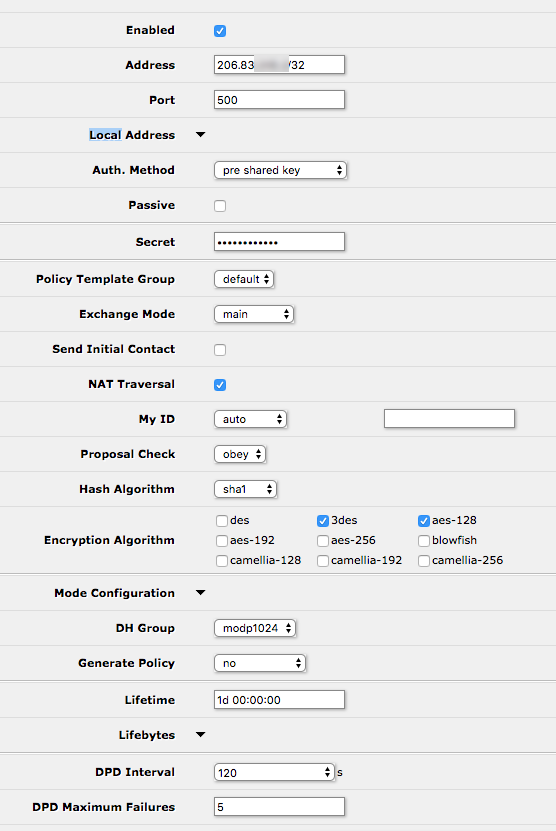
add address=0.0.0.0/0 local-address=0.0.0.0 send-initial-contact=no
add address=10.0.0.254/32 disabled=yes local-address=0.0.0.0 nat-traversal=no send-initial-contact=no
add address=206.83.x.x/32 local-address=0.0.0.0 send-initial-contact=no
/ip ipsec policy
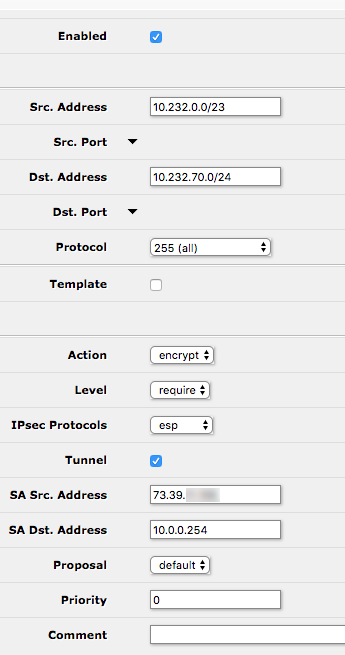
set 0 disabled=yes dst-address=10.232.70.0/24 src-address=10.232.0.0/23
add dst-address=10.232.70.0/24 sa-dst-address=10.0.0.254 sa-src-address=73.39.x.x src-address=10.232.0.0/23 tunnel=yes
/ip route
add disabled=yes distance=1 dst-address=10.232.70.0/24 gateway=10.232.250.2
/ip upnp
set enabled=yes
/ip upnp interfaces
add interface=Home type=internal
add interface=ether2 type=internal
add interface=bridge-local type=internal
/lcd
set default-screen=informative-slideshow
/ppp secret
add local-address=10.232.1.12 name=netnutmike remote-address=10.232.5.2
add local-address=10.232.1.12 name=netnutmikewinlap remote-address=10.232.5.3 service=pptp
add local-address=10.232.250.1 name=FARG profile=default-encryption remote-address=10.232.250.2 service=pptp
/routing ospf network
add area=backbone network=10.232.0.0/23
add area=backbone network=10.232.250.0/24
/snmp
set contact="Mike Myers" enabled=yes location="Home Network Rack" trap-version=2
/system clock
set time-zone-name=America/New_York
/system identity
set name=MyersRouter
/system logging
add action=action1 prefix=fw topics=firewall
add topics=ipsec,!debug
/system ntp client
set enabled=yes primary-ntp=10.232.1.248 secondary-ntp=10.232.1.249
/tool graphing interface
add allow-address=10.232.1.0/24 interface=ether1-gateway
add allow-address=10.232.1.0/24 interface=ether2
add interface=Guest
add interface=ether3
/tool graphing queue
add allow-address=10.232.1.0/24
/tool graphing resource
add allow-address=10.232.1.0/24
/tool mac-server
set [ find default=yes ] disabled=yes
add interface=ether2
add interface=ether3
add interface=ether4
add interface=ether5
add interface=ether6-master-local
add interface=ether7-slave-local
add interface=ether8-slave-local
add interface=ether9-slave-local
add interface=ether10-slave-local
add interface=sfp1
add interface=bridge-local
/tool mac-server mac-winbox
set [ find default=yes ] disabled=yes
add interface=ether2
add interface=ether3
add interface=ether4
add interface=ether5
add interface=ether6-master-local
add interface=ether7-slave-local
add interface=ether8-slave-local
add interface=ether9-slave-local
add interface=ether10-slave-local
add interface=sfp1
add interface=bridge-local
/tool sniffer
set file-name=ether6-sniff filter-interface=ether6-master-local
Here is the installed-sa output from the server side:
Flags: A - AH, E - ESP
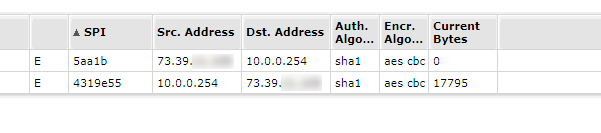
 0 E spi=0xDD0CA56 src-address=206.83.x.x:4500 dst-address=73.39.x.x:4500 state=mature auth-algorithm=sha1 enc-algorithm=aes-cbc
     auth-key="8861c6eb3f0d3ee0db4333c077d8d77ca12b741d" enc-key="929fb365f6ec14d5574308f6069a804f" addtime=apr/24/2018 17:06:41 expires-in=21m28s
     add-lifetime=24m/30m current-bytes=6388 replay=128

 1 E spi=0xCFEF7F4 src-address=73.39.x.x:4500 dst-address=206.83.x.x:4500 state=mature auth-algorithm=sha1 enc-algorithm=aes-cbc
     auth-key="5e5c0389202f5df003a12d1b6f35fd4ad734a1a7" enc-key="707956209d2be3ff790ce80d8089a6f6" add-lifetime=24m/30m replay=128

 2 E spi=0 src-address=73.39.x.x:53791 dst-address=10.0.0.254:443 state=larval add-lifetime=0s/30s replay=0
Here is the config export from the remote side:
# apr/24/2018 17:17:55 by RouterOS 6.32.2
# software id = YFGT-A2YC
#
/interface bridge
add admin-mac=E4:8D:8C:1E:29:7D auto-mac=no name=bridge-local
/interface ethernet
set [ find default-name=ether1 ] name=ether1-gateway
set [ find default-name=ether2 ] name=ether2-Raspberry-Pi
set [ find default-name=ether3 ] master-port=ether2-Raspberry-Pi name=\
    ether3-Winlink
set [ find default-name=ether4 ] master-port=ether2-Raspberry-Pi name=\
    ether4-Phone
set [ find default-name=ether5 ] master-port=ether2-Raspberry-Pi name=\
    ether5-Camera-1
set [ find default-name=ether6 ] name=ether6-AP
set [ find default-name=ether7 ] master-port=ether6-AP name=ether7-APRS
set [ find default-name=ether8 ] master-port=ether6-AP name=\
    ether8-Computer
set [ find default-name=ether9 ] master-port=ether6-AP name=ether9-MMDVM
set [ find default-name=ether10 ] master-port=ether6-AP name=\
    ether10-Camera-2
/interface pptp-client
add connect-to=someone.somewhere.com dial-on-demand=yes \
    keepalive-timeout=disabled name=PPTP-Datacenter user=FARG
/ip neighbor discovery
set ether1-gateway discover=no
/interface wireless security-profiles
set [ find default=yes ] supplicant-identity=MikroTik
/ip pool
add name=dhcp ranges=10.232.70.100-10.232.70.130
/ip dhcp-server
add address-pool=dhcp disabled=no interface=bridge-local lease-time=12h \
    name=default
/routing ospf instance
set [ find default=yes ] disabled=yes redistribute-connected=as-type-2 \
    redistribute-static=as-type-2 router-id=10.232.70.1
/interface bridge port
add bridge=bridge-local interface=ether2-Raspberry-Pi
add bridge=bridge-local interface=ether6-AP
add bridge=bridge-local interface=sfp1
/ip address
add address=10.232.70.1/24 comment="default configuration" interface=\
    ether2-Raspberry-Pi network=10.232.70.0
add address=10.0.0.254/24 interface=ether1-gateway network=10.0.0.0
add address=10.232.250.2/30 interface=PPTP-Datacenter network=10.232.250.0
/ip dhcp-client
add comment="default configuration" dhcp-options=hostname,clientid \
    interface=ether1-gateway
/ip dhcp-server lease
add address=10.232.70.51 client-id=1:b8:27:eb:c9:5:f8 mac-address=\
    B8:27:EB:C9:05:F8 server=default
add address=10.232.70.50 client-id=1:b8:27:eb:fe:98:7c mac-address=\
    B8:27:EB:FE:98:7C server=default
add address=10.232.70.20 client-id=1:4:18:d6:f0:e7:cd mac-address=\
    04:18:D6:F0:E7:CD server=default
add address=10.232.70.53 client-id=1:f4:4d:30:69:85:73 mac-address=\
    F4:4D:30:69:85:73 server=default
add address=10.232.70.52 client-id=1:b8:27:eb:b5:45:99 mac-address=\
    B8:27:EB:B5:45:99 server=default
/ip dhcp-server network
add address=10.232.70.0/24 comment="default configuration" dns-server=\
    8.8.8.8,10.232.1.249 domain=ideastudio.com gateway=10.232.70.1 \
    netmask=24 ntp-server=216.239.35.0,10.232.1.249
/ip dns
set allow-remote-requests=yes
/ip dns static
add address=10.232.70.1 name=router
add address=10.232.1.216 name=unifi
/ip firewall filter
add chain=forward dst-address=10.232.0.0/23 src-address=10.232.70.0/24
add chain=input comment="default configuration" protocol=icmp
add chain=input dst-port=500 protocol=udp
add chain=input protocol=ipsec-esp
add chain=input comment="default configuration" connection-state=\
    established,related
add action=drop chain=input comment="default configuration" in-interface=\
    ether1-gateway
add action=fasttrack-connection chain=forward comment=\
    "default configuration" connection-state=established,related
add chain=forward comment="default configuration" connection-state=\
    established,related
add action=drop chain=forward comment="default configuration" \
    connection-state=invalid
add action=drop chain=forward comment="default configuration" \
    connection-nat-state=!dstnat connection-state=new in-interface=\
    ether1-gateway
/ip firewall nat
add chain=srcnat dst-address=10.232.0.0/23 src-address=10.232.70.0/24
add action=masquerade chain=srcnat comment="default configuration" \
    out-interface=ether1-gateway
/ip ipsec peer
add address=73.39.x.x/32 local-address=0.0.0.0
/ip ipsec policy
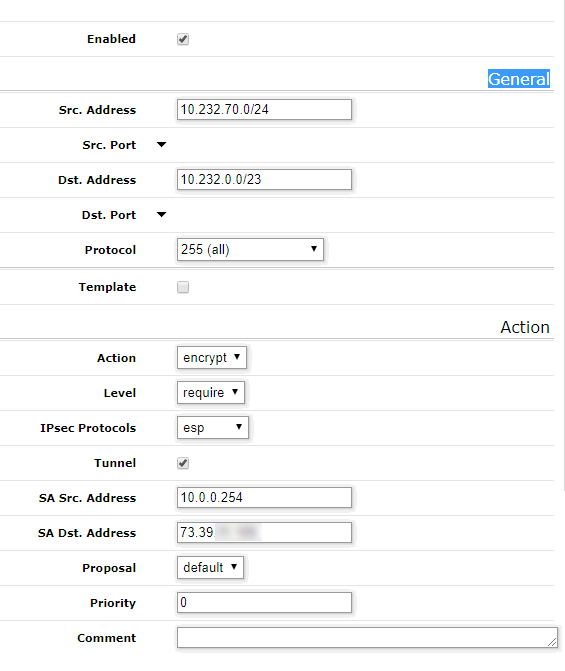
set 0 disabled=yes dst-address=10.232.0.0/23 src-address=10.232.70.0/24
add dst-address=10.232.0.0/23 sa-dst-address=73.39.11.105 sa-src-address=\
    10.0.0.254 src-address=10.232.70.0/24 tunnel=yes
/ip route
add distance=1 gateway=10.0.0.1
add distance=1 dst-address=10.232.0.0/23 gateway=10.232.250.1
/ppp secret
add disabled=yes name=FARG service=pptp
/routing ospf network
add area=backbone network=10.232.70.0/24
add area=backbone network=10.232.250.0/24
/snmp
set contact="Mike Myers" enabled=yes location="FARG Site"
/system clock
set time-zone-name=America/New_York
/system identity
set name=FARG-Site
/tool mac-server
set [ find default=yes ] disabled=yes
add interface=ether2-Raspberry-Pi
add interface=ether3-Winlink
add interface=ether4-Phone
add interface=ether5-Camera-1
add interface=ether6-AP
add interface=ether7-APRS
add interface=ether8-Computer
add interface=ether9-MMDVM
add interface=ether10-Camera-2
add interface=sfp1
add interface=bridge-local
/tool mac-server mac-winbox
set [ find default=yes ] disabled=yes
add interface=ether2-Raspberry-Pi
add interface=ether3-Winlink
add interface=ether4-Phone
add interface=ether5-Camera-1
add interface=ether6-AP
add interface=ether7-APRS
add interface=ether8-Computer
add interface=ether9-MMDVM
add interface=ether10-Camera-2
add interface=sfp1
add interface=bridge-local
Here is the installed-sa from the remote site:
Flags: A - AH, E - ESP
 0 E spi=0xCFEF7F4 src-address=73.39.x.x:4500 dst-address=10.0.0.254:4500
     state=mature auth-algorithm=sha1 enc-algorithm=aes-cbc
     auth-key="5e5c0389202f5df003a12d1b6f35fd4ad734a1a7"
     enc-key="707956209d2be3ff790ce80d8089a6f6" add-lifetime=24m/30m
     replay=128

 1 E spi=0xDD0CA56 src-address=10.0.0.254:4500 dst-address=73.39.x.x:4500
     state=mature auth-algorithm=sha1 enc-algorithm=aes-cbc
     auth-key="8861c6eb3f0d3ee0db4333c077d8d77ca12b741d"
     enc-key="929fb365f6ec14d5574308f6069a804f"
     addtime=apr/24/2018 17:06:43 expires-in=14m54s add-lifetime=24m/30m
     current-bytes=11860 replay=128




 So I haven’t noticed the ****