Slow WiFi

Hi all. New guy here. I’m pretty new into the network/wifi field. So be gentle :smiley: oh and of course, any info/help would be greatly appreciated!!

I’ve recently been tasked to assist with a WiFi issue at a company of roughly 40 - 50 users. I wa able to setup CAPsMAN, albeit not able to manually specify channels to the AP’s. We are using 2.4Ghz and the 5Ghz band. We have a couple of mobile devices that connects to the 2.4Ghz band.

Attached is the network layout. Of the existing as it is now, and then of the New Network. Reason for my question is that, if I do get teh business to replace the hardware, that the WiFi would be better than what it was, otherwise, I’ll be left with a red face :open_mouth:

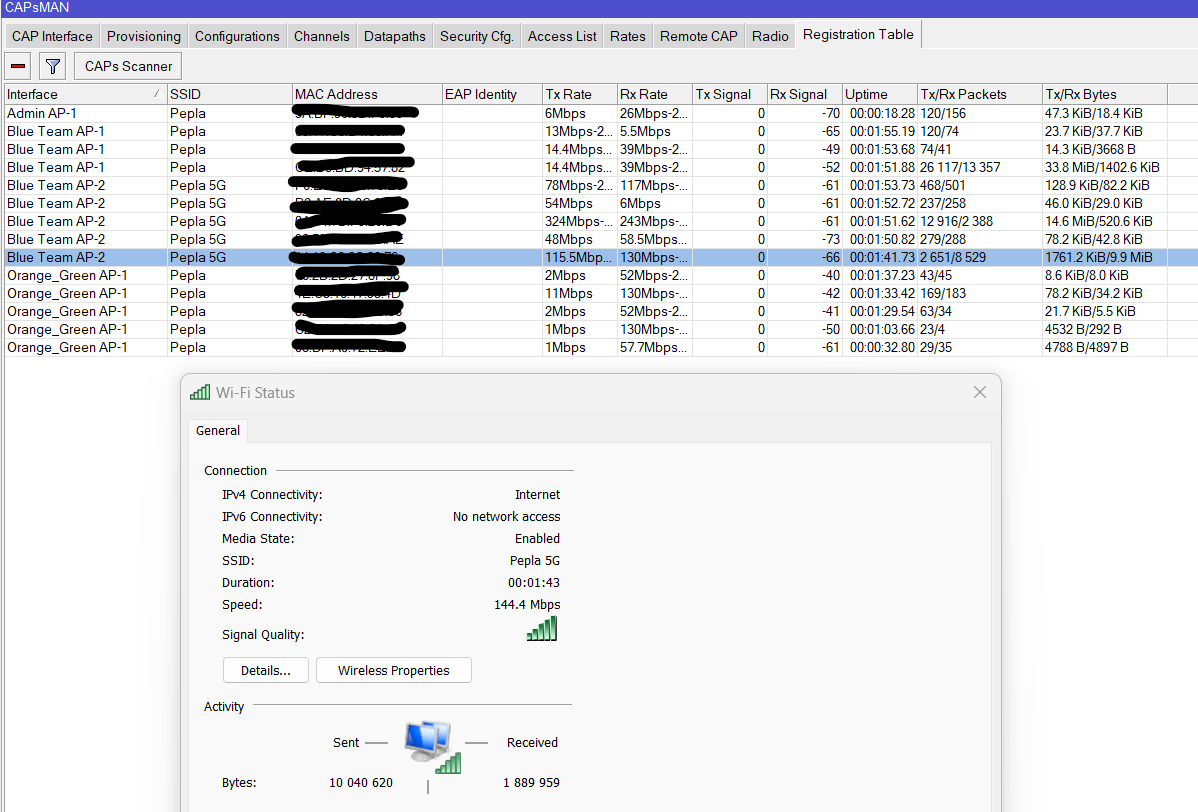
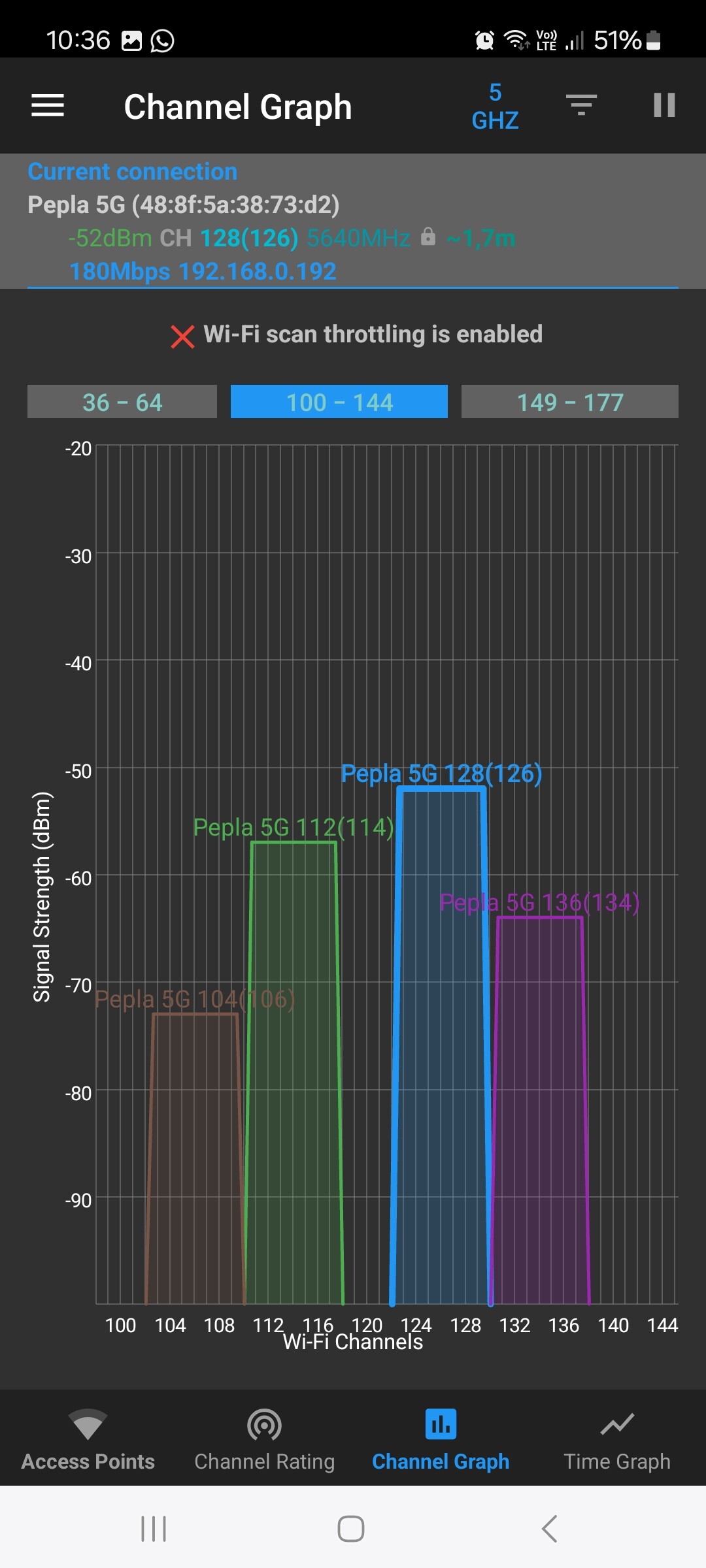
I’ve also attahced my laptops connectivity to the 5Ghz network. My laptops is the one highlighted.

Please do feel free to request any info from me. I wasn’t entirely sure what kind of info I had to upload.

My devices are as follow:

1 x Mikrotik hAP ac2 Router
4 x Mikrotik AP’s with PoE injectors (RbcAPGi-5acD2nD)
1 x ISP ONT Modem. (Modem that provider installed for that converts Fibre to Ethernet and plugs into hAP AC2 Router
1 x D-Link 24 port Gigabit Unmanaged Switch

I would like to give tops to gigabyte091 for devices he suggested we could get to improve efficiency of the network as well as futureproof the network, in one of my other posts.

He suggested the new equipment in the attached New Network.

Edit: I need to mention that the closest AP to me is the Blue AP. I’m roughly 6m away from it. The AP’s are generally about 10m apart from one another. Walls in the office are mostly drywalling. if need be, I can create and upload a layout of the office?
WiFi 5Ghz Connection.png
Existing_New Network Design.pdf (142 KB)

Some feedback requires insights into the config:

/export file=anynameyoulike

Remove serial and any other private info and post here inbtween code tags by using the </> button.

Well, then start by describing the issue you need to resolve first.

The topic name might give an indication :smiley:
But agreed, both problem description and the requirements are very welcome!

“Slow wifi” is like going to my mechanic and telling him to fix a “slow car”. It is the car from my uncle and I already tried to clean the spark plugs.

Sry, I’ll try to be gentle :laughing:

Uff, gentle… Good thing you don’t have question about wireguard… :laughing: :laughing: Our local wireguard guru doesn’t know what gentle is :laughing: :laughing:

Jokes aside, I don’t know if wifiwave2 drivers are available on ROS6 so that’s why i recommended you update to ROS7.

What do you mean that wifi is slow ? What is your speed, ping when measured by speedtest ?

Slow wifi … new in the wifi world … so many things to learn! Really it’s a lot.

  1. Speed definitions.
  • there is the “interface rate”, that is the transmission rate (like the speed of an ethernet connection)
  • there is the max and actual dynamic rate at an instant in time for a wifi radio . Windows shows always the max rate only, not the actual rate ! (see the 144Mbps)
    -The max rate depends on the encoding (signal quality) and channel width (20,40 or even 80 MHz wide) See https://mcsindex.com/ . Find your 144,4Mbps with 20Mhz width, short guard interval, dual stream)
    -Mikrotik shows the dynamic rate (can be different for Tx and Rx). But your sessions are too short in time, and the volume too low , to see some higher speeds here. (It’s gradually building up with good trnsmissions. It drops again with missed transmissions!)
  • There is the transmission time utilisation (due to inter transmission gaps.) Important with small transmission packets. Mikrotik WLAN driver has small AMPDU size, and can only get 360Mbps with 866Mbps interface rate in the best lonesome condition. Wifiwave2 is much better , ±600Mbps on 866 Mbps interface rate
  • Wifi is bidirectional communication. There can only be ONE transmitter in a channel at some point in time! All wifi devices (AP and clients) compete for the right to transmit.
  • Any busy slow transmitter will consume a lot of air-time in that channel. (Actually reducing the effective speed of all the others, to around it’s own slow speed.)
  • There is potential interference and collisions, requiring retransmissions. Check the CCQ in Mikrotik: % of transmissions that succeeded.
  • Interference is also with bluetooth, USB3, microwave oven, non-wifi transmitters, etc etc), and also partly overlapping channels.
  • Waiting for other transmitters to finish has a disturbing range that is typical 8 times the usefull range. (So not for 40 meters, but 320 meters in free field conditions)
  • Walls and other obstructions will disturb the signal quality. (High MCS will not be possible)
  1. Once you know now what that one transmitter can do, and what the expected speed can be … then there are the Mikrotik specifics.
  • wifiwave2 will not work well on a hAP ac2. The memory available (flash and RAM) are too small.
  • Mikrotik is not using WMM priorities out of the box in WLAN driver. Using AMPDU is also not set for higher priorities.
  • CAPsMAN has it’s own potential limitations (eg Size of AMPDU in the CAPWAP tunnel used?)
  • any tuning setting has effect on the performance. Only deviate from the default if you really know why you do it, and you monitor it.

Hi guys, thank you so much for everyone’s replies. I hope I’m providing better info with my 2nd post :stuck_out_tongue:

@erlinden, I hope I understood your requirements. Please find below. I’m hoping that the config shows something that might be useful.

Problem: When connected to the WiFi, 5ghz in this case, the response time of web sites, web sites take long to load, remote servers that I log into, seems to be “sluggish” and slow to respond upon commands given. It’s not as quick to open and respond when I’m connected with an ethernet cable for instance. Some of the laptops will be collected to the 5Ghz network and almost all personal mobile devices are connected to the 2.4Ghz network. Sometimes, the WiFi would be doing great, but most of the time, you’ll feel a BIG difference between being connected with an ethernet cable compared to the WiFi.

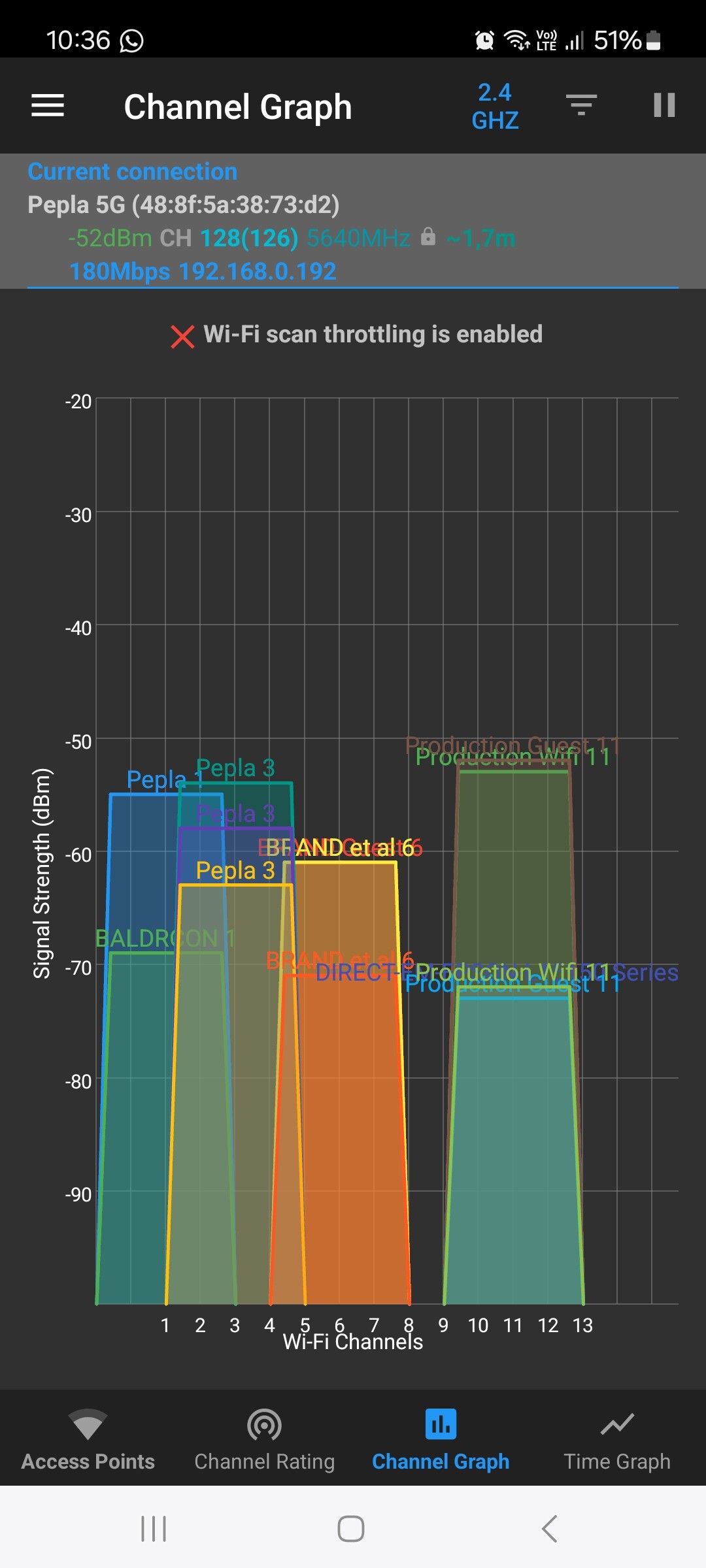
I’ve also attached a screenshot of the channels for 2.4Ghz and 5Ghz.
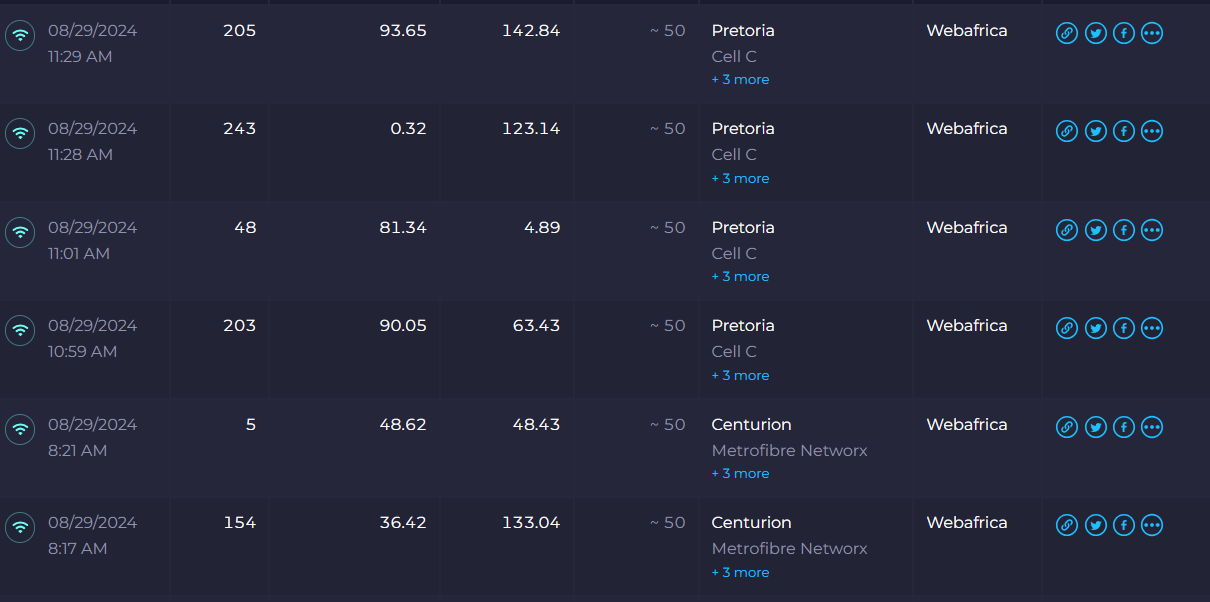
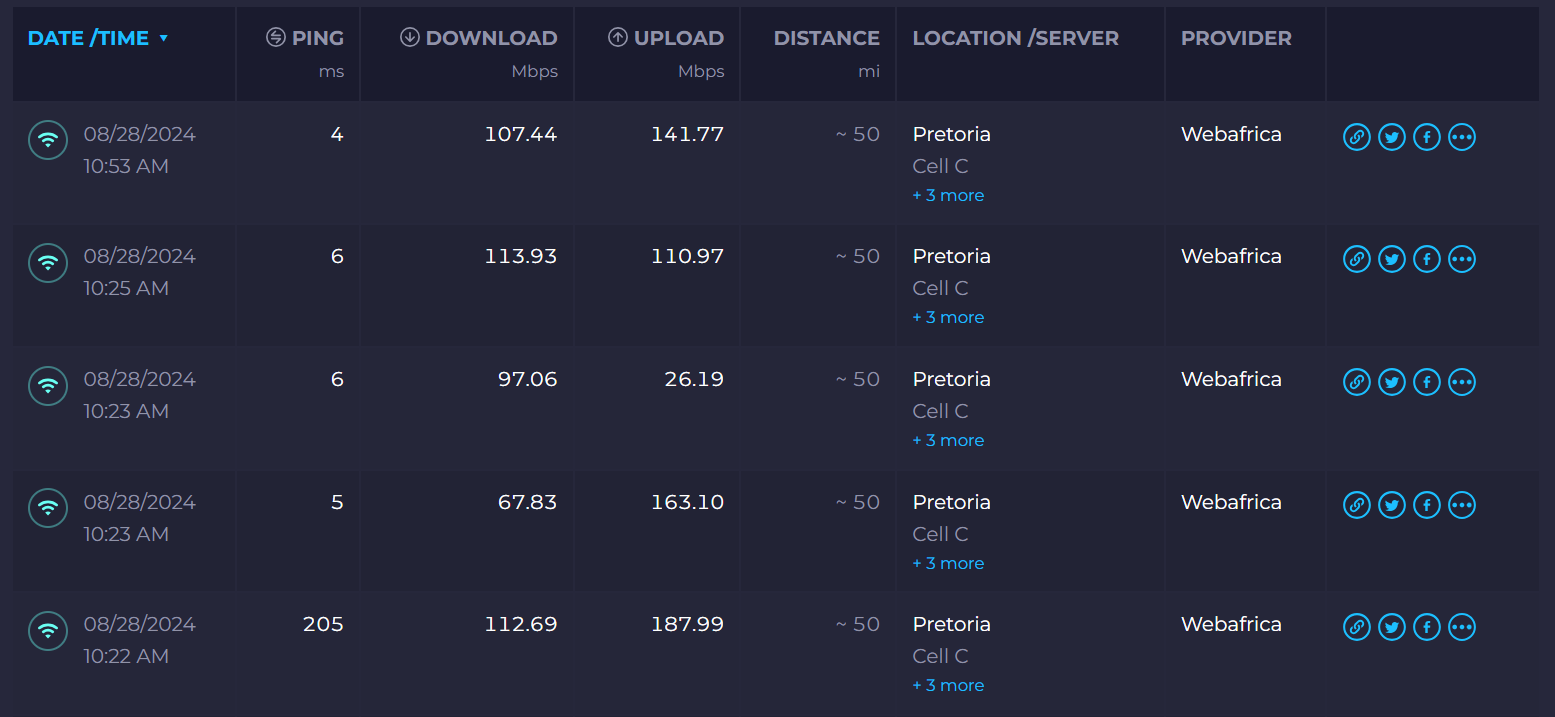
Also added speedtest. Which seems to be okay, but user still experience a “slow/sluggish” connection when connected to the WiFi.

Would it be better then to replace the hAP ac2 with theRB5009UG+S+IN that gigabyte09 suggested?

# aug/12/2024 16:11:41 by RouterOS 6.49.17
# software id = Y22R-I3EW
#
# model = RBD52G-5HacD2HnD
# serial number = Serial Number
/caps-man channel
add band=5ghz-n/ac control-channel-width=20mhz extension-channel=XX name=5Ghz \
    reselect-interval=1h save-selected=no skip-dfs-channels=no tx-power=20
add band=2ghz-b/g/n control-channel-width=20mhz extension-channel=disabled \
    frequency=2412 name=2412 reselect-interval=1h secondary-frequency=\
    disabled tx-power=14
add band=2ghz-b/g/n control-channel-width=20mhz extension-channel=disabled \
    frequency=2437 name=2437 reselect-interval=1h secondary-frequency=\
    disabled tx-power=14
add band=2ghz-b/g/n control-channel-width=20mhz extension-channel=disabled \
    frequency=2462 name=2462 reselect-interval=1h secondary-frequency=\
    disabled tx-power=14
add band=2ghz-b/g/n control-channel-width=20mhz extension-channel=disabled \
    name=2.4Ghz reselect-interval=1h save-selected=no tx-power=14
/interface bridge
add arp=proxy-arp name=bridge-lan
/interface ethernet
set [ find default-name=ether1 ] name=ether1-WAN
set [ find default-name=ether5 ] l2mtu=1596 mac-address=48:8F:5A:2C:2F:08 \
    name=ether2-mtnlte
set [ find default-name=ether4 ] l2mtu=1596 mac-address=48:8F:5A:2C:2F:09 \
    name=ether3-LAN
set [ find default-name=ether3 ] l2mtu=1596 mac-address=48:8F:5A:2C:2F:0A \
    name=ether4-LAN
set [ find default-name=ether2 ] l2mtu=1596 mac-address=48:8F:5A:2C:2F:0B \
    name=ether5
/interface pppoe-client
add add-default-route=yes disabled=no interface=ether1-WAN name="ISP Name" \
    password=***** user=user@user
/interface l2tp-server
add name=l2tp-in1 user=vpn
add name=l2tp-in2-user1 user=user1
add name=l2tp-in3-user2 user=user2
/interface wireless
set [ find default-name=wlan1 ] ssid=MikroTik
set [ find default-name=wlan2 ] ssid=MikroTik
/caps-man datapath
add bridge=bridge-lan local-forwarding=yes name=Internet
/caps-man security
add authentication-types=wpa2-psk encryption=aes-ccm group-encryption=aes-ccm \
    group-key-update=40m name="WiFi Security" passphrase=********
/caps-man configuration
add channel=5Ghz country="south africa" datapath=Internet datapath.bridge=\
    bridge-lan installation=indoor mode=ap name="Config 5G" rx-chains=0,1 \
    security="WiFi Security" ssid="Pepla 5G" tx-chains=0,1
add channel=2.4Ghz country="south africa" datapath=Internet datapath.bridge=\
    bridge-lan installation=indoor mode=ap name="Config 2.4Ghz" rx-chains=0,1 \
    security="WiFi Security" ssid=Pepla tx-chains=0,1
/interface ethernet switch port
set 0 default-vlan-id=1 vlan-mode=fallback
set 1 default-vlan-id=1 vlan-mode=fallback
set 2 default-vlan-id=1 vlan-mode=fallback
set 3 default-vlan-id=1 vlan-mode=fallback
set 5 default-vlan-id=1 vlan-mode=fallback
/interface list
add name=WAN
add name=LAN
/interface wireless security-profiles
set [ find default=yes ] supplicant-identity=MikroTik
/ip ipsec profile
set [ find default=yes ] enc-algorithm=aes-256,aes-128,3des
/ip ipsec proposal
set [ find default=yes ] auth-algorithms=sha256,sha1
/ip pool
add name=dhcp ranges=192.168.0.11-192.168.0.239
add name=vpn ranges=192.168.89.2-192.168.89.255
/ip dhcp-server
add address-pool=dhcp disabled=no interface=bridge-lan lease-time=4w name=\
    dhcp
/ppp profile
add change-tcp-mss=yes local-address=192.168.89.1 name=RAS remote-address=vpn \
    use-encryption=yes
/queue simple
add disabled=yes limit-at=100M/100M max-limit=100M/100M name=VPN target=\
    154.73.32.0/32
add disabled=yes limit-at=80M/80M max-limit=80M/80M name=Rest queue=\
    default/default target="" total-queue=default
/snmp community
set [ find default=yes ] addresses=154.73.32.1/32,154.73.32.2/32
/user group
set full policy="local,telnet,ssh,ftp,reboot,read,write,policy,test,winbox,pas\
    sword,web,sniff,sensitive,api,romon,dude,tikapp"
/caps-man access-list
add action=accept allow-signal-out-of-range=10s disabled=yes signal-range=\
    -70..120 ssid-regexp=""
add action=reject allow-signal-out-of-range=10s disabled=yes signal-range=\
    -120..-71 ssid-regexp=""
/caps-man manager
set ca-certificate=auto certificate=auto enabled=yes
/caps-man manager interface
set [ find default=yes ] forbid=yes
add disabled=no interface=bridge-lan
/caps-man provisioning
add action=create-dynamic-enabled hw-supported-modes=gn,b \
    master-configuration="Config 2.4Ghz" name-format=identity
add action=create-dynamic-enabled hw-supported-modes=ac,an \
    master-configuration="Config 5G" name-format=identity
/interface bridge port
add bridge=bridge-lan interface=ether3-LAN
add bridge=bridge-lan interface=ether4-LAN
add bridge=bridge-lan interface=ether5
/ip neighbor discovery-settings
set discover-interface-list=!dynamic
/interface l2tp-server server
set default-profile=RAS enabled=yes ipsec-secret="*********" \
    use-ipsec=yes
/interface list member
add list=WAN
add interface=bridge-lan list=LAN
/interface pptp-server server
set default-profile=RAS enabled=yes
/interface sstp-server server
set default-profile=RAS enabled=yes
/ip address
add address=192.168.0.1/24 interface=bridge-lan network=192.168.0.0
/ip cloud
set ddns-enabled=yes
/ip dhcp-client
add default-route-distance=255 disabled=no interface=ether2-mtnlte
/ip dhcp-server lease
add address=192.168.0.27 client-id=1:0:14:fd:19:21:4d mac-address=\
    00:14:FD:19:21:4D server=dhcp
/ip dhcp-server network
add address=192.168.0.0/24 dns-server=192.168.0.1 gateway=192.168.0.1 \
    ntp-server=154.73.32.1,154.73.32.2
/ip dns
set allow-remote-requests=yes servers=\
    8.8.8.8,154.73.32.2,2c0f:f720::1,2c0f:f720::2
/ip firewall address-list
add address=154.73.32.0/22 list=iewc-ip4s
add address=165.16.200.0/21 list=iewc-ip4s
add address=154.73.34.4/30 list=iewc-voice
add address=154.73.34.8/30 list=iewc-voice
add address=197.96.209.0/24 list=iewc-voice
add address=154.73.35.0/24 list=iewc-voice
/ip firewall filter
add action=accept chain=input connection-state=established,related
add action=accept chain=input protocol=ipsec-esp
add action=accept chain=input comment="allow IPsec NAT" dst-port=4500 \
    protocol=udp
add action=accept chain=input comment="allow IKE" dst-port=500 protocol=udp
add action=accept chain=input comment="allow l2tp" dst-port=1701 protocol=udp
add action=accept chain=input comment="allow pptp" dst-port=1723 protocol=tcp
add action=accept chain=input comment="allow sstp" dst-port=443 protocol=tcp
add action=drop chain=input connection-state=invalid
add action=accept chain=input dst-port=22,2000,8291 protocol=tcp \
    src-address-list=iewc-ip4s tcp-flags=syn,!fin,!rst,!ack
add action=accept chain=input icmp-options=8:0-255 protocol=icmp
add action=accept chain=input dst-port=53,123 in-interface=bridge-lan \
    protocol=udp
add action=accept chain=input dst-port=22,8291 in-interface=bridge-lan \
    protocol=tcp tcp-flags=syn,!fin,!rst,!ack
add action=accept chain=forward dst-port=19001 protocol=tcp
add action=drop chain=input
/ip firewall mangle
add action=accept chain=prerouting dst-address=192.168.0.0/24
/ip firewall nat
add action=masquerade chain=srcnat disabled=yes log=yes log-prefix=MARK \
    out-interface=bridge-lan
add action=masquerade chain=srcnat
/ip firewall service-port
set tftp disabled=yes
set h323 disabled=yes
set sip disabled=yes
set udplite disabled=yes
set dccp disabled=yes
set sctp disabled=yes
/ip route
add distance=10 gateway=192.168.0.10
add comment=briisk-dev-collections.database.windows.net disabled=yes \
    distance=1 dst-address=102.133.120.2/32 gateway=*B
add comment=2_briisk-dev-collections.database.windows.net disabled=yes \
    distance=1 dst-address=102.133.152.32/32 gateway=*B
add comment=lecroc.dedicated.co.za disabled=yes distance=1 dst-address=\
    165.73.81.148/32 gateway=*A
add comment=lecroc.dedicated.co.za disabled=yes distance=1 dst-address=\
    165.73.81.148/32 gateway=*B
add comment=pepladev2.dedicated.co.za disabled=yes distance=1 dst-address=\
    197.242.150.92/32 gateway=*A
add comment=pepladev2.dedicated.co.za disabled=yes distance=1 dst-address=\
    197.242.150.92/32 gateway=*B
add comment=stimulusmaksima.dedicated.co.za disabled=yes distance=1 \
    dst-address=197.242.159.114/32 gateway=*A
add comment=stimulusmaksima.dedicated.co.za disabled=yes distance=1 \
    dst-address=197.242.159.114/32 gateway=*B
/ppp secret
add name=vpn password="*****"
add name=user1 password=********
add name=user2 password=******
add name=user3 password=********* profile=RAS
/radius
add address=154.73.34.18 secret=eevohch5mie0ou1P service=login
add address=154.73.34.19 secret=eevohch5mie0ou1P service=login
add address=154.73.34.18 secret=eevohch5mie0ou1P service=login
add address=154.73.34.19 secret=eevohch5mie0ou1P service=login
/system clock
set time-zone-name=Africa/Johannesburg
/system identity
set name=iewc-cpe-pepla
/system ntp client
set enabled=yes server-dns-names=kerberos.iewc.co.za,cerberus.iewc.co.za
/system scheduler
add interval=1d name=backup_daily on-event=backup_email policy=\
    ftp,reboot,read,write,policy,test,password,sniff,sensitive,romon \
    start-date=may/18/2018 start-time=00:30:00
add interval=1w name=auto_upgrade on-event="/system package update\r\
    \ncheck-for-updates once\r\
    \n:delay 30s\r\
    \n:if ([ get status ] = \"New version is available\") do { install }" \
    policy=ftp,reboot,read,write,policy,test,password,sniff,sensitive,romon \
    start-date=mar/01/2023 start-time=00:30:00
/system script
add dont-require-permissions=no name=backup_email owner=admin policy=\
    ftp,reboot,read,write,policy,test,password,sniff,sensitive source="/export\
    \_file=email;\r\
    \n/tool e-mail send to=\"mikrotik@uls.co.za\" subject=(\"[CPE BACKUP] \".[\
    /system identity get name]) body=(\"Note that this is an export.rsc file a\
    nd not a backup.backup file for mikrotik.\") file=email.rsc;\r\
    \n:log info \"Export email sent.\";"
/tool e-mail
set address=mail.iewc.co.za from=mikrotik@uls.co.za start-tls=yes
/user aaa
set use-radius=yes
Speedtest.png
5Ghz network.jpg
2.4Ghz network.jpg

If a wired conneciton is fast, then it is not related to the routing part of the router.
I also notice that the 2.4GHz radio is broadcasting on channels 1, 3 and 6. In an ideal world (funny in the 2.4GHz context) you would only use channels 1, 6 and 11. Might want to configure frequencies 2412, 2437 and 2462.

Some concerns:

  • the firewall is modded. And I think it is missing some rules (definitely on the forward chain). Is this a public Internet facing device?
  • sure you want to have so many services publically available (like providing DNS and NTP to the world, assuming it is publically available)?
  • I notice some asteriks in the config, is this some legacy that hasn’t been properly removed?
  • why do you have IPv6 DNS servers configured while you only use IPv4?
  • I believe so, I know they use VPN accounts for users to remotely connect to the Mikrotik Router located in the office to obtain the Company Public IP. This IP is whitelisted at another company they do work for. However, I've tried creating an account, but when I create the VPN on my Windows machine, it fails. I haven't google'd that much yet with regards to this, but this is one of things I also need to look into. (I hope I've addressed your questions about internet facing device and DNS, NTP?)
  • I created the asterisks instead of the sensitive data that was located there :slight_smile:
  • I was literally too afraid to delete anything and didn't go looking in all places for configs that I don't use. This router was setup before my time starting here.

You said that sometimes wifi is feeling great and sometimes is sluggish.

How many clients are connected to the AP when wifi is “sluggish” ?

Maybe there is too many clients on one AP…

Varying wifi performance is normally not visible in the config settings.
Wifi is a shared medium, you are influenced by other devices.

These very short PING delays in those tests. Over wifi ?
Long PING times do indeed make the connection feel slow, very slow, even if the rate is OK.

Beware that …
-Mikrotik does not activate WMM if not set in config
-Mikrotik does not assign WMM priorities to traffic (video, voice, …) unless extra FW mangle rules are added. DSCP must be converted to priority in local RouterOS.
-For all but lowest WMM priority Mikrotik does not do AMPDU aggregation by default
-WMM priority takes the wifi-ether access much faster than the regular (shorter wait time for transmission attempt)
-Regular wifi will not get a fair share of air-time if WMM priority is around

For the 2.4GHz, avoid the 802.11b setting. “b” gives 1Mbps beacon speed (30 SSID/AP at 1Mbps overhead will fill all the available air-time just with the beacons)
802.11b in one AP, forces other reachable AP’s to also work with 1Mbps. There are 1Mbps connections in your sample.

Mikrotik does enable WMM by default on 802.11n/ac.

wmm-support (disabled | enabled | required; Default: disabled) Specifies whether to enable WMM. Only applies to bands B and G. Other bands will have it enabled regardless of this setting

Yes it is enabled, but out-of-the-box does NOTHING as WMM priority action.

Unless you convert DSCP to local RouterOS priority, or do set local RouterOS priority.
(That is the WMM setting I did refer to. (Sorry to be confusing))
Priority can be set as “dscp high 3 bits” , or it can be set in VLAN or in bridge priority setting

Using DSCP for priority is a newer option in the wifi(wave2) drivers, not in the WLAN drivers.
You need something like this: http://forum.mikrotik.com/t/new-priority-from-dscp-high-3-bits/102223/1

https://help.mikrotik.com/docs/display/ROS/WMM+and+VLAN+priority

I just wanted to correct this statement.

At the moment, we have 28 devices connected to the WiFi, Be that via 2.4Ghz or 5Ghz. My laptop would also jump between 2 AP’s. Hallway Ap & Blue AP. See attached Floor Layout of the Office. Tuesday’s and Thursday’s have the least amount of people in the office. But the WiFi still feels slow, as if the internet feels slow. Reponse time of websites are long, takes a few seconds longer for the sites to open compared to being on cable. I even have a space AP that I could install, however, I wasn’t sure if this might help and where to put it.

I was thinking of move the Blue AP out from behind the corner, behind the door it’s currently at and move it to the middle of the Blue Tables.

What is the maximum amount of Client’s an AP can handle? At the moment the Orange_Green AP carries about 10 clients.

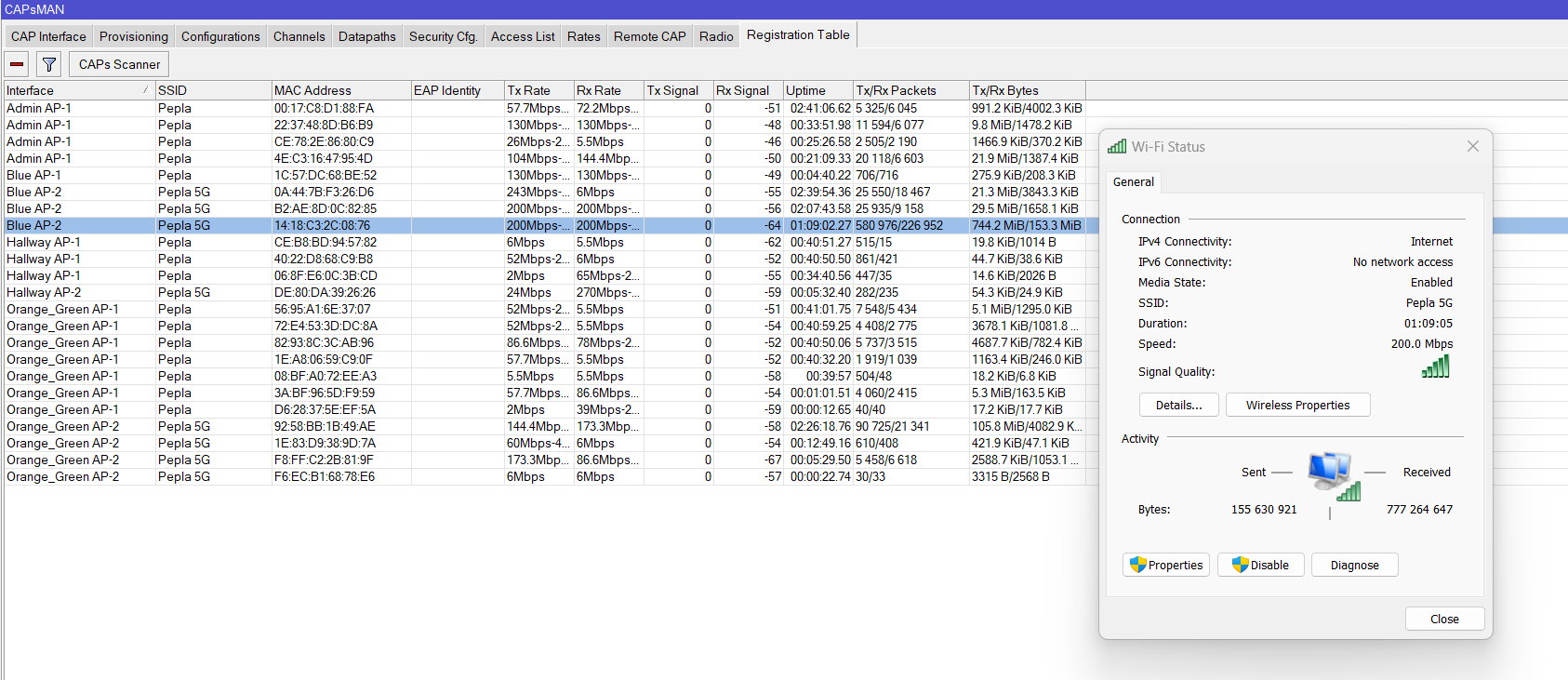
I’m also connected to the Blue AP at the moment. But is does then to jump to the Hallway AP when I move around the office with my laptop and stays connected to it. Rx Signal would be -70 when connected to Hallway AP. When connected to Blue AP, my signal strength is -63. See attached.

Thanks again for the helpful insights and especially to you gigabyte091, for contributing so much to this “project” of mine :slight_smile:
Connected to Blue AP.png
Floor Layout.pdf (737 KB)

Hi there bpwl. Thank you so much for contributing to this request for assistance. I really do appreciate that some of your stature would share your knowledge with us.

To answer your question, yes. those short pings where when I was connected to the WiFi. I’ve attached a speedtest I did today as well. You’ll notice quite a difference between some of the tests.

Thanks for the advice. I’m not entirely sure where to check this, but let me follow your links and if not google on where to change these settings.
Speedtest2908.png

Thanks for the correction. You’re absolutly right, it is enabled but AFAIK it does not bring the expected wifi priority (short intertransmission delay) . That is something else.

I do have questions on WMM and CAPsMAN. Where to set the priority in the case of CAPsMAN? On the controller , or on the CAP with the wifi interface? Different answer for central delivery and local forwarding could be expected. And if set in the CAPsMAN controller, is that priority then transported over the CAPWAP style (RFC wording) tunnel or not. Is there a field to store that information? In a VLAN there is one at least. Maybe to be checked with Torch or Sniffer to see if the priority is still there.

I usually get a remark on Mikrotik performance as “MT is not performing well in crowded environments”. WMM priority by others could be to blame. Or is someone or something setting “video” WMM priority on all it’s packets, just to perform better in crowded area’s. Or is it because video is just in the air? TEAM meeting, security camera, “click and share” wifi link from laptop to projector in meeting room, Chromecast, Miracast, etc etc.
Looking into the timing of the sluggish connections, might give a clue on the source of interference.

10 clients on an AP like hAP ac2 is no problem at all. All the clients around , as checked with “Snooper” have to be counted however. “Scan” only shows the AP’s emitting beacons. All transmitters compete for air-time in the channel, AP’s and clients equally well. Clients that see the AP, but not the other clients will create destructive interference while also talking to the AP, which is listening to another client. ‘RTS/CTS’ and ‘RTS to self’ might be considered then.

Now as you’ve mentioned it. Adding packet priorities for traffic on WiFI CAPsMAN (as there is local forwarding only) must be a PITA! This has to be done by hand and IMHO makes capsman completely obsolete. With wifi-qcom-ac you already need to configure vlans manually on caps, firewall mangle rules for WMM manually as well. CAPsMAN is less a manager, more a little tool for first wifi interface provisioning. That’s it. Mikrotik should rename it to RadioMan or something. Would fit better.