I have a CCR2116 at a branch location, with a private subnet behind NAT serving approximately 50 PCs, and one public IP provided by my ISP.
The ISP offers 1.2 Gbps download and 400 Mbps upload — a standard business connection with no SLA.
I regularly test internet speeds and consistently get close to what’s contracted.
On AWS, I have a Windows EC2 VM running as a NAT instance — similar architecture — with a private IP behind a Mikrotik CHR.
The VM only has a private IP, Windows Firewall is deactivated (this is just for testing), and the internet speed is excellent — around 3 Gbps download/upload — much faster than the branch.
My goal is to host an SMB share on the AWS VM and have one or more Windows PCs at the office access it.
Here are my observations:
If I copy a 1 GB file between two PCs within the branch LAN, I get 102 MB/sec — as expected, given the 1 Gbps LAN and NICs.
If I copy a similar file between two VMs within the same AWS VPC, I get 250 MB/sec or more — also expected, as the EC2 VNICs are rated at 5 Gbps.
However, between the AWS VM and the office (in either direction), speeds are terrible — anywhere from 500 KB/sec to 14 MB/sec (which is not even 25 Mbps).
Occasionally, after restarting the AWS CHR, speeds briefly jump to 35 MB/sec (~400 Mbps), but then drop again.
Here’s what I’ve tried so far:
Different VPN setups: IPsec, IPIP (encrypted), and WireGuard — WireGuard performed the worst.
Upgrading the AWS CHR to a larger instance (C6i with 32 GB RAM and 4 vCPUs).
Tuning MTU and TCP window size on Windows.
Tweaking queue settings on both the CHR and the CCR2116.
Nothing has made a consistent improvement. I understand SMB is chatty and sensitive to latency, but the performance drop seems excessive.
I’m out of ideas at this point.
I’d appreciate any advice — what else should I try? Or how can I properly check whether it’s really SMB that’s the issue, or something else in my setup that needs attention?
It depends, some VPN types have a setting for it. eg. GRE, also l2tp server profiles
Otherwise you would do it in a mangle firewall rule. (You also get more control here)
You can also choose clamp to pmtu, (be careful with this, some vpns eg. Wireguard can hide the underlying MTU)
You may need to clamp based on source or destination IP addresses rather than interface.
(Probably mostly when using an ipsec type tunnel)
I get near max speeds of wireguard tunnel it self.
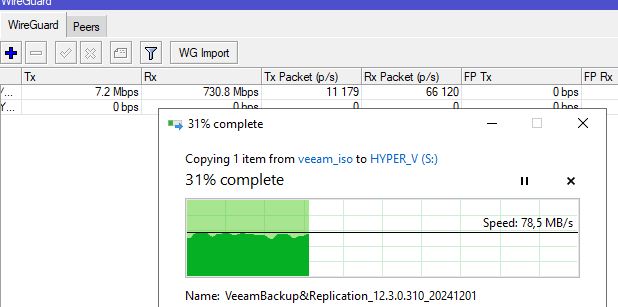
Here is example copy between CCR2004(server 2025) and HAP AX3(server 2019) using wireguard and 1350mtu. I get about 750mbit TCP on bandwidth test thru wireguard tunnel so thats near max SMB speeds.
I work from home, and if I am doing something that needs to access the file servers, it is much better to RDP to a VM at work over VPN and let the SMB access be local between the Win Pro PC (vm or physical) at work and the file servers at work.
RDP runs well over a relatively slow link (10-20 Mbps) for most desktop applications. Not great for audio/video (e.g. watching youtube videos), but fine for things that aren’t constantly modifying the screen, like is the case for most business applications.
What types of files are being accessed and what type of application is being used?
We have an app that must run locally, on Windows 10, and uses a mapped drive from a Windows Server.
This local server is being phased out.
That app itself does not need much bandwidth, but ocasionaly, the users need to copy big video files (around 1 Gb each) from and to the fileserver, via Windows Explorer.
With this current transfer rates, it would be painful for the users.
About the ping:
Pinging 192.10.0.97 with 32 bytes of data:
Reply from 192.10.0.97: bytes=32 time=37ms TTL=126
Reply from 192.10.0.97: bytes=32 time=41ms TTL=126
Reply from 192.10.0.97: bytes=32 time=52ms TTL=126
Reply from 192.10.0.97: bytes=32 time=40ms TTL=126
If you want to determine the effects of latency locally, you can use tc netem on a linux box with two ethernet adapters and place it between the PC and the SMB fileserver.
Then you can adjust the latency via software.
You can also test how VPN affects “throughput” independently from the latency due to speed of light in a WAN.
There are better protocols to transfer large files over high latency links than SMB. Why does the user have to be able to do this with windows explorer?
How long is it currently taking to transfer a single 1 GB file?
Let’s assume that the video files are already compressed and won’t compress much more with zip/7zip/gzip.
Why would anyone run wireguard inside network between servers?
Edit:I think your pings are causing the problems, I have 3ms between servers.
SMB over QUIC would solve your problems if you have new server 2025 or you need to play with tcp window sizes in windows if I remeber correctly to adjust for latency.
I can install 2025, no problem, AWS has it, and I have no problem on running the shares withouth VPN, on QUIc.
Do you have experience with it? what sort of performance can I expect with it?