SMTP Outbound port 25

Hi,
I´m a newbe and try to get my internal SMTP server working
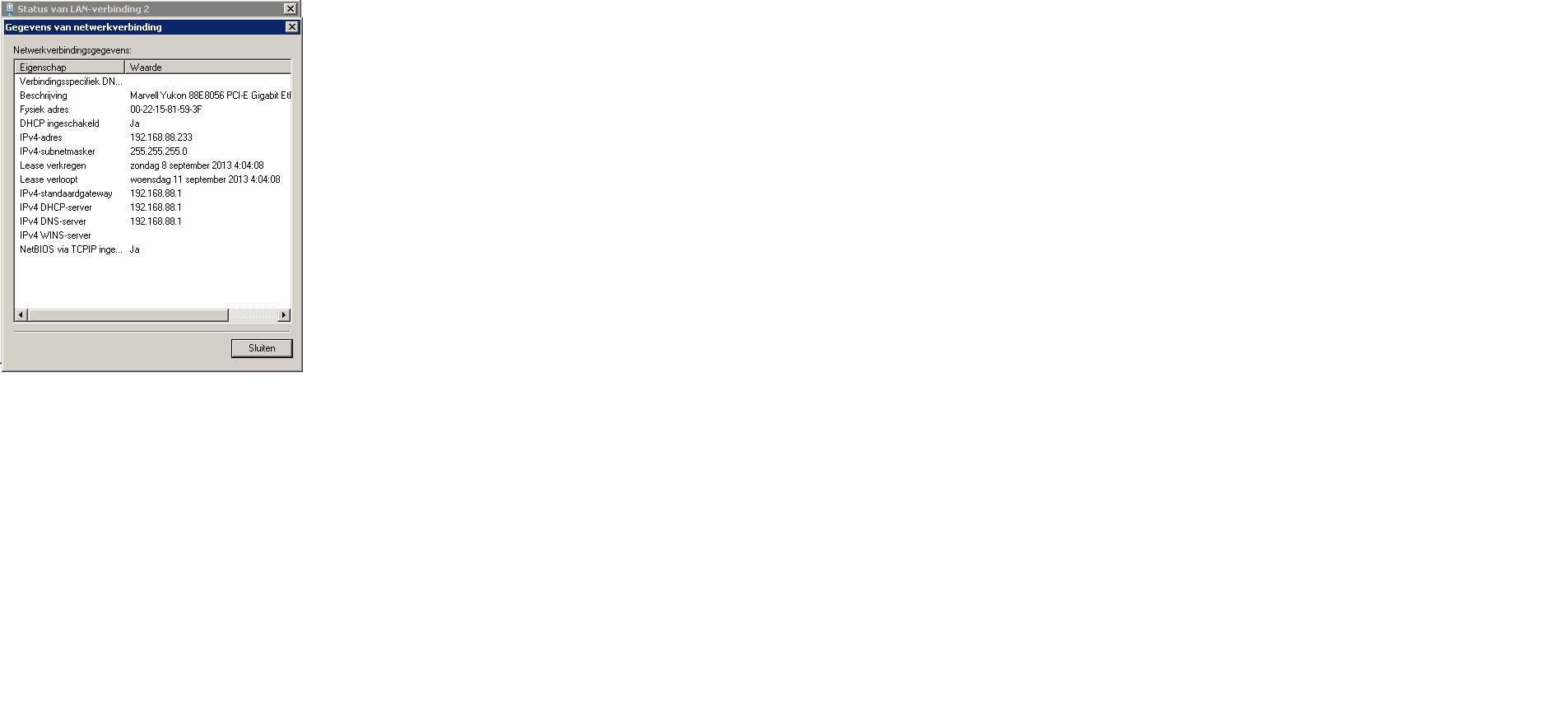
The server has an nat address 192.168.88.233 and use port 25 for incoming and outgoing email
In my router OS I defined the rules below, so incoming E-mail is received on my server.
Outgoing email is not working, I think I need to configure something in the firewall , but I don´t know what.

Nat rule: chain=dstnat, protocol=tcp, dst.port=25, action=dst-nat, to address=192.168.88.233, to ports=25

Faizal

Remove all your current rules from Firewall and NAT and use these. Study them to get an idea of what it is doing. Change ether-LAN and ether-WAN to match yours (probably ether2 ~ ether1).
#Router and internal network protection, internal servers, LAN is friendly
/ip firewall filter
add chain=input action=drop connection-state=invalid comment=“Disallow weird packets”
add chain=input action=accept connection-state=new in-interface=ether-LAN comment=“Allow LAN access to the router itself”
add chain=input action=accept connection-state=established comment=" ^^ that originated from LAN"
add chain=input action=accept connection-state=related comment=" ^^ that originated from LAN"
add chain=input action=accept protocol=icmp comment=“Allow ping ICMP from anywhere”
add chain=input action=drop comment=“Disallow anything from anywhere on any interface”
add chain=forward action=drop connection-state=invalid comment=“Disallow weird packets”
add chain=forward action=accept connection-state=new in-interface=ether-LAN comment=“Allow LAN access to move through the router”
add chain=forward action=accept connection-state=established comment=" ^^ that originated from LAN"
add chain=forward action=accept connection-state=related comment=" ^^ that originated from LAN"
add chain=forward action=accept protocol=tcp dst-port=25 comment=“Add a filter exception for port mapped server”
add chain=forward action=drop comment=“Disallow anything from anywhere on any interface”

Port Forward (map) to an internal LAN server.

/ip firewall nat add chain=srcnat action=masquerade out-interface=ether-WAN comment=“Turn on masquerading”
/ip firewall nat add chain=dstnat action=dst-nat protocol=tcp to-address=192.168.88.233 dst-port=25 to-port=25 comment=“Create an incoming port map rule”

In addition to the DST NAT rule you need to allow the traffic to 192.168.88.233 port 25 in the forwarding chain. Your mail server also typically needs to be using the RouterBoard as its default gateway and the forward chain needs to be allowing NEW outbound connections and RELATED & ESTABLISHED traffic inbound.

pcunit, thanks, I tried your advice but no success.
The drop on line 14 closed my internet connection from my pc, so I disabled that.
Email from internet are receiving on my exchange server at 192.168.88.233, but outgoing mail is not working
see my /export

MMM MMM KKK TTTTTTTTTTT KKK
MMMM MMMM KKK TTTTTTTTTTT KKK
MMM MMMM MMM III KKK KKK RRRRRR OOOOOO TTT III KKK KKK
MMM MM MMM III KKKKK RRR RRR OOO OOO TTT III KKKKK
MMM MMM III KKK KKK RRRRRR OOO OOO TTT III KKK KKK
MMM MMM III KKK KKK RRR RRR OOOOOO TTT III KKK KKK

MikroTik RouterOS 6.2 (c) 1999-2013 http://www.mikrotik.com/

[?] Gives the list of available commands
command [?] Gives help on the command and list of arguments

[Tab] Completes the command/word. If the input is ambigous,
a second [Tab] gives possible options

/ Move up to base level
.. Move up one level
/command Use command at the base level
[admin@MikroTik] > /export

jan/14/1970 04:31:36 by RouterOS 6.2

software id = 2K30-L2JH

/interface bridge
add admin-mac=D4:CA:6D:A1:04:84 auto-mac=no l2mtu=1598 name=bridge-local
protocol-mode=rstp
/interface ethernet
set 0 name=ether1-gateway
set 5 name=ether6-master-local
set 6 master-port=ether6-master-local name=ether7-slave-local
set 7 master-port=ether6-master-local name=ether8-slave-local
set 8 master-port=ether6-master-local name=ether9-slave-local
set 9 master-port=ether6-master-local name=ether10-slave-local
set 10 name=sfp1-gateway
/ip neighbor discovery
set ether1-gateway discover=no
set sfp1-gateway discover=no
/ip hotspot user profile
set [ find default=yes ] idle-timeout=none keepalive-timeout=2m
mac-cookie-timeout=3d
/ip pool
add name=default-dhcp ranges=192.168.88.10-192.168.88.254
add name=dhcp_pool1 ranges=192.168.88.2-192.168.88.126
add name=dhcp_pool2 ranges=192.168.88.2-192.168.88.254
add name=dhcp_pool3 ranges=192.168.88.2-192.168.88.254
/ip dhcp-server
add address-pool=dhcp_pool3 disabled=no interface=bridge-local name=dhcp1
/port
set 0 name=serial0
/system logging action
set 0 memory-lines=100
set 1 disk-lines-per-file=100
/interface bridge port
add bridge=bridge-local interface=ether2
add bridge=bridge-local interface=ether3
add bridge=bridge-local interface=ether4
add bridge=bridge-local interface=ether5
add bridge=bridge-local interface=ether6-master-local
/ip address
add address=192.168.88.1/24 comment=“default configuration” interface=
bridge-local network=192.168.88.0
add address=213.125.82.157/28 comment=ziggo interface=ether1-gateway network=
213.125.82.144
/ip dhcp-client
add comment=“default configuration” dhcp-options=hostname,clientid disabled=no
interface=sfp1-gateway
/ip dhcp-server lease
add address=192.168.88.247 client-id=1:0:9:34:28:c4:b3 mac-address=
00:09:34:28:C4:B3 server=dhcp1
add address=192.168.88.233 client-id=1:0:22:15:81:59:3f mac-address=
00:22:15:81:59:3F server=dhcp1
/ip dhcp-server network
add address=192.168.88.0/25 gateway=192.168.88.1
add address=192.168.88.0/24 comment=“default configuration” dns-server=
192.168.88.1 gateway=192.168.88.1
/ip dns
set allow-remote-requests=yes servers=212.54.35.25,212.54.40.25
/ip dns static
add address=192.168.88.1 name=router
add address=192.168.88.225 name=test.itwarriors.nl
add address=192.168.88.247 name=dreambox.itwarriors.nl
add address=192.168.88.233 name=master.itwarriors.nl
/ip firewall filter
add chain=input comment=“Open firewall voor proxy” dst-port=8080 protocol=tcp
add action=drop chain=input comment=“Disallow weird packets” connection-state=
invalid
add chain=input comment=“Allow LAN access to the router itself”
connection-state=new in-interface=bridge-local
add chain=input comment=“that originated from LAN” connection-state=established
add chain=input comment=“that originated from LAN” connection-state=related
add chain=input comment=“Allow ping ICMP from anywhere” protocol=icmp
add action=drop chain=input comment=
“Disallow anything from anywhere on any interface”
add action=drop chain=forward comment=“Disallow weird packets”
connection-state=invalid
add chain=forward comment=“Allow LAN access to move through the router”
connection-state=new in-interface=bridge-local
add chain=forward comment=“that originated from LAN” connection-state=
established
add chain=forward comment=“that originated from LAN” connection-state=related
add chain=forward comment=“Add a filter exception for port mapped server”
dst-port=25 protocol=tcp
add action=drop chain=forward comment=
“Disallow anything from anywhere on any interface” disabled=yes
/ip firewall nat
add action=masquerade chain=srcnat comment=“Turn on masquerading”
out-interface=ether1-gateway
add action=redirect chain=dstnat dst-address=213.125.82.157 dst-port=80
in-interface=ether1-gateway protocol=tcp to-ports=8080
add action=dst-nat chain=dstnat dst-port=8000 protocol=tcp to-addresses=
192.168.88.233 to-ports=8000
add action=dst-nat chain=dstnat comment=“Create an incoming port map rule”
dst-port=25 protocol=tcp to-addresses=192.168.88.233 to-ports=25
/ip proxy
set enabled=yes parent-proxy=0.0.0.0
/ip proxy access
add dst-host=test.itwarriors.nl dst-port=80
add dst-host=master.itwarriors.nl dst-port=80
add action=deny
/ip route
add distance=1 gateway=213.125.82.145
/lcd interface
set sfp1-gateway interface=sfp1-gateway
set ether1-gateway interface=ether1-gateway
set ether2 interface=ether2
set ether3 interface=ether3
set ether4 interface=ether4
set ether5 interface=ether5
set ether6-master-local interface=ether6-master-local
set ether7-slave-local interface=ether7-slave-local
set ether8-slave-local interface=ether8-slave-local
set ether9-slave-local interface=ether9-slave-local
set ether10-slave-local interface=ether10-slave-local
/system ntp client
set enabled=yes
/tool mac-server
set [ find default=yes ] disabled=yes
add interface=ether2
add interface=ether3
add interface=ether4
add interface=ether5
add interface=ether6-master-local
add interface=ether7-slave-local
add interface=ether8-slave-local
add interface=ether9-slave-local
add interface=bridge-local
/tool mac-server mac-winbox
set [ find default=yes ] disabled=yes
add interface=ether2
add interface=ether3
add interface=ether4
add interface=ether5
add interface=ether6-master-local
add interface=ether7-slave-local
add interface=ether8-slave-local
add interface=ether9-slave-local
add interface=bridge-local
[admin@MikroTik] >

It is because you did not change line 4 and 10 to in-interface=bridge-local … line 17 needs to be out-interface=ether1-gateway

you wrote - It is because you did not change line 4 and 10 to in-interface=bridge-local … line 17 needs to be out-interface=ether1-gateway
But all these settings was already done as you wrote, but still outgoing mail through port 25 from 192.168.88.233 is not working.

Does outbound email on port 25 work if not from the router? I use telnet to check the connection. From a computer:

telnet gmail-smtp-in.l.google.com 25

You should get a “220 mx.google.com ESMTP blahblahblah” message. If it doesn’t make the connection, your ISP might be blocking the connection to any email server but theirs.

I can do this from behind my router with no special firewall rules. HOWEVER, I had to contact my ISP (Cox Communications) first and have them open port 25 for my static public ips. It is a spam prevention measure they have implemented.

I tried telnet (is in dutch, it says no connection possible to port 25)
If I connect the server utp cable to my old router/modem (no firewall), mail outbound and inbound works.

C:\Users\Administrator>telnet gmail-smtp-in.l.google.com 25
Er wordt verbinding gemaakt met gmail-smtp-in.l.google.com…Kan geen verbinding
met de host maken, op poort 25: Het maken van de verbinding is mislukt

My email server required no special firewall rules in my router to send port 25 email (outbound). The only rule I needed was the dstnat rule you used in your first post, and that was only for receiving (inbound) email.

How do you have your srcnat/masquerade rules set on the router?

Are you certain the network settings on your email server are correct? I would check them again, especially the gateway.

edit: I had my email server set with a static ip. I see yours is issued by dhcp. I just found your masquerade rule in your post above. It looks good also. ??

My RouterOS (Mikrotik) has IP 192.168.88.1
If I connect the UTP cable of my server to the modem of my provider email outbound and inbound works fine
If I connect the UTP cable of the server to my Mikrotik router then only incoming email works, outbound doesn´t
DHCP is on at my server and made static in the Mikrotik router
masquerade rule: chain=srcnat, out.interface=ether1-gateway, action=masquerade
server.jpg

You should either supply you wan IP as dst-address or in-interface pointing your wan interface on your dst-nat rule for port 25.
Now all your traffic is hit, both in and outgoing. But only incoming should be translated
Good eye, Rudios! I missed that altogether. I use my public ip as the dst-address.

dst-address=wan address did the job, it works now!

Thanks a lot all for your help!