Sofware VLAN/Bridge on RuterOS explained.

A “vlan interface” can be seen as a virtual switch/bridge port which untags frames as it receives them from the bridge and tags them as it sends them to the bridge. So it is necessary for L3 access to its respective VLAN in both the “old school” and “new school” approach.

However, in the “old school” approach, there was no way to control which ports of a bridge can be used for ingress and egress of particular VLAN, so if you wanted to do that, you needed to use one bridge per VLAN, attach one vlan interface to each Ethernet interface on which that VLAN should be permitted to egress and ingress, and bridge the tagless sides of the vlan interfaces. With the “new school”, you only need vlan interface for the L3 access to the VLAN; membership of Ethernet ports of the same bridge in individual VLANs can be controlled using vlan filtering.

OK, I guess this explains why I need a “vlan interface” and why I don’t add it to bridge ports.

Any ideas as to why inbound internet packets are lost after de-NAT?

Config on box-1 seems mostly fine (perhaps set vlan-filtering=yes on massive-bridge). Although the more usual way would be to set vlan-mode=yes vlan-id=50 on guest-wlan and have guest-wlan as tagged member of massive-bridge (along with ether1 as you already have it)…

Config on box-2 is all messed up. The “new school” way would be something like this:

/interface bridge port
add bridge=bridge interface=ether1
#and all other LAN ports
/interface bridge vlan
add bridge=bridge tagged=ether1,bridge vlan-ids=50
/interface vlan
add name=guest-vlan interface=bridge vlan-id=50
/interface bridge
set [ find name=bridge ] vlan-filtering=yes

All guest-vlan IP config (router’s address, DHCP server, …) goes on guest-vlan interface.


As to the guest internet access … some NAT or firewall filter rule might ve misplaced. If you post that part of config we can have a look …

With box-1 I went with using bridge vlan filtering. I did start out with vlan-mode=use-tag vlan-id=50 on the virtual wireless interface but with bridge vlan filtering it’s ‘all in one place’.

On box-2 the configuration has eventually ended up pretty much how you just described! Understanding the “vlan interface” was the key issue for me and I really recommend looking through
Layer2 misconfiguration manual, especially the VLAN entries, as that solved and clarified some behaviours for me.

On the guest-internet issue, after some searching I came across a technique someone posted that used firewall mangle rules to set a ‘connection-mark’ and ‘routing-mark’ on the way out, so that the replies could be corrected routed/forwarded matching the same mark on arrival from the internet:

/ip firewall mangle
add action=mark-connection chain=prerouting new-connection-mark=Guest-mark passthrough=yes src-address=192.168.50.0/24
add action=mark-routing chain=prerouting connection-mark=Guest-mark new-routing-mark=Guest-mark passthrough=yes

/ip route
add distance=1 dst-address=192.168.50.0/24 gateway=Guest-vlan routing-mark=Guest-mark

I’m still not sure why the NAT/firewall engine can’t do this by itself but it does work!

Thanks for all your help and may other vlan pilgrims seek (quicker) enlightenment from this thread!

Generally RB has no problem routing/masquerading several LAN subnets to single WAN interface without any “manual” mangling … all that without fear that some traffic might get mis-routed. The code you posted seem overly complicated for the task you need to perform.

The only thing to care about, when having several LAN subnets, is proper separation between subnets and that’s easy to achieve using a few simple firewall rules.

My real-life example: I’ve got 3 subnets (LAN, guest and IPTV), all runing over same physical infrastructure but using different VLANs.

/interface vlan
add interface=bridge name=vlan-40 vlan-id=40
add interface=bridge name=vlan-41 vlan-id=41
add interface=bridge name=vlan-42 vlan-id=42
/interface list member
add interface=vlan-40 list=IPTV
add interface=vlan-41 list=guest
add interface=vlan-42 list=LAN
add interface=pppoe1-out list=WAN
/ip firewall filter
# The first one takes care about "return" traffic ... masqueraded on the way out
add action=accept chain=forward comment="defconf: accept established,related,untracked" connection-state=established,related,untracked
add action=accept chain=forward comment="allow connections from guest to WAN" in-interface-list=guest out-interface-list=WAN
add action=drop chain=forward comment="drop connections from guest to anywhere else" in-interface-list=guest
add action=accept chain=forward comment="allow connections from IPTV to WAN" in-interface-list=IPTV out-interface-list=WAN
add action=drop chain=forward comment="drop connections from IPTV to anywhere else" in-interface-list=IPTV
add action=drop chain=forward comment="drop connections from MGMT to WAN" in-interface-list=MGMT out-interface-list=WAN
/ip firewall nat
add action=masquerade chain=srcnat comment="defconf: masquerade" ipsec-policy=out,none out-interface-list=WAN

I wonder whether use of routing-marks is not the poison rather than the cure? If you assign routing-marks, you have to take realize that they override even dynamically created routes to connected networks which are always (unless you use vrf!) created in the default routing table (named “main”), so these routes are not used if a different routing-mark is assigned to the packet and any route matching the destination prefix and bearing that other routing mark exists. So you have to either assign routing-marks only to LAN->WAN packets, or to use routing rules to force the routing-mark assigned by mangle rule back to “main” for packets with dst-address of local LANs. If you didn’t use routing marks before, and if you have no IPsec policies there, the reason why the response packets get lost must be something else.

Mkx,
Why not
allow LAN to WAN
allow VLANX to WAN
drop all else

You seem to have to many separate drop rules LOL.

Was thinking about that but decided to do it like this in case I decide to allow some other cross connectivity. But yes, your suggestion has its merits.

Ahh yes, to handle that I make up different ip firewall address lists and add those to existing rules with the concept that players and devices may change but the rules are generally more static.
Like access to a shared printer on a different VLAN for example.

I have only just understood what you actually meant by this. The only point of the new VLAN filtering method is to specifically allow hardware switching on a bridge interface. Only useful when you want to create a layer 2 bridge for VLANS on different hardware ports, as in a managed switch. There is no benefit in this outside of using ports on your router like a switch without involving the CPU. i.e. doing the job of a managed switch. So I might as well revert to having my VLANS as slaves to my hardware port, where I can firewall them by interface rather than just IP, let my router be a router…

Hello,

am new in VLAN solution on mikrotik and i have some problem with it :frowning: if someone could help me it will awsome
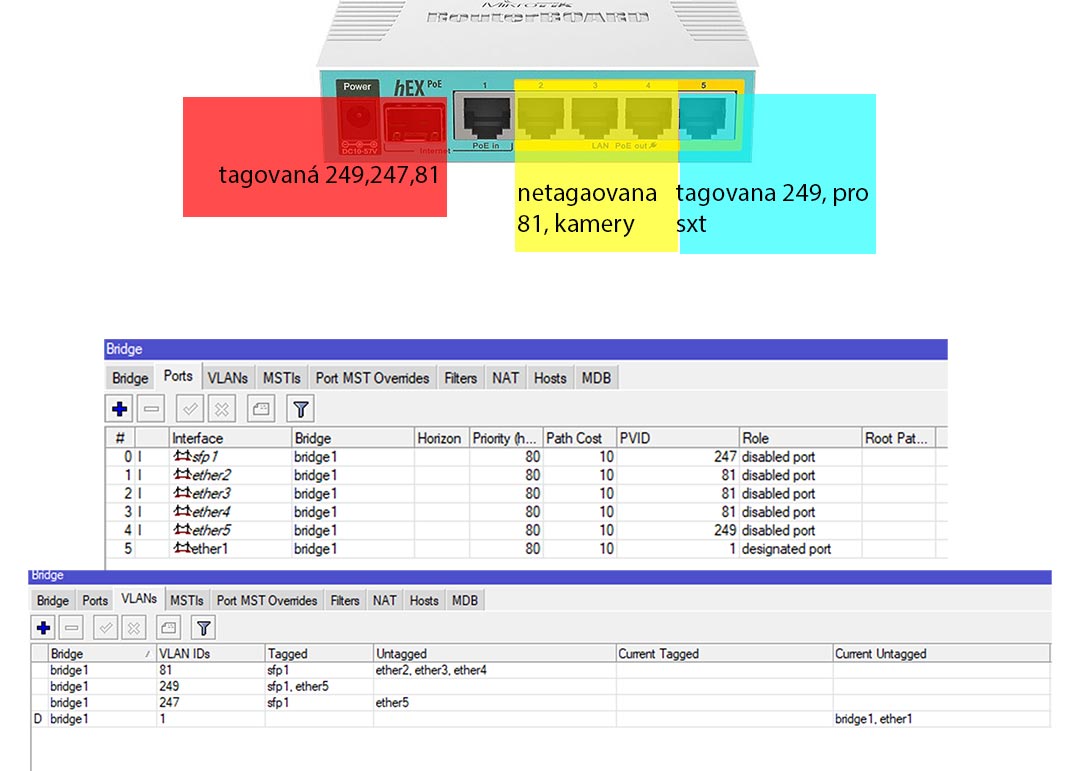
that solution kind of works....i can get to cameras but i cannot reach that mikrotik am working at, i cant connect there by winbox or even ping doesnt work
there is my setup

model = 960PGS

/interface bridge
add name=bridge1 protocol-mode=none vlan-filtering=yes
/interface ethernet
set [ find default-name=ether2 ] poe-out=forced-on
set [ find default-name=ether3 ] poe-out=forced-on
set [ find default-name=ether4 ] poe-out=forced-on
/interface wireless security-profiles
set [ find default=yes ] supplicant-identity=MikroTik
/interface bridge port
add bridge=bridge1 interface=sfp1 pvid=247
add bridge=bridge1 interface=ether2 pvid=81
add bridge=bridge1 interface=ether3 pvid=81
add bridge=bridge1 interface=ether4 pvid=81
add bridge=bridge1 interface=ether5 pvid=249
add bridge=bridge1 interface=ether1
/interface bridge vlan
add bridge=bridge1 tagged=sfp1 untagged=ether2,ether3,ether4 vlan-ids=81
add bridge=bridge1 tagged=sfp1,ether5 vlan-ids=249
add bridge=bridge1 tagged=sfp1 untagged=ether5 vlan-ids=247
/ip address
add address=192.168.1.1/24 interface=bridge1 network=192.168.1.0
add address=10.22.247.3/24 interface=sfp1 network=10.22.247.0
/ip route
add distance=1 gateway=10.22.247.254


thank you

There is a conceptual mistake in what you do. You can either have the tagged end of /interface vlan vlan-id=247 attached to the bridge, and in that case sfp1 can be a member port of that bridge, or you can attach the tagged end of /interface vlan vlan-id=247 directly to sfp1, but in that case sfp1 cannot be a member port of a bridge. The same applies if you attach an IP configuration - if you attach it directly to an interface, that interface cannot be a member port of any bridge. RouterOS will not eject a hand and slap you in the face but it won’t work properly.

Plus on the picture you declare VLAN 247 to be tagged on sfp1 but your configuration attempts to have it tagless there and also to have it tagless at ether5 (in another way) whereas the picture does’t show it at all.

So first review one more time the actual requirements and maybe fix the picture to express them, and then we can suggest a setup to fulfil those requirements.

Suggest you have a good read (at least twice through this thread and examples to get a good understanding).
http://forum.mikrotik.com/t/using-routeros-to-vlan-your-network/126489/1

Once you understand then the wiki here will be more useful and if
you have a special case need for a hybrid port, then look at the fourth diagram on this post:
http://forum.mikrotik.com/t/using-routeros-to-vlan-your-network/126489/1

Amazing thread. Hopefully I’ll be successful today. I’m surprised my router has not caught fire due to all of the configuration resets I’ve done in the last 24 hours.

Hi

I tryed for a few days now and ute not that simple like än D-Link smart switch have reseted my routers so the reset button is soon used up :slight_smile:

Try to do config like this

Router 1 hAP Main router "WAN to lan on vlan 100"

Eth1 <- WAN in
Eth2 -> LAN out "untag vlan 100"
Eth3 -> IPTV "untag vlan 200"
Eth4 -> IPTV "untag vlan 200"
Ett5 <-> vlan trunk 100,200


SXTsq bridge 1

Eth1 <-> vlan trunk 100,200
Wlan1 <-> vlan trunk 100,200
VEth -> LAN out "untag vlan 100"

SXTsq bridge 2

Eth1 <-> vlan trunk 100,200
Wlan1 <-> vlan trunk 100,200
VEth -> LAN out "untag vlan 100"

Router 2 hAP as switch
Eth1 -> LAN out "untag vlan 100"
Eth2 -> LAN out "untag vlan 100"
Eth3 -> LAN out "untag vlan 100"
Eth4 -> IPTV "untag vlan 200"
Eth5 <-> vlan trunk 100,200

I want IPTV and LAN to be isolated and virtual Ethernet in bridges to get reachable from LAN vlan 100.

I tryed everything i could get from this thread but locked me out every time some way.

Mvh Tim

When you start to mess with L2 (e.g. VLANs), you really have to be careful not to break your current management connection to device. Always be sure to leave one device with old configuration so you can use one of ports to re-gain connection. And use winbox with MAC connectivity … it won’t help if you cut the L2 (MAC) connectivity, but will help while L3 setup (IP address) doesn’t match L2 config.

If you’re configuring VLANs using bridge vlan-filtering, it does help if you set things up with vlan-filtering=no. When you think everything is set as it should be, enter safe mode (it’s available both in winbox and CLI) and enable vlan-filtering. If you loose connection, setup will revrert to the state before entering safe mode. If connection survives (might take a few seconds to re-establish), exit safe mode and you’re done.

I tryed this but i cant even get connection between ether3 and ether4 thats are on same vlan on same router.
Only port i can reach management is ether5 with MAC style.
To get firewall to work i can add an Virtual Ethernet and make it member of bridge1 pvid 100? Then i could use that way to reach management too?

/interface bridge
add name=bridge1 protocol-mode=RTSP vlan-filtering=yes
/interface bridge port
add bridge=bridge1 interface=ether2 pvid=100
add bridge=bridge1 interface=ether3 pvid=200
add bridge=bridge1 interface=ether4 pvid=200
add bridge=bridge1 interface=ether5 pvid=1
/interface bridge vlan
add bridge=bridge1 tagged=ether5 untagged=ether2 vlan-ids=100
add bridge=bridge1 tagged=ether5 untagged=ether3,ether4 vlan-ids=200


//Tim

Or its it easyer to do the simple VLAN under Switch?

Don’t mess with VLANs using /interface ethernet switch until you grasp them under /interface bridge.

First, you cannot attach IP configuration (address, DHCP servers, DHCP clients) to a member port of a bridge. The IP configuration must be attached to the bridge itself or to /interface vlan using that bridge as its underlying interface.

So to fix your configuration, you need
/interface vlan add name=bridge1.247 interface=bridge1 vlan-id=247
/ip address set [find interface=sfp1] interface=bridge1.247

But the above configuration requires vlan-filtering=yes because until you activate it, no tagging and untagging takes place on interfaces. So if connected via sfp1 while vlan-filtering=no, to stay connected, you have to use CLI to do the change: first create the /interface vlan as above, then switch safe mode on, and then place two commands on the same line:
/ip address set [find interface=sfp1] interface=bridge1.247 ; interface bridge set bridge1 vlan-filtering=yes

Next, you have another IP address attached to ether1, but at the same time ether1 is also a member port of bridge1, however it is not stated as a member port of any VLAN.

So if you want to stay connected using that IP subnet and ether1, first move the IP configuration from ether1 to bridge1, still with vlan-filtering=no:
/ip address set [find interface=ether1] interface=bridge1

Then, define the egress handling for ether1:
add /interface bridge vlan add bridge=bridge1 vlan-ids=1 untagged=bridge1,ether1

And after that, you may set vlan-filtering on bridge1 to yes.

EDIT: Please see my follow-up before spending time on this.

Hi Guys, I’m new around here and hoping for sage advice. Yesterday I took delivery of a RB4011iGS+RM as replacement for a Ubiquiti ERPOE5 and have been slowly working my way through set-up and have run into a VLAN issue. I’ve read through this whole thread and a number of others (this and this), with this one probably being closest to what I’m trying to do, but I’m still having trouble.

My set-up is pretty simple really, I have the RB4011 eth1 hooked up to WAN, eth9 and eth10 to a pair of Unifi APs, eth7 and eth8 to a pair of dumb switches. The Unifi APs have SSIDs enabled, essentially home and guest with guest using VLAN ID 67. Everything is working as I think it should except the guest wifi has no internet access. Also, when I hook up to the guest wifi I can’t ping the DHCP server even though I am getting an IP in the valid range served up.

I’m hoping that whatever is wrong in the config is obvious to someone, even if not to me and I can be pointed in the right direction.

Config:

/interface bridge
add admin-mac=XX:XX:XX:XX:XX:XX auto-mac=no comment=defconf name=bridge vlan-filtering=yes

/interface pppoe-client
add add-default-route=yes disabled=no interface=ether1 name=pppoe-out1 use-peer-dns=yes user=XXXXXX

/interface vlan
add interface=bridge name=vlan67 vlan-id=67

/interface ethernet switch port
set 0 default-vlan-id=0
set 1 default-vlan-id=0
set 2 default-vlan-id=0
set 3 default-vlan-id=0
set 4 default-vlan-id=0
set 5 default-vlan-id=0
set 6 default-vlan-id=0
set 7 default-vlan-id=0
set 8 default-vlan-id=0
set 9 default-vlan-id=0
set 10 default-vlan-id=0
set 11 default-vlan-id=0

/interface list
add comment=defconf name=WAN
add comment=defconf name=LAN
add comment="All VLAN interfaces" name=all_vlan

/interface wireless security-profiles
set [ find default=yes ] supplicant-identity=MikroTik

/ip pool
add name=dhcp ranges=192.168.66.50-192.168.66.254
add name=dhcp_vlan67_pool ranges=192.168.67.2-192.168.67.254

/ip dhcp-server
add address-pool=dhcp disabled=no interface=bridge name=defconf
add address-pool=dhcp_vlan67_pool disabled=no interface=vlan67 name=dhcp_vlan67

/interface bridge port
add bridge=bridge comment=defconf interface=ether2
add bridge=bridge comment=defconf interface=ether3
add bridge=bridge comment=defconf interface=ether4
add bridge=bridge comment=defconf interface=ether5
add bridge=bridge comment=defconf interface=ether6
add bridge=bridge comment=defconf interface=ether7
add bridge=bridge comment=defconf interface=ether8
add bridge=bridge comment=defconf interface=ether9
add bridge=bridge comment=defconf interface=ether10
add bridge=bridge comment=defconf interface=sfp-sfpplus1
add interface=*E

/ip neighbor discovery-settings
set discover-interface-list=LAN

/interface bridge vlan
add bridge=bridge untagged=ether2,ether3,ether4,ether5,ether6,ether7,ether8,ether9,ether10 vlan-ids=1
add bridge=bridge tagged=bridge,ether9,ether10 vlan-ids=67

/interface list member
add comment=defconf interface=bridge list=LAN
add comment=defconf interface=ether1 list=WAN
add interface=pppoe-out1 list=WAN
add comment="Include VLAN 67 in all_vlan" interface=vlan67 list=all_vlan

/ip address
add address=192.168.66.1/24 comment=defconf interface=ether2 network=192.168.66.0
add address=192.168.67.1 interface=vlan67 network=192.168.67.1

/ip dhcp-client
add comment=defconf dhcp-options=hostname,clientid interface=ether1

/ip dhcp-server lease
add address=192.168.66.10 address-lists=CleanBrowsing comment="Frasers Laptop" mac-address=4C:BB:58:A1:21:DD server=defconf use-src-mac=yes
add address=192.168.66.2 client-id=1:80:2a:a8:c9:8:ff comment="Unifi ACAP Laundry" mac-address=80:2A:A8:C9:08:FF server=defconf
add address=192.168.66.3 client-id=1:78:8a:20:80:47:35 comment="Unifi ACAP Activity" mac-address=78:8A:20:80:47:35 server=defconf

/ip dhcp-server network
add address=192.168.66.0/24 comment=defconf gateway=192.168.66.1 netmask=24
add address=192.168.67.0/24 dns-server=8.8.8.8 gateway=192.168.67.1 netmask=24

/ip dns
set allow-remote-requests=yes

/ip dns static
add address=192.168.66.1 comment=defconf name=router.lan

/ip firewall address-list
add address=192.168.66.10 list=CleanBrowsing

/ip firewall filter
add action=accept chain=input comment="defconf: accept established,related,untracked" connection-state=established,related,untracked
add action=drop chain=input comment="defconf: drop invalid" connection-state=invalid
add action=accept chain=input comment="defconf: accept ICMP" protocol=icmp
add action=accept chain=input comment="Accept DHCP requests on VLAN interfaces" dst-port=67 in-interface-list=all_vlan protocol=udp src-port=68
add action=accept chain=input comment="Accept DNS requests (UDP) from VLAN interfaces" dst-port=53 in-interface-list=all_vlan protocol=udp
add action=accept chain=input comment="Accept DNS requests (TCP) from VLAN interfaces" dst-port=53 in-interface-list=all_vlan protocol=tcp
add action=accept chain=input comment="defconf: accept to local loopback (for CAPsMAN)" dst-address=127.0.0.1
add action=drop chain=input comment="defconf: drop all not coming from LAN" in-interface-list=!LAN
add action=accept chain=forward comment="defconf: accept in ipsec policy" ipsec-policy=in,ipsec
add action=accept chain=forward comment="defconf: accept out ipsec policy" ipsec-policy=out,ipsec
add action=fasttrack-connection chain=forward comment="defconf: fasttrack" connection-state=established,related
add action=accept chain=forward comment="defconf: accept established,related, untracked" connection-state=established,related,untracked
add action=drop chain=forward comment="defconf: drop invalid" connection-state=invalid
add action=drop chain=forward comment="defconf: drop all from WAN not DSTNATed" connection-nat-state=!dstnat connection-state=new in-interface-list=WAN
add action=accept chain=input comment="defconf: accept established,related,untracked" connection-state=established,related,untracked
add action=drop chain=input comment="defconf: drop invalid" connection-state=invalid
add action=accept chain=input comment="defconf: accept ICMP" protocol=icmp
add action=accept chain=input comment="defconf: accept to local loopback (for CAPsMAN)" dst-address=127.0.0.1
add action=drop chain=input comment="defconf: drop all not coming from LAN" in-interface-list=!LAN
add action=accept chain=forward comment="defconf: accept in ipsec policy" ipsec-policy=in,ipsec
add action=accept chain=forward comment="defconf: accept out ipsec policy" ipsec-policy=out,ipsec
add action=fasttrack-connection chain=forward comment="defconf: fasttrack" connection-state=established,related
add action=accept chain=forward comment="defconf: accept established,related, untracked" connection-state=established,related,untracked
add action=drop chain=forward comment="defconf: drop invalid" connection-state=invalid
add action=drop chain=forward comment="defconf: drop all from WAN not DSTNATed" connection-nat-state=!dstnat connection-state=new in-interface-list=WAN

/ip firewall nat
add action=masquerade chain=srcnat comment="defconf: masquerade" ipsec-policy=out,none out-interface-list=WAN
add action=dst-nat chain=dstnat comment="Clean Browsing DNS" dst-port=53 log=yes protocol=udp src-address-list=CleanBrowsing to-addresses=185.228.168.168 to-ports=53
add action=masquerade chain=srcnat comment="defconf: masquerade" ipsec-policy=out,none out-interface-list=WAN
add action=dst-nat chain=dstnat comment="Clean Browsing DNS" dst-port=53 log=yes protocol=udp src-address-list=CleanBrowsing to-addresses=185.228.168.168 to-ports=53

/system clock
set time-zone-name=Australia/Sydney

/system identity
set name=Mikrotik

/tool mac-server
set allowed-interface-list=LAN

/tool mac-server mac-winbox
set allowed-interface-list=LAN

My config is pretty much out-of-the-box with only the additional things added that I think I need over the next few days as I play and get used to it. The intention is try to get to a place where I have a completely custom config, or at least ready to attempt it on the coming weekend - wish me luck!

Thanks for taking the time to look, I really appreciate any help / advice anyone can offer.