Hey,
yes I generate the certs on MT and export (p12) to my mac, then I use apple configurator:
- add both certificates here:
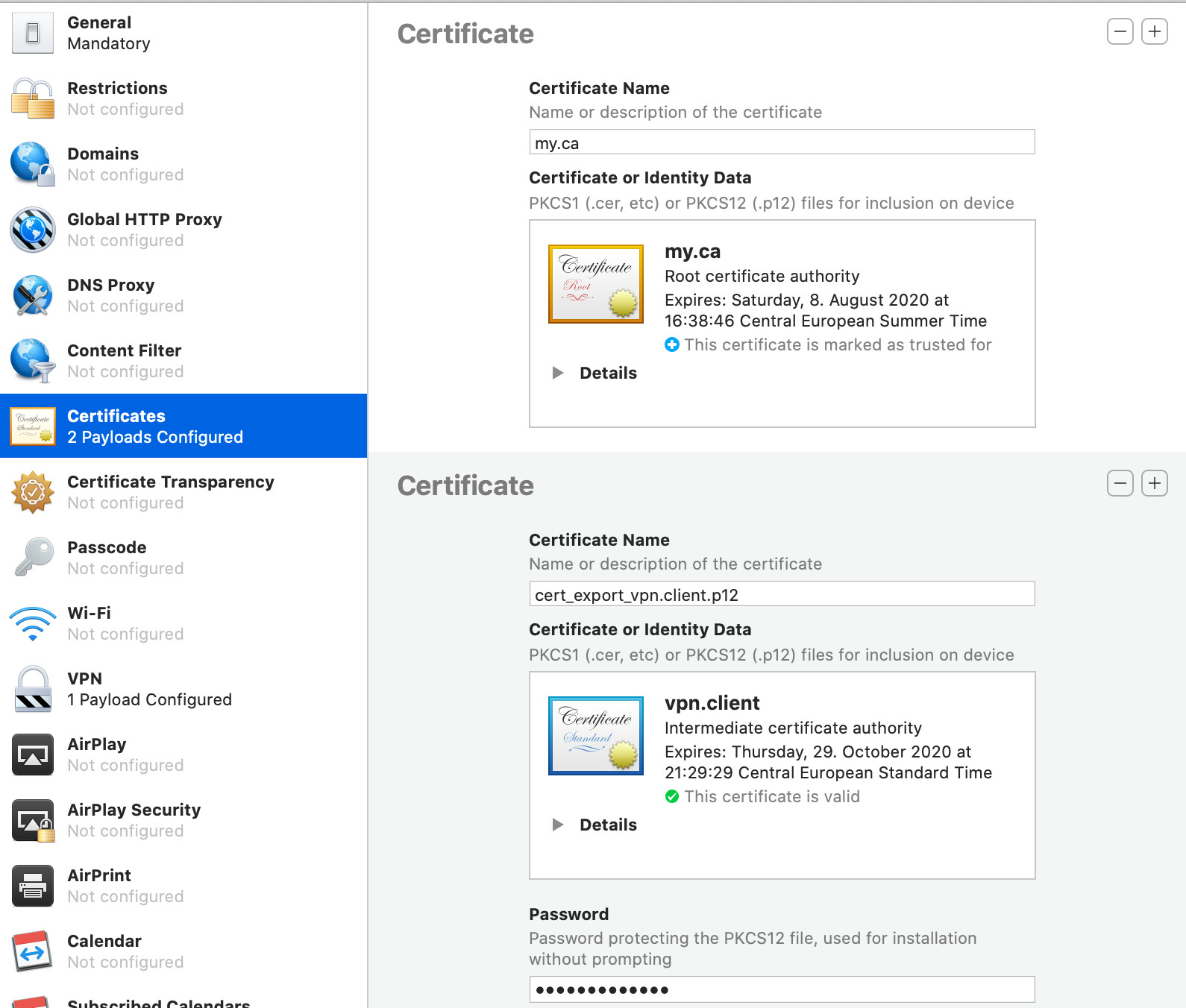
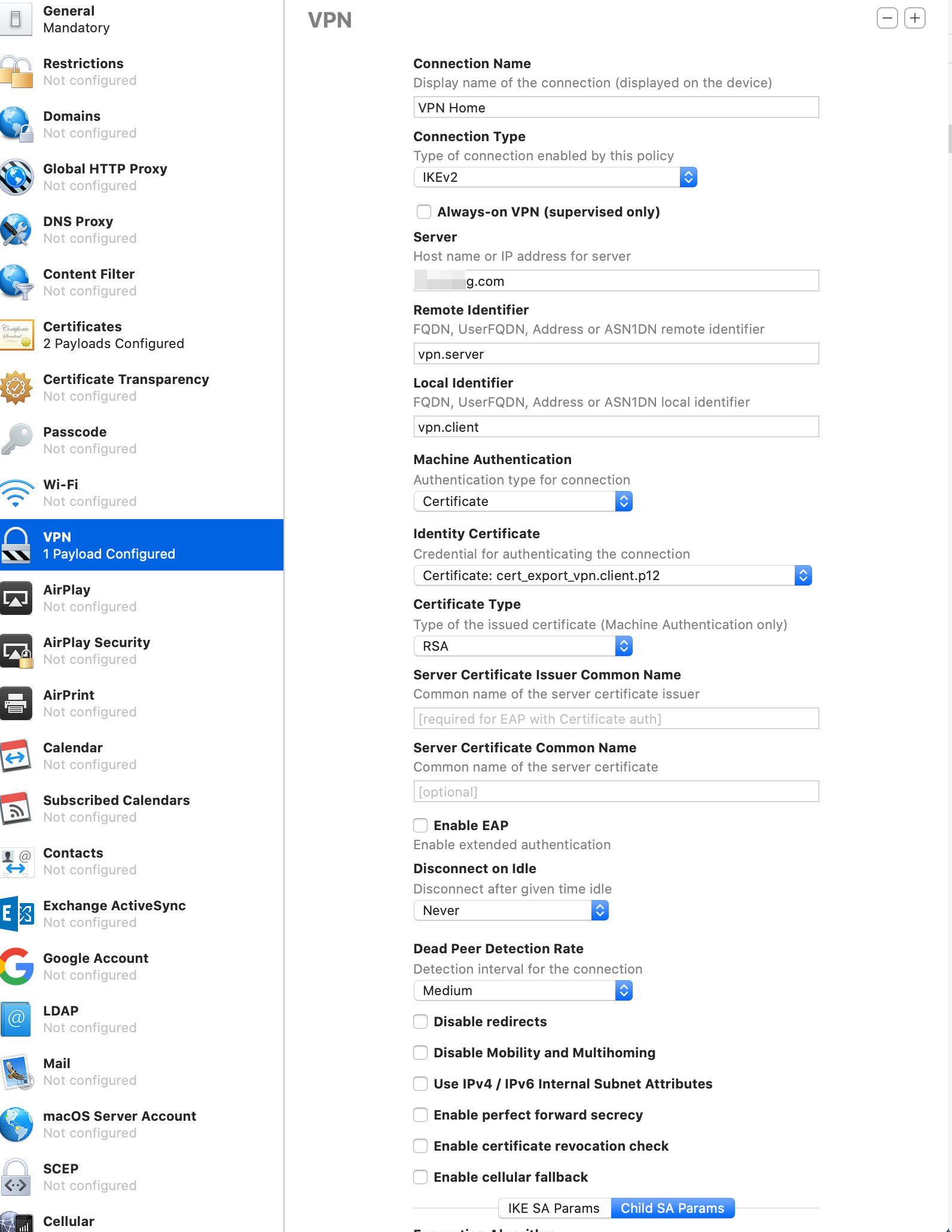
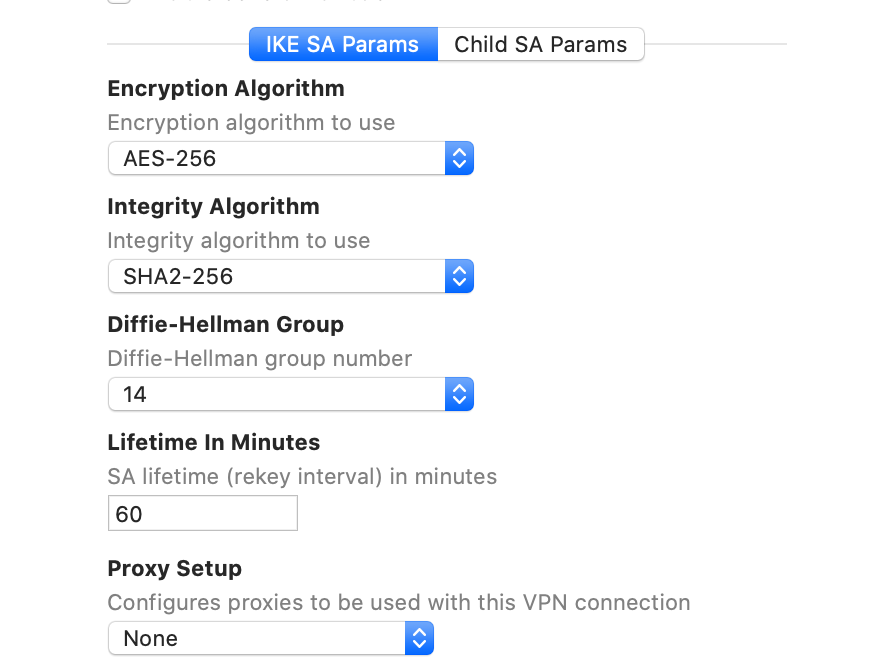
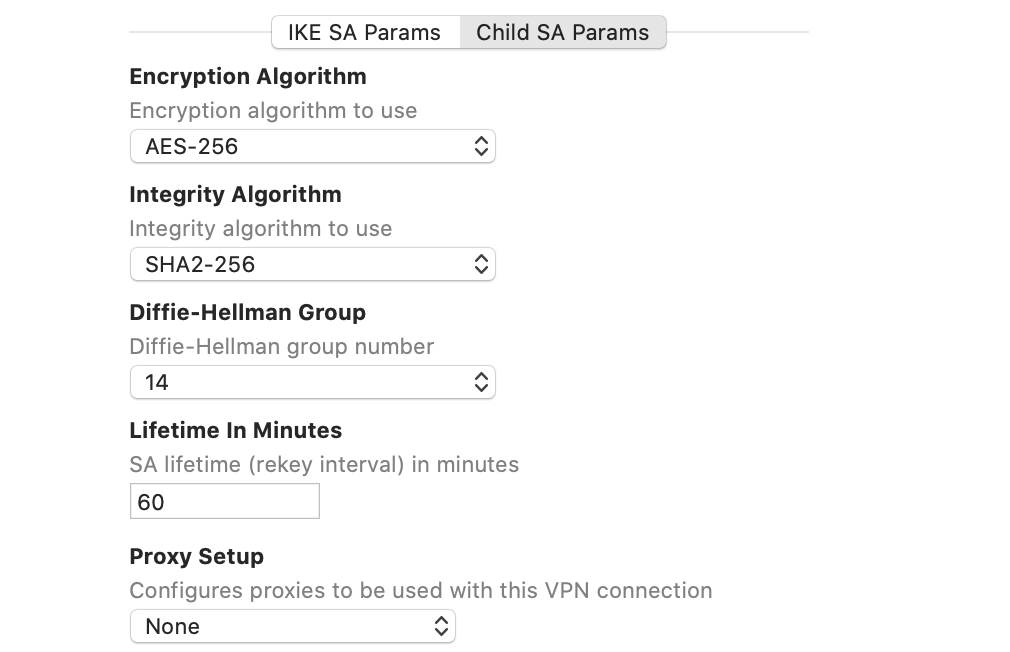
Hey,
yes I generate the certs on MT and export (p12) to my mac, then I use apple configurator:
Works for me. Thanks a lot!
Hmm, not working for me.
No problems adding the alternate name bit.
I even get a good connection on the MT with a viable active peer.
The problem is on the iphone side which doesnt connect and says unathorized client or user etc…
Okay same issues not solved. I managed to add the DNS:vpn.server and DNS:vpn.client alternate names in the certificate but the results were the same. 
The only details I could find direct from IOS are posted below (1-5). The first three items are covered I believe by the current setup.
Need help understanding 4!!
Oopsie on number five I added a zero to 365 which puts it way past 825 days, to will try 800 and see what comes back
Edit: I set the certificates to 800 days with same result.
Yes I tried every combination of settings from above with no joy.
I think the problem may be item 4 below.
How do I ensure #4 is followed??
Requirements for trusted certificates in iOS 13 and macOS 10.15
All TLS server certificates must comply with these new security requirements in iOS 13 and macOS 10.15:
1- TLS server certificates and issuing CAs using RSA keys must use key sizes greater than or equal to 2048 bits. Certificates using RSA key sizes smaller than 2048 bits are no longer trusted for TLS.
2- TLS server certificates and issuing CAs must use a hash algorithm from the SHA-2 family in the signature algorithm. SHA-1 signed certificates are no longer trusted for TLS.
3- TLS server certificates must present the DNS name of the server in the Subject Alternative Name extension of the certificate. DNS names in the CommonName of a certificate are no longer trusted.
Additionally, all TLS server certificates issued after July 1, 2019 (as indicated in the NotBefore field of the certificate) must follow these guidelines:
4- TLS server certificates must contain an ExtendedKeyUsage (EKU) extension containing the id-kp-serverAuth OID.???
5- TLS server certificates must have a validity period of 825 days or fewer (as expressed in the NotBefore and NotAfter fields of the certificate).
Connections to TLS servers violating these new requirements will fail and may cause network failures, apps to fail, and websites to not load in Safari in iOS 13 and macOS 10.15.
Too funny, I made the changes to the #days but left out tls client and tls server on the certificates (check box options).
Will do that now and let you know.
Nope. No difference after adding back in tls server and client on the certificate check boxes and creating new certificates. Still user authentication failed no matter what is entered.
My certificates:

I guess key usage must be at least tls-client for client and tls-server for server
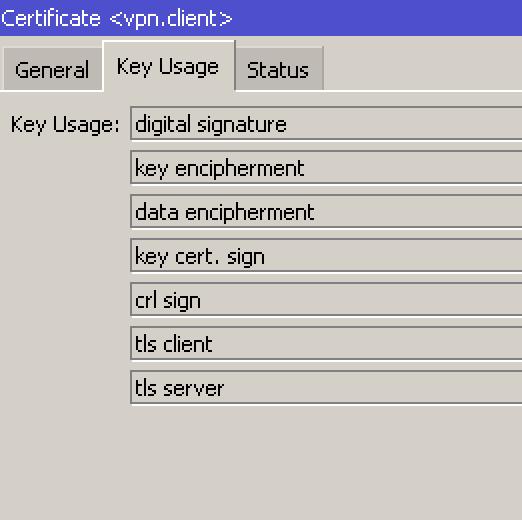
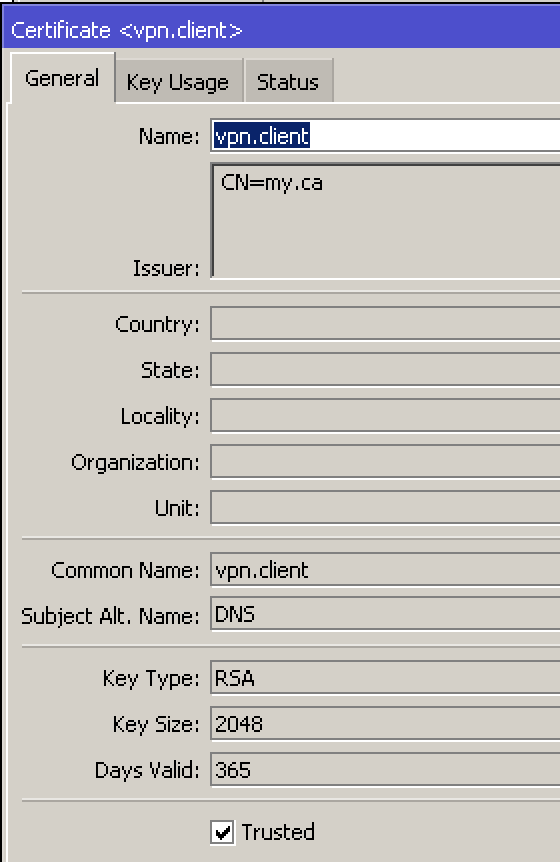
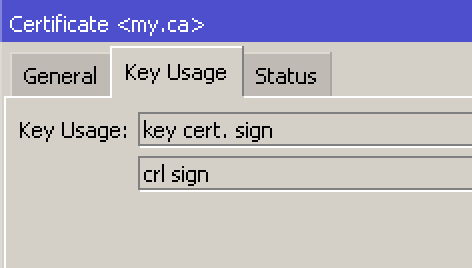
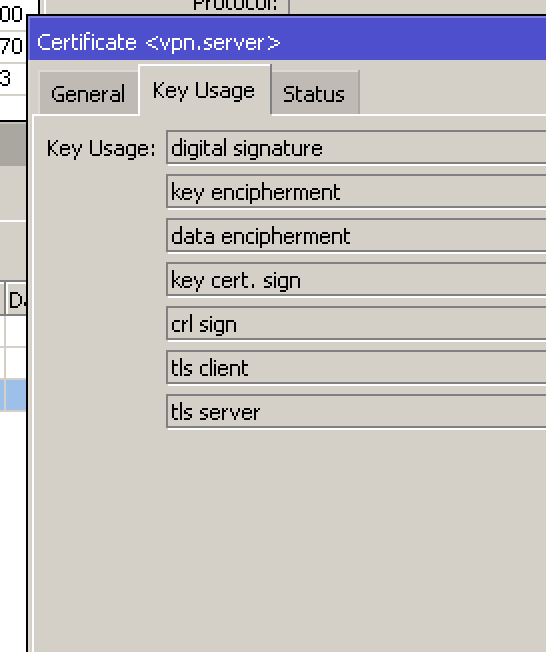
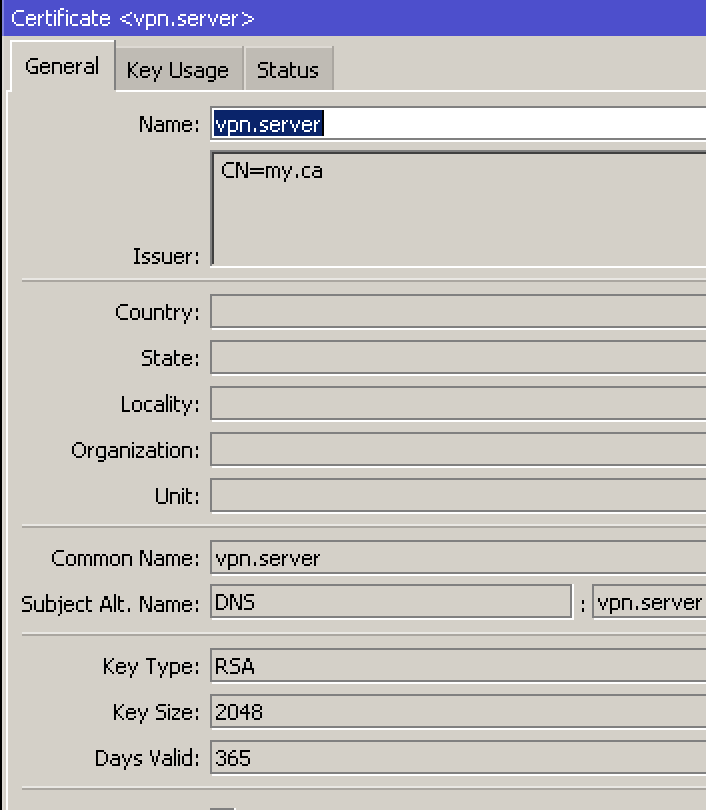
We are extremely close in settings.
I do not have any entries for issuer (your CN=my.ca) but I didnt have them before and dont think its a showstopper.
I have 800 days for my server and client certificate, I will change to 365 although I have a feeling that will not make a difference.
(quick question, do my ca expiry date have to match the client and vpn expiry days???)
The final point I will make is that my actual server and client names are not copies of the common name.
When I add alternate name however, they are copes of the common name.
For example server name is myvpn.server, with common name vpn.server and altname DNS:vpn.server
For example client name is myvpn.client, with common name vpn.client and altname DNS:vpn.client
Is this a problem? Should the alternate name match the actual name (vice common name)?
ahm, if you don’t have a value in issuer field the cert is not signed by the CA?
ca expiration date doesn’t has to match client cert date…
try to re-create that all from scratch. New ca on router, new certs on router, sing them with router’s ca…
match cn and dns (SAN)
name of the cert could be any, just match it with your cn for easier reading…
Yes, I am attempting to figure that out.
I use the SIGN feature in system certificates and I am signing the vpn.server and vpn.client certificates so it seems but no issuer info ever gets set in there. So my question is how does one get data into the issuer field - via the MT method of self signing certificates??
I also have discovered another potential issue.
Despite including the two tls entries when creating the certificates, the iphone certificate (client) that I imported seems to be missing these two elements.
Can anyone check to on their iphone or imac, whether or not the client certificate shows all 7 attributes and not just 5.
In this linked presentation, there are no issuers??
https://mum.mikrotik.com/presentations/NG17/presentation_4851_1511945783.pdf
Yours also shows all 7. 5+2
Extended Key Usage: Client and server authentication. Same on mine.
When you sign the certificate on MT, you must select the existing CA. Otherwise you just get a self signed.
Okay maybe I am really daft here, but when I sign the vpn.client and vpn.server certificates, in the popup box there are two selections to be made:
I just deleted all to start from scratch and now I cannot sign my router certificate as there is no CA available it says unknown in red???
Okay so the first certificate (master) self-signed by ignoring the CA entry in winbox or just using these commands
/certificate add name=my.ca common-name=my.ca key-usage=key-cert-sign,crl-sign trusted=yes
/certificate sign my.ca
Gives me a result where i Have my base Certificate on the router, BUT IT HAS NO CA entry (and no issuer).
I am able to use this though as the CA for both the vpn.server and vpn.client certificates. (but no issuer appears for them).
Does the above make sense? If so where do I go from here??
MT: So its impossible for me to get an entry in issuer no matter what I try.
Apple: With IOS 13 one needs to go to Settings General About - trusted certificates to physically enable the certificate there, which is separate from the General - Settings - Profiles, where one installs the certificate.
*** The problem is there is no entry in the Trusted Certificates section for me to enable???
The discussions have stated if the cert cannot be traced back to a ROOT CA, it will not appear.
Are folks only sending their client certification to the iphone?
For future Iphone users, 3 items have changed.
(1) a. Both certs are required (.ca & .client) but they have to be done/installed separately.
b. As well as installing the .ca certificate one has to, on the iphone, also enable the cert under Trusted Certificates.
(2) Have to use Subj Alternate name and format is DNS:actual name (and not DNS:common name)
(3) Max 800 days on certificates
Observation on Key usage.
For the .ca cert only need ‘key cert sign’, and ‘crl sign’
For .server and .client certs only need two keys (not 7) (tls client & tls server)
For any other fellows struggling to make certificates work with IKEv2 on macOS Big Sur (possibly also with previous versions) - make sure to issue both server & client certificates with subjectAltName field (Subject Alternative Name X509 extension).
I did generate client certificate without it, Mikrotik complained about “peer identity not found” even though it identified the peer with IP or FQDN supplied by macOS client, however the CERT payload was missing and authentication always failed.
I am also struggling with peer identity not found. My setup was working fine until a few weeks ago (IOS update or ROS update? I can’t figure it out as I discovered the problem after having updated both).
My client and server certs have the SAN DNS field same as common name.
I can’t figure out how to make it back to work.
I’ll appreciate if someone would have a clue if anything has changed with the latest updates?
Does that fqdn in Subject Alt Name of the certificate of the Mikrotik resolve in public DNS to the IP address of the Mikrotik to which the MacOS connects?
And do you also get “peer identity not found” at Mikrotik side or it just “stopped working”?
The SAN DNS:myserver.com entry for the server certificate does resolve (but not for the SAN DNS: client.myserver.com for the client certificate however as it is a roadwarrior).
The relevant messages I have in the ROS log are
ID_I(FQDN):client.myserver.com
ID_R(FQDN):myserver.com
processing payload: AUTH (not found)
requested server id: myserver.com
identity not found for server:myserver.com peer: FQDN: client.myserver.com
reply notify: AUTHENTICATION_FAILED
That’s clear.
That looks as if the Apple device didn’t like the certificate it should use to authentify itself, so it doesn’t provide it as ID_I. You may try to change the /ip ipsec identity row at Mikrotik side to remote-id=fqdn:client.myserver.com match-by=remote-id, but if the assumption above is correct, it won’t help, you’ll just end up with a different set of errors.
Anyone got this solved on IOS14 and ROS 6.47.8 ?
same issue