Good to hear, and if you run into future issues, please post both configs
/export file=anynameyouwish ( minus router serial number, any public WANIP information, keys etc.)
Allowed IPs describe three things
-
THE WIREGUARD NETWORK PORTION
a. the wireguard subnet 0/24 ( at the client device peer at initial handshake ) *********
b. the wireguard exact peer /32 ( at the server device peer at initial handshake, should have a separate allowed IP entry for each client peer)
-
The REMOTE SUBNETS, local users need to access.
-
THE REMOTE SUBNETS, accessing the local LAN.
The Exceptions
******** If the client peer needs internet access through the connection, allowed peers are replaced by 0.0.0.0/0
Note: Local subnets are never described.
++++++++++++++++++++++++++++++++++++++++++++++++++++++++++++++
In your case, the allowed IPs on the wireguard of the CHR router (server for handshake) are simple.
10.20.30.2/32, NASsubnet, Anyother relevant remote subnet.
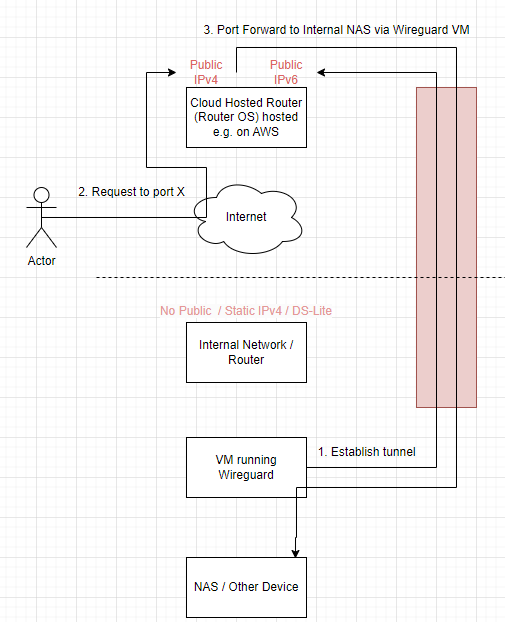
In other words, the outside users are going to come in on the CHR router heading to the server based on
StaticWANIP of the CHR and port off NAS server on the second router
With port forwarding rule.
add action=dst-nat chain=dstnat dst-address=staticIPofCHR dst-port=NAS port protocol=XYZ to-addresses=NAS_lanIP
So all that traffic now is heading to the IP address of the NAS server so we have to let the CHR know WHERE to send this non-local traffic.
The question that needs answering before proceeding → Does the NAS need to track sourceIP for any reason…
Solution A: The NAS server doesn’t need to know the sourceIP of each user, so we then, to simplify, sourcenat the traffic heading into the wireguard tunnel.
add chain=srcnat action=masquerade out-interface=wireguard1
Now all wireguard traffic will be given the source IP address of the wireguard interface on the CH
We still need a route to match the allowed IPs identifying where to send non-local subnet bound traffic.
add dst-address=NASsubnet gateway=wireguard1 routing-table=main.
Outside users are port forwarded to the lANIP of the server and the router is told to send that traffic out wireguard and on the way out the users IPs get changed to the IP of the CHR wireguard interface, so far so good.
The traffic arrives at the wireguard portal on the home router.
The incoming IP of the chr wireguard interface is accepted.
One needs a firewall rule forward chain rule to ensure that traffic can reach the subnet server
add action=accept chain=forward comment=“remote users to NAS” in-interface=wireguard1 dst-adddress=NAS_lanIP
The return traffic is sent to the wireguard IP of the CHR of which the home router is aware and sends the traffic back out the wireguard interface.
++++++++++++++++++++++++++++
Solution B: What if there is a requirement to capture the source IPs at the NAS server, this has a ripple effect on the settings.
There is no change on allowed IPs for the CHR,
There is no change on port forwarding,
However we CANNOT sourcenat out the wireguard tunnel.
The main changes are on the home router.
Allowed IPs becomes; 0.0.0.0/0 ( since you need to be able to capture all possible public IPs hitting the CHR)
So, the effect is that all that traffic forwarded from various IPs hits the home router,
We need the same forward chain rule to allow access to the NAS…
However when the NAS replies, the router has no idea where to send the return traffic!!!
Therefore we need to capture/identify the traffic and direct the traffic back through the wireguard tunnel.
Easiest is to
add table fib name=useWG
add route dst-address=0.0.0.0/0 gateway=WG-Home routing-table=useWG
/routing rules
add min-prefix=0 action=lookup-only-in-table table=main comment=“ensure NAS local traffic is permitted”
add src-address=NAS-lanIP action=lookup-only-in-table table=useWG comment=all other NAS traffic forced out tunnel"
So you can see that there is a simple way and a more complicated way of accomplishing the flow depending upon requirements.