Hi, my 1st mikrotik switch and trying to setup simple network with two VLANs with own subnets:
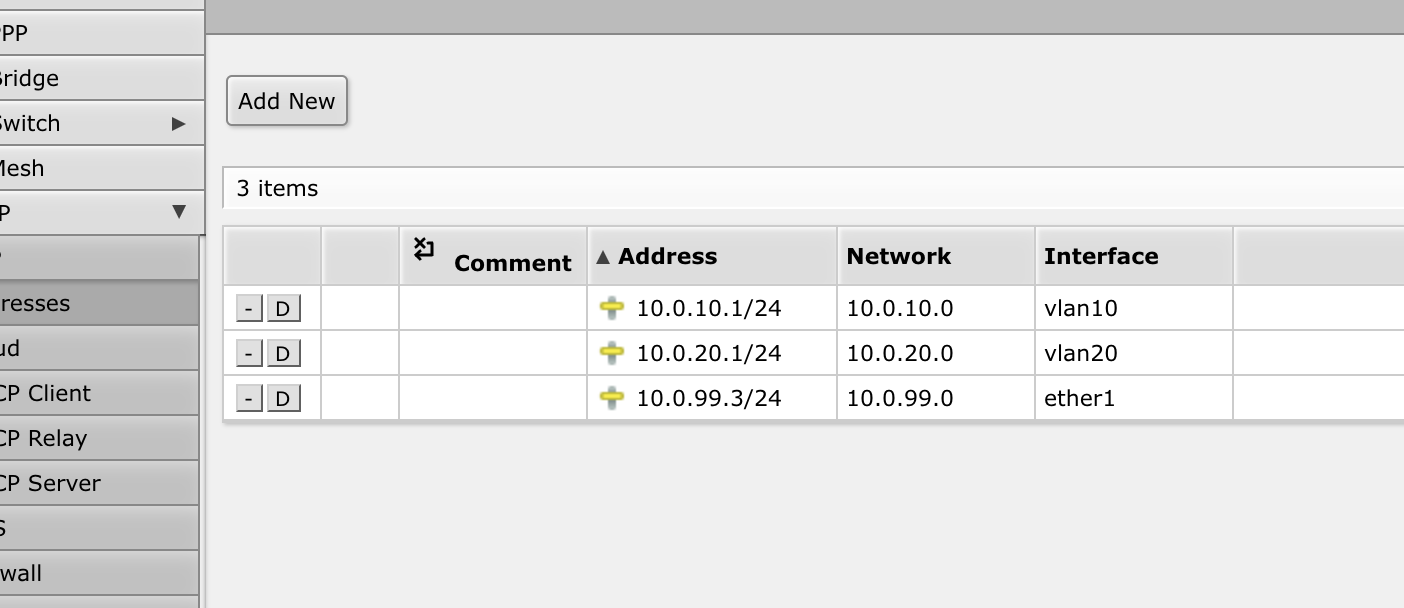
vlan10 / 10.0.10.1/24
vlan20 / 10.0.20.1/24
Device: CRS310-1G-5S-4S+IN
Connected to ISP modem/router 10.0.99.1 via ether1
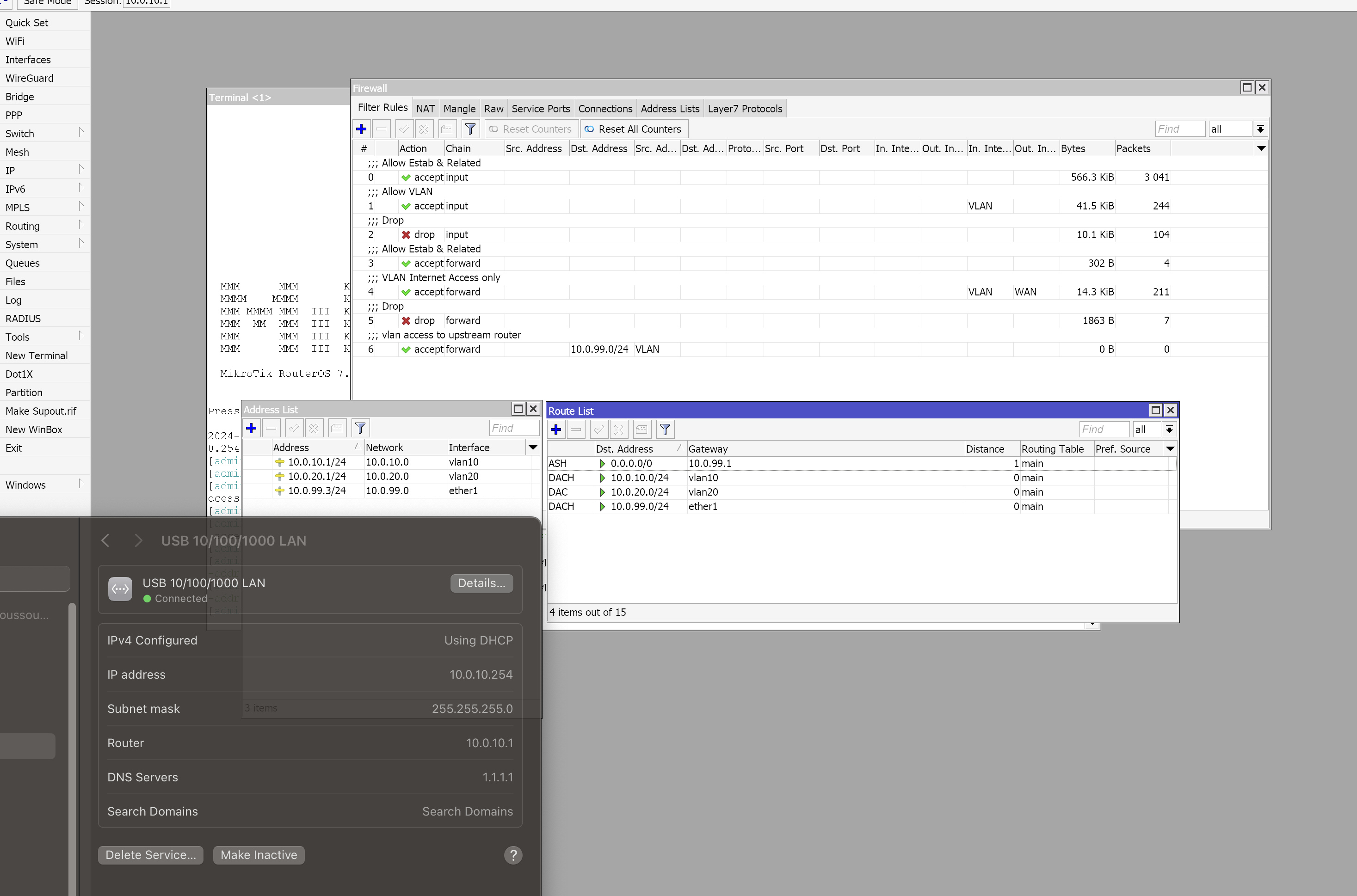
Looks like VLANs part works as expected, connecting to different ports assigns expected IPs:
sfp1: 10.0.10.254 gateway 10.0.10.1
sfp2-…sfp4+ 10.0.20.254 gateway 10.0.20.1
Can reach RouteOs webUI via gateway IPs
But 10.0.99.1(modem) is not reachable, so no internet from VLANs
Well the question is what is the TRUSTED or management subnet?? Did you want to use vlan20 or create another one like vlan99??
All smart devices should get their IP address on this subnet save the MT switch which should get its IP address from the upstream routers private LAN.
Once this is setup one should be able to reach any LANIP on the 10.0.99.0/24 subnet.
Since all traffic leaving the router is given a source IP of 10.0.99.3 ( due to sourcenat masquerade ) return traffic from that LAN should head back to the MT switch.
You have left some default config which seems to be messing this up. ether1 is labelled as a WAN and you are firewalling/nat’ing however it is still a member of br1:
Removing defcon rules static route 192.168.88.1 and “add bridge=BR1 comment=defconf interface=ether1” did the trick!
Still learning and I couldn’t find the way to apply new config from WebUI, instead I did modify script from http://forum.mikrotik.com/t/using-routeros-to-vlan-your-network/126489/1 to update existing interfaces.
If I reset config with “no default config” option how do I connect to the switch w/o winbox?
sfp1 (vlan10) as AP for all personal devices TRUSTED vlan I guess
sfp-plus1 (trunk port?) to connect another switch in the future
and use remaning ports (vlan20) for homelab proxmox cluster
ether1 WAN port
This what’s I use at the moment, I’ll do more research today how to apply config from scratch
#######################################
# Naming
#######################################

# name the device being configured
/system identity set name="swtich1"


#######################################
# VLAN Overview
#######################################


# 10 = Archer
# 20 = proxmox

#######################################
# Bridge
#######################################

/interface set "bridge" name="BR1"

# create one bridge, set VLAN mode off while we configure
#/interface bridge add name=BR1 protocol-mode=none vlan-filtering=no
/interface bridge set BR1 vlan-filtering=no
/interface/ethernet/switch set 0 l3-hw-offloading=no


#######################################
#
# -- Access Ports --
#
#######################################

# ingress behavior
/interface bridge port

# Archer VLAN 1GB
#add bridge=BR1 interface=sfp1 pvid=10
set [find where interface=sfp1] pvid=10

# proxmox VLAN 1GB ports
#add bridge=BR1 interface=sfp2 pvid=20
#add bridge=BR1 interface=sfp3 pvid=20
#add bridge=BR1 interface=sfp4 pvid=20
#add bridge=BR1 interface=sfp5 pvid=20
set [find where interface=sfp2] pvid=20
set [find where interface=sfp3] pvid=20
set [find where interface=sfp4] pvid=20
set [find where interface=sfp5] pvid=20


# proxmox VLAN 10GB ports
#add bridge=BR1 interface=sfp-sfpplus2 pvid=20
#add bridge=BR1 interface=sfp-sfpplus3 pvid=20
#add bridge=BR1 interface=sfp-sfpplus4 pvid=20
set [find where interface=sfp-sfpplus2] pvid=20
set [find where interface=sfp-sfpplus3] pvid=20
set [find where interface=sfp-sfpplus4] pvid=20


# egress behavior, handled automatically

# L3 switching so Bridge must be a tagged member
/interface bridge vlan
add bridge=BR1 tagged=BR1 vlan-ids=10
add bridge=BR1 tagged=BR1 vlan-ids=20


#######################################
# IP Addressing & Routing
#######################################

# DNS server, set to cache for LAN
/ip dns set allow-remote-requests=yes servers="1.1.1.1"

# Yellow WAN facing port with IP Address and route provided by ISP
/ip address add interface=ether1 address=10.0.99.3/24 network=10.0.99.0
/ip route add distance=1 gateway=10.0.99.1

/ip dns static add address=192.168.88.1 name=router

#######################################
# IP Services
#######################################

# Blue VLAN interface creation, IP assignment, and DHCP service
/interface vlan add interface=BR1 name=vlan10 vlan-id=10
/ip address add interface=vlan10 address=10.0.10.1/24
/ip pool add name=vlan10 ranges=10.0.10.2-10.0.10.254
/ip dhcp-server add address-pool=vlan10 interface=vlan10 name=vlan10_dhcp disabled=no
/ip dhcp-server network add address=10.0.10.0/24 dns-server=1.1.1.1 gateway=10.0.10.1

# Green VLAN interface creation, IP assignment, and DHCP service
/interface vlan add interface=BR1 name=vlan20 vlan-id=20
/ip address add interface=vlan20 address=10.0.20.1/24
/ip pool add name=vlan20 ranges=10.0.20.2-10.0.20.254
/ip dhcp-server add address-pool=vlan20 interface=vlan20 name=vlan20_dhcp disabled=no
/ip dhcp-server network add address=10.0.20.0/24 dns-server=1.1.1.1 gateway=10.0.20.1


#######################################
# Firewalling & NAT
# A good firewall for WAN. Up to you
# about how you want LAN to behave.
#######################################

# Use MikroTik's "list" feature for easy rule matchmaking.

/interface list add name=WAN
/interface list add name=VLAN

/interface list member
add interface=ether1     list=WAN
add interface=vlan10     list=VLAN
add interface=vlan20     list=VLAN

# VLAN aware firewall. Order is important.
/ip firewall filter


##################
# INPUT CHAIN
##################
add chain=input action=accept connection-state=established,related comment="Allow Estab & Related"

# Allow VLANs to access router services like DNS, Winbox. Naturally, you SHOULD make it more granular.
add chain=input action=accept in-interface-list=VLAN comment="Allow VLAN"

add chain=input action=drop comment="Drop"

##################
# FORWARD CHAIN
##################
add chain=forward action=accept connection-state=established,related comment="Allow Estab & Related"

# Allow all VLANs to access the Internet only, NOT each other
add chain=forward action=accept connection-state=new in-interface-list=VLAN out-interface-list=WAN comment="VLAN Internet Access only"

add chain=forward action=drop comment="Drop"

##################
# NAT
##################
/ip firewall nat add chain=srcnat action=masquerade out-interface-list=WAN comment="Default masquerade"


#######################################
# VLAN Security
#######################################

# Only allow ingress packets without tags on Access Ports
/interface bridge port

set bridge=BR1 ingress-filtering=yes frame-types=admit-only-untagged-and-priority-tagged [find interface=sfp1]
set bridge=BR1 ingress-filtering=yes frame-types=admit-only-untagged-and-priority-tagged [find interface=sfp2]
set bridge=BR1 ingress-filtering=yes frame-types=admit-only-untagged-and-priority-tagged [find interface=sfp3]
set bridge=BR1 ingress-filtering=yes frame-types=admit-only-untagged-and-priority-tagged [find interface=sfp4]
set bridge=BR1 ingress-filtering=yes frame-types=admit-only-untagged-and-priority-tagged [find interface=sfp5]
set bridge=BR1 ingress-filtering=yes frame-types=admit-only-untagged-and-priority-tagged [find interface=sfp-sfpplus2]
set bridge=BR1 ingress-filtering=yes frame-types=admit-only-untagged-and-priority-tagged [find interface=sfp-sfpplus3]
set bridge=BR1 ingress-filtering=yes frame-types=admit-only-untagged-and-priority-tagged [find interface=sfp-sfpplus4]

# Only allow ingress packets WITH tags on Trunk Ports
set bridge=BR1 ingress-filtering=yes frame-types=admit-only-vlan-tagged [find interface=sfp-sfpplus1]


#######################################
# MAC Server settings
#######################################

# Ensure only visibility and availability from VLAN
/ip neighbor discovery-settings set discover-interface-list=VLAN
/tool mac-server mac-winbox set allowed-interface-list=VLAN
/tool mac-server set allowed-interface-list=VLAN


#######################################
# Turn on VLAN mode
#######################################
/interface bridge set BR1 vlan-filtering=yes

/interface/ethernet/switch set 0 l3-hw-offloading=yes
Manage to install winbox on macbook, can apply config from scratch.
My current config- almost there. When I reboot router, no internet access, I found that if I change WAN IP address manually it start working again
e.g. if I change it to 10.0.99.5 start working again
Also I don’t have access to 10.0.99.1 (modem webUI) from VLANs, I can ping it from RoOs terminal though