i can access my webserver from another network. In local, i have this error :
Failed to establish a secure connection
SSL_ERROR_NO_CYPHER_OVERLAP
I have tried to do like this post but it doesn’t work. I have tried “Hairpin NAT” configuration without understand what i was doing … it doesn’t work …
Hi,
You need to move rule 3 to the top. You might also need to make it have action=src-nat and give a specific IP address to use as src (if it doesn't work with masq)
You can turn rules 1 and 2 into a single rule (with multiple ports in the to-ports section)
XMPP works because you use the condition dst-address=46.231.XXX.XXX in the DSTNAT rules related to it.
Your port forwarding of for port 443 and 80 only works from the outside, not from LAN because you use a different condition on them in-interface-list=WAN. With that, DSTNAT only kicks in when the connections come from the other side of the WAN interface, not when you are in your LAN (because in-interface would than be your bridge or local VLANs).
Edit those two DSTNAT rule to remove the condition in-interface-list=WAN and replace that with dst-address=46.231.XXX.XXX.
Specifying dst-address=46.231.XXX.XXX of course is only handy when your public IP address is a static address that rarely changes (otherwise you'd have to edit the rules every time you get a new public IP address). If the public IP address is not static, consider replacing the condition with dst-address-type=local dst-address=!192.168.0.1 (if 192.168.0.1 is the router).
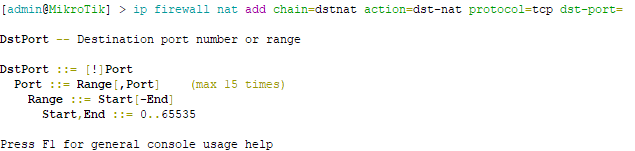
Yes, you can consolidate the 5 rules into one single rule, because they all have to same to-addresses value of 192.168.0.252, same protocol=tcp, and do not modify the ports. As for specifying the ports: when entering a command in on the CLI, you can press F1 and see the available syntax most of the time:
so the parameter accepts syntax such as dst-port=12,34,567-678,910,1011-1112.
In your case, when you group the port be aware to:
Not specify to-ports (leave the parameter grey in WinBox / not present in the export)
Not specify src-port="" like in some of your exported rules above. Having src-port="" like that is wrong and may cause the rules to not match. In WinBox the Src. Port must stay greyed out, not white having an empty string as value!
This rule should be able to replace the 5 original rules:
But keeping 5 separate rules is fine too and have some advantages, such as having 5 separate traffic counters that allow you to see the individual number of connections being port-forwarded per port. There is not much performance difference between the two approaches, because NAT rules are only evaluated once per connection, and not per each individual packet.
 .
.