Consider removing "detect-internet" - you already know where it is, and it can be problematic.
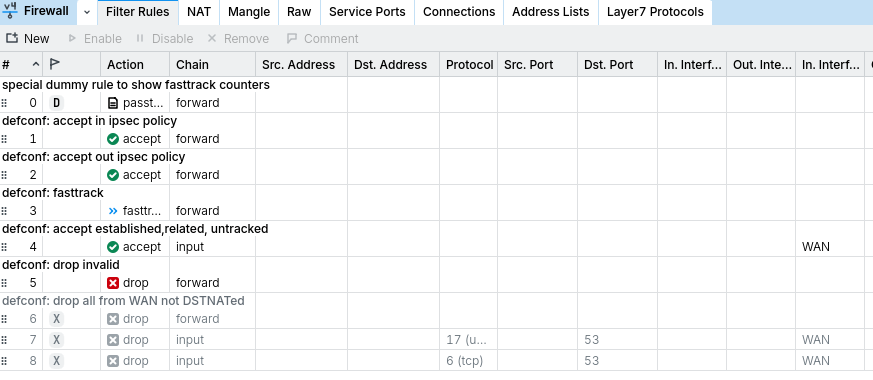
The "drop" rules on the input chain on port 53 would make the router drop all dns replies from your configured DNS server(s) . . . not sure why you have those - disble and retest.
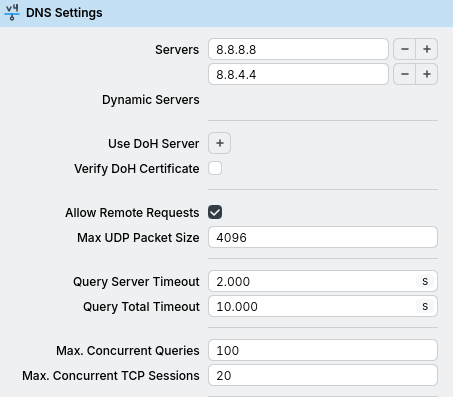
Can you ping your DNS servers from the router? (Tools menu, or /tools/ping in the cli). The DNS config itself looks fine.
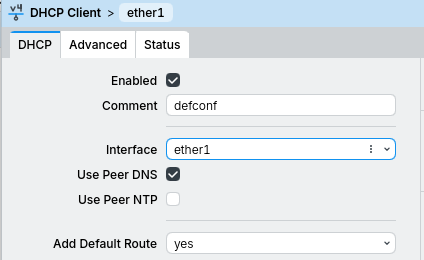
Since you are getting your ether1 IP via DHCP, you could also set "use-peer-dns" and use that . . .
oct/27/2026 01:40:13 by RouterOS 6.49.15
software id = PSVA-E617
model = 951G-2HnD
serial number = XXXXXXX

/interface bridge
add admin-mac=6C:3B:6B:95:3F:C5 auto-mac=no comment=defconf name=bridge-lan
/interface list
add comment=defconf name=WAN
add comment=defconf name=LAN
/interface wireless security-profiles
set [ find default=yes ] authentication-types=wpa-psk,wpa2-psk mode=
dynamic-keys supplicant-identity=MikroTik
/ip pool
add name=dhcp ranges=192.168.0.10-192.168.0.254
/ip dhcp-server
add address-pool=dhcp disabled=no interface=bridge-lan lease-time=8h name=
dhcp1
/interface bridge port
add bridge=bridge-lan comment=defconf interface=ether2
add bridge=bridge-lan comment=defconf interface=ether3
add bridge=bridge-lan comment=defconf interface=ether4
add bridge=bridge-lan comment=defconf interface=ether5
add bridge=bridge-lan comment=defconf interface=wlan1
/ip neighbor discovery-settings
set discover-interface-list=all
/interface detect-internet
set detect-interface-list=WAN internet-interface-list=WAN lan-interface-list=
all wan-interface-list=WAN
/interface list member
add comment=defconf interface=bridge-lan list=LAN
add comment=defconf interface=ether1 list=WAN
/ip address
add address=192.168.0.2/24 comment=defconf interface=bridge-lan network=
192.168.0.0
/ip cloud
set ddns-enabled=yes ddns-update-interval=5m
/ip dhcp-client
add comment=defconf disabled=no interface=ether1 use-peer-ntp=no
/ip dhcp-server alert
add disabled=no interface=bridge-lan
/ip dhcp-server lease
add address=192.168.0.15 mac-address=DC:A6:32:76:88:7D
/ip dhcp-server network
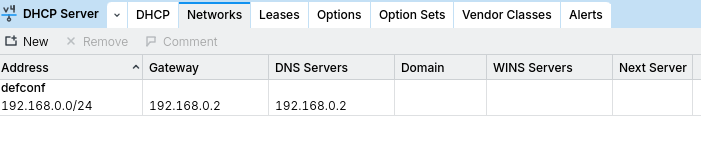
add address=192.168.0.0/24 comment=defconf dns-server=192.168.0.2 gateway=
192.168.0.2 netmask=24
/ip dns
set allow-remote-requests=yes servers=8.8.8.8,8.8.4.4
/ip dns static
add address=192.168.0.2 comment=defconf name=router.lan
/ip firewall filter
add action=accept chain=forward comment="defconf: accept in ipsec policy"
ipsec-policy=in,ipsec
add action=accept chain=forward comment="defconf: accept out ipsec policy"
ipsec-policy=out,ipsec
add action=fasttrack-connection chain=forward comment="defconf: fasttrack"
connection-state=established,related
add action=accept chain=input comment=
"defconf: accept established,related, untracked" connection-state=
established,related,untracked in-interface-list=WAN
add action=drop chain=forward comment="defconf: drop invalid"
connection-state=invalid
add action=drop chain=forward comment=
"defconf: drop all from WAN not DSTNATed" connection-nat-state=!dstnat
connection-state=new
add action=drop chain=input dst-port=53 in-interface-list=WAN protocol=udp
add action=drop chain=input dst-port=53 in-interface-list=WAN protocol=tcp
/ip firewall nat
add action=masquerade chain=srcnat comment="defconf: masquerade"
ipsec-policy=out,none out-bridge-port-list=all out-interface=ether1
add action=accept chain=dstnat comment="dietpi server" in-interface=
bridge-lan in-interface-list=WAN port=26 protocol=tcp
/ip route
add check-gateway=ping distance=1 gateway=ether1
/ip upnp
set enabled=yes
/ip upnp interfaces
add interface=bridge-lan type=internal
add interface=ether1 type=external
/system clock
set time-zone-name=Africa/Johannesburg
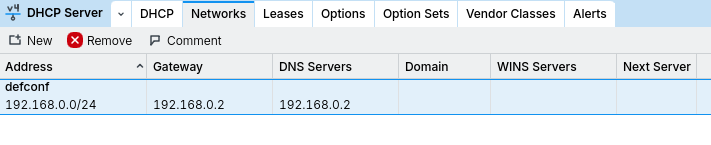
Other than that, you don't need /ip dns static if you dont use DoH, Allow remote requests should be set to yes only if you use the gateway router as a dns server, meaning that everyone whos set to get ip's by dhcp server from the core router has to have core routers ip address as a dns server. (i assume 192.168.0.1 for you)
Those FW rules shouldn't be the cause of the DNS problem. They are only blocking requests from the internet, not from the LAN as he have this before drop rules:
Looking at the configuration it seems that router itself is set as DNS server so when router reaches out to google DNS that connection is established and response from google dns is let trough the firewall.
But as I said, whole config is a mess and @linuxisthebom should explain what is he/she trying to do. Also I would start with a default configuration and see if everything is working then introduce changes step by step.
Thank you greatly for the replays. It's just a simple connection to the internet but without PPPOE. So my ISP will take me to a landing page, I put my information in, then I'm connected to the internet. Yes my Firewall is going to be a mess, I do lots of experiment, but also run Raspberry PI servers. My bad didn't put the extra Firewall settings. Still not connecting. Is there something I'm missing.
I am disconnected from the Internet with showing these pictures, using my other router till this is fixed.
Login via a browser for html traffic and simple IP connectivity aren't really the same thing (although one uses the other). Are you certain that your provider will just pass traffic?
The config you have in place is for a typical ISP that simply routes traffic with no login nonsense.
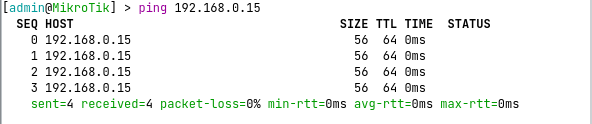
I ask again - can you ping anything from the router?
And do you get an IP assignment via the DHCP client on ether1?
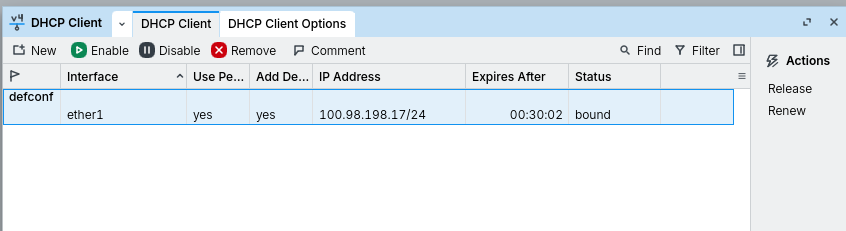
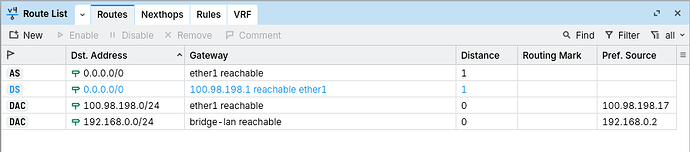
From your screenshots the DHCP client doesn't seem to be able to acquire a lease. There is no connected route dynamically added to ether1 like when a lease is obtained, and also no dynamic default route added. The status displayed by the DHCP client is probably not bound.
On a side note, this static default route that you added will not work:
Using ping to check gateway doesn't work when the gateway is specified as a non-point-to-point interface (PPPoE is point-to-point, but ether1 is an ethernet interface and not P2P). That's why in your IP -> Routes screenshot the route is blue and unreachable.
But even if you remove check-gateway=ping it will most probably also not work when you want to reach internet addresses (such as 8.8.8.8) because writing the gateway like that (gateway=ether1) means the router will use ARP for every destination addresses (including 8.8.8.8) to find out the MAC address and it won't work unless there is something gateway attached to ether1 that does Proxy-ARP.
So, just remove that static route after you've resolved the DHCP client issue.
If ether1 is directly connected to the ISP device, check whether the ISP require that you provide them with your MAC address (the MAC address assigned to ether1) before giving you a DHCP lease.
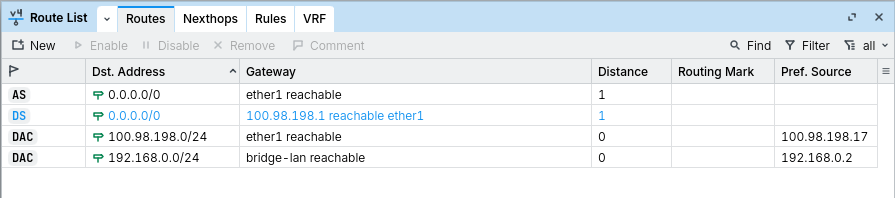
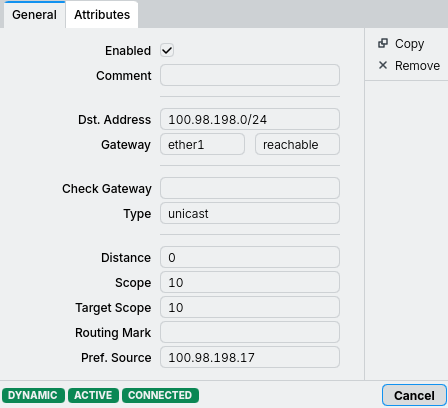
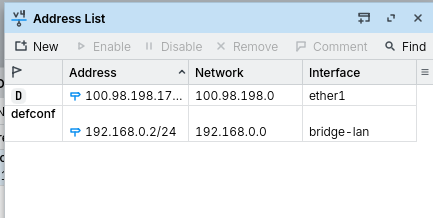
You don't need to manually add that route at all. As of your newest screenshots, DHCP is now working and your router got an IP address 100.98.198.17, which is a CGNAT address, in the subnet 100.98.198.0/24 via DHCP.
Having that address and subnet information, the router could automatically add the dynamic connected route dst-address=100.98.198.0/24 with gateway=ether1 to the route table. That route has the DAC flag for "Dynamic, Active, and Connected".
The DHCP client is working, and the setting "Add Default Route" in the DHCP client is "yes", so the DHCP client adds the default route with destination dst-address=0.0.0.0/0 and gateway=100.98.198.1 to the route table. This is the route that normally will allow you to reach the internet. 100.98.198.1 here is the IP address of the ISP gateway. When that gateway needs to be contacted, the router tries to figure out how to reach 100.98.198.1, and it will find the other dynamic route dst-address=100.98.198.0/24 with gateway=ether1 that tells it to reach 100.98.198.1 over ether1.
That's how it supposes to work. BUT you can see that that dst-address=0.0.0.0/0 gateway=100.98.198.1 route is currently blue and doesn't have the A flag, which means it's not active and will not be used.
The reason it's blue is because you yourself has unnecessarily added a static dst-address=0.0.0.0/0 gateway=ether1 route to the table. This is the route in black with the AS (Active and Static) flag in the table. When you try to reach the internet, this route will be used instead of the one provided by DHCP.
But as I wrote in the previous post, having the gateway set to the ethernet interface ether1 most probably will not work, because no host will able to answer the ARP request for internet address such as 8.8.8.8. The real ISP gateway 100.98.198.1 will only answer ARP requests for the address 100.98.198.1, not 8.8.8.8 or 1.1.1.1.
So, now that DHCP client is working, delete the static (currently AS) route that you have manually added.
The route table now appears correct. You wrote above that your ISP requires opening a landing page before they unlock the access to the internet. If that's the case, specifying the custom DNS servers 8.8.8.8,8.8.4.4 as you have here:
might not work, because you won't be able to resolve domain names using those servers before unlocking with the landing page. But a DNS request over UDP 53 or TCP 53 will definitely not be able to make a web browser redirection.
So for now, clear those two DNS server entries, and only use the one provided by the ISP via DHCP (with Use Peer DNS enabled).
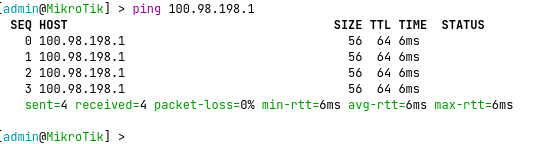
Also try to ping the gateway 100.98.198.1 from both your PC and the router, to see if the gateway is reachable.
Looks like that's my problem. I cannot ping 100.98.198.1 from the PC. Only from the Mikrotik. I did completely removed the NAT settings, only left the masquerade. I left the DNS 8.8.8.8
My normal router shows these settings to connect to the internet
Your masquerade rule has out-bridge-port-list=all which is quite unusual, and is only usable when /interface bridge settings has use-ip-firewall enabled. Maybe try to clear that condition first? The defconfmasquerade rule only has this:
Your normal router has a real public IP address which is non-CGNAT. The address that RouterOS receives is a CGNAT one (within 100.64.0.0/10) but it normally only affects your ability to forward ports. For outgoing connections to the internet it should still work.
For IPv4 and normal internet subscription where you are only given one single IP address by the ISP, NAT is a must, namely source NAT (chain=srcnat).
You have many more devices in your LAN that need internet access than that single IP address from the ISP, and those devices in LAN have local IP addresses in the private ranges, such as 192.168.0.25 that are not usable on the internet.
So the router before forwarding the packets that those LAN devices send to the internet must change the source address of the packets, from 192.168.0.x to the single address 100.98.198.17 or 102.182.32.212 that the ISP allocated to you. And that is exactly what the masquerade rule of the SRCNAT chain does.
If that rule is wrong and unable to match the outgoing connections, source address translation is not performed correctly, and when your PC sends packets to 8.8.8.8 the packets leaves yout router still with 192.168.0.x as source and the ISP will not accept them.
When you ping from the router itself even without masquerade rule, the router knows to use 100.98.198.17 as source address, no NAT is needed, and the ping works.
But if you ping 8.8.8.8 from your PC, then you need the working SRCNAT rule.
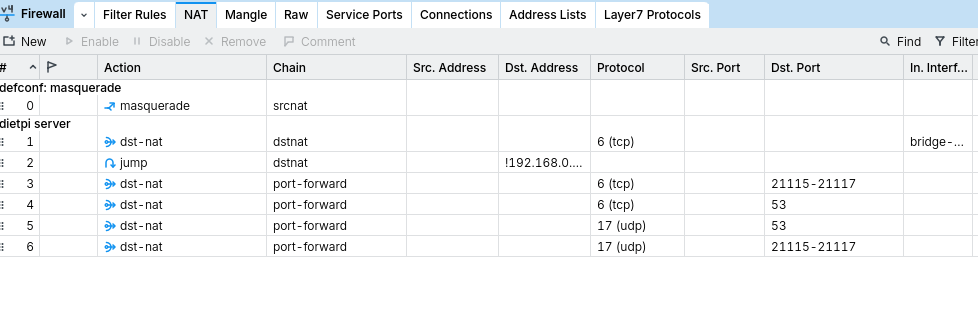
As I mentioned above, if your ISP only gives you an IP address in the 100.64.x.x-100.127.x.x range, then you are behind CGNAT https://en.wikipedia.org/wiki/Carrier-grade_NAT and your port-forwarding setup (your DSTNAT rules) will not work. The IP address the ISP gives you is not the same as the one the public internet sees when you makes connections to the internet. The ISP added one extra layer of NAT in front of you and you can't ask them to forward certain ports to you.
You will first need to ask the ISP to move you out of CGNAT. Maybe it will require some additional fee, or maybe it costs nothing extra, it depends on the ISP.
Port-forwarding I've done since ADSL days. Also on all types of routers. Except Mikrotik. I did set-up a Mikrotik to go over a road at a shop, another which was about 2KM far at a factory.
My ISP locks my MAC address to my router, so I just phone them when I change the router.
My port-forwarding is working. I just have an issue with the below rule. It works for the reason of using a DDNS were I'm connected to the router, but cannot do two different Ports from external to internal. Which is something I can do with any other router.