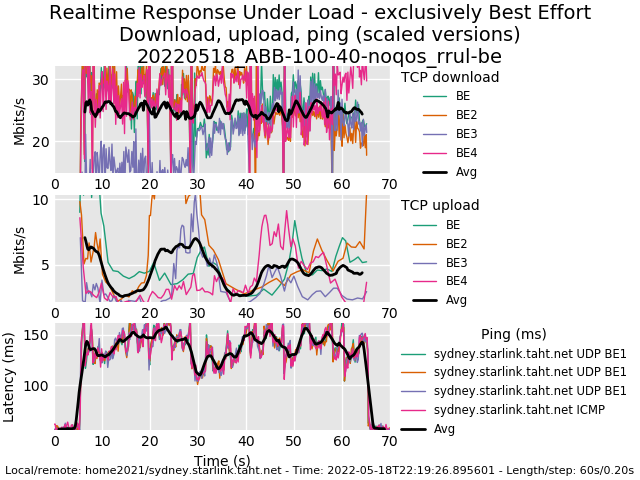
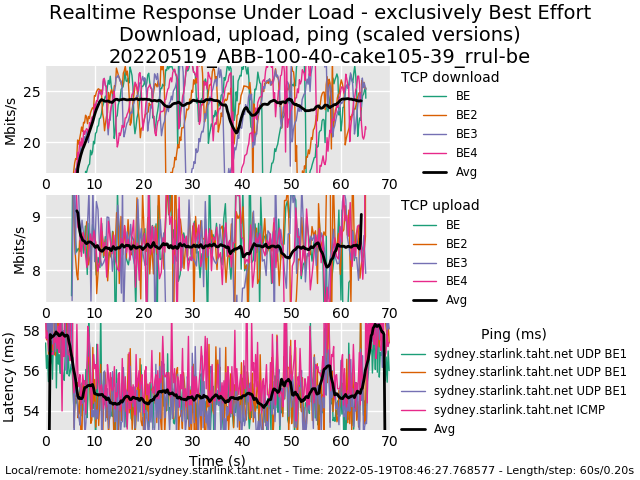
I’m using the below on a symmetrical 1Gb/1Gb connection but it reduces the over upload and download to 500Mb and I’ve checked CPU usage which is around 58% on an RB4011 any ideas what I’m doing wrong.
I experience the same phenomenon on an RB5009 regardless if I use cake or fq_codel. Bandwidth on a Gigabit WAN link is roughly cut in half. I’m guessing it’s a CPU constraint ?
I’ve also picked up another issue with queues where some incoming traffic seems to exceed the limit of the queue quite significantly, effectively breaking cake’s ability to keep latency under control. In some cases I need to reduce the “bandwidth limit” to as low as 50% of the line’s rated capacity to stabilize ping and prevent throughput saturation, resulting in a glaring discrepancy between traffic shown on the queue vs traffic shown on the actual interface. If anyone has any clues on this please do shout?
Same experience. Download speed is ok but the upload speed is cut to almost a half.
Just keep the default settings for the “total-queue=default-small” , then everything go fine. I get 9xx / 9xx Mbps.
Any queue type other than the default-small causes serious upload drop.
Actually I dont know why. I just trial and error.
Do I need to include an Overhead Scheme such as via ethernet?
I have been trying to find info about the Australian NBN ‘upload policer’ and how I limit the upload egress traffic to avoid the NBN Policer dropping packets. I also need to configure uploads to combat bufferbloat. Will one upload queue satisfy the other?
They are talking about that Mikrotik decided to limit cake to interface queues only in the latest 7.3beta40 release. Release notes buried here: http://forum.mikrotik.com/t/v7-3rc-testing-is-released/157306/1
Apparently this breaks some use cases people had for using cake in other scenarios and there is a little but of murmuration because of that.
Can somebody take a look at my CAKE config and tell me if there’s anything I can do to get as close to line-speed as possible. Some background:
Zen VDSL2 connection (80/20) into Vigor 130 modem (VLAN 101); PPPoE connection established via RB4011 on ether1. Jumbo packets enabled (ether1 MTU 1508; PPPoE MTU 1500)
Line speed according to the Vigor130 is 78M/20M; so the more I can eek out to get towards this speed would be a bonus; but otherwise my question would be around whether the correct overhead or mpu is set (PPPoE connection; VLAN101 however this is currently set modemside and jumbo packets router-end)
Do you mean that the interface needs to be set to eth1 (as opposed to the pppoe-interface) or rather the upcoming change in ROS 7.3 that does not allow cake as a simple queue type?
Nice result! And yes, under load on some technologies it’s possible to get less latency, as remarkable as it is.
Powersave is often a problem. A device will go to sleep until there are more packets to transmit. This is a somewhat foolish behavior network-wise, in that - for example - a tcp syn then syn/ack packet outstanding needs all the boost it can get to get more packets in flight once the flow gets going.
One string of cable modems would sleep stupidly this way. Many of our devices will buffer up small numbers packets over a small interval and only release them after a ms or 4, to save on cpu context switches, also.
In other cases you can get inside the request/grant loop that some gpon and some cable has. The underlying hw makes a request for a slot ahead of time based on an estimate of what it will need in the next cycle from the previous, thus overlapping requests. cable has a 2-6ms request/grant cycle.
In wifi, the rate controller stablizes the more you use it.
the fq-codel derived packet schedulers try hard to give the sparsest flows a boost towards the head of the queue, so they more rapidly can come into balance with the others.
Lastly the reason why your upload is so good and responsive is due to the low latency and shorter queues tcp is seeing in that direction. So few test for up and download at the same time, and your first result is what so many see, an upload goes to hell with big queues.
Check out Flent! If you’re running Windows then you’ll need to setup a linux machine in order to use it. If it’s a newer Windows computer then I’d consider setting up the Windows Subsystem for Linux to get you going quickly.