Yes, that should not be the problem with the setup above.
I've not had time yes to fully read your post and study your posted configuration, but about this question then yes, it was tested on the Frankenstein CHR setup made up for the MACVLAN tunnel adventure from previous threads. The setup has:
-
WAN (DHCP client) on
ether1, which is in thewanVRF, it needs this for the router to be able to go to the internet to check for update, sync time, etc... -
The is
secondaryVRF which hasether3and the172.20.80.2/24subnet. This is where I also have the PC that manages the CHR. -
The main LAN (with DHCP server) is in the
tertiaryVRF, has the192.168.88.1/24subnet onether2. -
Router services like DNS, WinBox, WebFig are in
main, so it uses the trick from here to be able to reach them from other VRFs (like from LAN intertiary, or from my PC172.20.80.1insecondary). -
There is PPPoE server which put the clients in the
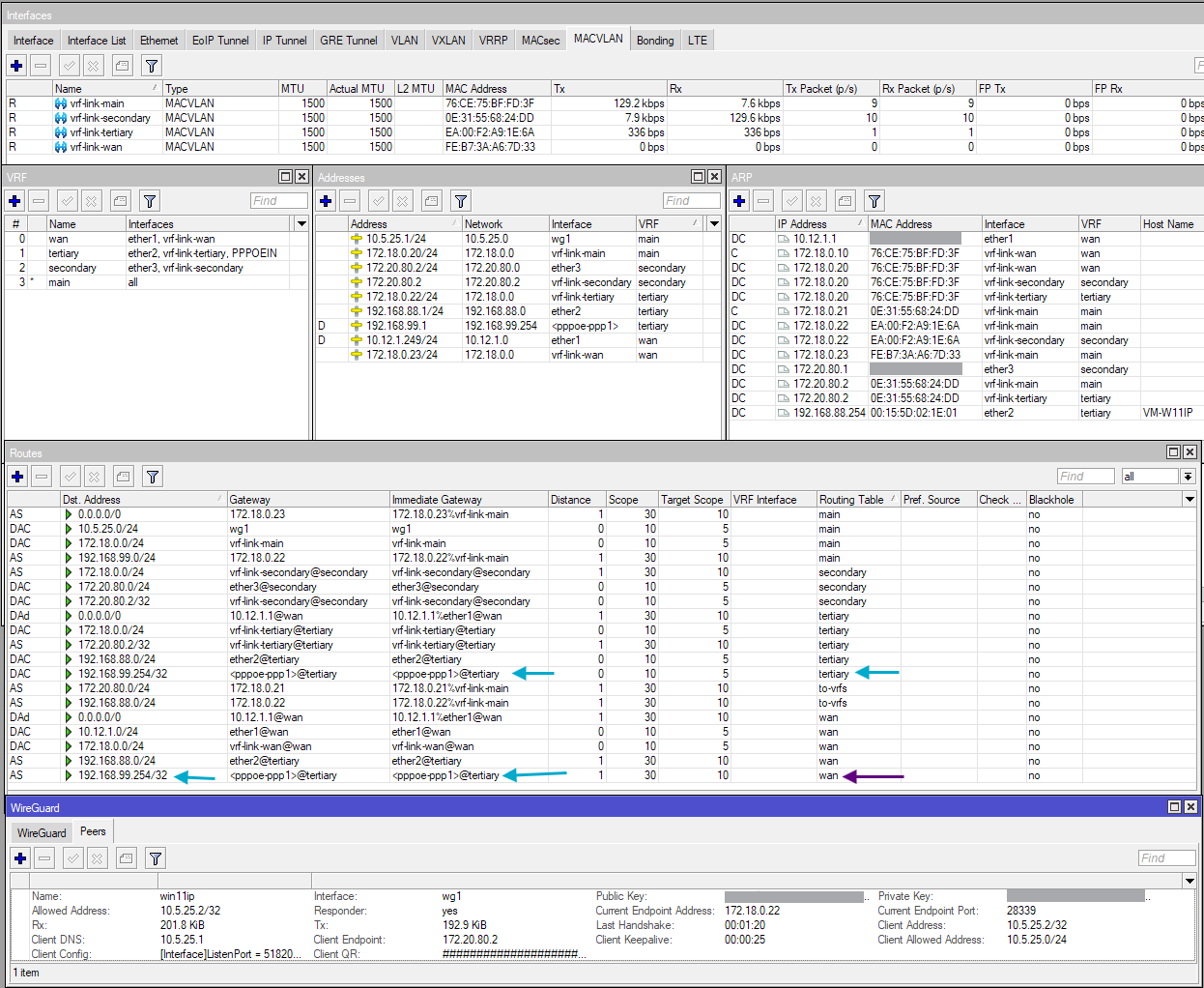
tertiaryVRF. These client needs to access the internet, so there are scripts that add the return route to them fromwan. PPPoE clients are put in the192.168.99.0/24subnet. -
The WireGuard interface is created like this:
/interface wireguard
add listen-port=51820 mtu=1420 name=wg1 vrf=secondary
Which means from my PC at
172.20.80.1I can make WG connection to the router at172.20.80.2(onether3) being in thesecondaryVRF.This
172.20.80.2plays the role of your192.0.2.222address, and is reachable from outside of the router, if plugged to the right port(s).The interface
wg1itself as well as the subnet inside the tunnel (10.5.25.1/24), is in themainVRF, but this is not important for the test, you can move thewg1interface to other VRFs if you want. What important is thevrf=secondaryparameter on the interface definition above, because that determines the VRF of the WireGuard UDP wrapper packets. -
The
vrf-linkbridge is created with 4 MACVLAN interfaces,vrf-link-main,vrf-link-secondary,vrf-link-tertiary,vrf-link-wan. They originally have the addresses172.18.0.20-23assigned. However with the change made for WireGuard as described in the post above,172.18.0.21has been removed fromvrf-link-secondary, replaced by the address that should be used for accessing WG, which is172.20.80.2(same as address onether3).172.18.0.21now only exists as ARP response that map to the MAC address ofvrf-link-secondary(see ARP table).
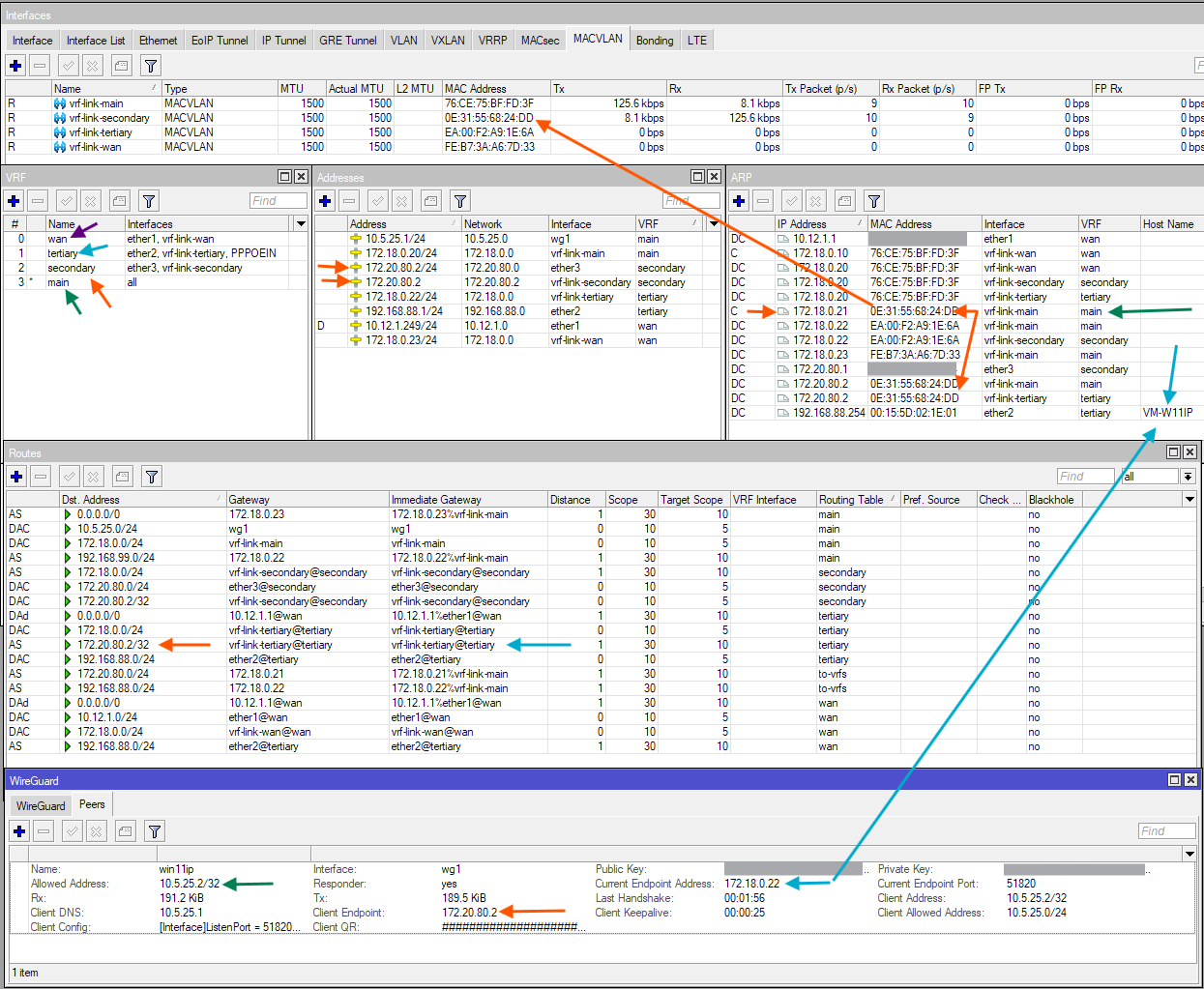
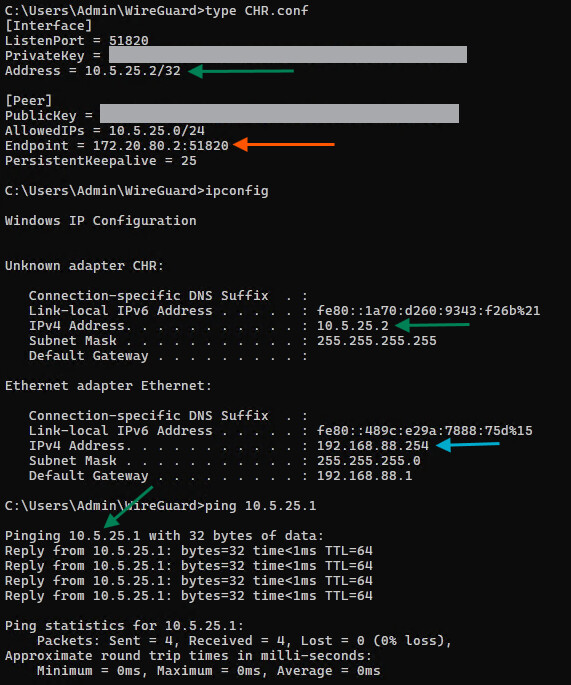
With the setup, a Win11 client which is in the LAN network (tertiary VRF) with address (obtained via DHCP) 192.168.88.254 can establish a WG connection to 172.20.80.2 (which is in secondary), and get a working tunnel. I can ping 10.5.25.1 from the Win11 machine with address inside tunnel 10.5.25.2. On the router, the peer show correct last handshake and current endpoint information.
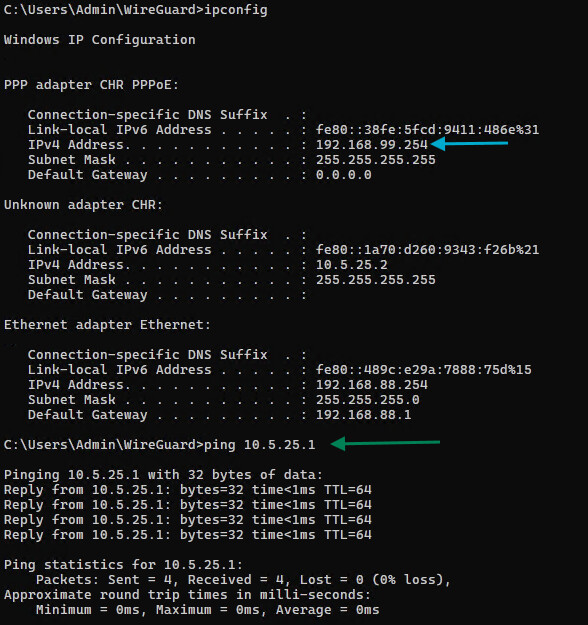
Similarly, a PPPoE client (192.168.99.x, which is in tertiary too) is be able to make WG tunnel to 172.20.80.2 too.
Here is the full export without sensitive information from the CHR:
# 2026-08-03 06:19:33 by RouterOS 7.23.2
# system id = **********
#
/interface bridge
add name=vrf-link protocol-mode=none
/interface ethernet
set [ find default-name=ether1 ] disable-running-check=no
set [ find default-name=ether2 ] disable-running-check=no
set [ find default-name=ether3 ] disable-running-check=no
set [ find default-name=ether4 ] disable-running-check=no
/interface macvlan
add interface=vrf-link mac-address=76:CE:75:BF:FD:3F name=vrf-link-main
add interface=vrf-link mac-address=0E:31:55:68:24:DD name=vrf-link-secondary
add interface=vrf-link mac-address=EA:00:F2:A9:1E:6A name=vrf-link-tertiary
add interface=vrf-link mac-address=FE:B7:3A:A6:7D:33 name=vrf-link-wan
/interface list
add name=PPPOEIN
add include=PPPOEIN name=VRFs
/ip pool
add name=dhcp_pool0 ranges=192.168.88.20-192.168.88.254
add name=pppoe-pool ranges=192.168.99.20-192.168.99.254
/ip dhcp-server
add address-pool=dhcp_pool0 interface=ether2 name=dhcp1
/ip vrf
add interfaces=ether1,vrf-link-wan name=wan
add interfaces=ether2,vrf-link-tertiary,PPPOEIN name=tertiary
add interfaces=ether3,vrf-link-secondary name=secondary
/interface wireguard
add listen-port=51820 mtu=1420 name=wg1 vrf=secondary
/ppp profile
add change-tcp-mss=yes interface-list=PPPOEIN local-address=192.168.99.1 \
    name=pppoe-in on-down="/ip route remove [find dst-address=\$\"remote-addre\
    ss\" routing-table=wan];" on-up=":local ifaceName [/interface/pppoe-server\
    \_get \$interface name];\r\
    \n/ip route add dst-address=\$\"remote-address\" gateway=\"\$ifaceName@ter\
    tiary\" routing-table=wan;" remote-address=pppoe-pool
/routing table
add disabled=no fib name=to-vrfs
/interface list member
add interface=ether2 list=VRFs
add interface=ether3 list=VRFs
/interface pppoe-server server
add default-profile=pppoe-in disabled=no interface=ether2 service-name=\
    pppoe-lan
/interface wireguard peers
add allowed-address=10.5.25.2/32 client-address=10.5.25.2/32 \
    client-allowed-address=10.5.25.0/24 client-dns=10.5.25.1 client-endpoint=\
    172.20.80.2 client-keepalive=25s interface=wg1 name=win11ip public-key=\
    "*****" responder=yes
/ip address
add address=172.20.80.2/24 interface=ether3 network=172.20.80.0
add address=172.18.0.20/24 interface=vrf-link-main network=172.18.0.0
add address=192.168.88.1/24 interface=ether2 network=192.168.88.0
add address=172.18.0.22/24 interface=vrf-link-tertiary network=172.18.0.0
add address=172.18.0.23/24 interface=vrf-link-wan network=172.18.0.0
add address=10.5.25.1/24 interface=wg1 network=10.5.25.0
add address=172.20.80.2 interface=vrf-link-secondary network=172.20.80.2
/ip arp
add address=172.18.0.10 interface=vrf-link-wan mac-address=76:CE:75:BF:FD:3F
add address=172.18.0.21 interface=vrf-link-main mac-address=0E:31:55:68:24:DD
/ip dhcp-client
add default-route-tables=wan,tertiary interface=ether1 name=client1
/ip dhcp-server network
add address=192.168.88.0/24 dns-server=192.168.88.1 gateway=192.168.88.1
/ip dns
set allow-remote-requests=yes
/ip firewall address-list
add address=172.20.80.2 list=VRF-LOCAL
add address=192.168.88.1 list=VRF-LOCAL
add address=172.20.80.0/24 list=VRF-RANGES
add address=192.168.88.0/24 list=VRF-RANGES
add address=192.168.99.1 list=VRF-LOCAL
add address=192.168.99.0/24 list=VRF-RANGES
/ip firewall mangle
add action=mark-connection chain=prerouting connection-mark=no-mark \
    connection-state=new in-interface=vrf-link-main new-connection-mark=\
    from-vrfs src-address-list=VRF-RANGES
add action=mark-routing chain=output connection-mark=from-vrfs \
    new-routing-mark=to-vrfs
/ip firewall nat
add action=src-nat chain=srcnat dst-address-list=!VRF-RANGES out-interface=\
    vrf-link-main to-addresses=172.18.0.10
add action=dst-nat chain=dstnat dst-address-list=VRF-LOCAL dst-port=53 \
    in-interface-list=VRFs protocol=udp to-addresses=172.18.0.20
add action=dst-nat chain=dstnat dst-address-list=VRF-LOCAL dst-port=53 \
    in-interface-list=VRFs protocol=tcp to-addresses=172.18.0.20
add action=dst-nat chain=dstnat dst-address-list=VRF-LOCAL dst-port=8291 \
    in-interface-list=VRFs protocol=tcp to-addresses=172.18.0.20
add action=dst-nat chain=dstnat dst-address-list=VRF-LOCAL dst-port=80 \
    in-interface-list=VRFs protocol=tcp to-addresses=172.18.0.20
add action=masquerade chain=srcnat out-interface=ether1
add action=masquerade chain=srcnat dst-address=172.20.80.2 dst-port=51820 \
    out-interface=vrf-link-tertiary protocol=udp
/ip route
add dst-address=172.20.80.0/24 gateway=172.18.0.21@main routing-table=to-vrfs
add dst-address=192.168.88.0/24 gateway=172.18.0.22@main routing-table=\
    to-vrfs
add dst-address=0.0.0.0/0 gateway=172.18.0.23 routing-table=main
add dst-address=192.168.88.0/24 gateway=ether2@tertiary routing-table=wan
add dst-address=192.168.99.0/24 gateway=172.18.0.22@main routing-table=main
add dst-address=172.18.0.0/24 gateway=vrf-link-secondary@secondary \
    routing-table=secondary
add dst-address=172.20.80.2/32 gateway=vrf-link-tertiary@tertiary \
    routing-table=tertiary
/ppp secret
add name=ppp1 profile=pppoe-in service=pppoe