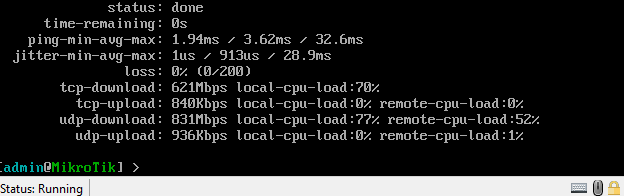
Not sure what I might be doing wrong but hAP ax2 UDP Upload test is low when testing from Router speedtest tool (Console) to Btest/server on PC.
Doesn’t seem to matter if it’s wired or wireless.
tool/speed-test address=Local
              status: done
      time-remaining: 0s
    ping-min-avg-max: 1.75ms / 2.62ms / 3.89ms
  jitter-min-avg-max: 1us / 267us / 1.42ms
                loss: 0% (0/200)
        tcp-download: 699Mbps local-cpu-load:62%
          tcp-upload: 730Mbps local-cpu-load:35% remote-cpu-load:1%
        udp-download: 589Mbps local-cpu-load:29% remote-cpu-load:1%
          udp-upload: 5.88Mbps local-cpu-load:3% remote-cpu-load:1%


 tool/speed-test address=Local
              status: done
      time-remaining: 0s
    ping-min-avg-max: 792us / 1.35ms / 3.55ms
  jitter-min-avg-max: 0s / 222us / 2.57ms
                loss: 0% (0/200)
        tcp-download: 931Mbps local-cpu-load:71%
          tcp-upload: 933Mbps local-cpu-load:73% remote-cpu-load:1%
        udp-download: 941Mbps local-cpu-load:43% remote-cpu-load:1%
          udp-upload: 6.95Mbps local-cpu-load:3% remote-cpu-load:1%
Can you perform a test with two machines, using i.e. iperf?
It would seem so.
I'm getting some strange results, So I'm testing from a PC to pi4 8GB. I'm going to spin up another server later to test again.
If I use multiple streams Linux to Linux? WSL I'm loosing as you can see below But.... If I test again from pi4 to PC iperf3.exe using
UDP single stream 100M if works fine! second set of tests.
pi4 has iperf3 version 3.6 (something-something fixed in version 3.10 UDP Multi) hence i want to spin up another server.
PC has WSL Ubuntu - Hyper-V shared connection iperf3 version 3.13
I need a better match to make sure what I'm seing isn't an iperf -v mismatch problem.
iperf3 -c 192.168.0.104 -P 10 -b 10M -R

[SUM]   0.00-10.00  sec  16.9 MBytes  14.1 Mbits/sec  2563             sender
[SUM]   0.00-10.00  sec  16.0 MBytes  13.4 Mbits/sec                  receiver

iperf3 -c 192.168.0.104 -P 10 -b 10M
[SUM]   0.00-10.00  sec   120 MBytes   100 Mbits/sec    8             sender
[SUM]   0.00-10.00  sec   120 MBytes   100 Mbits/sec                  receiver
If I do the same test single stream Linux to iperf3.exe I get this..
iperf3 -c  -p 5201 -b 100M -u
Connecting to host , port 5201
[  5] local  port 60825 connected to  port 5201
[ ID] Interval           Transfer     Bitrate         Total Datagrams
[  5]   0.00-1.00   sec  11.9 MBytes  99.9 Mbits/sec  8626
[  5]   1.00-2.00   sec  11.9 MBytes   100 Mbits/sec  8633
[  5]   2.00-3.00   sec  11.9 MBytes   100 Mbits/sec  8633
[  5]   3.00-4.00   sec  11.9 MBytes   100 Mbits/sec  8632
[  5]   4.00-5.00   sec  11.9 MBytes   100 Mbits/sec  8634
[  5]   5.00-6.00   sec  11.9 MBytes   100 Mbits/sec  8632
[  5]   6.00-7.00   sec  11.9 MBytes   100 Mbits/sec  8633
[  5]   7.00-8.00   sec  11.9 MBytes   100 Mbits/sec  8633
[  5]   8.00-9.00   sec  11.9 MBytes   100 Mbits/sec  8632
[  5]   9.00-10.00  sec  11.9 MBytes   100 Mbits/sec  8633
- - - - - - - - - - - - - - - - - - - - - - - - -
[ ID] Interval           Transfer     Bitrate         Jitter    Lost/Total Datagrams
[  5]   0.00-10.00  sec   119 MBytes   100 Mbits/sec  0.000 ms  0/86321 (0%)  sender
[  5]   0.00-10.00  sec   119 MBytes  99.6 Mbits/sec  0.137 ms  324/86319 (0.38%)  receiver

iperf3 -c  -p 5201 -b 100M -u -R
Connecting to host , port 5201
Reverse mode, remote host  is sending
[  5] local  port 46993 connected to  port 5201
[ ID] Interval           Transfer     Bitrate         Jitter    Lost/Total Datagrams
[  5]   0.00-1.00   sec  11.6 MBytes  97.1 Mbits/sec  0.144 ms  0/8381 (0%)
[  5]   1.00-2.00   sec  12.0 MBytes   100 Mbits/sec  0.241 ms  0/8656 (0%)
[  5]   2.00-3.00   sec  12.1 MBytes   102 Mbits/sec  0.148 ms  0/8786 (0%)
[  5]   3.00-4.00   sec  11.9 MBytes  99.6 Mbits/sec  0.144 ms  0/8599 (0%)
[  5]   4.00-5.00   sec  11.9 MBytes  99.6 Mbits/sec  0.138 ms  0/8598 (0%)
[  5]   5.00-6.00   sec  11.8 MBytes  99.1 Mbits/sec  0.160 ms  0/8559 (0%)
[  5]   6.00-7.00   sec  12.1 MBytes   101 Mbits/sec  0.163 ms  0/8758 (0%)
[  5]   7.00-8.00   sec  11.8 MBytes  99.1 Mbits/sec  0.181 ms  0/8551 (0%)
[  5]   8.00-9.00   sec  12.1 MBytes   102 Mbits/sec  0.151 ms  0/8788 (0%)
[  5]   9.00-10.00  sec  11.7 MBytes  98.1 Mbits/sec  0.156 ms  0/8467 (0%)
- - - - - - - - - - - - - - - - - - - - - - - - -
[ ID] Interval           Transfer     Bitrate         Jitter    Lost/Total Datagrams
[  5]   0.00-10.00  sec   119 MBytes  99.8 Mbits/sec  0.000 ms  0/86166 (0%)  sender
[  5]   0.00-10.00  sec   119 MBytes  99.8 Mbits/sec  0.156 ms  0/86143 (0%)  receiver
i'm not sure Windows iperf3 does -P properly at all.
I'll pop back when I've got more clean results
@erlinden
Test to a proper linux server (iperf3 v 3.9) gives me no such nonsense.
So that would be a no it doesn’t do the same thing.
iperf3 -c 192.168.0.22 -P 10 -b 50M -u -R
[SUM] 0.00-10.01 sec 597 MBytes 500 Mbits/sec 0.000 ms 0/432120 (0%) sender
[SUM] 0.00-10.00 sec 596 MBytes 500 Mbits/sec 0.291 ms 0/431855 (0%) receiver
iperf3 -c 192.168.0.22 -P 10 -b 50M -u
[SUM] 0.00-10.00 sec 596 MBytes 500 Mbits/sec 0.000 ms 0/431600 (0%) sender
[SUM] 0.00-10.01 sec 594 MBytes 497 Mbits/sec 0.186 ms 1727/431593 (0.4%) receiver
1 test from the server just to check
iperf3 -c 192.168.0.104 -P 10 -b 50M
[SUM] 0.00-10.00 sec 597 MBytes 501 Mbits/sec 4 sender
[SUM] 0.00-10.02 sec 597 MBytes 500 Mbits/sec receiver
oops try that again that last 1 was tcp…
iperf3 -c 192.168.0.104 -P 10 -b 50M -u
[SUM] 0.00-10.00 sec 596 MBytes 500 Mbits/sec 0.000 ms 0/431600 (0%) sender
[SUM] 0.00-10.00 sec 595 MBytes 499 Mbits/sec 0.271 ms 674/431595 (0.16%) receiver
Works fine from Mikrotik >> Mikrotik
status: done
      time-remaining: 0s
    ping-min-avg-max: 145us / 214us / 436us
  jitter-min-avg-max: 0s / 20us / 291us
                loss: 0% (0/200)
        tcp-download: 929Mbps local-cpu-load:59%
          tcp-upload: 932Mbps local-cpu-load:42% remote-cpu-load:87%
        udp-download: 943Mbps local-cpu-load:26% remote-cpu-load:58%
          udp-upload: 956Mbps local-cpu-load:37% remote-cpu-load:47%
Just not Mikrotik to Windows btest/server, another PC fresh install same thing
 status: done
      time-remaining: 0s
    ping-min-avg-max: 374us / 424us / 862us
  jitter-min-avg-max: 0s / 26us / 441us
                loss: 0% (0/200)
        tcp-download: 942Mbps local-cpu-load:47%
          tcp-upload: 933Mbps local-cpu-load:42% remote-cpu-load:6%
        udp-download: 938Mbps local-cpu-load:27% remote-cpu-load:6%
          udp-upload: 6.85Mbps local-cpu-load:2% remote-cpu-load:6%
So I’m out of Ideas.
That’s why it was suggested to use iperf on both sides passing over that Tik router.
My go to tool for such cases is always iperf3 in container or bare metal (and HE.NET app on Android if needed).
I wasn’t aware that it didn’t work properly Windows btest.exe.
erm.. how about x86 Mikrotik in a VM would that work properly ?
Depends on the CPU you have on that VM and the available network card.
There is a public Btest server available hosted by our own North Idaho Tom Jones, if you want.
I believe it can digest up to several Gbps 
http://forum.mikrotik.com/t/public-mikrotik-bandwidth-test-server-s-now-shutdown-as-of-april-1st-2025/94863/1
If only I had that much bandwidth 
27 Mbps… meh
Ok so installed Hyper-V then CHR on Windows11 yup Windows11 it works now I guess.
https://www.youtube.com/watch?v=RQ-52Ih_MmQ
But guess what, it’s the same as btest.exe oh well more useless info gained so someone else doesn’t need to.
It works very well guys, big thumbs up