SSH Brute force Prevention

Hi Guys,

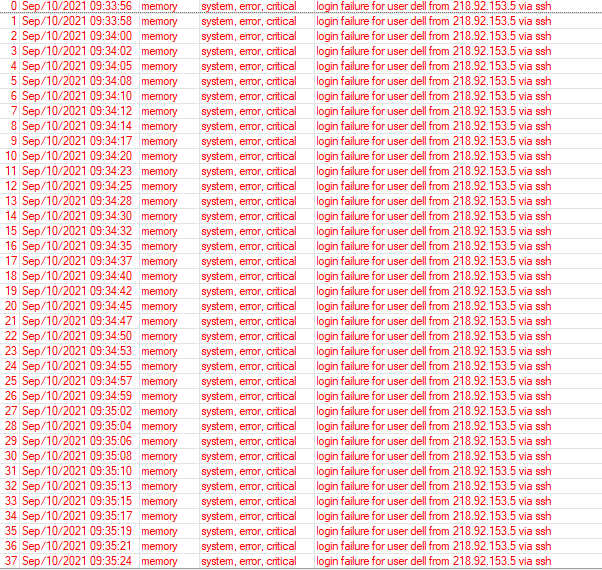
I’m getting log messages stating “login failure for user oracle, dell, etc. from 218.92.153.5 via ssh”

I’ve followed the guideline from the link below.
https://wiki.mikrotik.com/wiki/Bruteforce_login_prevention

My configuration is below:

/ip firewall filter
add action=drop chain=input src-address-list=blacklisted-ip
add action=add-src-to-address-list address-list=blacklisted-ip \
    address-list-timeout=3d chain=input connection-state=new dst-port=\
    21,22,23,8291,8728,8279 protocol=tcp src-address=!192.168.20.0/23 \
    src-address-list=stage-3
add action=add-src-to-address-list address-list=stage-3 address-list-timeout=\
    5m chain=input connection-state=new dst-port=21,22,23,8291,8728,8279 \
    protocol=tcp src-address=!192.168.20.0/23 src-address-list=stage-2
add action=add-src-to-address-list address-list=stage-2 address-list-timeout=\
    5m chain=input connection-state=new dst-port=21,22,23,8291,8728,8279 \
    protocol=tcp src-address=!192.168.20.0/23 src-address-list=stage-1
add action=add-src-to-address-list address-list=stage-1 address-list-timeout=\
    3m chain=input connection-state=new dst-port=21,22,23,8291,8728,8279 \
    protocol=tcp src-address=!192.168.20.0/23

Do I need to add additional firewall rules along with it? Since I keep getting that log. Please advise.
ssh.PNG

I guess most of (advanced) forum users agree that management access to router should be allowed in “allow few, block the rest” manner … your firewall is in manner “block a few, allow the rest” which opens huge window of opportunity to try to hack it (by using a distributed crowd of bots).

BTW, your top-most “drop blacklisted” rule would be better moved to /ip firewall raw like this

/ip firewall raw
add action=drop chain=prerouting src-address-list=blacklisted-ip

And check if the offending remote IP address did end-up on any of the address lists involved in your port scanning detection rules.

I’m currently using the drop action in /firewall raw. So far, no log error is received.
But the following IP didn’t end up in the blacklisted-ip list. Had to manually put it there. That’s what is worrying me the most.

I’m planning on allowing ssh for few management IPs if I receive this once again. To be very safe.