tried to connect with an sstpc client at Mikrotik-SSTP server … connection lasts only ~60sec
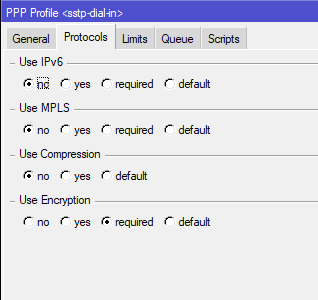
LCP is shutting down with nego-timeout … seems sstpc is not answering certain control-protocol requests* … point is the unanswered protocols are disabled in the sstp-server ppp-profile ?!
this a bug or are feature ? … are there any known workarounds ?
.
*) Windows- and Mikrotik-clients working flawless
.
16:01:27 echo: sstp,ppp,debug,packet  <sstp-exampleuser>: rcvd IPCP ConfAck id=0x1
16:01:27 echo: sstp,ppp,debug,packet     <addr 172.XX.YY.9>
16:01:27 echo: sstp,ppp,debug,packet  <sstp-exampleuser>: rcvd IPCP ConfReq id=0x2
16:01:27 echo: sstp,ppp,debug,packet     <addr 0.0.0.0>
16:01:27 echo: sstp,ppp,debug,packet  <sstp-exampleuser>: sent IPCP ConfNak id=0x2
16:01:27 echo: sstp,ppp,debug,packet     <addr 172.XX.YY.47>
16:01:27 echo: sstp,ppp,debug,packet  <sstp-exampleuser>: rcvd IPCP ConfReq id=0x3
16:01:27 echo: sstp,ppp,debug,packet     <addr 172.XX.YY.47>
16:01:27 echo: sstp,ppp,debug,packet  <sstp-exampleuser>: sent IPCP ConfAck id=0x3
16:01:27 echo: sstp,ppp,debug,packet     <addr 172.XX.YY.47>
16:01:27 echo: sstp,ppp,debug <sstp-exampleuser>: IPCP opened
16:01:27 echo: sstp,ppp,info <sstp-exampleuser>: connected
16:01:57 echo: sstp,ppp,debug,packet  <sstp-exampleuser>: rcvd LCP EchoReq id=0x1
16:01:57 echo: sstp,ppp,debug,packet     <magic 0x46c37fff>
16:01:57 echo: sstp,ppp,debug,packet  <sstp-exampleuser>: sent LCP EchoRep id=0x1
16:01:57 echo: sstp,ppp,debug,packet     <magic 0x68b869a8>
  (2 messages discarded)
16:02:27 echo: sstp,packet 00 00 00 00
16:02:27 echo: sstp,ppp,debug <sstp-exampleuser>: LCP lowerdown
16:02:27 echo: sstp,ppp,debug <sstp-exampleuser>: LCP closed
16:02:27 echo: sstp,ppp,debug <sstp-exampleuser>: CCP lowerdown
16:02:27 echo: sstp,ppp,debug <sstp-exampleuser>: BCP lowerdown
16:02:27 echo: sstp,ppp,debug <sstp-exampleuser>: BCP down event in starting state
16:02:27 echo: sstp,ppp,debug <sstp-exampleuser>: IPCP lowerdown
16:02:27 echo: sstp,ppp,debug <sstp-exampleuser>: IPCP closed
16:02:27 echo: sstp,ppp,debug <sstp-exampleuser>: IPV6CP lowerdown
16:02:27 echo: sstp,ppp,debug <sstp-exampleuser>: IPV6CP down event in starting state
16:02:27 echo: sstp,ppp,debug <sstp-exampleuser>: MPLSCP lowerdown
16:02:27 echo: sstp,ppp,debug <sstp-exampleuser>: MPLSCP down event in starting state
16:02:27 echo: sstp,ppp,info <sstp-exampleuser>: terminating... - negotiation timeout
16:02:27 echo: sstp,ppp,debug <sstp-exampleuser>: LCP lowerdown
16:02:27 echo: sstp,ppp,debug <sstp-exampleuser>: LCP down event in starting state
16:02:27 echo: sstp,ppp,info,account exampleuser logged out, 59 1034 412 17 10 from 192.XXX.YYY.142
16:02:27 echo: sstp,ppp,info <sstp-exampleuser>: disconnected
.
…
.
after further investigation
… must be something else … container-related … sstps on another client works without connection-loss … seems the host-system is not properly handing-over/filtering some frame-types … odd