I’m a bit confused at the moment and need your help.
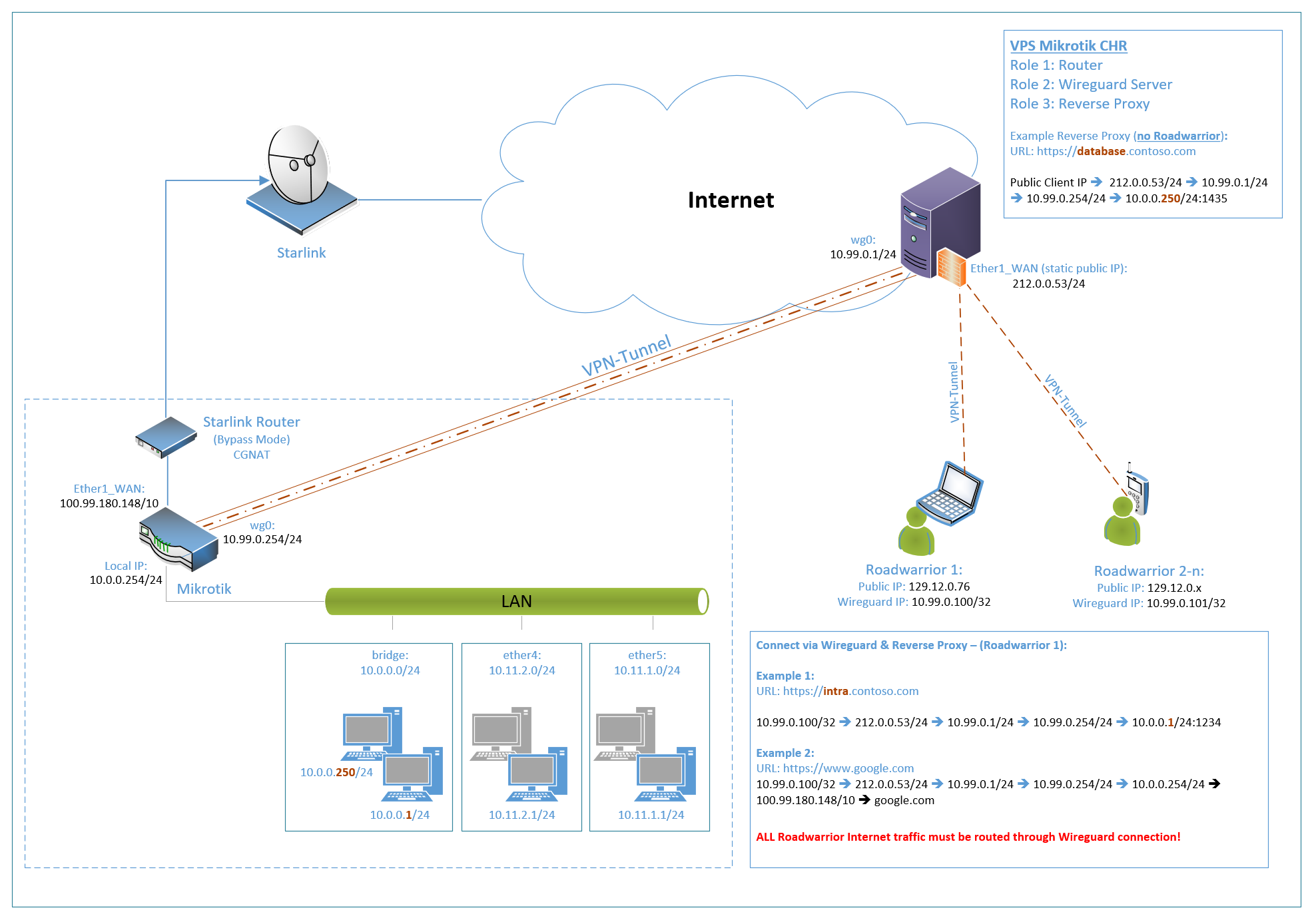
This involves the configuration of a wireguard connection between a VPS and a Microtics router, as Internet access is via Starlink (CGNAT).
The objective is to access my local network via the VPS. In addition, the VPS should serve as an endpoint for road warrior clients and route their traffic to the Internet via the LAN.
Problemstatement:
I´m not able to reach/connect any of the devices located in any of the the subets configured on the Mikrotik router.
SSH-Login on VPS:
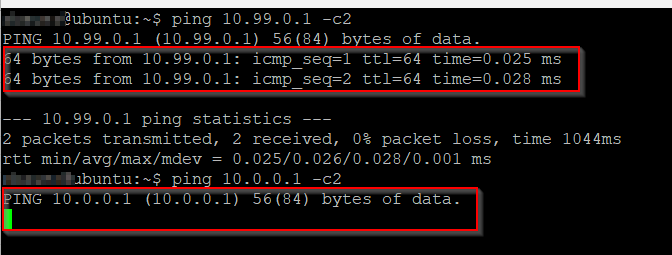
10.99.0.1 is reachable (Ping)
10.99.0.254 is reachable (Ping)
10.0.0.1 is NOT reachable (Ping)
10.0.0.254 is NOT reachable (Ping)
10.11.1.254 is NOT reachable (Ping)
10.11.2.254 is NOT reachable (Ping)
Login Mikrotik (LAN 10.0.0.254):
10.99.0.1 is reachable (Ping)
10.99.0.254 is reachable (Ping)
10.11.1.254 is reachable (Ping)
10.11.2.254 is reachable (Ping)
Login Testclient (LAN 10.0.0.1):
10.99.0.1 is NOT reachable (Ping)
10.99.0.254 is reachable (Ping)
10.11.1.254 is reachable (Ping)
10.11.2.254 is reachable (Ping)
Road-Warrion Client (Connected to Wireguard Server on VPS):
10.99.0.1 is NOT reachable (Ping)
10.99.0.254 is NOT reachable (Ping)
10.0.0.1 is NOT reachable (Ping) – No route to host
10.0.0.254 is NOT reachable (Ping)
10.11.1.254 is NOT reachable (Ping)
10.11.2.254 is NOT reachable (Ping)
Traffic is not routed through Wireguard tunnel!
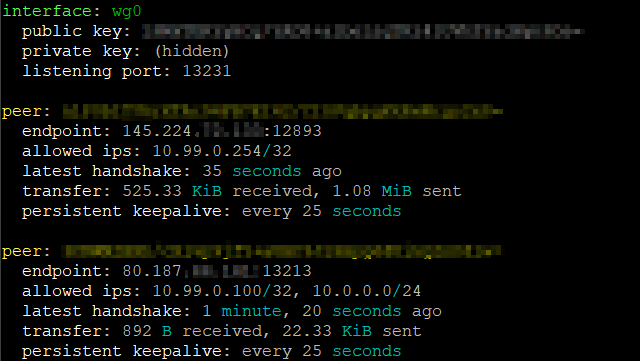
So all Clients in all subnets behind the Wireguard Gateway 10.99.0.254/24 1,2,3 are not reachable ether from VPS nor from the Roadwarrior Client.
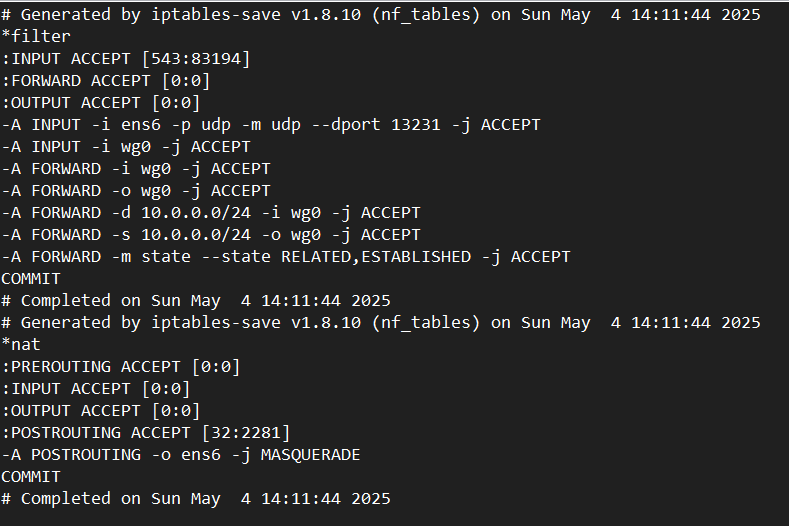
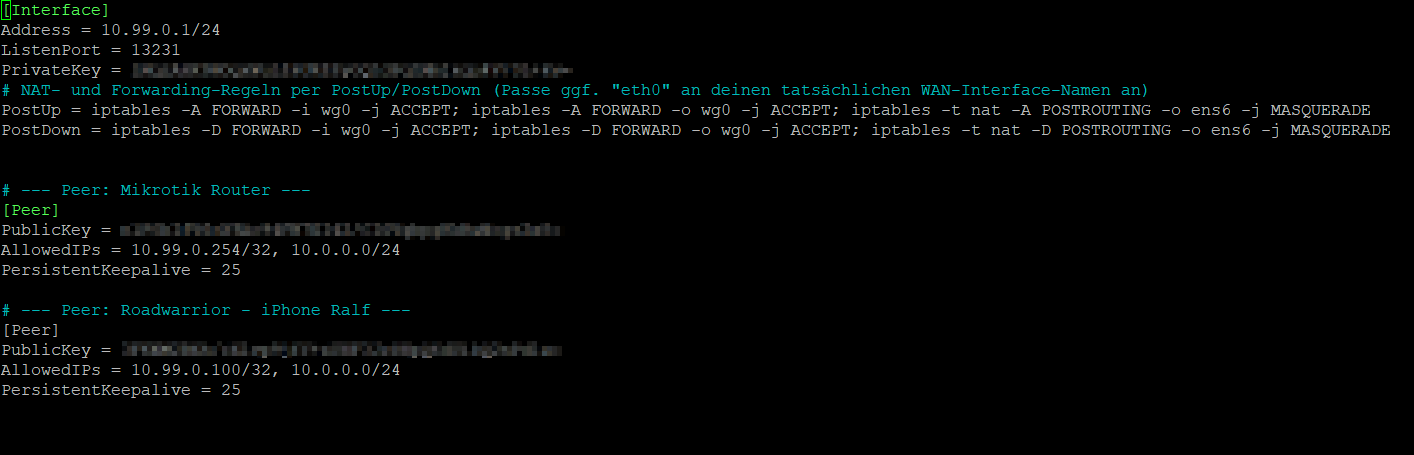
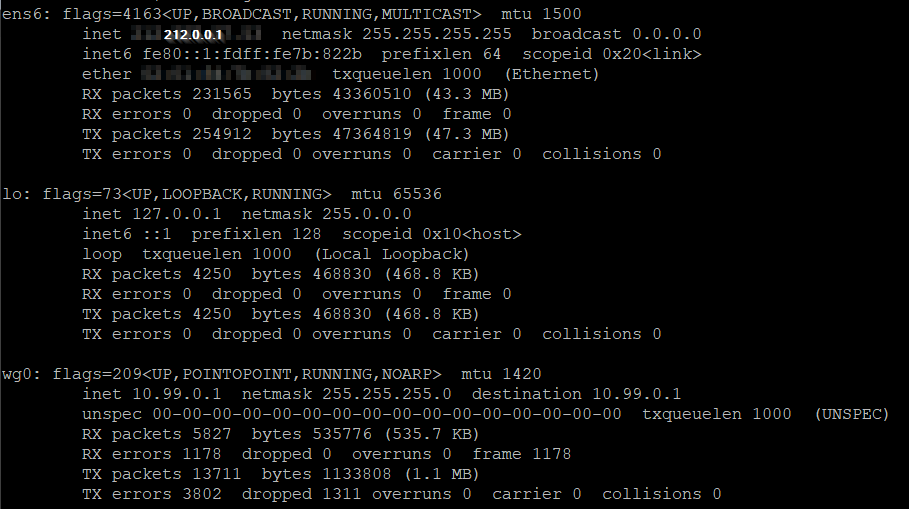
It seems that there is a Firewall or routig issue but I do not get it/do not find the issue.
Hopefully someone can help me to get this up an running.
First mistake is using ubuntu for VPS in stead of mikrotik CHR
What you are attempting to do I only explain in MT terms.
The MT Router behind the starlink needs some TLC!
Delete this line, known to cause funky issues on MT devices. or set to none! /interface detect-internet
set detect-interface-list=NONE
Clearly not understand, is the purpose of allowed addressess, which is to identify the remote users coming into the router or the remote peers local users are trying to reach.
For example if you local users were using the wireguard for internet, only the single address 0.0.0.0/0 would be needed as this covers both remote subnets, and any wireguard IPs as well.
In your case it would appear that you want a variety of wireguard users to come into the router, and thats it. /interface wireguard peers
add allowed-address=10.99.0.0/24 comment=“VPS Peer”
endpoint-address=212.0.0.1 endpoint-port=13231 interface=wg0 name=VPS
persistent-keepalive=25s public-key=“”
I have no clue why you have hairpin nat??
If you had access to a public WANIP, and one is doing port forwarding and using WANIP or dynamic DNS name for both exterrnal and internal users, it would mean you dont need VPS for wireguard as you could access your router directly, so something is not right here.
Further to the point, you seem to have a whole bunch of rules disabled. They should either be enabled or removed as thats noise to the reader.
Without a public IP I dont see the point to have any?? ( except maybe the DNS related ones but these are disabled also )
Firewall rules are overcooked and should be simplified if at all possible. Also not organized and thus harder to spot errors…
Dont log everything there is no point and wastes storage cycles on the router, keep logging as a tool when required.
Security can be improved as with your setup all road warrior clients have access to the router on input chain and only admin needs it…
You have some weird shit happening with your two separate ports and suffice to say its probably best to consider them their own list.
Also the input chain rule for lets encrypt on the input chain makes no sense as there is no lets encrypt service on the router. Perhaps it was on the forward chain cannot recall,
but as stated before you dont have a public iP so not useful anyway and forward chain only should get generic rule, and all port forwarding dstnat rules are made in ip firewall nat.
It would appear there are only two locations TIGO subnet should be allowed to visit externally.
/interface list
add name=WAN
add name=LAN
add name=LIMITED /interface list member
add comment=defconf interface=ether1_WAN list=WAN
add comment=defconf interface=bridge list=LAN
add interface=wg0 list=LAN
add interface=ether5 list=LIMITED
add interface=ether4 list=LIMITED
On the VPS server you need a relay rule of sorts as wireguard is a peer to peer network so in MT terms it would be add action=accept chain=forward comment=“relay rule” in-interface=wg0 out-interface=wg0
Therefore a destination address for 10.0.0.25 would come from a road warrior exit the tunnel at the VPS but then be allowed back into the tunnel to head to the starlink wireguard end.
Assumes of course VPS has static route for 10.0.0.0/24 with gateway of wireguard…
Thanks for your detailed replay. I’ll do a walkthrough in detail, do a cleanup, implement your suggestions and check if i can use mikrotik CHR on my VPS.
What do you mean with TCL?
The local users should use internet via starlink directly connected to the mikrotik WAN port, not via wireguard. The roadwarriors connected to VPS WG server: all traffic should go through wireguard to the mikrotik, and from there either to LAN or Internet via starlink conneted to the mikrotik WAN port.
My public IP should be the static IP of the VPS. Later I want to implement a reverse proxy on the vps to route specific ports (subdomain based) via wireguard to different IPs in my local LAN.
I’ll come back as soon I have implemented all your suggestions.
No worries, meant TLC sorry! ( tender loving care )
Local users in your config do use the local WAN for internet, there is no way for them to use wireguard based on the config, so not a concern.
a. since the wireguard interface is part of the LAN interface list and
b. you have a rule allowing LAN interface list to go out the WAN interface list, those roadwarriors will get WAN access and
c. LAN also has access to DNS on the router and thus can resolve www addresses as well in the process.
Your static IP is not the public IP of the VPS, that is the static IP of the cloud device, NOT your router. Your router has a cgnat type of IP address that is not public.
+++++++++++++++++++++++++++++++++++++++
You have two options.
a. any external user that needs access to a LAN or tigo/huwaie device, can be given a wireguard account and through firewall rules allowed to reach their proper destination.
(safest)
b. you can port forward at the VPS, through the tunnel, to the MT device.
If the VPS is a MT device..
need input chain rule for allowing wireguard handshake
need forward chain rule to allow port forwarding
need input chain rule to allow admin road warrior to config vps ( or admin local IPs on MT router ) via source address list
need forward chain rule for other road warriors to connect to vbs and relay onward to MT device ( to access subnets, or internet out starlink )
need routes for all subnets on MT device that will be reached by any user wireguard and/or port forwarding
need forward chain rule to allow port forwarding
IF doing port forwarding, then recommend that all traffic leaving wireguard tunnel headed to MT be sourcenatted to wireguard IP of VPS.
In this way all source addresses will be accepted at the MT as they will all be given the IP address of the VPS wireguard.
Once fixed, then recheck. I suspect any further issue for road warriors to reach either internet or subnets have more to do with the VPS setup than the MT.
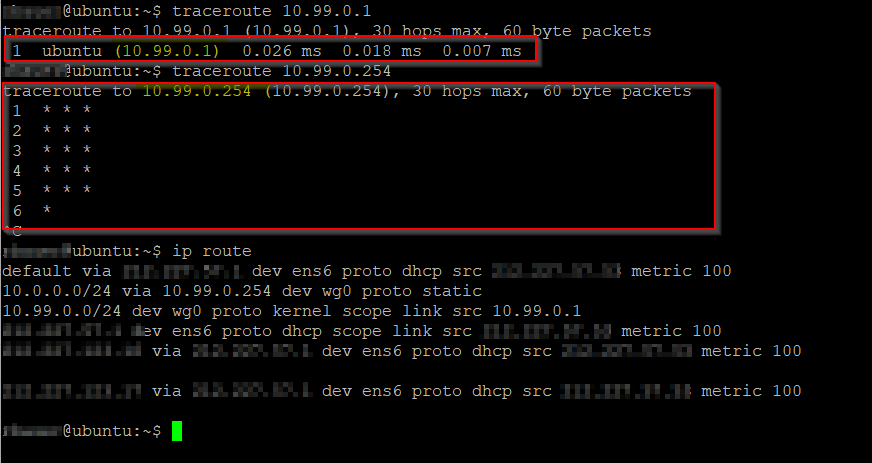
Still no ping possible from VPS (wg0: 10.99.0.1) to a LAN device (e.g. 10.0.0.1).
But this is strange:
IMO the traceroute to 10.99.0.1 (MT wg IP) should be done via 2 hops, correct?
I also want to connect to intra.contoso.com from both, a public IP and from the LAN. (Diskstation Photo App for example)
In this case, how can I ensure that the connection from the LAN goes directly to the server in the LAN and not first to the Internet, via the VPS (reverse proxy) and back again?
Please provide the configs from both Starlink MT router and the VPS CHR…
There is nothing we can do to control the setup on your roadwarriors. That is up to you to config.
On my iphone for example my allowed IPs are 0.0.0.0/0 and any traffic I attempt is routed through the vpn tunnel.
There may some options on other devices on split tunneling or other factors etc… such as local firewalls, that may get in the way.
Again, nothing to do with the configurations on the VPS or MT router behind starlink.
In your first example, how does your local device know how to resolve intra.contso.com. is the key.
Does it send the port 53 request into the tunnel or outside the tunnel to whatever its connected too?
Following the bouncing ball, lets assume the dns request stays in the tunnel and is routed to the VPS and exits the VPS.
Does the VPS allow such dns resolution to take place aka go out the www to find the actual IP?
Clearly not what you want to happen as this server is behind the starlink.
Not an expert but I suspect you would need to setup a static DNS entry of some sort on the VPS, pointing intra.contoso.com to the correct address 10.0.0.1 and thus
the VPS CHR would know where to route the request ( aka into the tunnel ) as we would have: /ip route add dst-address=10.0.0.0/24 gateway=wireguard1 routing-table=main
and for wg peer settings: add allowed-addresses=10.99.0.254,10.0.0.0/24,10.11.2.0/24,10.11.1.0/24 interface=wireguard1 public-key=“------” comment=“Road Warrior Bob”
FOR your second example, again, it depends on how the device is setup in terms of resolving www addresses aka DNS.
It should work fine if the DNS query is going through the tunnel and hitting the VPS.
Again the traffic must be allowed by firewall rules to access DNS and the WWW at the VPS.
In summary you have two separate requirements here.
road warrior to
a. reach subnets on the MT starlink LAN ( could be a mix of workers and admin )
b. reach the MT starlink router for config purposes ( admin only )
road warrior to access the internet via the VPS internet connection.
Other???
From starlink Router –
a. To reach VPS for config purposes (admin only)
b. To reach all VLANS for monitor/setup purposes ( admin only )
sorry for the late response. I had a bit trouble in the last days.
In the meanwhile, i´ve the most topics up and running. Only two topics are still open where I need help.
1. Port-forwarding to local Reverse-Proxy (and back)
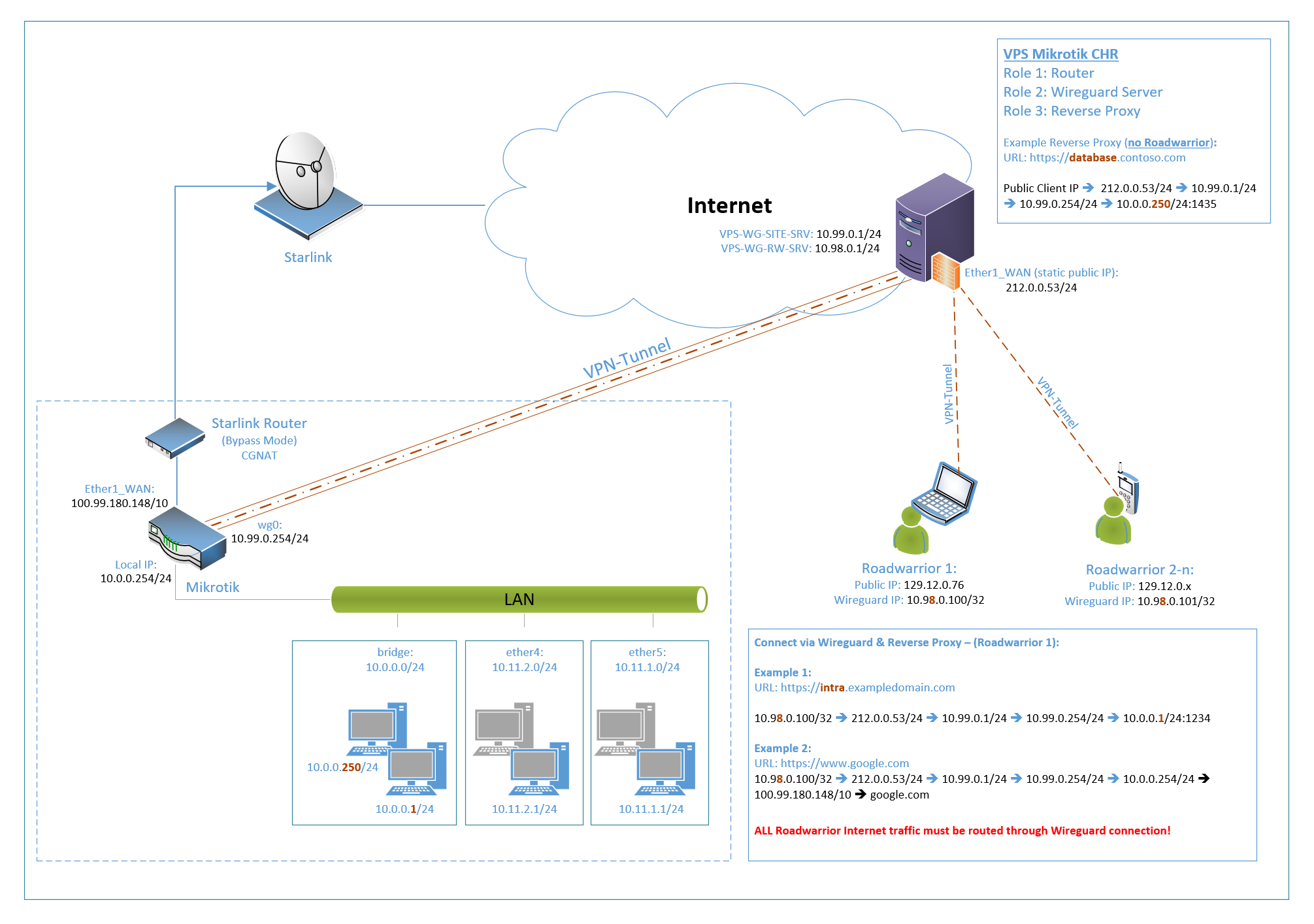
When accessing the URL https://dsm.exampledomain.com with the static IP 212.0.0.53/24 (resolved via CNAME entry at my domain hosting provider), traffic should be as follows:
I tried with different forwarding and mangle rules but I had no access. (already cleaned)
Requirements:
Only Port 443 (HTTPS)
Both, public clients and clients located in th LAN (10.0.0.0/24) must be able to access the Reverse-Proxy via the mentioned URL. (Maybe Hairpin required for local clients?)
The subdomain (dsm) must be forwared to the Reverse-Proxy (domain based redirection by the Proxy)
Can you please help me to build up the required rules fron scratch?
2. SNAT to subnet on interface ether5
In the Subnet of interfacr eher5 there is a device (Tigo CCA) with IP 10.11.1.1/24.
This device accepts only HTTP (Port 80) request from devices of the own subnet.
On this device, no config changes are possible. (Yeah, stupid device, but it is like it is.)
Requirement:
Devices from 10.0.0.0/24 Subnet must be able to connet to the device via HTTP Port 80.
Goal: When connecting from a device of the 10.0.0.0/24 Subnet, the device 10.11.1.1/24 must think, that the devis is in the same subnet (10.11.1.0/24) - e.g. 10.0.0.165/24 should become 10.11.1.165/24.
How can I archive this? Maybe a combination of srcnat, masquerading & routing?
Many thanks.
Update: Changed Wireguard Setup as shown in the Diagram.