If you want agent to know more about actual devices, there is a "hidden" page with a CSV of all products:
https://mikrotik.com/products/matrix
This has a rich table most LLM could consume, and any agent have much better chance to "reason" through the new .md docs mention in top post, when it has the row from the product.csv. e.g. it know your models #ports, switch chip,, arch, etc. etc. etc. - so when AI is reading the manual.mikrotik.com, it has YOUR devices CPU/arch/etc in the current context which is going to prevent guessing from training.
My Rosetta MCP makes this more efficient and more automatic... since product CSV is a database table... but I can assure everyone an agent know the specs for your model is going to dramatically improve results (however it get its).
I commented on the manual.mikroitk.com and suggested a Docusaurus plugin that resolves between switch/CPU chips and models and their abilities (PTP, HWQoS, PoE, "beeper", etc) would be useful so the doc pages have the mapping someplace already... But the release note above is the proof-point of why. Although the release notes are not index by Docusaurus today, some principle applies.
Well, you highlighted a weakness in my AI toolchain, nothing knows about a supout.rif - but that's actually a good idea for my tools to know about. Since it's information dense so an agent can more easily check all the various bits (e.g. the logs and other Linux-like stats shown in other sections). I'd never thought about it. 
Rosetta MCP has all of the restraml schema tools data build - indexed by RouterOS version. So it has a fair chance of using the command/attribute data to verify a config file, on top of all the potential sources to check. For example, not only release notes, docs, matrix.csv, etc. but Rosetta even indexes the YouTube video transcripts, like the "What's new in 7.2x" series of videos. e.g. Rosetta is a "one stop shop" for RouterOS information, all indexed (and AI agents pretty good at constructing cleaver queries based on your prompt) and allow for "progressive discovery" (e.g. first result returns points to various sources for the search string)
| Data Source | Coverage |
|---|---|
| Documentation pages | 317 pages (~515K words) from the retired help.mikrotik.com Confluence export |
| Property definitions | 4,860 with types, defaults, descriptions |
| Command tree | 5,114 commands, 551 dirs, 34K arguments |
| Version history | 46 RouterOS versions tracked (7.9–7.23.1) |
| Hardware products | 144 devices — specs, pricing, block diagrams |
| Performance benchmarks | 2,874 tests across 125 devices (ethernet + IPSec) |
| YouTube transcripts | 518 videos, ~1,890 chapter-level segments |
| Callout blocks | 1,034 warnings, notes, and tips |
And depending on your AI tools, there is often some schedule tasks that could say check daily the mikrotik site, and then review some directory of your config files against any new releases notes and/or documentation updates.
And the later goes to @fischerdouglas commentary in new manual FEEDBACK thread about the changes to docs being a important piece of metadata, since if you do run on it on a schedule and if agent has already done some comprehensive review of config/monitoring-data/etc., it only need to confirm things that were updated. So the /console/inspect/"CLI Reference" knows the command tree... the "prose" in the docs related to those changes is often equality important.
At this point, I've been more interested in developing AI-enabled RouterOS TOOLS that could underpin "higher level" things like UI or site-specific tooling or whatever. Since I started a couple year back cateloging the RouterOS scheme, I've largely been trying to wrap that all up (and more) for AI. Which has necessitated some thinking about "what agent an needs to work with RouterOS"....
Rosetta MCP is really just SQLite DB with all of MikroTik "stuff" and MCP just wires up SQL queries to it for an AI. Or you can use bunx @tikoci/rosetta browse to get a non-AI TUI which also does searches.. Since it has an AI-friendly interface, you avoid agents having to parse something like manual.mikrotik.com/llms.txt - which will help a lot over nothing - but "digging deeper" is harder using web retrieval.
But mainly I've been working on the other part of my RouterOS AI tools "trilogy", which are two CLI tools that human or code-based agent can easily interact with RouterOS, both real ones and "fake" ones for testing.
quickchr — Fastest path to MikroTik RouterOS CHR instance for testing and scripts
So one tool is quickchr, which allows an agent (or human) to easily bring up a CHR at specific version & fully provisioned (device-mode, packages, enable trail license) in 30s to 1m. I have a lot of unit/integration tests in various project that are based on quickchr since it work as both GitHub runner (which in turn is used to build the schema used by Rosetta MCP) & quickchr also run locally (any Mac, Windows, or Linux with QEMU stuff installed).
But essentially, a human run bunx @tikoci/quickchr setup which bring up a wizard for bring up CHR at version/provisioned via a wizard.
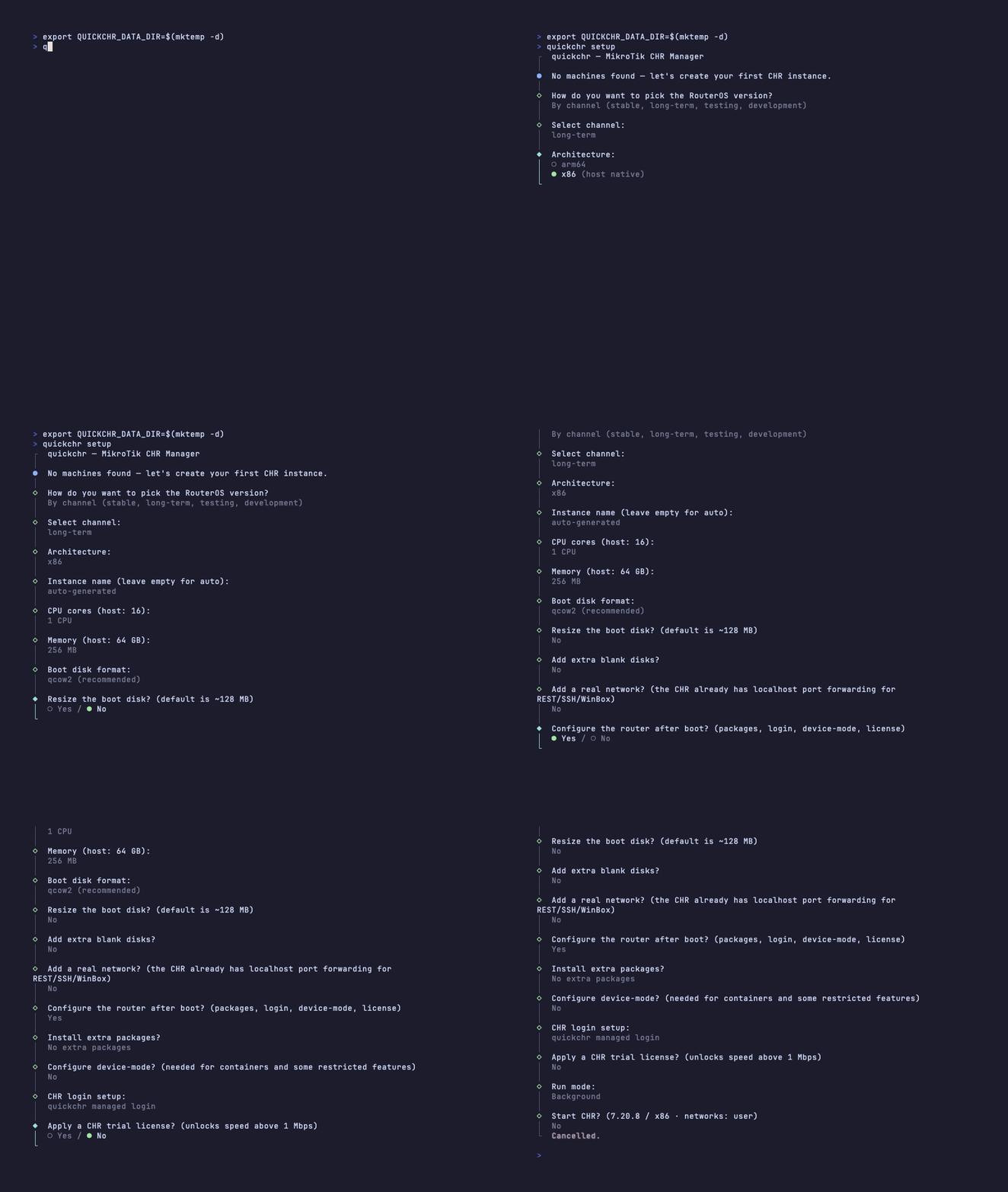
Or an AI agent can construct a more complex CLI with args to bring up what it want to test (assuming you prompted it to use quickchr to validate something). Overall, quickchr is pretty solid at this point.
The networking scheme is a bit "funky" at first, since out of the box it prefers QEMU user-mode networks to avoid needing sudo or root. This also ensures it's "easy" to start, without needing to provide an LLM creds or constructing complex networking setups, etc. e.g. if you want to test a commands or config, you may not need a high powered CHR to just know something "works". See networking doc: quickchr/docs/networking.md at main · tikoci/quickchr · GitHub on the more esoteric networking schemes employed. There is TUN/TUN support as well as first-class Mac support. e.g. can use the native Hypervisor framework (via QEMU) to access bridged or "shared" network - this requires sudo once to setup, but then can be used without root when a agent/human wants to use quickchr
And there are some example usages here: quickchr/examples at main · tikoci/quickchr · GitHub
centrs - Multi-protocol (REST, native API, mac-telnet, SSH) CLI and TypeScript interface to RouterOS, with rich help and validation
This one is "functional" but still a WIP since trying to work through the exact interface and code validation and reverse-engineering things like mac-telnet or btest. There are quite a few concepts bundled into centrs but essentially it way an agent (or human) can actually "interact" (read or write) to a real RouterOS device.
For example, it can use any protocol, including L2 mac-telnet, to access a router. To enable more seamless and safer authentication centrs can use a .CDB file (WinBox's password storage), either its own or theoritically shared with WinBox one (if you grant permissions for that). And before any command is issued, it's checked against :parse and/or /console/inspect so that there is "feedback" before a command issued in the form of an envelope with errors/warning/tips (see centrs/docs/errors at main · tikoci/centrs · GitHub ).
The current state of centrs is tracked here: centrs/docs/MATRIX.md at main · tikoci/centrs · GitHub with the full concept explained in centrs/docs/CONSTITUTION.md at main · tikoci/centrs · GitHub . Including future being an "MCP Server" (like Rosetta) to avoid needing to use CLI (but noting that agents are often just as good at using a CLI, if available, as an MCP server). Also considering packaging it as a /app to allow it working with a single router. The MCP server is more complex since centrs via HTTPS needs to implement OAuth2 front-end to RouterOS auth so it could be done safely - since Rosetta never interacts with a router (and is really a front-end to a read-only database) it avoid all the thorny authentication issues. Since centrs is designed to be "safe" (by at least some rational definition) while still writing to RouterOS, it's a bit trickier than Rosetta...