well, that explains the behavior, but it still stays rather strange:
i won’t agree that it
allows debug syntax or > other errors more easily> .
Moreover, it definitely makes things harder to debug and I don’t see much effort for using verbose keyword in case it alters the result of script execution. There should be no
Schrödinger’s cat effect
Not a bug, but a feature that looks like a real bug…
I think that is a relic from the ages when the name “import” was conceived. I’ve found verbose=yes totally unusable to do any debugging.
But I might be wrong, I would like to know any use case when it helps to anything.
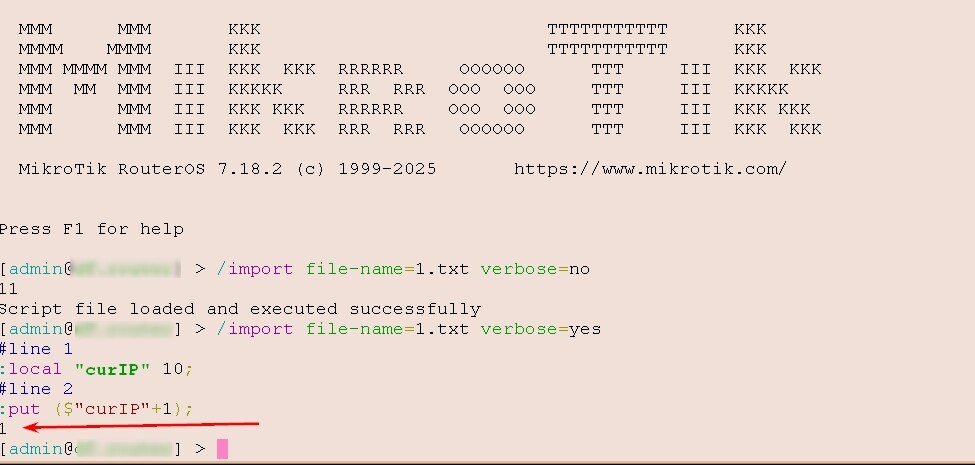
Well, msatter explained how with the verbose switch the file is read line by line individually.
So, the "normal" version won't work, while the one with the relevant part enclosed in curly brackets, making it a "scope" (in Mikrotik parlance) may.
You just confirmed that with curly brackets works, so it is working "as documented".
Now, whether this behaviour reflects what you expected, is up to debate , but I don't think that the good Mikrotik guys are going to ever change this behaviour.
If you think about it, "interpreting line-by-line" and "interpreting several lines as a scope" are mutually exclusive.
This is expected. local scope is enclosed by {}. No {} means the current line is your scope. If you want to access variable in following line, you need :global (the default scope).
Maybe this clears things up.
{:local "curIP" 5
{:local "curIP" 10
:put ($"curIP"+1)}
:put ($"curIP"+1)}
11
6
This allows to separate local variables to their own section of code. I am using twice the same names for the local variable but they exist only in their own scope.
The page mentioned above states: Do not define a global variable inside a local scope. Why, because they only exits in that local scope.
Hmmm, that is strange and the manual is wrong on this:
{
:local a 3;
{
:global b 4;
}
:put ($a+$b);
}
7
This should not happen, I am on 7.23.1 currently.
I don't need to define and retrieve the global variable in the outer scope with ":global b;"
So lets tests when I define b as local also:
{
:local a 3;
:local b 5;
{
:global b 4;
}
:put ($a+$b);
}
8
b=5 and in the same scope and global is then ignored.
And lets see if this is making a difference:
{
:local a 3;
{
:global b 4;
:local b 5;
}
:put ($a+$b);
}
7
Nope, that is working as previous and the the local b exits only in inner scope.
Actually the first one "declared" counts. But things are not that simple, because there are also parameters, not only local and global variables.
This is the content of wrk.rsc:
:put ("$b $c")
{
	{
		:global b "G b"
		:local b "L b"
		:local c "L c"
		:global c "G c"
		:put ("$b $c")
	}
	:put ("$b $c")
}
:put ("$b $c")
Declare the function fx: :global fx do={ /import wrk.rsc}.
[admin@GateWay] > $fx b="A b"
A b
G b L c
G b
G b
Script file loaded and executed successfully
[admin@GateWay] > :put $b

[admin@GateWay] > $fx

G b L c


Script file loaded and executed successfully
[admin@GateWay] > :put $b
G b
[admin@GateWay] >
Now that is strange.
If fx is called with parameter b the script cannot create the global variable b, instead the statement :global b "G b" is executed as :set $b "G b".
I tested it on RoS v6.32.3, v.7.19.1 and v7.21.5.
There's nothing strange about it, and RouterOS isn't a programming language.
And then, I'd like to see who writes scripts where all local, global, and parameter variables always have the same letter.
Specifying b= already creates a constant $b for the local purpose,
so it's obvious that subsequent globals and locals that try to have same name "b",
which already exists as constant parameter, can't be overridden because it's the parameter the function was called with...
There is no such thing in Ros as constant and a parameter has not local visibility like a local variable, it is visible in the imported .rsc file and also in the nested imports.
I understand that you consider all right, that a functions action can be potentially ruined by supplying a named, unused parameter. Because "RouterOS isn't a programming language". Is time to look up what that means and and reflect on what help you provide by repeating it.
Yours also deserves some reflecttion:
Why waste time considering something when in all programming languages it's wrong to give identical names to variables, constants, parameters, functions, etc.?
If you want to consider a script as a programming language, well, then the very idea of using the same name for variables, constants, parameters, functions, etc. is wrong.
And then the next post will be about division by zero?
There's no point in going over all the established concepts again: it's illogical.
On the other hand, when there's a bug, other than the "programmer making a mistake," well, then it's right to talk about it.
Or maybe you didn't explain yourself properly in your post, like maybe I did in mine,
but the pointless speech is definitely @dfdf : who expects them, after a year, to "fix" something,
because FOR HIM it doesn't work, when it really has to work that way?
in the point of view a s a programmer (spoiler: this is also wrong imho, but never mind). Now take another point: a sysadmin (not every sysadmin is a programmer). Such admin takes a script from an external source, read docs and decides to check the script, wondering it's executions results depends on the way it was called... that was the initial intension: to stress on inconsistency of behavior (definitely should be considered as a bug, not a programmer mistake, because programmer can't change this behavior).
Ideally parser which takes source code and translates it to executable format (script interpreter, compiler ... depends on what's source code) would check for such re-definitions and vague usage and warn (or thow an error) about it. But as already explained, ROS is not programming language and it's not even proper scripting language, it's command executioner with tiny scripting capabilities. And since MT guys are trying very hard to keep storage and memory footprint of ROS small (still failing to do so in some certain cases), they are pretty limited in what they can include. I guess that proper syntax and grammar checker is one of things that can be omitted without lots of damage ... although we would all want to see ROS improved in this area (but keep having small memory/storage footprint in order to have our tiny devices supported for next few decades).
Given that some of developer features (yes, programming/scripting language checker is a developer feature) lack, it is developer's duty to pay extra care not to produce scripts that execute in strange ways. If administrator of such device/NOS takes a script from untrusted/unknown source, then it's administrator's responsibility to understand what script does. If administrator is not capable of understanding what script does (and doesn't have access to trustworthy person who can understand what script does), then the only sensible decision by that administrator is to not use such a script. If administrator still uses such a script, then he owns any of consequences.
Not to argue whether the behaviour should be changed or not: we (normal ROS users happening to be members of this forum) are only able to explain (with certain certainty) how ROS works. We're not in position to change that, only MT devs are ... and to make MT devs change the way ROS works, one has to open bug report or feature request through actual support channels (support portal, e-mail), this forum is not one of them.
 , but I don't think that the good Mikrotik guys are going to ever change this behaviour.