Hi, I have this strange “jumpy” readings showing in winbox traffic monitor:
No, I’m not in Japan, traffic was not 87.8gb in that interface It was about 1.4gb that very moment.
All interfaces had their traffic messed up, that one with 96.0kbps had in truth 2.2kbps.
It happens in every CCR with an active BGP session to my local IXP.
CCRs used are:
1036-4S
1036-2S+
1072
With versions ranging from 6.33 to 6.40.4, tested them all.
What do you guys think could be causing it?
Maybe Mikrotik don’t live to receive too many prefixes?
At random times (I haven’t been able to pin down what exactly is causing it) Winbox will show the exact opposite.
Instead of the huge-unrealistic values you get, in my case, every 2-3 seconds all interfaces in interface list shows 0bpps/pps.
It’s not only shown on the interface list but also on each interface’s traffic graph and once it starts it rarely stops on it’s own (only real solution atm is router reboot).
This appears to be purely a cosmetic issue since using SNMP, all monitoring tools (Cacti, Dude, Observium, etc) show the correct values without any problems.
Some times this issue would go away on it’s own (it has been happening for so long that I don’t even notice it any more - albeit when I do notice it, it really annoys me) by simply reconnecting with a fresh Winbox session. But this is truly hit and miss and 9 out of 10 times it doesn’t go away, so obviously not a solution.
And it will definitely go away with a router reboot (which is also not an option of course on production networks).
Also this issue seems to come up when connected for many many hours on a router and if I recall it happens regardless of RB model/cpu arch.
I’ve seen it on CCR’s, RB3011, RB433AH, and probably others too but I can’t remember for sure (as nowadays - after years of this behavior - I keep ignoring it)…
I do have BGP peers on all mentioned routers but I don’t think this has anything to do with my problem (but I sure hope I am wrong and it gets fixed regardless)
The only thing that comes close to reproducing it on demand, is when the winbox client computer is under heavy load, it seems that, that can trigger the issue. But on one hand this seems totally counter-intuitive (nothing happening on the desktop client OS should affect ROS) and on the other hand I haven’t been able to reproduce it by manually inducing heavy load on my desktop. Only when it happens on it’s own.
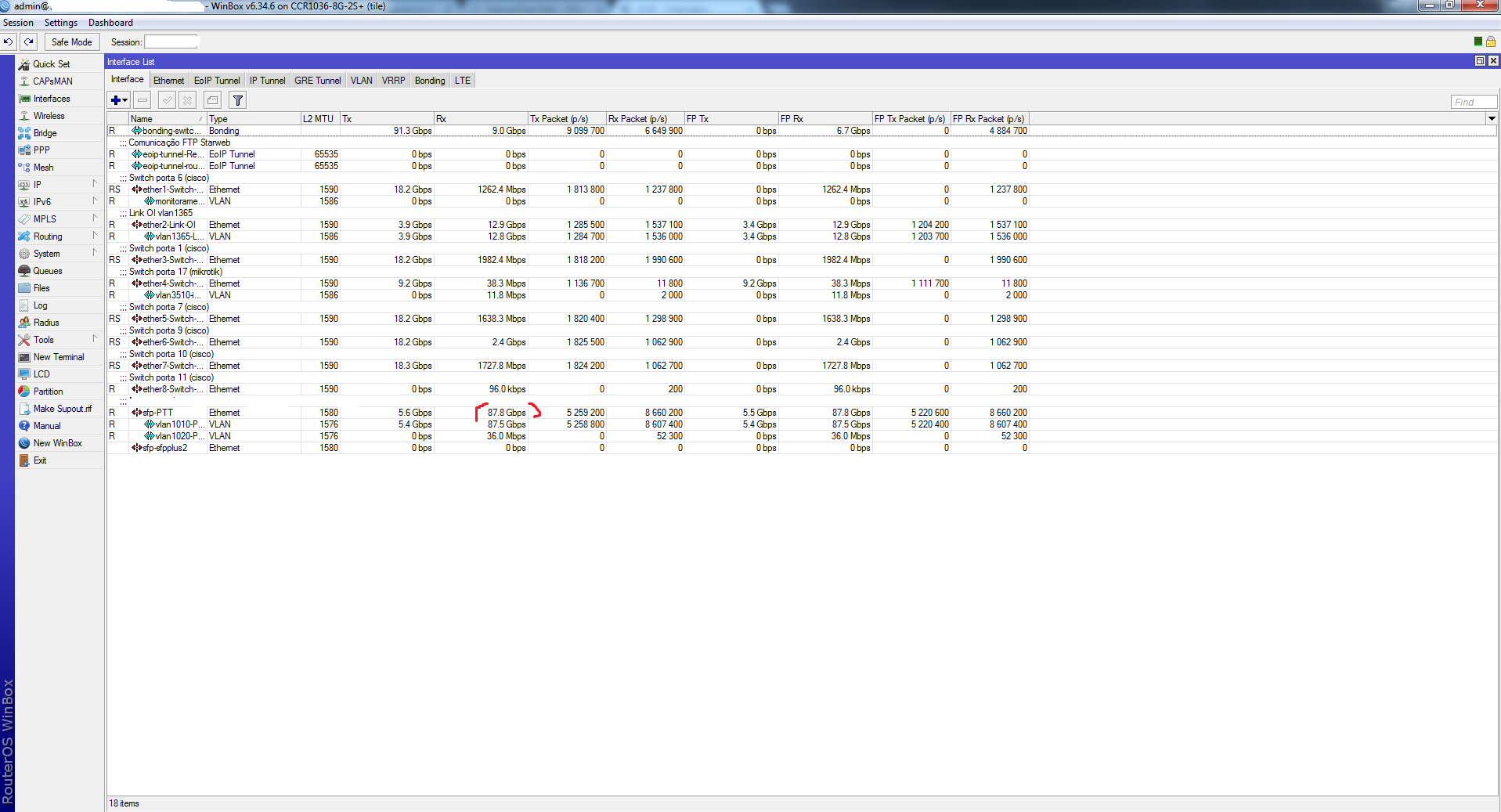
 It was about 1.4gb that very moment.