Hello,
I am completely new to MikroTik products (and fairly inexperienced with networking full stop) and having trouble with VLAN configuration.
For some background, I have a have a small server/homelab setup running a few difference services, each of which have different access permission requirements. Up to now, I’ve been handling this through ACL and firewall rules on the server. I’ve just moved house so needed to setup a new home network, so decided it was about time I attempt to setup some VLANs. The broadband comes in downstairs, and my office is upstairs on the other side of the house, with no options to run cabled. The solution I landed with for this was to use a couple HAP AC Lites, one downstairs set up as a wireless point to point bridge (I’ve called this router 0), and the other upstairs acting as the router(router1). This part has worked perfectly. My next step was to go about setting up VLANs. I would like to be able to use the router0 as an access point for downstairs, as well as have wireless management access to it, so I have been trying to set up the wireless uplink as a trunk port, along with a trunk port from router1 to my server.
Overall, this was the topology/vlan setup I am aiming for (I appreciate this is a bit overkill but this is mainly as a learning exercise rather than actually needing this level of network segmentation) :
- VLAN10, LAN wide services: 10.1.0.0/24
- VLAN20, Services with limited access: 10.1.1.0/24
- VLAN30, Exposed services: 10.1.2.0/24
- VLAN40, Wired Users: 10.2.0.0/24
- VLAN50, Wireless Users: 10.2.1.0/24
- VLAN60, Remote Users: 10.2.3.0/24
- VLAN60, Testing: 10.3.0.0/24
- VLAN80, Management: 10.0.1.0/24
- VLAN90, WAN
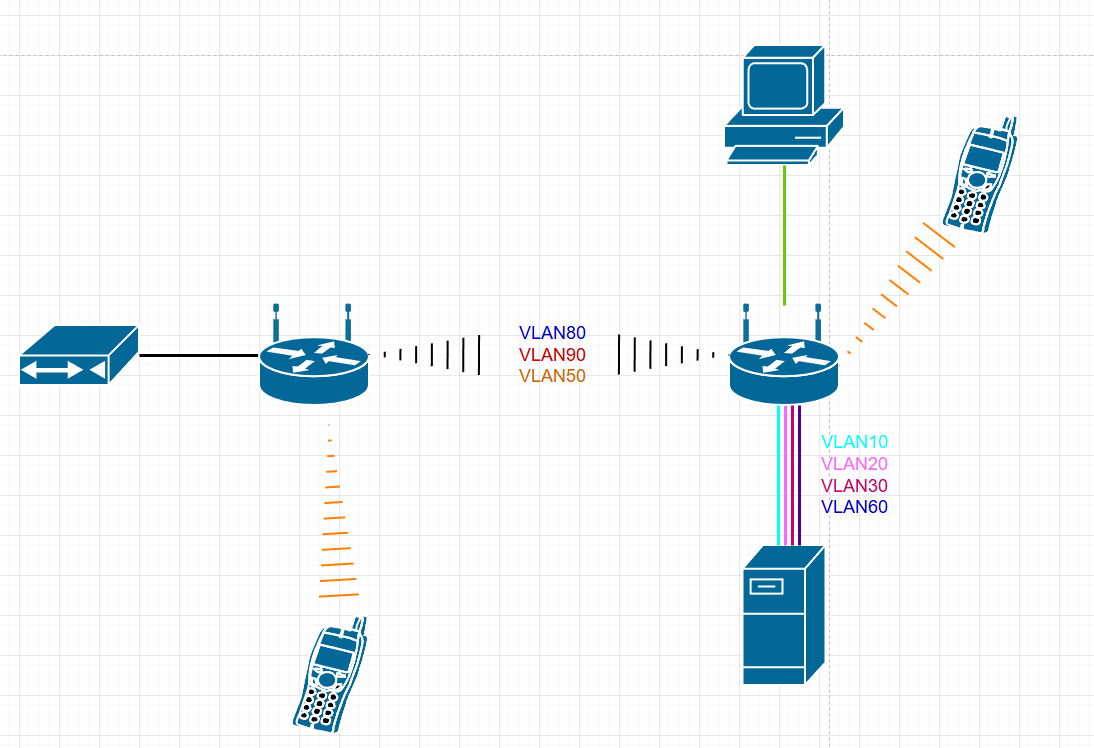
After more attempts then I would like to admit, I have the VLANs structure partially set up but, whatever I try, I can’t get the wireless uplink to act as a trunk port. Below is the config for each device. I appreciate that this still requires firewall rules, inter-vlan routing ect… to work properly (Which I am yet to figure out) but I just want to check before I spend anymore time that 1, what I have done so far is correct, and 2, what I am trying to do is actually possible. Any guidance would be greatly appreciated.
AP/BRIDGE, router0
/interface bridge
add frame-types=admit-only-vlan-tagged ingress-filtering=yes name=WAN-bridge \
    pvid=90 vlan-filtering=yes
add admin-mac=D4:01:C3:84:98:AC auto-mac=no name=bridge
/interface ethernet
set [ find default-name=ether3 ] disabled=yes
set [ find default-name=ether4 ] disabled=yes
/interface vlan
add interface=bridge name="VLAN50 - Wireless" vlan-id=50
add interface=bridge name="VLAN80 - Managment" vlan-id=80
add interface=WAN-bridge name="VLAN90 - WAN" vlan-id=90
/interface list
add comment=defconf name=WAN
add comment=defconf name=LAN
/interface wireless security-profiles
set [ find default=yes ] supplicant-identity=MikroTik
add authentication-types=wpa2-psk mode=dynamic-keys name=ap_bridge_security \
    supplicant-identity=MikroTik wpa2-pre-shared-key=REDACTED
add authentication-types=wpa2-psk mode=dynamic-keys name=WLAN \
    supplicant-identity=MikroTik wpa2-pre-shared-key=REDACTED
/interface wireless
set [ find default-name=wlan2 ] band=5ghz-a/n/ac channel-width=20/40mhz-XX \
    country="united kingdom" disabled=no distance=indoors frequency=5805 \
    hide-ssid=yes installation=indoor mode=ap-bridge name=WAN_uplink \
    security-profile=ap_bridge_security ssid=REDACTED \
    wireless-protocol=802.11 wps-mode=disabled
set [ find default-name=wlan1 ] band=2ghz-b/g/n country="united kingdom" \
    disabled=no distance=indoors frequency=2422 installation=indoor mode=\
    ap-bridge security-profile=WLAN ssid="REDACTED" \
    wireless-protocol=802.11 wps-mode=disabled
add disabled=no mac-address=D6:01:C3:84:98:B0 master-interface=WAN_uplink name=\
    wlan2 security-profile=WLAN ssid="REDACTED" \
    wds-default-bridge=bridge wps-mode=disabled
/interface bridge port
add bridge=bridge interface=ether2
add bridge=bridge interface=wlan1
add bridge=WAN-bridge frame-types=admit-only-untagged-and-priority-tagged \
    ingress-filtering=yes interface=WAN_uplink pvid=90
add bridge=bridge interface=wlan2
add bridge=WAN-bridge frame-types=admit-only-vlan-tagged \
    ingress-filtering=yes interface=ether1 pvid=90
/ip neighbor discovery-settings
set discover-interface-list=LAN
/interface bridge vlan
add bridge=WAN-bridge tagged=WAN-bridge,WAN_uplink untagged=ether1 vlan-ids=90
add bridge=bridge tagged=WAN_uplink,bridge untagged=ether2 vlan-ids=80
add bridge=bridge tagged=WAN_uplink,bridge untagged=wlan1,wlan2 vlan-ids=50
/interface detect-internet
set detect-interface-list=LAN lan-interface-list=LAN wan-interface-list=WAN
/interface list member
add comment=defconf interface=bridge list=LAN
add comment=defconf interface=ether1 list=WAN
add comment="TEMP CONFIG FOR ACCESS" interface=ether5 list=WAN
/interface wireless access-list
add disabled=yes interface=WAN_uplink mac-address=D4:01:C3:84:A1:98
add authentication=no disabled=yes forwarding=no interface=WAN_uplink
/ip address
add address=10.0.0.2/14 interface=bridge network=10.0.0.0
add address=10.0.0.2/24 interface="VLAN80 - Managment" network=10.0.0.0
add address=10.2.1.1/24 interface="VLAN50 - Wireless" network=10.2.1.0
/ip dhcp-client
# DHCP client can not run on slave interface!
add comment=defconf disabled=no interface=ether1
/ip dhcp-server network
add address=10.0.0.0/14 domain=local gateway=10.0.0.1
/ip dns
set allow-remote-requests=yes
/ip dns static
add address=192.168.88.1 comment=defconf name=router.lan
/ip firewall filter
add action=accept chain=input log=yes src-address=10.0.1.0/24
add action=accept chain=forward dst-address=10.0.0.0/14 src-address=10.0.1.0/24
add action=accept chain=input comment=\
    "defconf: accept established,related,untracked" connection-state=\
    established,related,untracked
add action=drop chain=input comment="defconf: drop invalid" connection-state=\
    invalid disabled=yes
add action=accept chain=input comment="defconf: accept ICMP" protocol=icmp
add action=accept chain=input comment=\
    "defconf: accept to local loopback (for CAPsMAN)" dst-address=127.0.0.1
add action=drop chain=input comment="defconf: drop all not coming from LAN" \
    in-interface-list=!LAN
add action=accept chain=forward comment="defconf: accept in ipsec policy" \
    ipsec-policy=in,ipsec
add action=accept chain=forward comment="defconf: accept out ipsec policy" \
    ipsec-policy=out,ipsec
add action=fasttrack-connection chain=forward comment="defconf: fasttrack" \
    connection-state=established,related
add action=accept chain=forward comment=\
    "defconf: accept established,related, untracked" connection-state=\
    established,related,untracked
add action=drop chain=forward comment="defconf: drop invalid" connection-state=\
    invalid disabled=yes
add action=drop chain=forward comment="defconf: drop all from WAN not DSTNATed" \
    connection-nat-state=!dstnat connection-state=new disabled=yes \
    in-interface-list=WAN
/system clock
set time-zone-name=Europe/London
/tool mac-server
set allowed-interface-list=LAN
/tool mac-server mac-winbox
set allowed-interface-list=LAN
ROUTER, router1
/interface bridge
add frame-types=admit-only-vlan-tagged ingress-filtering=yes name=WAN-bridge pvid=90 vlan-filtering=yes
add admin-mac=D4:01:C3:84:A1:94 auto-mac=no ingress-filtering=yes name=bridge vlan-filtering=yes
/interface ethernet
set [ find default-name=ether4 ] disabled=yes
set [ find default-name=ether5 ] poe-out=off
/interface wireless
set [ find default-name=wlan2 ] band=5ghz-a/n/ac channel-width=20/40mhz-XX country="united kingdom" disabled=no distance=indoors installation=indoor mode=station-bridge name=WAN_uplink ssid=REDACTED wireless-protocol=nv2-nstreme-802.11
/interface vlan
add interface=bridge name="VLAN10 - LAN services" vlan-id=10
add interface=bridge name="VLAN20 - Secure services" vlan-id=20
add interface=bridge name="VLAN30 - Exposed services" vlan-id=30
add interface=bridge name="VLAN40 - Wired users" vlan-id=40
add interface=bridge name="VLAN50 - Wireless users" vlan-id=50
add interface=bridge name="VLAN60 - Remote users" vlan-id=60
add interface=bridge name="VLAN70 - Testing" vlan-id=70
add interface=bridge name="VLAN80 - Management" vlan-id=80
add interface=WAN_uplink name="VLAN90 - WAN" vlan-id=90
/interface list
add comment=defconf name=WAN
add comment=defconf name=LAN
/interface wireless security-profiles
set [ find default=yes ] authentication-types=wpa-psk,wpa2-psk group-ciphers=tkip,aes-ccm mode=dynamic-keys supplicant-identity=MikroTik unicast-ciphers=tkip,aes-ccm wpa-pre-shared-key=REDACTED wpa2-pre-shared-key=REDACTED
add authentication-types=wpa2-psk mode=dynamic-keys name=WLAN supplicant-identity=MikroTik wpa2-pre-shared-key=REDACTED
/interface wireless
set [ find default-name=wlan1 ] band=2ghz-b/g/n country="united kingdom" disabled=no distance=indoors frequency=2462 installation=indoor mode=ap-bridge security-profile=WLAN ssid="REDACTED" wireless-protocol=802.11 wps-mode=disabled
add disabled=no mac-address=D6:01:C3:84:A1:98 master-interface=WAN_uplink name=wlan2 security-profile=WLAN ssid="REDACTED" wds-default-bridge=bridge wps-mode=disabled
/ip pool
add name=dhcp ranges=10.2.0.1-10.2.2.254
add name="Services - LAN" ranges=10.1.0.10-10.1.0.254
add name="Services - Secure" ranges=10.1.0.50-10.1.1.10
add name="Services - Exposed" ranges=10.1.2.10-10.1.2.50
add name="Users - Wired" ranges=10.2.0.10-10.2.0.20
add name="Users - Wireless" ranges=10.2.0.254-10.2.1.10
add name="Users - Remote" ranges=10.2.3.10-10.2.3.14
add name=Testing ranges=10.3.0.10-10.3.0.20
add name=Managment ranges=10.0.0.10-10.0.0.15
/ip dhcp-server
add address-pool=dhcp disabled=no interface=bridge name=defconf
add address-pool="Users - Wired" disabled=no interface="VLAN40 - Wired users" name="Users - Wired"
add address-pool="Users - Wireless" disabled=no interface="VLAN50 - Wireless users" name="Users - Wireless"
add address-pool="Users - Remote" disabled=no interface="VLAN60 - Remote users" name="Users - Remote"
add address-pool=Testing disabled=no interface="VLAN70 - Testing" name=Testing
add address-pool=Managment disabled=no interface="VLAN80 - Management" name=Management
/interface bridge port
add bridge=bridge frame-types=admit-only-untagged-and-priority-tagged ingress-filtering=yes interface=ether2 pvid=40
add bridge=bridge frame-types=admit-only-vlan-tagged ingress-filtering=yes interface=ether3
add bridge=bridge interface=ether4
add bridge=bridge frame-types=admit-only-untagged-and-priority-tagged ingress-filtering=yes interface=ether5 pvid=80
add bridge=bridge interface=wlan1
add bridge=bridge frame-types=admit-only-untagged-and-priority-tagged interface=ether1 pvid=80
add bridge=bridge interface=wlan2
add bridge=WAN-bridge frame-types=admit-only-untagged-and-priority-tagged ingress-filtering=yes interface=WAN_uplink pvid=90
/ip neighbor discovery-settings
set discover-interface-list=LAN
/interface bridge vlan
add bridge=bridge tagged=ether3,bridge vlan-ids=10
add bridge=bridge tagged=ether3,bridge vlan-ids=20
add bridge=bridge tagged=bridge,ether3 vlan-ids=30
add bridge=bridge tagged=bridge untagged=ether2 vlan-ids=40
add bridge=bridge tagged=bridge,WAN_uplink untagged=wlan1,wlan2 vlan-ids=50
add bridge=bridge tagged=ether3,bridge vlan-ids=60
add bridge=bridge tagged=ether3,bridge vlan-ids=70
add bridge=bridge tagged=bridge,WAN_uplink untagged=ether5 vlan-ids=80
add bridge=WAN-bridge tagged=WAN_uplink,WAN-bridge vlan-ids=90
/interface list member
add interface=WAN_uplink list=WAN
add interface=ether1 list=LAN
add interface=ether2 list=LAN
add interface=ether3 list=LAN
add interface=ether4 list=LAN
add interface=ether5 list=LAN
add interface=wlan1 list=LAN
add interface=bridge list=LAN
add interface=wlan2 list=LAN
add interface=WAN-bridge list=WAN
/ip address
add address=10.0.0.1/14 interface=bridge network=10.0.0.0
add address=10.1.0.1/24 interface="VLAN10 - LAN services" network=10.1.0.0
add address=10.1.1.1/24 interface="VLAN20 - Secure services" network=10.1.1.0
add address=10.1.2.1/24 interface="VLAN30 - Exposed services" network=10.1.2.0
add address=10.2.0.1/24 interface="VLAN40 - Wired users" network=10.2.0.0
add address=10.2.1.1/24 interface="VLAN50 - Wireless users" network=10.2.1.0
add address=10.2.3.1/24 interface="VLAN60 - Remote users" network=10.2.3.0
add address=10.3.0.1/24 interface="VLAN70 - Testing" network=10.3.0.0
add address=10.0.0.1/24 interface="VLAN80 - Management" network=10.0.0.0
/ip dhcp-client
# DHCP client can not run on slave interface!
add disabled=no interface=WAN_uplink
/ip dhcp-server network
add address=10.0.0.0/14 domain=local gateway=10.0.0.1 netmask=14
add address=10.2.0.0/24 gateway=10.2.0.1
add address=10.2.1.0/24 gateway=10.2.1.1
add address=10.2.3.0/24 gateway=10.2.3.1
add address=10.3.0.0/24 gateway=10.3.0.1
/ip dns
set allow-remote-requests=yes
/ip dns static
add address=10.0.0.1 comment=defconf name=router.lan
/ip firewall filter
add action=accept chain=input dst-port=80 in-interface="VLAN80 - Management" log=yes protocol=tcp
add action=accept chain=forward dst-port=80 in-interface="VLAN40 - Wired users" out-interface="VLAN80 - Management" protocol=tcp
add action=drop chain=input dst-port=80 in-interface=bridge log=yes protocol=tcp
add action=accept chain=input comment="defconf: accept established,related,untracked" connection-state=established,related,untracked
add action=drop chain=input comment="defconf: drop invalid" connection-state=invalid
add action=accept chain=input comment="defconf: accept ICMP" protocol=icmp
add action=accept chain=input comment="defconf: accept to local loopback (for CAPsMAN)" dst-address=127.0.0.1
add action=drop chain=input comment="defconf: drop all not coming from LAN" in-interface-list=!LAN
add action=accept chain=forward comment="defconf: accept in ipsec policy" ipsec-policy=in,ipsec
add action=accept chain=forward comment="defconf: accept out ipsec policy" ipsec-policy=out,ipsec
add action=fasttrack-connection chain=forward comment="defconf: fasttrack" connection-state=established,related
add action=accept chain=forward comment="defconf: accept established,related, untracked" connection-state=established,related,untracked
add action=drop chain=forward comment="defconf: drop invalid" connection-state=invalid
add action=drop chain=forward comment="defconf: drop all from WAN not DSTNATed" connection-nat-state=!dstnat connection-state=new in-interface-list=WAN
/ip firewall nat
add action=masquerade chain=srcnat comment="defconf: masquerade" disabled=yes ipsec-policy=out,none out-interface-list=WAN
add action=masquerade chain=srcnat out-interface=WAN-bridge
/system identity
set name=router1
/tool mac-server
set allowed-interface-list=LAN
/tool mac-server mac-winbox
set allowed-interface-list=LAN
EDIT: Since posting I’ve made some changes which has got VLAN90 (WAN) working:
- Allowed all traffic on WAN bridge:
add ingress-filtering=yes name=WAN-bridge vlan-filtering=yes
- assigned an address to VLAN90 – WAN:
add address=192.168.1.97/24 interface="VLAN90 - WAN" network=192.168.1.0
- moved the DHCP client from physical interface (WAN_UPLINK) to VLAN:
add disabled=no interface="VLAN90 - WAN"
- Switched NAT out interface to the VLAN:
add action=masquerade chain=srcnat out-interface="VLAN90 - WAN"
I am however still stuck getting the other vlans (50 and 80) to work over the trunk port.