I am trying to revive a CCR1016-12S-1S+ who has been malfunctioning, with weirdly high CPU temperature readings.
The router would not boot properly, and I decided to proceed to a reset and netinstall.
First I upgraded the firmware with the latest tilegx-7.19.4.fwf found in the downloads, then I used netinstall-cli to kickstart the upgrade process, and I noticed that netinstall-cli includes a TFTP server so I had to stop the one installed on my machine.
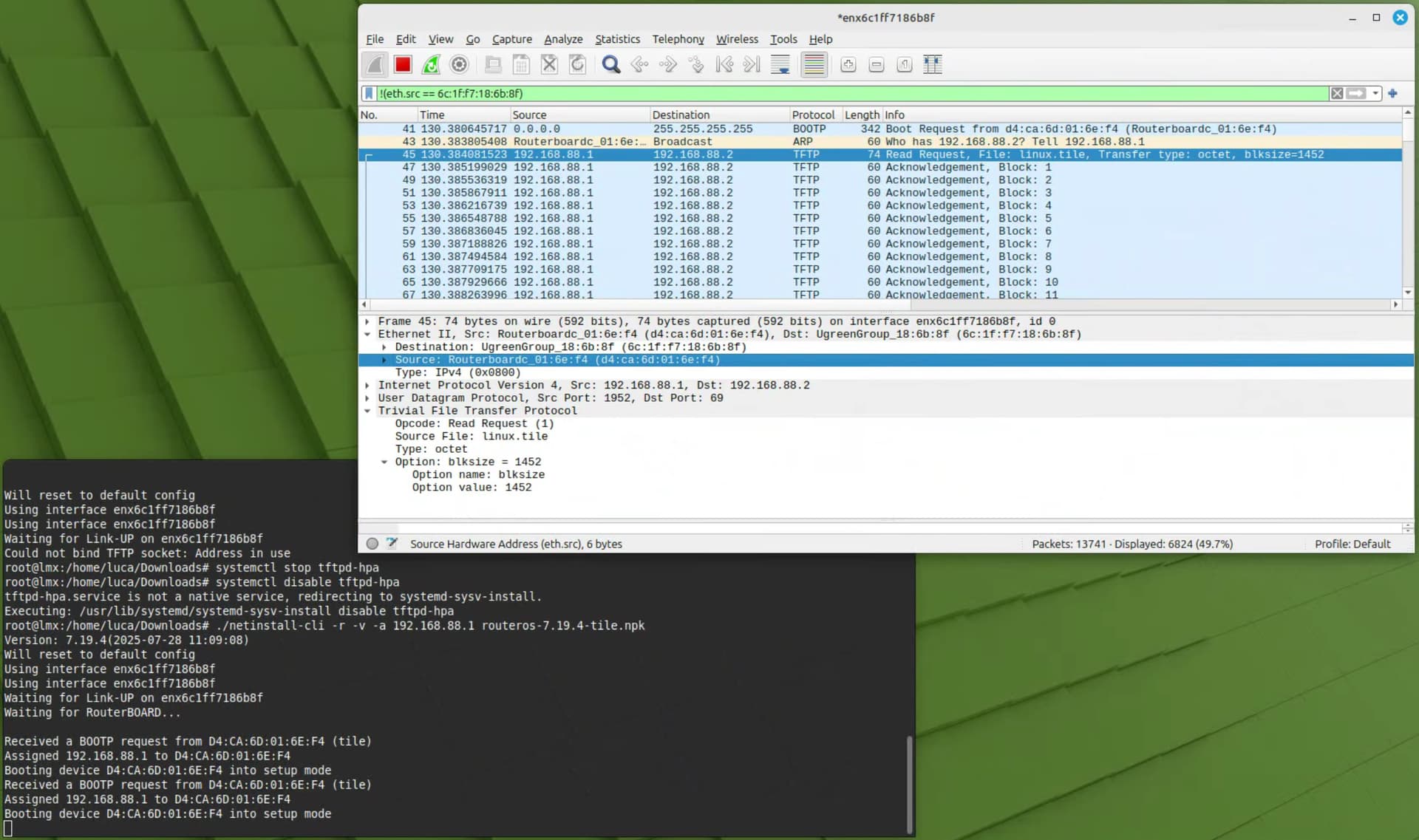
Here is a screenshot of what happened when I restarted the router and told it to netboot:
As you can see also from the Wireshark capture, the BOOTP request was honored and in just a few seconds the linux.tile boot code was downloaded via TFTP and executed on the CCR1016.
This is the log on the serial console, though...
CCR1016-12S-1S+

CPU frequency: 1200 MHz
Memory size:   2 GiB
NAND size: 128 MiB

Press Ctrl+E to enter etherboot mode
Press any key within 2 seconds to enter setup
trying bootp protocol... OK
Got IP address: 192.168.88.1
resolved mac address 6C:1F:F7:18:6B:8F
transfer started ..................................... transfer ok, time=0.46s
setting up elf image... OK
jumping to kernel code

Welcome to MikroTik Router Software remote installation 7.19.4
Press Ctrl-Alt-Delete to abort

mac-address: D4:CA:6D:01:6E:E8
mac-address: D4:CA:6D:01:6E:E9
mac-address: D4:CA:6D:01:6E:EA
mac-address: D4:CA:6D:01:6E:EB
mac-address: D4:CA:6D:01:6E:EC
mac-address: D4:CA:6D:01:6E:ED
mac-address: D4:CA:6D:01:6E:EE
mac-address: D4:CA:6D:01:6E:EF
mac-address: D4:CA:6D:01:6E:F0
mac-address: D4:CA:6D:01:6E:F1
mac-address: D4:CA:6D:01:6E:F2
mac-address: D4:CA:6D:01:6E:F3
mac-address: D4:CA:6D:01:6E:F4

software-id: BFEE-CRBT key:
EXvqpL+x0hm7HfWal5F7lykhkFadW/JSCm0Ei9oJfPQGnnHLTTg1OXJmHP+FXYohirrnOu83oOeFbWgl4qWPOA==

Checking old configuration...

Waiting for installation server...
and then nothing happens! No further packets come on the wire, and no indication of the continuation of the netinstall process appear anywhere.
The exact same thing happens using the Windows version of netinstall.
What could be wrong? Is this an hardware failure maybe, and I am just at a loss with this device?
Do you also running another services on that linux pc ? Like dhcp ??
Stop that service also please, because I have seen this boot repeated messages before. Netinstall have lot's of hidden services build in.
What port do you do this on ?? Make shore that is the first port.
And what i suggest is to use netinstall-cli with just -i enx6c1ff7186b8f to just define the interface name. So you remove the -a options.
And just set that interface to a static ip like 192.168.88.1/24 and netinstall will lease/set out next ip 192.168.88.2 to the device.
no other network services are running on this Linux machine.
If there would be other services running, netinstall-cli would try to bind to the same port and will give an error, like you can see from the screenshot, where I had tftpd-hpa running when I first tried to launch netinstall-cli, got the error, then stopped and disabled tftpd-hpa, then I was able to launch netinstall-cli.
Running an lsof on the netinstall-cli PID gives a few more open UDP ports, including bootps and something on port 5000:
I would rule out any conflict between services and the netinstall-cli utility.
I have also used the -i syntax, BTW, and the results are very much the same.
It's just that the damned CCR1016 seems to be completely silent after having gotten the adress via BOOTP, downloaded some code via TFTP, started it, with the log of the code shown on the serial console, then nothing more happens... Wireshark shows not a single packet ever being sent by the router.
Thanks for your help, hopefully others who tinkered with similar situations might be able to chip in too.
Well, you are the second person in a few days with an issue with netinstall on Linux.
And also in the other case the user was adamant that It was just a plain Linux, with no conflicting services running or settings that could be an obstacle for netinstall.
It could be a coincidence, and your case could be due to the Mikrotik device malfunctioning, but I am usually very skeptic about coincidences.
That's not the only way netinstall-cli can fail. See my article Run NetInstall in a VM for a complete discussion of the causes and solutions.
(This is a partial rewrite of my older "NetInstall on EL9" article, both to remove the unnecessary tie in the title to RHEL9 but also to clarify matters and improve the discussion generally.)
I did more than the VM, I followed to the letter your guide but using an old PC on which I installed Fedora, then installed all your work (great collection of tools BTW!), customized it to suit the needs of my TILE-based CCR1016... and nothing different happened.
The router gets the IP and boots from TFTP fine, then once it loads and starts the code it downloaded, it prints the exact same log on the serial console, then stop, and not a single packet get transmitted.
I am starting to wonder if this device is really broken, but then again, why does it boot fine and loads the bootloader via TFTP fine... go figure!
@jaclaz I tried the VM approach, installing Fedora from scratch on a PC I could repurpose and following the great guidelines from @tangent but sadly the issue remains unsolved.
It definitely looks like the CCR1016 doesn't send any udp/5000 broadcast, which to me seems where a router advertises itself in order to receive the full copy of the npk package to write on the flash.
I am starting to wonder if the device is really broken after all...
Hi @patrikg and thanks for the additional link to the pynetinstall GitHub repo, I might give it a try but I am starting to think that the issue happens after any of the initial netinstall, as the issue has the same exact face whether I do it on my system, or using @tangent guide on a fresh Fedora machine, or on Windows.
The issue is still very much the same, the lack of any udp/5000 packet after the CCR1016 receives via TFTP the first image, then boots and get stuck at the "Waiting for installation server..." message...
One question for you, I see that in your netinstall-cli command you added "-k Y7SR-Z6EA.key"
as an additional parameter, I presume the license key gets transferred only after the full NPK is correctly written on the flash, so it is a non-issue in my case...
If you look at the python script you will see that the key is transferred in the stage 1, and get written to the device at stage 2, after the nand being formatted.
I think the key file is not any problem for you, if you haven't any fault nand, with a fault RouterBoot.
You have a serial port on your device, like you said before.
You could try to switch how RouterBoot boots in the RouterBoot menu.
With the r key you can reset the RouterBoot to it's default, within the RouterBoot Menu.
And when you say it's not sending any packets to the interface/port, have you tried to sniff the other ports of the device ?
I have done that too, and switched from the primary to the backup booter too, no luck!
I have tried many things, and believe me I tried! I was even able to upgrade the boot code using Xmodem, something I had not done since my modem days on Fidonet/Opus back some 35 years ago or more!
I have indeed done that, and no packet has been see on the other ports I tried. Did not try all of them though...
The CCR1016 netboots from ether12, contrary to most other devices which use ether1, here Wireshark came to the rescue early on in the process.
The last thing I can think of is that the RJ45 SFP module does not get properly reconfigured upon startup of the code that gets loaded via TFTP, and thus nothing comes out of the RJ45 copper ethernet port... it seems very weird though, as the same SFP works just a second before during etherbook/BOOTP/TFTP, and also the same exact SFP used to work fine on the same machine before it started to malfunction...
This is not just about restoring back to life the CCR1016, it has become a mental crusade to try to understand what is causing this weird issue, really!
ROS is pretty picky about SFP/SFP+ modules that work. And the list of working modules depends on RB device model as well, so a module which works in one device model doesn't necessarily work in another device model. Even Mikrotik's own SFP modules don't work in every RB device model. See official compatibility list, there are numerous notes on limited support.
And RJ45 SFP modules are even trickier to get working properly in RBs.
So you might want to try another model of RJ45 SFP module, possibly one which is known to reliably work in CCR1016-12S-1S+ in particular.
still, why would the same exact SFP module work during the initial phase of netinstall, and also used to work well on the exact same router running ROS v6 before it was reset?
Unless the MikroTik Router Software remote installation software does not properly configure the SFP module once it reboots, that is...
Next step will be to find a MikroTik official S-RJ01, if not then we will see if with a DAC things will change...
SFP modules are tiny computers to a certain extent (some are almost trivial, some are complex) so they don't simply pass bit-by-bit. And it could happen that in some certain situation something doesn't get passed correctly.
I'm not saying this is indeed the problem with your CCR, but since you do have problems, it's best to make sure everything is supposed to be fully supported and working.
FWIW, I recently had the same issue on an RB1100AH.
The fix was to boot it using the "Boot" port on the RB (Port 13 here), and when it got to "waiting for installation server" move the cable to another port (Port 1).
Discovered purely by happenstance, noticed that Etherboot was listing ALL the ports MAC addresses so I figured it must've been watching all the ports, moved the cable over and was about to reboot the RB when lo and behold it started installing.
Did an idiot check to confirm that I wasn't delusional but the next time the behaviour was the same.
Just for laughs I just did the same thing in Windows (previously when I tried the RB would netboot but would never appear in the netinstall UI, when I moved the cable to port 1 it popped right up).
I'm actually wondering if this is an etherboot bug... Because as you say, most devices use port1 whereas the RB1100AH uses Port 13 and your CCR uses Port12, maybe after the initial netboot it's trying to use port 1 rather than the port it booted from...
Just did some further testing, and it seems like ONLY port 1 works after the "waiting for installation server" phase so I assume the bootstrap image netinstall sends over assumes Port 1 for all platforms, which is why you never see the broadcast to UDP/500 otherwise.
Thanks for the great tip @arandomadmin, this is exactly what it turned out to be the case also on the CCR1016-12S-1S+ I have been trying to get unstuck for a while now.
In my case it was even worse, in that the port on which the router started its second phase of the netboot process is the first port on the left which is an SFP+ port which only supports 10G SFP+, so I had to wait until I received an S+RJ10 SFP+ and when I connected the cable to the same switch as port 12 and the machine running the netinstall-cli command, it all worked out fine.
Now the kernel starts up fine, but the war is not over yet, as I get a pesky error and then the router reboots, the error is:
“Could not mount ubifs/yaffs filesystem: No such device”
Let’s see if I can find any reference to this error in other threads.
I was finally able to revive the CCR1016-12S-1S+, only to discover that the pesky “Could not mount ubifs/yaffs filesystem: No such device” error would appear again and again, even after repartitioning and saving the OS on either one of the partitions.
What’s worse is that I was able to boot ROS and to get to the CLI, but then upon reboot after changing a few parameters, I would again get the “Could not mount ubifs/yaffs filesystem: No such device” error.
This probably means that the onboard NAND is failing, so the router cannot be trusted for normal operations.
I will thus scavenge the fans and the power supply, as I have similar machines which might need spares.
Overall this was an interesting learning experience on how etherboot, netboot and netinstall work, and the intricacies of the process.
Hello @lucaberta, I am happy that you bring your device into life.
So you're saying that when you do a netinstall-cli on your device, you have to use an SFP port to make it work.
Or did I get you wrong? In that case, Mikrotik must fix this or tell the user in the netinstall-cli program that you have to change the port between the different steps.
Do you get any errors during the netinstall-cli step when it formats the flash(NAND) ?