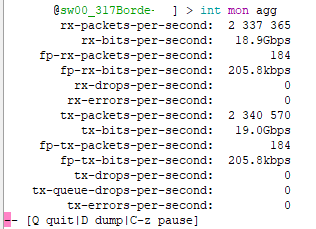
I bought this Switch crs317-1g-16s+RML6 and can´t handle more of 1 Gb of traffic with pppoe and 1500 users conneted, the ping have lost and grow to 40-60 ms, y try with 1500 clients with 4 gb of traffic and I rollback the switch implementation, Any sugestions?
Is it really badly explained, the bare minimum to understand that you wrote something?
For example «1500 users connected», where, inside pppoe-server inside the switch?
Also the correct switch model is CRS317-1G-16S+RM or at least only CRS317-1G-16S
1GB of traffic is about right according to the test results on the product page.
I presume you’re using queues or filters and given it’s PPPoE probably an MTU of 1492?
Routing	none (fast path)	254.4	3089.4	309.8	1268.9	315.4	161.5
Routing	25 simple queues	104.6	1270.3	104.4	427.6	104.6	53.6
Routing	25 ip filter rules	104.6	1270.3	103.4	423.5	103.9	53.2
The device you’re using is a switch and not a router.
you are right you bought a SWITCH but are trying to use it as a ROUTER, consider you fortunate to reach those speeds
You need an additional ROUTER for Routing tasks, leave the SWITCH only for Switching tasks
Main router as bgp ccr1036 from there to another ccr1036 as pppoe administrative and from there to the xrs317 do distrinute to 2 olt teying to handle 4 gb but only traffic barely 2 gb of traffic and losing packets if i conect the pppoe1036 dirextly to the olt all works. The switch is used as switch one bridge and all ports in the bridge any sugestions?
Switches switch, routers route. CRS is not designed to be a router. Rather get a small CCR or RB4011/5009
Make suer the 1G port is not bridge member. And make absolutely sure that SFP modules used are fully supported (and running at correct speed), MT devices are known to be picky about SFPs used … not even all MT devices are guaranteed to equally support the same SFP model.
That’s a good advice
I am thinking that the mikrotik switch is not prepared for so much traffic in pppoe mode only for ip, can someone from mikrotik confirm this for me?
After what the others have answered you,
and the question/statement you just made,
I guess you still don’t understand the difference between a switch and a router.
CRS 317 can handle much more than 2gb
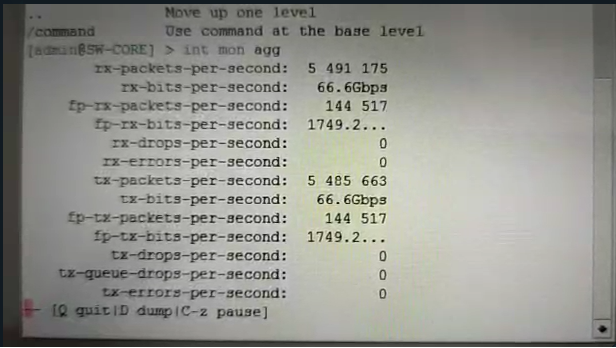
for a switch its irrelevant what kind of traffic you put inside the frames, the switch only evaluate the MAC address to do its job
avoid that kind of procedure to investigate a issue trying to signal a culprit based on baseless assumptions, every minute you still on stay on the way to blame the switch is a minute you stay far from a real solution to you performance Issue
anothe example