Just got my 2 SXTac units. I wish to put it as a bridge by replacing 2 locos M5.
Have anyone some advices how should I setup wifi interface to get best results ?
Thank you in advance.
First of all use only 20MHz or 2x20MHz (Ce - eC) channels and enable bot HT tx/rx chains.
To get the highest Modulation (256-QAM 5/6) you’ve to use at least 40MHz Channels.
SXT AC also supports 80Mhz channel width so you can utilize data-rates up to 866.6Mbps - MCS9 (256-QAM), 2 Spatial Streams, 80mhz, Short Guard Interval.
…but if you do that you cause interferencies with other WISP (who already use MikroTik from years), or yourself…
…for the law DFS must be active with radar detection on, I do not know where you live, but if you use DFS and other (and yourself) WISP are present, I want really see if you find contiguos 80MHz free…
…and I want see how you implement 20MHz guard interval 80MHz + 20MHz guard on both edge = 120MHz contiguos free…
thanks all of you for answers 
Well that ll be test bridge… there is not so much traffic goingt throu it and distance is 250m
- Which modes should I put to it works as transparent bridge? if nv2 or nstreme then which settings they should have ?
- Which wireless Protocol should I use?
- Hw. Rerties?
- Hw. Protection Mode?
- Hw. Protection Threshold?
- Adaptive Noise Immunity?
- Preamble ?
- WDS on/off ?
- If I want to have mgmt vlan 100 with some IP on it should I add it on LAN and WLAN interface and bridge then put IP on that bridge ?
Thanks in advance.
Paste this on the devices. This create a transparent Layer 2 bridge with management IP.
For be totally secure you do not alter any config [I’m expecting no other item are changed from default],
install with netinstall 6.17 the routeros-mipsbe.6.17.npk without keeping previous configuration & paste the scripts.
(and remember to update the bios [firmware]!)
Some settings (band “ac”, mode “ap-bridge”, country and frequency) must be tuned because I not have at the moment one “ac”.
REMEMBER: DO NOT USE MORE TX POWER THAN NEEDED for 250m link…
PTP Start (or PTMP Start if Licence>=4 and mode=ap-bridge)
/interface bridge
add name=bri-dorsale
/interface wireless security-profiles
add authentication-types=wpa2-psk management-protection=allowed management-protection-key=97a6bvi456i7a64v32 mode=dynamic-keys name=klojiayueiufcaoibe67 supplicant-identity=MikroTik wpa2-pre-shared-key=o987a63vr389759aa
/interface wireless
set [ find default-name=wlan1 ] band=5ghz-onlyn country=italy disabled=no frequency=5500 ht-rxchains=0,1 ht-txchains=0,1 max-station-count=6 mode=bridge nv2-cell-radius=10 nv2-preshared-key=978a6bv3986aav67867768ae \
    nv2-security=enabled radio-name="PTP F-M" rate-set=configured security-profile=klojiayueiufcaoibe67 ssid=PTP-FMF tx-power=8 tx-power-mode=all-rates-fixed wds-default-bridge=bri-dorsale wds-mode=dynamic-mesh wireless-protocol=nv2
/interface wireless nstreme
set wlan1 enable-nstreme=yes
/interface bridge port
add bridge=bri-dorsale interface=ether1
/ip address
add address=10.0.0.2/24 interface=bri-dorsale network=10.0.0.0
/ip dns
set servers=8.8.8.8
/ip firewall service-port
set ftp disabled=yes
set tftp disabled=yes
set irc disabled=yes
set h323 disabled=yes
set sip disabled=yes
set pptp disabled=yes
/ip route
add distance=1 gateway=10.0.0.1
/ip service
set telnet disabled=yes
set ftp disabled=yes
set ssh disabled=yes
set api disabled=yes
set api-ssl disabled=yes
PTP End (or any PTMP End):
/interface bridge
add name=bri-dorsale
/interface wireless security-profiles
add authentication-types=wpa2-psk management-protection=allowed management-protection-key=97a6bvi456i7a64v32 mode=dynamic-keys name=klojiayueiufcaoibe67 supplicant-identity=MikroTik wpa2-pre-shared-key=o987a63vr389759aa
/interface wireless
set [ find default-name=wlan1 ] band=5ghz-a/n country=italy disabled=no frequency=5500 ht-rxchains=0,1 ht-txchains=0,1 mode=station-wds nv2-preshared-key=978a6bv3986aav67867768ae nv2-security=enabled radio-name=\
    "PTP M-F" security-profile=klojiayueiufcaoibe67 ssid=PTP-FMF tx-power=8 tx-power-mode=all-rates-fixed
/interface wireless nstreme
set wlan1 enable-nstreme=yes
/interface bridge port
add bridge=bri-dorsale interface=wlan1
add bridge=bri-dorsale interface=ether1
/ip address
add address=10.0.0.3/24 interface=bri-dorsale network=10.0.0.0
/ip dns
set servers=8.8.8.8
/ip firewall service-port
set ftp disabled=yes
set tftp disabled=yes
set irc disabled=yes
set h323 disabled=yes
set sip disabled=yes
set pptp disabled=yes
/ip route
add distance=1 gateway=10.0.0.1
/ip service
set telnet disabled=yes
set ftp disabled=yes
set ssh disabled=yes
set api disabled=yes
set api-ssl disabled=yes
Wow thats a great config mate thanks!
but one question, as I can see in Start you put
/interface bridge port
add bridge=bri-dorsale interface=ether1
While in End:
/interface bridge port
add bridge=bri-dorsale interface=wlan1
add bridge=bri-dorsale interface=ether1
I guess in Start it should be also both interfaces in bridge, right ?
How about mgmt on vlan then ? Should I create vlans on both interfaces and bridge them and assign IP to the bridge ?
I wish to someone from Mikrotik post some advices about their new ac product 
On desk tests resuts I got was very poor and unstable… tmorrow I am going to put it on prod system so ll test it there.
But I ll be rly glad if MT could help with proper config.
Thanks in advance.
FALSE, the wds interface is put automatically on bridge when linked.
How about mgmt on vlan then ? Should I create vlans on both interfaces and bridge them and assign IP to the bridge ?
Simpy assign one IP to the bridge, like the example.
Is not needed any VLAN for management.
Probably because you do not set tx-power to 1 on both end…
Too much power broken communication on short range
in my case mgmt is on vlan 100 all APs and bridges and so on are on that vlan
I created and it works fine
About config i think you also use older version cuz there is no ht-rxchains=… comand
anyway i modified it to could apply but real tests ll be tmorrow so i ll write
RIGHT! on the last 6.15 release the parameters are changed!
Thanks for notice.
question, in config you set up nstream as on but in wireless-protocol you put nv2 while on another end is unspecified, is that correct ?
I’m waiting this question
I set the slave for support ANY protocol I want use, also on the master,
and finally I set only-n and nv2 only on master.
The slave is adacting to the master.
If for some reason come up some problem, I can fast change protocol, frequency and mode for find one temporary fix…
great explanation 
right now I am going to the site, put it and test. At afternoon ll write again, cheers!
oki so I put it as a bridge and here are results
Please see attached screen and YT movie for BTest
https://www.youtube.com/watch?v=1po0EL-i7Dg
In my opinion results are very very poor…
The distance is very short, the quality of signal should be very good as it was on Locos.
I am using config as posted above, maybe it need more tune up for AC ?
I ll be very glad for all kinds of support.
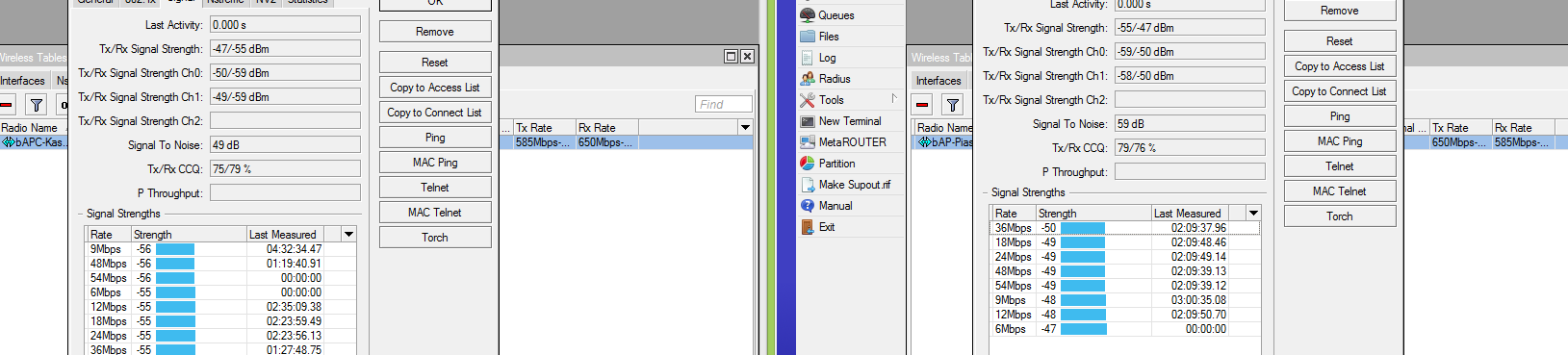
-47 is too high!
decrease to 1 the tx power or put on more distance the device,
too much signal compromise all the transissions!
Everywhere one thing is always clear: do not use same device you want test to do bandwidth test.
You must put traffic generator on both side and at this point see on bridge how many bandwidth pass…
will change it, on what lvl should the signal be to be good enought ? around -55? -60?
depend on data rated wanted, but be between -57 and -64