Hi,
I have just replaced my SXT-LTE with SXT-LTE6 - so that i can benefit from higher speeds with Carrier Aggregation functionality.
I use 3 UK SIM in this box. Now, i can see the router be default take Band20 as primary band and Band1 as CA.
When i try to fix Band1 as primary band, then CA doesnt come up. The box doesnt do Carrier Aggregation at all. Also on reboot I loose the fix to Band1 and I need to configure the command again.
The main firmware is latest Stable, however I can see there is an upgrade available for Routerboard, is that recommended?
Probably you select one Band=1 and then other are not existing. Then only B1+B1 can be possibly but it depend’s from ISP and his freq. who he use. Maybe he only got one 20Mhz width at this band and you stuck with only it, without ca-band.
You can enable other EMEA bands like: band=1,3,7,8 (without your B20) and check if some ca-band will be present or not.
When you just select some Band and not select other the primary-band and ca-band are automatically selection. Primary will be enabled if any signal receive modem but ca-band will be added only if your ISP/BTS give you additional Band. This is not RB decision, RB only can receive what BTS/eNB/Tower give to him.
You can only select Band’s on what you try work.
Do you have got any possibility to force the specific Band/Freq/CellID to be a primary-band ?
YES, only by CellLock.
Example:
My default connection is:
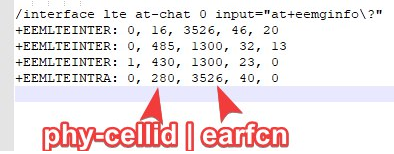
primary-band: B8@5Mhz earfcn: 3526 phy-cellid: 16
ca-band: B3@20Mhz earfcn: 1300 phy-cellid: 485
This give me slow B8@5Mhz with high signal as primary Band via automaticaly connecting.
To invert it I can force it by:
/interface lte at-chat lte1 input=“at*cell=2,3,1300,485”
And now I have primary-band at B3@20Mhz with good speed and some other B8@5Mhz are my ca-band (I have only this two Band near me).
You can run Cell-Monitor to search what Band with what Phy-CellID and Earfcn are possibly to connect and that way connect to every CellID and do speedtest.
You can discover that some BTS have differ policy, differ speed, differ bands on it, differ latency…
I hope this will be help.
This r11e-lte6 have some problems but I think you must at start try this settings.
Remember that you can write to my Telegram, in foot/signature.
Hi SiB, you have vast knowledge of Mikrotik and have been very helpful, many thanks for that.
On the new SXT-LTE6, I dont have any bands selected and in cell monitor i can see the B20 and B3: B20@5Mhz and B3@15Mhz. Now you see the reason I want B3 as my main band.
If I do CellLock to Band3, i dont get Band20 as CA.
This evening I will :
connecting to different cell id of B3 this evening to see if
Tick all the boxes of different bands
As you mention the r11e-lte6 is having some problems - can you please advise what these are, just to be aware.
I face random internet blackouts, despite lte interface is up and with full functionality - have you seen this?
First I must say anybody at forum not doing testing like me (or not write it at forum) and I not have anyone who can confirm my problems. You use the same Band combination like me, this can be good key to doing checking on your site.
I have so many testing at few differ firmware then I must check my old reports to MikroTik support team, when I use original firmware v20 who is still latest, to give you information.
Check my command’s at: http://forum.mikrotik.com/t/v6-46-stable-is-released/135149/1
Firmware v20 in my opinion and in my ISP and band combination B3 & B20 have problems:
At default settings, optional with own Band selection.
It’s slow recovering from offline. Weak re-searching the network signal (to do a registration in ISP).
Speed is not accumulate from be best speed from band’s. Ex. B3 give better DL but B20 give better upload then you not receive grate DL and UL (I not say as aggregation).
All this means fast recovery, fast registration in ISP, relative good speed are very very better at current internal Release Candidate and I hope this will be publish asap.
Some times I must do disable lte1 and enable lte1 interface to comeback internet. Using some watchdog/netwatch etc. should be used as standard in fw20 working at default setting’s.
In CellLock feature
who can force specific Band as primary band, you have reach/stuck offline and then:
CA Band is blank, he not connect at all or just in first minute disappear
RSRQ = -19.5dB always freez with this number
other signal parameters are freeze, every time with other value
LED’s are off (in my situation and last signal)
interface lte1 RX=0
interface lte1 is still Running, still have Your ISP adress IP, active route etc.
you are in offline, no internet.
it’s not go to 3G/UMTS - modem freeze and not do anything
SMS is not work any direction.
–
WorkARound: from fast to slow
[Try check firmware-upgrade | Try send SMS] start re-connection process > Set Cell Lock again or disable it > Re-Enable lte1 interface > Reset power-usb > Reboot.
Problem Replication: Change device position to wrong direction with CellLock still active, 2 ping timeout’s and you are in offline even if your device is in optimal position. This can be stuck in offline by minutes to 24h.
and one more.
I not remember that was at fw20 or other beta fw but to reach ca-band again I must do:
reboot / usb power-reset / at+reset
after every setup CellLock / disable celllock / re-enable lte1 because those 3 operation work’s me like “switch off ca-band feature”.
Again, This is my opinion and I cannot give information that other person have the same problems.
You must check this by yourself.
Remember to check if the MikroTik share a new firmware, currently the v20 is latest and I use some other who is better and I hope this will be publicate in near future.
@SiB, i did the testing last night:
I dont have any other Cell showing up for B3. So I enabled B1, 3 and 20 - as these are three bands i have seen before. The I did cell lock on B3. I could immediately see the band 3 being the primary band and then there was no CA band.
As such I disabled the Celllock and I could see B20 became primary and B3 became the CA band.
I still cant understand if this is a limitation on SXT-LTE6 side or my carrier - 3UK.
Is there a way to try a different firmware version?
Then please do testing like this. I understand this are steps to resume your situation.
Default situation.
Disable CellLock & All Bands active (no one selected).
/interface lte at-chat lte1 input="at*cell=0"
/interface lte set lte1 !band
Setup the CellLock into your Band3 (I assume you are in this situation now)
/interface lte at-chat lte1 input="atcell=2,3,,1300,485"
I assume that ca-band is not show, not every one.
You can check what CellLock is setup or not setup by
/interface lte at-chat lte1 input="atcell?"
Try check if you can see/detect the other Band's by
You can use the Cell-Monotor to check if that B8/B20 is detected.
/interface lte cell-monitor lte1
Other way to check what Tower/BTS/eNB is send to your modem is:
/interface lte at-chat lte1 input="at+eemginfo?"
Check logs for the results like
/interface lte at-chat lte1 input="at*cell=2,3,,1300,485"
Means setup the same CellLock again is the faster way to do a re-connection but this is very often kill ca-band in next connection.
on differ set of modem firmware version they are fix or broke the CellLock or his ca-band.
Sorry for interrupting on this thread, but I am looking to do the same thing as the OP. As with the OP I can connect to Band 3 or Band 20, but not both at the same time. Has anyone got this to work with Three UK?
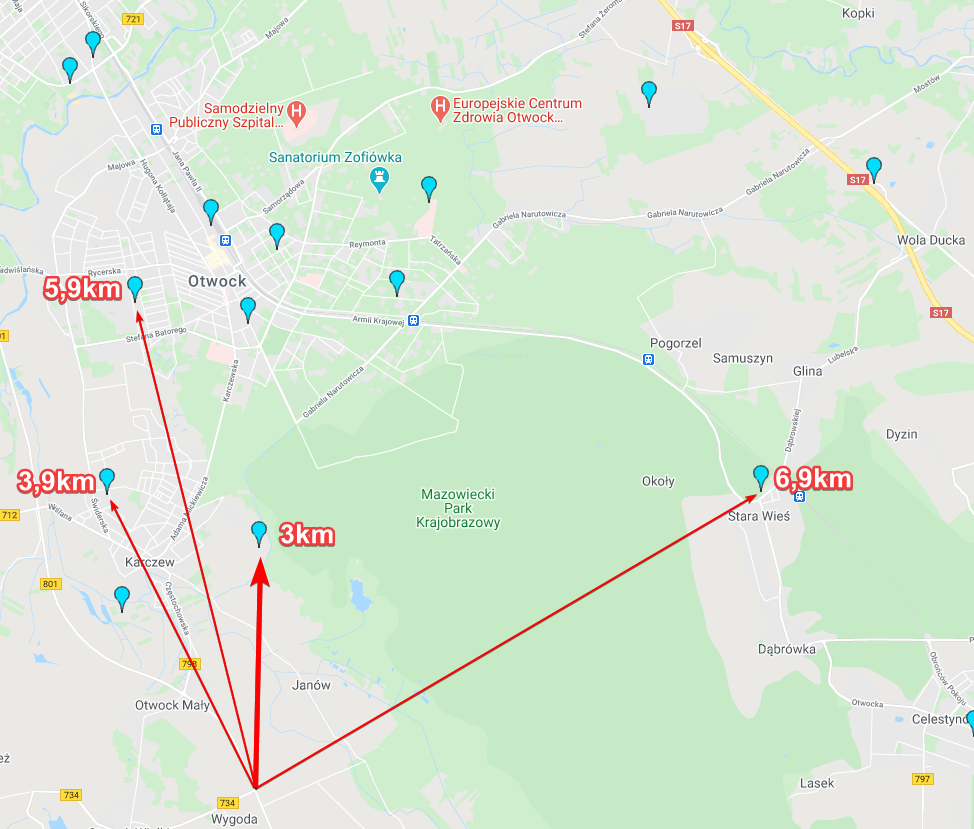
Oh that is odd!! For B20 it’s connecting to a base I know about which is 4.7km away, however for B3 it’s connecting to “something” closer with a different eNB, but I can’t find it’s location. I been trying to collect points with cellmapper, but can’t pinpoint it’s location
The B3 signal, if cellmapper is to be believed, is at about 90 degrees off from where my dish is pointing, I didn’t think it was possible to pick up signals outside the 25 degree spread in front of the dish?
Even stranger, it is being reported as “Current Operator : 3 ITA”, is ITA short-code for Italy?
The B3 signal, if cellmapper is to be believed, is at about 90 degrees off from where my dish is pointing, I didn’t think it was possible to pick up signals outside the 25 degree spread in front of the dish?
It can, my SXTR
Even stranger, it is being reported as “Current Operator : 3 ITA”, is ITA short-code for Italy?
It is times like this I regret selling the antenna rotator that used to be on the top of it. I have been out driving with CellMapper today trying to locate the mast’s I am connecting to, but can’t seem to locate the mast the “rogue” B20 signal is coming from. Also, my old set-up used to connect to this mysterious mast on B3 (Teletonika RUT950 with Poynting 4G-XPOL) but I was hoping to get a better speed by using both B3 and B20 together with the Cat6 modem.
Could it be some kind of repeater or signal booster someone has installed?
PS : I performed a cell lock onto the main genuine mast in the area, and now getting Primary Band: B3@15Mhz and CA Band: B20@5Mhz Not seeing a huge speed increase, but tends to be rather congested this time of the day anyway. Is there any preference as to what should be primary band? B20 would be more stable for me, but slow, whereas B3 is a bit unstable but faster.
rogue cannot exist in LTE because the “BSSID” in lte is know as phy-cell-id and that ID can be only one at specific earfcn. Both are used in CellLock feature for LOCK to specific sector antenna at specific band for primary-band.
For locate you should use other unit with CellLock at this “rogue” cell and try connect to it. Probably you can connect at big distances like 15-20km from your mast.
Also, my old set-up used to connect to this mysterious mast on B3 (Teletonika RUT950 with Poynting 4G-XPOL) but I was hoping to get a better speed by using both B3 and B20 together with the Cat6 modem.
Thats why if prev unit have better signals you should grab from him information where and to what tower eNB and Cell he was connected, with what bands aggregation and signal levels too of course - to compare both.
Could it be some kind of repeater or signal booster someone has installed?
LTE Booster is antenna or lte module with bigger Tx power.
now getting Primary Band: B3@15Mhz and CA Band: B20@5Mhz Not seeing a huge speed increase, but tends to be rather congested this time of the day anyway. Is there any preference as to what should be primary band? B20 would be more stable for me, but slow, whereas B3 is a bit unstable but faster.
I always use CellLock or FreqLock because automaticaly connection is like B20+3 and I receive faster speeds with B3+20 and I can select “master” primary band as FreqLock or I do CellLock who lock band+cell.
I was getting a good speed from the rogue cell and know it’s ID, but I can’t find it via the MikroTik dish, only B20! The only problem with this cell is that it kept throwing me off any time the local power went off and I couldn’t get back onto it, without calling Three and getting them to “reset my connection”!! All my comms equipment is backed up by a 24VDC battery, so as to keep my connection running 24/7.
I didn’t realise that the modem software was upgradable outside of the routerboard and packages!! It is currently revision: R11e-LTE6_V025 and I have just now upgraded to R11e-LTE6_V027
Just an update. I finally found this rogue mast but it turns out that it’s location was just an “estimate” based on user submitted signal recordings, so was sending me looking in the wrong direction!! I looked for the bright patches on the coverage checker and drove around in that area which led to me getting some decent reading for CellMapper to more accurately estimate the location. Then found the planning applications to determine the exact location. I now know where I should point my dish!!
While pointing the dish to the mast, I get a lot better speed on Band 3 and it is a lot more stable. But I can’t seem to get it to use Band 20 as well. In fact band 20 has disappeared from the scanner totally, despite the dish being pointed directly at it!
Still generic story.
Remember that math: enB ID * 256 + Sector ID = Current Cell ID
eNB ID - ID of your Tower for your ISP (other ISP at the same tower and antennas have other eNB ID)
Sector ID - is a ID of sector antenna for specific band, like eg. id 0,1,2,3 can be 4 sides of the world for Band20 and 4,5,6 at 3 sides of the world and any other combination…
Remember that SXTR is good for 3-4km, LHGR to 8-12km max
People general use CellMapper website for searching Towers.. but it’s not proof for data on it.
Provice both eatfcn what you receive at B3 and B20 from any tower/antenna.
I’ve found some of our local masts incorrectly marked. The one my SXT connects to is correct I think, Google Maps satellite images show two masts at the location, one of which is the one I connect to. My colleague has found the same, he connects to a mast that is not only in the wrong place on Cellmapper but he connects to a segment that is documented as facing the opposite direction.
LOL yes, I have found all the local cell sites are incorrect and I have been chasing shadows for weeks now! The omi antenna didn’t care where the signal was coming from, but that also has the side effect of decreased quality of the signal. I have joined CellMapper and seems to be a great community as they have been helping me relocate the actual cell locations. I also pointed the dish directly at the mast and seeing a much more stable connection with better ping and average speeds as well (about 10Mbps on average)
They are both on the same eNB / tower. The data I submitted to CellMapper says that I’m on Cell 0 for B3 which is covering the direction NE(62 degrees) and on Cell 6 for B20 which is pointing N(15 degrees). I can connect to either one at a time, but can’t get it to aggregate both (ie B3+B20)
3+20 or 20+3 can connected by a firmware of R11e-LTE6, the issue is a ISP because 2CA is decision of eNB, not a lte module/modem.
You not share your earfcn is for B3 and B20… then general info.
B20 ~ 800Mhz at SXTR have little gain
B3 ~ 1800Mhz at SXTR have ~7 Gain
Again,
This show you that CA what your Tower say he have.. and maybe connect as 2CA
/interface lte at-chat lte1 input=“at+eemginfo?”
You not like share details I assume. No problems but check that stuff too.