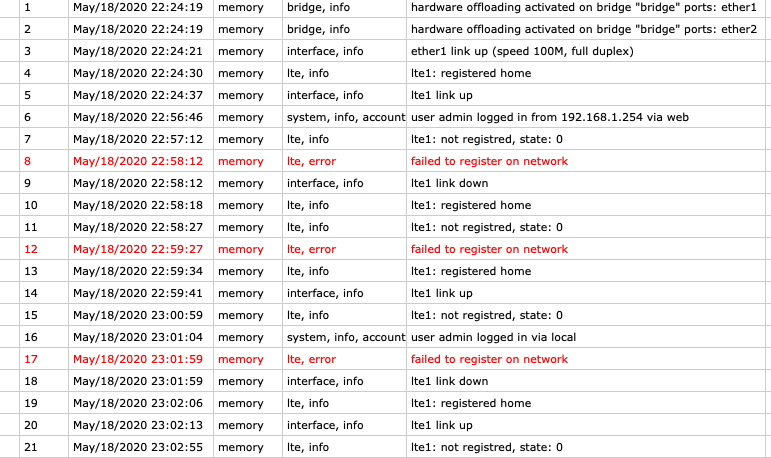
My R11e-LTE6 router continues to disconnect from LTE
Signal is quite good: -90db and SINR 15.
It connects to internet, it works for some seconds (I can ping, navigate, check for router updates…) then it disconnect and then it reconnects:
lte1: registered home
lte1 link up
lte1: not registered, state: 0
failed to register on network
lte1 link down
…and it repeats…
Note:
If I don’t navigate or use the internet connection, it usually takes longer to disconnect.
I tried to place the router in different places. Some places “look like” get better result (just a bit, I’m not sure). One time I was able to navigate for 10 min without any problem! Not able to replicate this.
if like bug in modem firmware v20.
What modem firmware you have, v20 or v25 ??
you said this is a known bug in v20? How can i check my current modem firmware version?
solution was in viewtopic.php?t=154865#p768708 #22 means he use some own netwatch etc . script who start with ros and do modem re-setting… after that modem not works. If you have some “own scripting” doing some at+reset, re-enable lte1 etc then disable them.
To be honest I have no idea on how to implement this. Can you help me? By the way I think a router should work without the need of doing this.
r11e-lte6 can be upgraded firmware via few ways
try other sim who give stable internet, then do upgrade
No other sims works. Always same problem. I’ll try to downgrade router version because I’m already on the last stable release.
I think I see few that similar cases here at forum and fw v22 fix them.
WinBox > Interfaces > LTE tab > lte1 2x LMB > General tab and you can see the r11e-lte6_v???
or check if you have new firmware to upgrade:
Read this !!! https://wiki.mikrotik.com/wiki/Manual:Interface/LTE#Modem_firmware_upgrade
.
To be honest I have no idea on how to implement this. Can you help me? By the way I think a router should work without the need of doing this.
If you not create own scripting, netwatch etc. then you not have them, in default configuration they not exist.
.
No other sims works. Always same problem. I’ll try to downgrade router version because I’m already on the last stable release.
Any other suggestions?
WinBox - connect to MikroTik via MAC address
WinBox > IP > DHCP-CLIENT > add new dhcp-client and select the bridge inteface.
WinBox > IP DHCP-Server > you see one entry, select it and just do DISABLE it, red cross icon
Connect that MikroTik to other cable network who give him internet like regular laptop.
Connect via mac-address or detected IP (better)
Do modem firmware upgrade.
PS. If you write me at Telegram then I can help you remotely with this.
Changed APN to another one that the ISP gave to me.
This new APN didn’t get disconnections but it cannot registers DNS. To be precise even ping 8.8.8.8 from router didn’t work.
I updated MODEM firmware to v25 (it was v20)
Now it works!
To be honest updating Modem firmware should be easier to do, I mean: there should be a way using user interface and it should be suggested on “check update” page of webfig.
hope this is a definitive fix. If I have other issue about this in the future I will let you know.