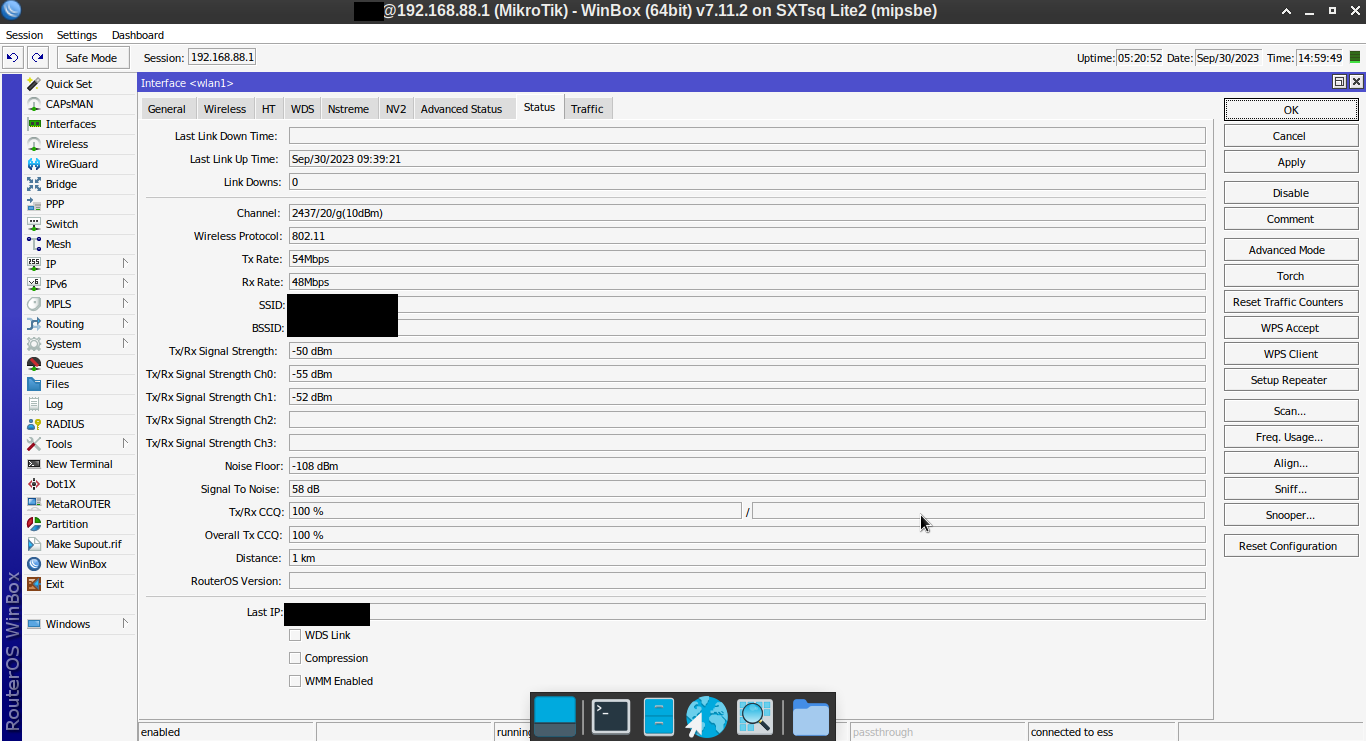
I’m using an old MikroTik SXTsq Lite2 to connect wifi from my house to my grandfather’s house across the road (15 meters).
The AP is a 2.4GHz (20Mhz) ISP router located in my house.
The client is a SXTsq Lite2 (station mode) located at my grandfather’s house.
The problem is:
The connection is only stable when I set the SXTsq Lite2 to use the 2GHz-only-G band.
If I set SXTsq Lite2 to use the 2GHz-only-N or 2GHz-B/G/N or 2GHz-G/N band, the connection becomes unstable and often disconnects.
Really, it’s very stable using wireless-G, but it’s slow.
How to make a stable connection when using wireless-N?
Any tweaks?
The received signal in this status screen looks OK.
But I expect the (too) weak received signal to be on the ISP side!
Wifi connection needs to work bidirectional to function.
The SXTsq 2.4 Lite has an antenna gain of 10dBi
The signal coming from the ISP AP will be amplified with 10 dB (antenna gain is reciproque: works for sending and receiving)
The signal sent towards the ISP AP is still only 20dB, despite the 10 dBi antenna gain. The EIRP emission limit for the region (typical 20 dBm), will limit the TX power of the SXTsq to 10dB
(Info is in the status screen!). The total emitted strength is 10dB+10dBi (actually 7dB, +3dB for 2 antenna).
The ISP AP probably has a much lower antenna gain, so the received signal there is amplified less.
802.11n should be backward compatible with 802.11g, and use the slower 802.11g interface rates or G-rates when needed. (Unless somewhere the allowed MCS rates (MCS0 is lowest) or G-rates are excluded.) Make sure this is not the case. Some people do advise to remove the lower rates, and/or use higher basic rates only.
The rate increase/decrease algorimes can be somewhat unstable. 802.11n also uses 2 chains, 802.11g normally not and combines the signals. Look in the “Registration table” to see what is used for send and receive. (interface rate, band width, 1S or 2S).
Values are dynamic and may be different for send and receive.
Hello, thanks for the explanation.
Actually I have tried various settings before.
But still not good.
And the best result is to set the device to use the 2GHz-only-G band.
But with compensation it becomes slow.
Now I have replaced RouterOS with OpenWrt.
And the problem is gone.